

Activities Summary
The following are our activities:
- Create Project in Visual Studio
- Define Content Type Fields
- Deploy Solution
Procedure
Create a new project in Visual Studio. Choose Farm Solution. Then choose Add New Item > Content Type from the Office/SharePoint category of templates.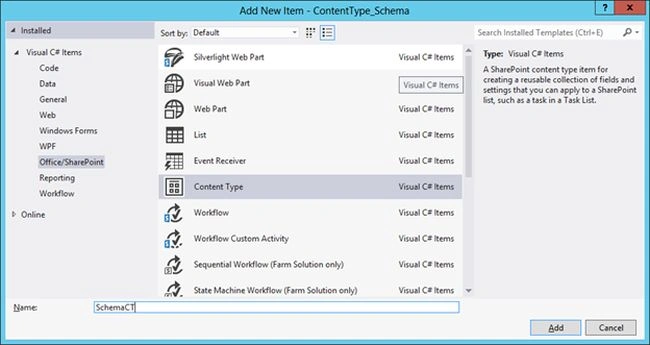
Inherit from Item as parent.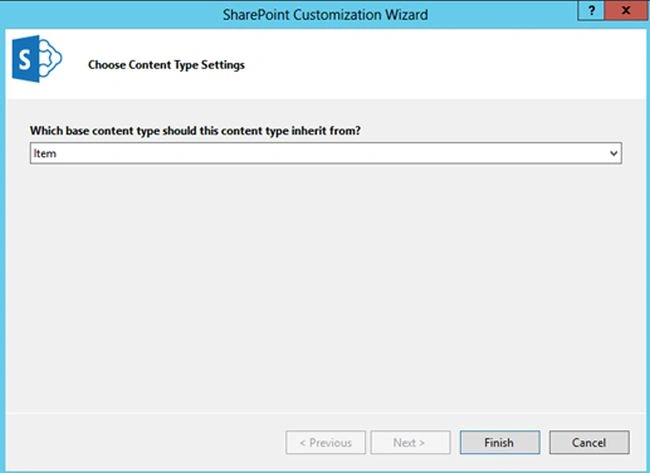
Close the designer view of the content type and use Solution Explorer to open the XML view.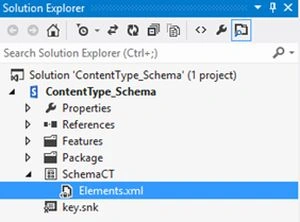
You will get the following view.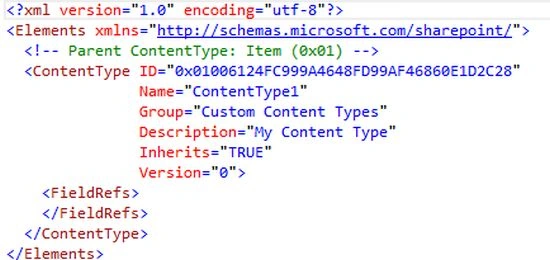
Replace the content with the following.
- <?xml version="1.0" encoding="utf-8"?>
- <Elements xmlns="http://schemas.microsoft.com/sharepoint/">
- <Field ID="{00D74D75-B775-4222-967D-D26973B8C5DB}" Name="CustomField" DisplayName="Custom Field" Type="Text"/>
- <Field ID="{C3CD561C-D714-42DE-8112-C830B4108CEF}" Name="CustomChoiceField" DisplayName="Custom Choice Field" Type="Choice">
- <CHOICES>
- <CHOICE>Choice 1</CHOICE>
- <CHOICE>Choice 2</CHOICE>
- <CHOICE>Choice 3</CHOICE>
- </CHOICES>
- </Field>
- <!-- Parent ContentType: Item (0x01) -->
- <ContentType ID="0x0100CB3ADB9F2D014E3F920C47C0B14D25BD" Name="SchemaCT" Group="Custom Content Types" Description="My Content Type" Inherits="TRUE" Version="0">
- <FieldRefs>
- <FieldRef ID="{00D74D75-B775-4222-967D-D26973B8C5DB}" Name="Custom Field" DisplayName="Custom Field"/>
- <FieldRef ID="{C3CD561C-D714-42DE-8112-C830B4108CEF}" Name="Custom Choice Field" DisplayName="Custom Choice Field"/>
- <FieldRef ID="{1DAB9B48-2D1A-47b3-878C-8E84F0D211BA}" DisplayName="$Resources:core,Status;" Name="_Status"/>
- </FieldRefs>
- </ContentType>
- </Elements>
- The Elements section specifies the XML namespace URL. We can include Field definitions here. Fields are first defined and later referenced.
- The first field is of type Text. We need to specify the GUID for each Field.
- The second field is of type Choice. The Choice values are specified in the child tag.
- The section Content Type specifies information on the content type like Name, Description, Group, Version and so on.
- The FieldRefs section is important since it actually specifies the fields used in the content type. Please note that we are referring to the fields here that we defined previously.
- Each Field Reference should include the ID, Name and Display Name of it. We can also refer to existing Site Columns here using the ID. We are using 2 custom fields and 1 existing site column here.
Now save the changes and Deploy the project. Once the deployment succeeds, open SharePoint to view the new content type in the Site Settings > Site content types page.
You can see the columns being shown up there.
This concludes our content type creation using XML Schema. If you wanted to create various field types, please see the field types in the references section.
References
SPFieldType enumeration.
Summary
In this article we have explored how to create a content type using XML Schema.
Vinodh NarayananPosted Jan 5, 2016, 3:56 AM
Sir one doubt how do we generate the GUID for each field