
In this article I am sharing my thoughts of a custom jQuery function and how to create it when its required to customize the code according requirements.
It's very simple, you need to create a simple ASP.Net application and then it is necessary to add a jQuery script file.
jQuery provides you ample functions to create impressive animations and interactions.
I will attempt to demonstrate to my technology geeks how to create a custom jQuery function. I hope it will be helpful for those who are keen to create and take advantage of this.
I've created a MVC sample applciation that I won't explore here, however my main focus is to dig into customizing the function using jQuery.
Here we go for a first look of the "MyCustomJquery.js" file that has been added to the solution: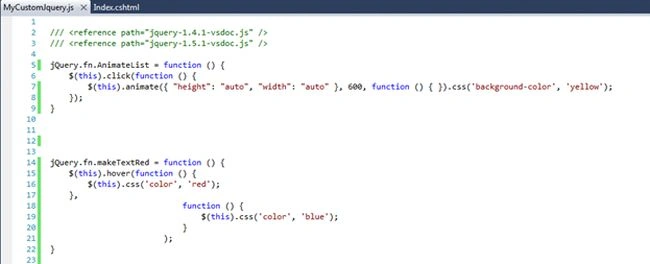
Open "index.cshtml" and have a look at the code segment as in the following: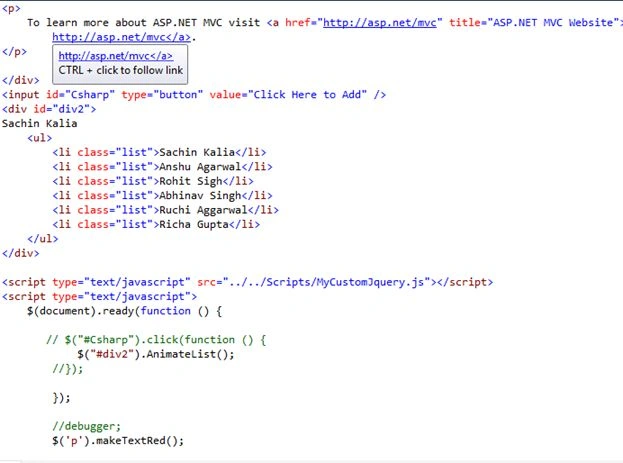
Note: I've added a reference of the .js file that contains the method definition (what logic has implemented) as depicted in the following image:
Moving further to the code segment in the "index.cshtml" file, I called the "AnimateList()" customized function and bound it to the div having the id "div2" along with one more function, "makeTextRed()", that is bound to a paragraph.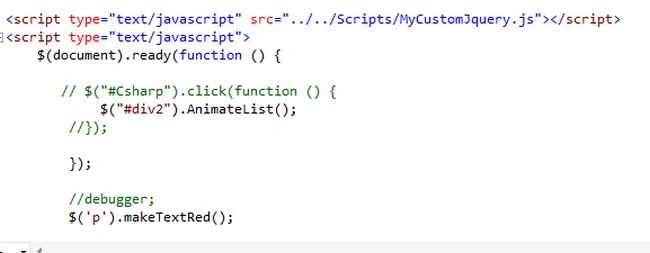
The images above states that both functions have been bound to the DOM element and works as desired. Press F5 and find the output as depicted in the image here:
If you drag the mouse over the paragraph, it changes the font color to red, as in:
And later to blue when you move the mouse away from the paragraph:
Click on the div element, it animates the div and changes the div size with a yellow background as in the code defined: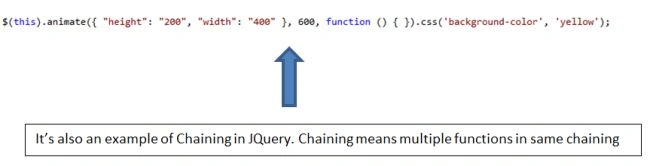
Output
The sample application has been attached as a reference.
Kindly let me know if you have any query.

Create Custom jQuery Function (jQuery Plugins)
Join the conversation! Your thoughts help the community grow.
Sign in to leave a comment
It is the same account you read, post and publish with — and you will come straight back to this page.
Sachin KaliaPosted May 23, 2013, 3:53 AM
Thanks Mahak :)
Mahak GuptaPosted May 16, 2013, 10:32 AM
Nice Article