

Introduction
In this article we create a Custom List property in a SharePoint List in List Settings under the "General Settings" Category.
Use the following procedure to create the sample.
1. Execute Visual Studio 2010; in SharePoint 2010 select "List Definition" and name it "NewTestDef".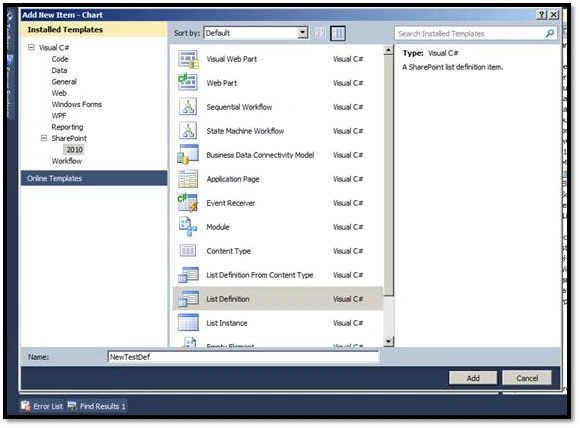
2. Open Element.xml for editing the List Name.
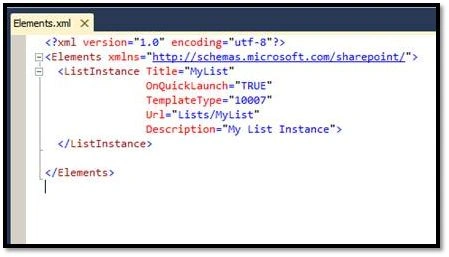
3. Open another "Element.xml" under NewTestDef and add a "Custom Action".
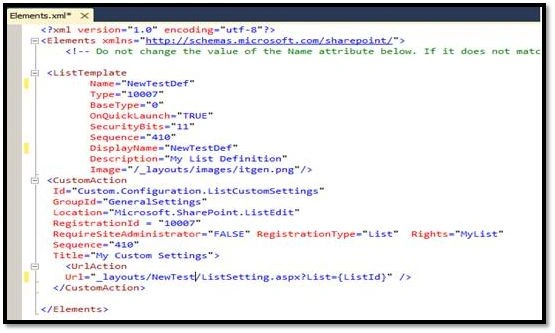
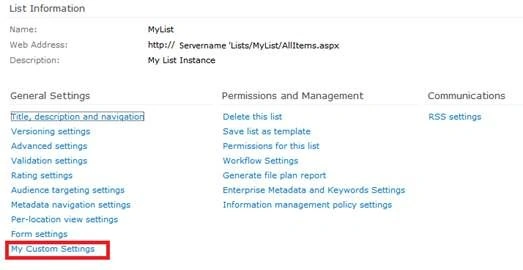
4. Deploy the solutions and then check.

Cs.Code
protected void Button2_Click(object sender, EventArgs e)
{
page.ClientScript.RegisterStartupScript(owner.GetType(),
"ShowMessage", string.Format("<script type='text/javascript'>alert(‘Hello..!’)</script>");
}
Summary
In this article I would like to add a custom link to a SharePoint list settings page.
Amar SPosted Oct 15, 2015, 12:50 AM
looks to me like an incomplete article.
Kalpesh VaghelaPosted Feb 28, 2015, 2:20 AM
Can we add custom group in library settigns? I want to add custom group like "General Settings","Permissions and Management". I have done following but it is not creating custom group <Elements xmlns="http://schemas.microsoft.com/sharepoint/"> <CustomActionGroup Id="LibrarySettings.MyGroup" Title ="My Group" Sequence="1000" Location="Microsoft.SharePoint.ListEdit"> </CustomActionGroup> <CustomAction Id="Custom.Configuration.ListCustomSettings" GroupId="LibrarySettings.MyGroup" Location="Microsoft.SharePoint.ListEdit" RequireSiteAdministrator="FALSE" Sequence="100" Title="Library Admins"> <UrlAction Url="_layouts/15/LibrarySettings.aspx?List={ListId}" /> </CustomAction> </Elements> Any Idea what I am missing here?
Kalpesh VaghelaPosted Feb 28, 2015, 2:16 AM
Hello sagar
Kalpesh VaghelaPosted Feb 28, 2015, 2:16 AM
Hello Sagar,