Introduction
Hi friends, this is my first article on C# Corner, I am Ravi Sharma, an Android developer.
This article is intended to make a custom listener on a button, that belongs to a list item. This article is another answer for the interview question “How to use an interface in Android?“.
Now to discuss the code to understand how to make a custom listener.
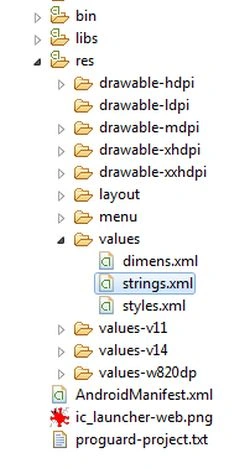
For doing this, first make a string array in a string file, this file is automatically generated in the value folder in the res folder as in the following:
Put the following code in this file,
- <string-array name="listdata">
- <item>item 1</item>
- <item>item 2</item>
- <item>item 3</item>
- <item>item 4</item>
- <item>item 5</item>
- <item>item 6</item>
- <item>item 7</item>
- <item>item 8</item>
- <item>item 9</item>
- <item>item 10</item>
- <item>item 11</item>
- <item>item 12</item>
- <item>item 13</item>
- <item>item 14</item>
- <item>item 15</item>
- <item>item 16</item>
- <item>item 17</item>
- <item>item 17</item>
- <item>item 18</item>
- <item>item 19</item>
- <item>item 20</item>
- </string-array>
Then make a layout for the activity with the code below,
- <RelativeLayout xmlns:android="http://schemas.android.com/apk/res/android"
- xmlns:tools="http://schemas.android.com/tools"
- android:id="@+id/container"
- android:layout_width="match_parent"
- android:layout_height="match_parent" >
-
- <ListView
- android:id="@+id/listView"
- android:layout_width="fill_parent"
- android:layout_height="fill_parent" >
- </ListView>
-
- </RelativeLayout>
Then make the child layout for the list, the code is below:
- <RelativeLayout xmlns:android="http://schemas.android.com/apk/res/android"
- xmlns:tools="http://schemas.android.com/tools"
- android:layout_width="match_parent"
- android:layout_height="match_parent"
- android:paddingBottom="@dimen/activity_vertical_margin"
- android:paddingLeft="@dimen/activity_horizontal_margin"
- android:paddingRight="@dimen/activity_horizontal_margin"
- android:paddingTop="@dimen/activity_vertical_margin"
- tools:context="com.example.articalonlistiner.MainActivity$PlaceholderFragment" >
-
- <TextView
- android:id="@+id/childTextView"
- android:layout_width="wrap_content"
- android:layout_height="match_parent"
- android:layout_alignParentLeft="true" />
-
- <Button
- android:id="@+id/childButton"
- android:layout_width="wrap_content"
- android:layout_height="wrap_content"
- android:layout_alignParentRight="true"
- android:text="Click Me" />
-
- </RelativeLayout>
Now make the reference of the ListView and Adapter.
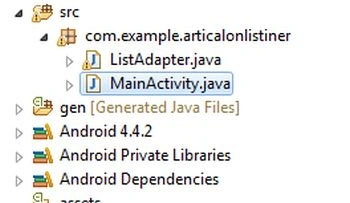
Make an activity (MainActivity.java) in the src folder.
Write that code in the MainActivity.
- <RelativeLayout xmlns:android="http://schemas.android.com/apk/res/android"
- xmlns:tools="http://schemas.android.com/tools"
- android:id="@+id/container"
- android:layout_width="match_parent"
- android:layout_height="match_parent" >
-
- <ListView
- android:id="@+id/listView"
- android:layout_width="fill_parent"
- android:layout_height="fill_parent" >
- </ListView>
-
- </RelativeLayout>
This code shows the error because you have not made the ListAdapter.java file in the src folder. Please make that file and extend it with ArrayAdapter<String>.
- public class ListAdapter extends ArrayAdapter<String>
Then make the constructor of the ListAdapter as in the following,
- public ListAdapter(Context context, ArrayList<String> dataItem) {
- super(context, R.layout.child_listview, dataItem);
- this.data = dataItem;
- this.context = context;
- }
There R.layout.child_listview is the child view of the ListView.
Now make an interface in ListAdapter, this interface works like a listener for the button.
- customButtonListener customListner;
-
- public interface customButtonListener {
- public void onButtonClickListner(int position,String value);
- }
And make a method to set the instance of the activity that has a ListView.
- public void setCustomButtonListner(customButtonListener listener) {
- this.customListner = listener;
- }
This method shares the context of the MainActivity with the interface to use this.
Make a child class in ListAdapter.
- public class ViewHolder {
- TextView text;
- Button button;
- }
If you have more items in the listItem view then add all the references in the ViewHolder class.
Now focus on the getview method of the adapter.
For this override the getView method.
- @Override
- public View getView(final int position, View convertView, ViewGroup parent) {
- ViewHolder viewHolder;
- if (convertView == null) {
- LayoutInflater inflater = LayoutInflater.from(context);
- convertView = inflater.inflate(R.layout.child_listview, null);
- viewHolder = new ViewHolder();
- viewHolder.text = (TextView) convertView
- .findViewById(R.id.childTextView);
- viewHolder.button = (Button) convertView
- .findViewById(R.id.childButton);
- convertView.setTag(viewHolder);
- } else {
- viewHolder = (ViewHolder) convertView.getTag();
- }
- final String temp = getItem(position);
- viewHolder.text.setText(temp);
- viewHolder.button.setOnClickListener(new OnClickListener() {
-
- @Override
- public void onClick(View v) {
- if (customListner != null) {
- customListner.onButtonClickListner(position,temp);
- }
-
- }
- });
-
- return convertView;
- }
Note- Here the yellow marked function is new for you. This is the main function to provide a listener for the button of each item of the list view. This function returns a callback for MainActivity because the MainActivity shares our context with the listener.
To use this you should implement this interface in MainActivity.
- public class MainActivity extends Activity implements
- customButtonListener
After implementing this, this interface overrides the method. The method gives you the position of the list adapter.
I implemented it only to show the toast. It is the code of my function.
- @Override
- public void onButtonClickListner(int position, String value) {
- Toast.makeText(MainActivity.this, "Button click " + value,
- Toast.LENGTH_SHORT).show();
-
- }
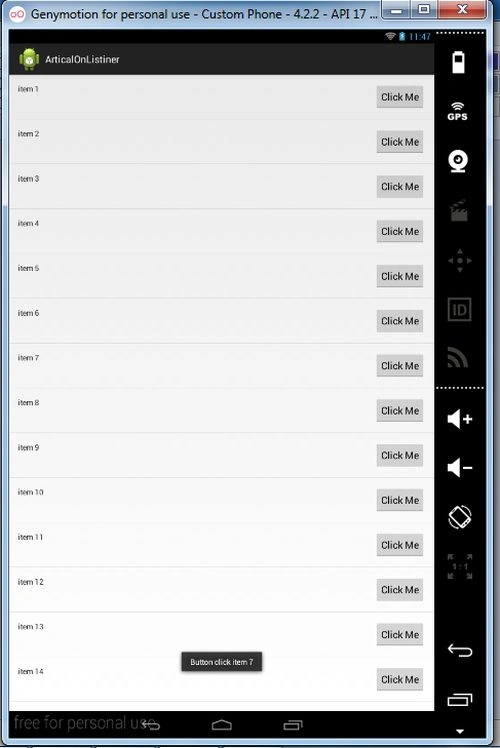
The output of this article is like,
You can implement your method, whatever you want to do with the button.
Here is the simple Toast.
This article is over now. The following is the entire code of the MainActivity and List Adapter.
MainActivity
- package com.example.articalonlistiner;
-
- import java.util.ArrayList;
- import java.util.Arrays;
- import java.util.List;
-
- import com.example.articalonlistiner.ListAdapter.customButtonListener;
-
- import android.os.Bundle;
- import android.support.v7.app.ActionBarActivity;
- import android.widget.ListView;
- import android.widget.Toast;
-
- public class MainActivity extends ActionBarActivity implements
- customButtonListener {
-
- private ListView listView;
- ListAdapter adapter;
- ArrayList<String> dataItems = new ArrayList<String>();
-
- @Override
- protected void onCreate(Bundle savedInstanceState) {
- super.onCreate(savedInstanceState);
- setContentView(R.layout.activity_main);
- String[] dataArray = getResources().getStringArray(R.array.listdata);
- List<String> dataTemp = Arrays.asList(dataArray);
- dataItems.addAll(dataTemp);
- listView = (ListView) findViewById(R.id.listView);
- adapter = new ListAdapter(MainActivity.this, dataItems);
- adapter.setCustomButtonListner(MainActivity.this);
- listView.setAdapter(adapter);
-
- }
-
- @Override
- public void onButtonClickListner(int position, String value) {
- Toast.makeText(MainActivity.this, "Button click " + value,
- Toast.LENGTH_SHORT).show();
-
- }
-
- }
ListAdapter
- package com.example.articalonlistiner;
-
- import java.util.ArrayList;
-
- import android.content.Context;
- import android.view.LayoutInflater;
- import android.view.View;
- import android.view.View.OnClickListener;
- import android.view.ViewGroup;
- import android.widget.ArrayAdapter;
- import android.widget.Button;
- import android.widget.TextView;
-
- public class ListAdapter extends ArrayAdapter<String> {
- customButtonListener customListner;
-
- public interface customButtonListener {
- public void onButtonClickListner(int position,String value);
- }
-
- public void setCustomButtonListner(customButtonListener listener) {
- this.customListner = listener;
- }
-
- private Context context;
- private ArrayList<String> data = new ArrayList<String>();
-
- public ListAdapter(Context context, ArrayList<String> dataItem) {
- super(context, R.layout.child_listview, dataItem);
- this.data = dataItem;
- this.context = context;
- }
-
- @Override
- public View getView(final int position, View convertView, ViewGroup parent) {
- ViewHolder viewHolder;
- if (convertView == null) {
- LayoutInflater inflater = LayoutInflater.from(context);
- convertView = inflater.inflate(R.layout.child_listview, null);
- viewHolder = new ViewHolder();
- viewHolder.text = (TextView) convertView
- .findViewById(R.id.childTextView);
- viewHolder.button = (Button) convertView
- .findViewById(R.id.childButton);
- convertView.setTag(viewHolder);
- } else {
- viewHolder = (ViewHolder) convertView.getTag();
- }
- final String temp = getItem(position);
- viewHolder.text.setText(temp);
- viewHolder.button.setOnClickListener(new OnClickListener() {
-
- @Override
- public void onClick(View v) {
- if (customListner != null) {
- customListner.onButtonClickListner(position,temp);
- }
-
- }
- });
-
- return convertView;
- }
-
- public class ViewHolder {
- TextView text;
- Button button;
- }
- }
If anyone has a query then provide it in the comments.
Thank for reading.


 Put the following code in this file,
Ramesh RamalingamPosted Jul 18, 2017, 2:10 AM
Nice BRO its working fine. awesome
Nitul BarmanPosted Jul 14, 2017, 8:07 AM
Adapter.setCustomButtonListner(MainActivity.this); this line is showing error. can you tell me why?
Gerry JohnPosted Feb 2, 2017, 12:42 AM
What if I want to add one more string array in string.xml.. How I can get resource for the both data???
kalu singh raoPosted Jul 12, 2016, 6:23 AM
Nice...
Rius SimbolonPosted Jul 11, 2016, 5:54 AM
Hello Bro, i need your help, in my case, i have two ListView in one Activity with Custom Adapter ListView one = List Data ListView two = Display data the problem is: how to Load data to ListView two when button on row ListView one Clicked Thank You
Hugh ONeillPosted Apr 14, 2016, 5:10 AM
Hi All, A really Great tutorial....!!!! As a newcomer to Java and Android I'm still struggling a bit..!! Your explanation is clear and concise. However I've got a problem...!! I loaded your code into Android Studio and I'm getting an error with this code: adapter = new ListAdapter(MainActivity.this, dataItems); Android Studio is telling me that ListAdapter is an abstract class and cannot be instantiated..??? Hope you can help....
Madhuram SrivastavaPosted Oct 27, 2015, 12:46 AM
great , nice one , it is very helpful :) thank you for sharing
Ajish NairPosted Jul 31, 2015, 2:01 PM
Hello Ravi Sir, Please reply me. Waiting for your reply.
Ajish NairPosted Jul 29, 2015, 4:08 AM
Thanks for the reply. But can u show me one example with the code & snapshot so that it will be easy for me to understand.
Ajish NairPosted Jul 28, 2015, 7:14 AM
Hello Sir, I want to develop an android app. Its a lyrics app when i click on list view it should show the lyrics. List view with buttons. There is a 500 songs lyrics. Can you help me out pls.
archana crPosted Jul 24, 2015, 4:48 AM
nice article helped a lot
Mehdi DehghaniPosted May 19, 2015, 2:35 PM
thanks for this great example. but listView.setOnItemClickListener not work for me.how can i handle it.
Noah APosted Mar 7, 2015, 11:29 AM
Great article, thanks. What do I do if I have more than one button in each row, and I need to have multiple listeners for them?
Arvind PradhanPosted Dec 18, 2014, 12:18 PM
Nice Article ravi........
Dinesh BeniwalPosted Dec 17, 2014, 10:29 PM
Good start Ravi, Welcome to C# Corner.