

As per the QTP:
The DotNetFactory object in QTP enables you to create an instance of a .NET object, and access its methods and properties.
You can use this object to access the static methods and properties of a class that does not have an instance constructor, for example, System.Environment, as well as a class that does.
Also the .Net Add-in is not required for this to work. I personally feel that the utility has been introduced to resolve the problem that occured when referencing a .Net Assembly or C/C++ DLL and making a call to its functions.
The piece of code would be as in the following:
Set myMessageBox = DotNetFactory.CreateInstance (TypeName [,Assembly] [,args])
Set myMessageBox =
DotNetFactory.CreateInstance("System.Windows.Forms.Form",
"System.Windows.Forms")
myMessageBox.Show()
Create the custom UI forms part of my automation test framework so the tester can run opted test scripts as per the user's choice using the .Net factory utility: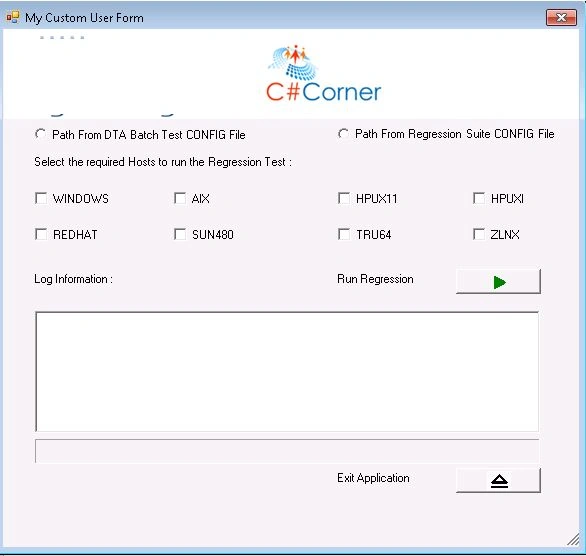
The entire code of the Test Method would be as in the following:
'Form
UIForm = DotNetFactory.CreateInstance("System.Windows.Forms.Form", "System.Windows.Forms")
'Logo Image
imgLogo = DotNetFactory.CreateInstance("System.Windows.Forms.PictureBox", "System.Windows.Forms")
imgLogoSize = DotNetFactory.CreateInstance("System.Windows.Forms.PictureBoxSizeMode", "System.Windows.Forms")
'Form Background Image
frmImage = DotNetFactory.CreateInstance("System.Drawing.Image", "System.Windows.Forms")
'Labels
lblHosts = DotNetFactory.CreateInstance("System.Windows.Forms.Label", "System.Windows.Forms")
lblRun = DotNetFactory.CreateInstance("System.Windows.Forms.Label", "System.Windows.Forms")
lblCancel = DotNetFactory.CreateInstance("System.Windows.Forms.Label", "System.Windows.Forms")
lblLog = DotNetFactory.CreateInstance("System.Windows.Forms.Label", "System.Windows.Forms")
'Buttons
btnRun = DotNetFactory.CreateInstance("System.Windows.Forms.Button", "System.Windows.Forms")
btnCancel = DotNetFactory.CreateInstance("System.Windows.Forms.Button", "System.Windows.Forms")
dResult = DotNetFactory.CreateInstance("System.Windows.Forms.DialogResult", "System.Windows.Forms")
'Radio Buttons
rdDTAOption = DotNetFactory.CreateInstance("System.Windows.Forms.RadioButton", "System.Windows.Forms")
rdCONFIGOption = DotNetFactory.CreateInstance("System.Windows.Forms.RadioButton", "System.Windows.Forms")
'Radio Buttons POS
rdDTAOptionPos = DotNetFactory.CreateInstance("System.Drawing.Point", "System.Drawing", x, y)
rdCONFIGOptionPos = DotNetFactory.CreateInstance("System.Drawing.Point", "System.Drawing", x, y)
'Check Boxes
chkWindows = DotNetFactory.CreateInstance("System.Windows.Forms.CheckBox", "System.Windows.Forms")
chkAix = DotNetFactory.CreateInstance("System.Windows.Forms.CheckBox", "System.Windows.Forms")
chkHpux11 = DotNetFactory.CreateInstance("System.Windows.Forms.CheckBox", "System.Windows.Forms")
chkHpuxi = DotNetFactory.CreateInstance("System.Windows.Forms.CheckBox", "System.Windows.Forms")
chkRedhat = DotNetFactory.CreateInstance("System.Windows.Forms.CheckBox", "System.Windows.Forms")
chkSun480 = DotNetFactory.CreateInstance("System.Windows.Forms.CheckBox", "System.Windows.Forms")
chkTru64 = DotNetFactory.CreateInstance("System.Windows.Forms.CheckBox", "System.Windows.Forms")
chkZlnx = DotNetFactory.CreateInstance("System.Windows.Forms.CheckBox", "System.Windows.Forms")
' Progress Bar
frmProgressBar = DotNetFactory.CreateInstance("System.Windows.Forms.ProgressBar", "System.Windows.Forms")
' Text Box
txtLog = DotNetFactory.CreateInstance("System.Windows.Forms.TextBox", "System.Windows.Forms")
'Labels POS
lblHostsPOS = DotNetFactory.CreateInstance("System.Drawing.Point", "System.Drawing")
lblRunPOS = DotNetFactory.CreateInstance("System.Drawing.Point", "System.Drawing")
lblCancelPOS = DotNetFactory.CreateInstance("System.Drawing.Point", "System.Drawing")
lblLogPOS = DotNetFactory.CreateInstance("System.Drawing.Point", "System.Drawing")
'Buttons POS
btnRunPOS = DotNetFactory.CreateInstance("System.Drawing.Point", "System.Drawing")
btnCancelPOS = DotNetFactory.CreateInstance("System.Drawing.Point", "System.Drawing")
frmImagePOS = DotNetFactory.CreateInstance("System.Drawing.Point", "System.Drawing")
'Check Boxes POS
chkWindowsPos = DotNetFactory.CreateInstance("System.Drawing.Point", "System.Drawing", x, y)
chkAixPos = DotNetFactory.CreateInstance("System.Drawing.Point", "System.Drawing", x, y)
chkHpux11Pos = DotNetFactory.CreateInstance("System.Drawing.Point", "System.Drawing", x, y)
chkHpuxiPos = DotNetFactory.CreateInstance("System.Drawing.Point", "System.Drawing", x, y)
chkRedhatPos = DotNetFactory.CreateInstance("System.Drawing.Point", "System.Drawing", x, y)
chkSun480Pos = DotNetFactory.CreateInstance("System.Drawing.Point", "System.Drawing", x, y)
chkTru64Pos = DotNetFactory.CreateInstance("System.Drawing.Point", "System.Drawing", x, y)
chkZlnxPos = DotNetFactory.CreateInstance("System.Drawing.Point", "System.Drawing", x, y)
' Progress Bar POS
frmProgressBarlPOS = DotNetFactory.CreateInstance("System.Drawing.Point", "System.Drawing")
' Text Box POS
txtLogPos = DotNetFactory.CreateInstance("System.Drawing.Point", "System.Drawing", x, y)
Var = DotNetFactory.CreateInstance("System.Environment")
'Logo Image POS
imgLogoPos = DotNetFactory.CreateInstance("System.Drawing.Point", "System.Drawing")
'Logo Image Properties
With imgLogoPos
.X = 1
.Y = -1
End With
With imgLogo
.ImageLocation = "~ \Images\Icon.jpg"
.Location = imgLogoPos
.SizeMode = imgLogoSize.Autosize
.Width = 580
.Height = 91
End With
'Radio Buttons Properties
With rdDTAOptionPos
.X = 32
.Y = 96
End With
With rdDTAOption
.Location = rdDTAOptionPos
'.BackColor=System.Drawing.Color.Transparent
.Text = "Path From DTA Batch Test CONFIG File"
.Name = "rdDTAOption"
.Width = 239
.Height = 20
End With
With rdCONFIGOptionPos
.X = 335
.Y = 96
End With
With rdCONFIGOption
.Location = rdCONFIGOptionPos
'.BackColor=System.Drawing.Color.Transparent
.Text = "Path From Regression Suite CONFIG File"
.Name = "rdCONFIGOption"
.Width = 250
.Height = 19
End With
' Label Selected Hosts Properties
With lblHostsPOS
.X = 29
.Y = 126
End With
With lblHosts
.Text = "Select the required Hosts to run the Regression Test :"
.Location = lblHostsPOS
.Width = 325
.Height = 17
End With
'Check Boxes Properties
With chkWindowsPos
.X = 32
.Y = 160
End With
With chkWindows
.Location = chkWindowsPos
'.BackColor=System.Drawing.Color.Transparent
.Text = "WINDOWS"
.Name = "chkWindows"
.Width = 82
.Height = 20
End With
With chkAixPos
.X = 171
.Y = 160
End With
With chkAix
.Location = chkAixPos
.Text = "AIX"
.Name = "chkAix"
.Width = 82
.Height = 20
End With
With chkHpux11Pos
.X = 335
.Y = 160
End With
With chkHpux11
.Location = chkHpux11Pos
.Text = "HPUX11"
.Name = "chkHpux11"
Gowtham RajamanickamPosted Apr 25, 2015, 5:33 AM
good