

Document sets can be used, when you want to group together documents within a particular library. Document set by itself is a content type, which acts as a folder at a high level. Apart from the logical grouping of the documents, we can also assign the metadata and assign Workflows to run on a group of documents. In addition to it, we can set the default content to a document set, so that whenever a document set is created, the default contents will be created along with it. This is quite helpful, as it gives a starting point to the team. Documents sets were introduced in SharePoint 2010 version and has made its way all the way till SharePoint 2016 came.
Document sets are part of a site collection feature.

We can create document sets out of the box, as well as through SharePoint programming model. In this article, we will see, how we can create a Document Set, using JavaScript Object Model.
Internal Implementation
- Add reference to jQuery file.
- <script language="javascript" type="text/javascript" src="//ajax.googleapis.com/ajax/libs/jquery/1.8.1/jquery.min.js"></script>
- <script language="javascript" type="text/javascript">
- Within Document ready function, use getScript function, so as to load the on demand script SP.js and SP.DocumentManagement.js . Call the main starting point function say: createDocumentSet.
- $.getScript(scriptbase + "SP.DocumentManagement.js",createDocumentSet);
- Instantiate client context, web and library instance.
- clientContext = new SP.ClientContext.get_current();
- oWeb = clientContext.get_web();
- var oList = oWeb.get_lists().getByTitle("Demo Library");
- Get the content type for the Document Set.
- var documentSetContentTypeID = "0x0120D520";
- documentSetContentType = clientContext.get_site().get_rootWeb().get_contentTypes().getById(documentSetContentTypeID);
- Load the client context and execute the batch.
- clientContext.load(documentSetContentType);
- clientContext.executeQueryAsync(QuerySuccess, QueryFailure);
- In the success call back function, set the document set name and create the Document Set.
- var documentSetName = "Long Term Execution Planning";
- SP.DocumentSet.DocumentSet.create(clientContext, oLibraryFolder, documentSetName, documentSetContentType.get_id());
- Execute the batch once again.
Full Code- clientContext.executeQueryAsync(SecondQuerySuccess,SecondQueryFailure);
The full code to create a document set, using JSOM is given below-
- <script language="javascript" type="text/javascript" src="//ajax.googleapis.com/ajax/libs/jquery/1.8.1/jquery.min.js"></script>
- <script language="javascript" type="text/javascript">
- $(document).ready(function() {
- var scriptbase = _spPageContextInfo.webServerRelativeUrl + "/_layouts/15/";
- $.getScript(scriptbase + "SP.Runtime.js", function() {
- $.getScript(scriptbase + "SP.js", function() {
- $.getScript(scriptbase + "SP.DocumentManagement.js", createDocumentSet);
- });
- });
- });
- var oLibraryFolder, clientContext, docSetContentType;
- function createDocumentSet() {
- //Get the client context,web and library object.
- clientContext = new SP.ClientContext.get_current();
- oWeb = clientContext.get_web();
- var oList = oWeb.get_lists().getByTitle("Demo Library");
- //Load the library object
- clientContext.load(oList);
- //Get the root folder of the library and load it
- oLibraryFolder = oList.get_rootFolder();
- clientContext.load(oLibraryFolder);
- //Get the content type for the document set and load it
- var documentSetContentTypeID = "0x0120D520";
- documentSetContentType = clientContext.get_site().get_rootWeb().get_contentTypes().getById(documentSetContentTypeID);
- clientContext.load(documentSetContentType);
- //Execute the batch
- clientContext.executeQueryAsync(QuerySuccess, QueryFailure);
- }
- function QuerySuccess() {
- //Set the document set name
- var documentSetName = "Long Term Execution Planning";
- SP.DocumentSet.DocumentSet.create(clientContext, oLibraryFolder, documentSetName, documentSetContentType.get_id());
- clientContext.executeQueryAsync(SecondQuerySuccess, SecondQueryFailure);
- }
- function QueryFailure() {
- console.log('Request failed - ' + args.get_message());
- }
- function SecondQuerySuccess() {
- console.log('Document Set Created.');
- }
- function SecondQueryFailure(sender, args) {
- console.log('Request failed - ' + args.get_message());
- }
- </script>
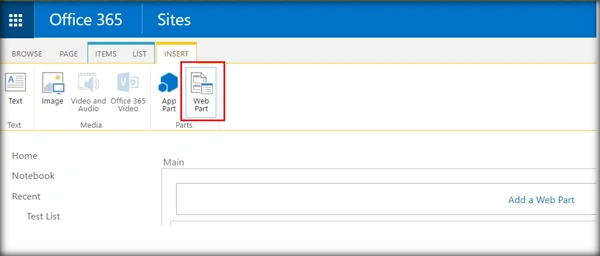
- Go to the edit settings of SharePoint page and click Web part from the Insert tab.
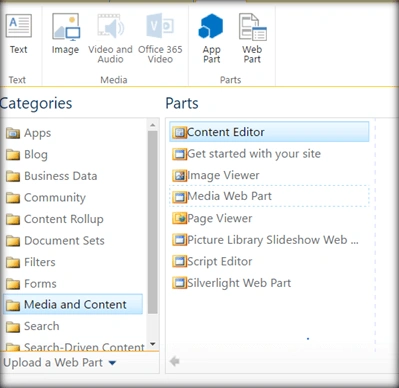
- Add Content Editor Web part.
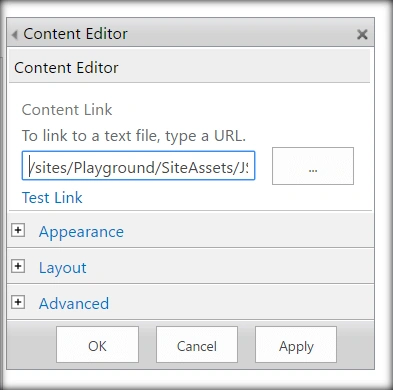
- Click Edit Web part from Content Edit Web part. Assign the URL of the script text file and click Apply.
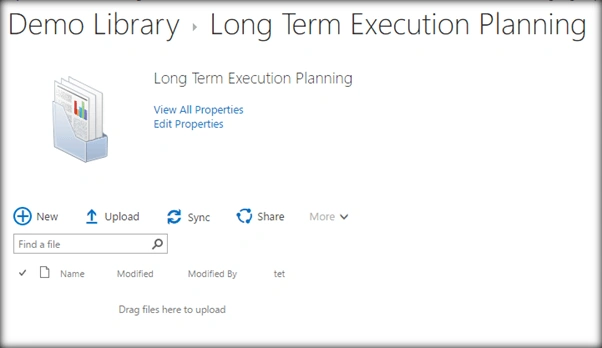
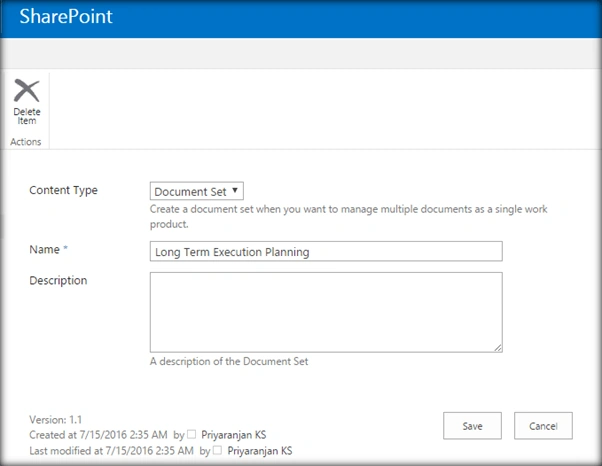
Output: The document set has been created in the library.
Summary
Thus, we have seen, how to create the Document Set, using JavaScript Object Model. This has been tried and tested in both SharePoint 2016 and Office 365.
Tarun DPosted Sep 1, 2016, 1:42 AM
Nice article.. Thanks for sharing..