This article will solve the problem of how to create a MVC 5 application with CURD (Create, Edit, Details, Delete) operation using Fancy Box and Entity Framework.
First we create a model and context class. We create a student information class with the following properties.
- [Key]
- public Guid ID { get; set; }
- [Required(ErrorMessage = "*")]
- [Display(Name = "First Name")]
- public string FirstName { get; set; }
- [Required(ErrorMessage = "*")]
- [Display(Name = "Last Name")]
- public string LastName { get; set; }
- [Required(ErrorMessage = "*")]
- [Display(Name = "Course")]
- public string Course { get; set; }
- [Required(ErrorMessage = "*")]
- [Display(Name = "Phone No")]
- public string PhoneNo { get; set; }
And second is the context class like this that inherits the DbContext class:
- public class DbConnectionContext : DbContext
- {
- public DbConnectionContext():base("name=dbContext")
- { }
- public DbSet<StudentInformation> Students { get; set; }
- }
We also have a web config file. We configure connectionStrings under the Web.Config file.
- <connectionStrings>
- <add name="dbContext" connectionString="Data Source=localhost;
- Initial Catalog=CommonDataBase; Integrated Security=true" providerName="System.Data.SqlClient" />
- </connectionStrings>
Then we create a controller class in a controller folder and edit the name as StudentController. Add Scaffold select MVC 5 Controller with Views, using Entity Framework.
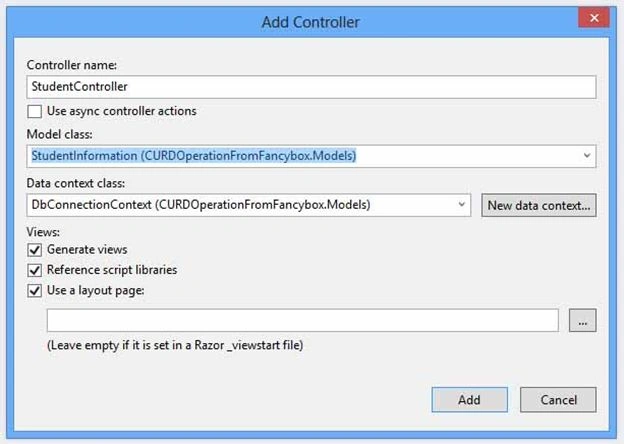
We edit the Index View according to requirements and add the following code:

Then we add these references to the Index View:
- @model IEnumerable<CURDOperationFromFancybox.Models.StudentInformation>
- @{
- ViewBag.Title = "Index";
- }
- <h2>Student</h2>
- <p>
- <a class="createEditStudent btn btn-primary" data-fancybox-type="iframe" href="@Url.Action("Create", "Student")">Create New Student</a>
- </p> <table class="table">
- <tr>
- <th>
- @Html.DisplayNameFor(model => model.FirstName)
- </th>
- <th>
- @Html.DisplayNameFor(model => model.LastName)
- </th>
- <th>
- @Html.DisplayNameFor(model => model.Course)
- </th>
- <th>
- @Html.DisplayNameFor(model => model.PhoneNo)
- </th>
- <th></th>
- </tr>
- @foreach (var item in Model) {
- <tr>
- <td>
- @Html.DisplayFor(modelItem => item.FirstName)
- </td>
- <td>
- @Html.DisplayFor(modelItem => item.LastName)
- </td>
- <td>
- @Html.DisplayFor(modelItem => item.Course)
- </td>
- <td>
- @Html.DisplayFor(modelItem => item.PhoneNo)
- </td>
- <td>
- <a class="createEditStudent btn btn-primary" data-fancybox-type="iframe" href="@Url.Action("Edit", "Student", new {id=item.ID })">Edit</a>
-
- <a class="createEditStudent btn btn-primary" data-fancybox-type="iframe"
- href="@Url.Action("Details", "Student", new { id = item.ID })">Details</a>
-
- <a class="createEditStudent btn btn-danger" data-fancybox-type="iframe"
- href="@Url.Action("Delete", "Student", new {id=item.ID })">Delete</a>
- </td>
- </tr>
- }
- </table>
And Add jQuery code to Index View and .createEditStudent as in the following:
- <script type="text/javascript">
- $(document).ready(function () {
- $('.createEditStudent').fancybox({
- fitToView: false,
- width: '600px',
- height: '400px',
- autoSize: false,
- closeClick: false,
- openEffect: 'none',
- closeEffect: 'none',
- padding: 0,
- closeBtn: false,
- 'afterClose': function () {
- window.location.reload();
- },
- });
- });
- </script>
We add a Create View in the Student folder, Create.cshtml. The purpose of this view is to create a new entry stored in the database.
- @model CURDOperationFromFancybox.Models.StudentInformation
- @{
- ViewBag.Title = "Create";
- Layout = null;
- }
- <html>
- <head>
- <title></title>
- <script src="~/Scripts/jquery-1.5.1.min.js"></script>
- <script src="~/Scripts/jquery.unobtrusive-ajax.min.js"></script>
- <script src="~/Scripts/jquery.validate.min.js"></script>
- <script src="~/Scripts/jquery.validate.unobtrusive.min.js"></script>
- <link href="~/Content/bootstrap.min.css" rel="stylesheet" />
- <link href="~/Content/bootstrap.css" rel="stylesheet" />
- <style type="text/css">
- .table-style
- {
- margin-left: 150px;
- }
- .table-style tr td
- {
- height: 50px;
- }
- </style>
- <script type="text/javascript">
- function OnSuccess(response)
- {
- if (response == "success")
- {
- parent.jQuery.fancybox.close();
- }
- else
- {
- alert("Error. Please check out");
- }
- }
- </script>
- </head>
- <body style="background-color:#fff;">
- <div style="height: 30px; width: 599.4px; background-color: #558cc3; border: 0px solid red; text-align: center;">
- <b style="color: white;"> Create New Student</b>
- <div style="float:right; height:30px; width:30px; border-left:1px solid #c8c8c8">
- <a href="javascript:parent.jQuery.fancybox.close();" style="color: orange; cursor: pointer; text-decoration: none; ">
- <i style="font-size:20px; text-decoration:none">X</i></a>
- </div>
- </div>
- <br /><br />
- @using (Ajax.BeginForm("Create", new AjaxOptions { HttpMethod = "POST", OnSuccess = "OnSuccess" }))
- {
- @Html.AntiForgeryToken()
- <table class="table-style">
- <tr>
- <td>@Html.TextBoxFor(model => model.FirstName, new { @class = "form- control",
- @style = "width:300px", placeholder = "First Name" })</td>
- <td style="color:red">@Html.ValidationMessageFor(model => model.FirstName)</td>
- </tr>
- <tr>
- <td>@Html.TextBoxFor(model => model.LastName, new { @class = "form-control",
- @style = "width:300px", placeholder = "Last Name" })</td>
- <td style="color:red">@Html.ValidationMessageFor(model => model.LastName)</td>
- </tr>
- <tr>
- <td>@Html.TextBoxFor(model => model.Course, new { @class = "form-control",
- @style = "width:300px", placeholder = "Course" })</td>
- <td style="color:red">@Html.ValidationMessageFor(model => model.Course)</td>
- </tr>
- <tr>
- <td>@Html.TextBoxFor(model => model.PhoneNo, new { @class = "form-control",
- @style = "width:300px", placeholder = "Phone Number" })</td>
- <td style="color:red">@Html.ValidationMessageFor(model => model.PhoneNo)</td>
- </tr>
- </table>
- <br />
- <div class="form-group" style="margin-left:140px;">
- <div class="col-md-offset-2 col-md-10">
- <input type="submit" id="btnSubmit" value="Create" class="btn btn-primary" />
-
- <a class="btn btn-danger" href="javascript:parent.jQuery.fancybox.close();"
- style="cursor: pointer; text-decoration: none; ">Close</a>
- </div>
- </div>
- }
- </body>
- </html>
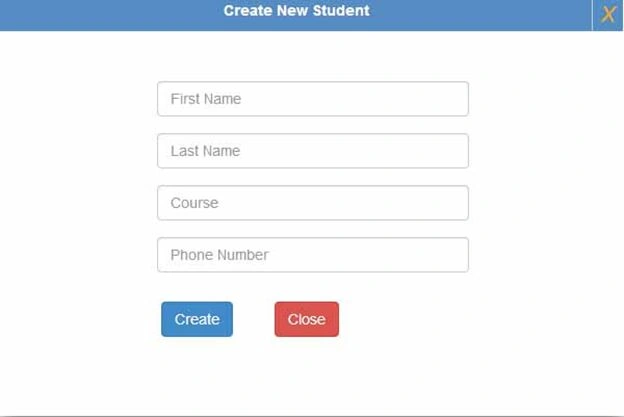
We need to submit a form from the Ajax.BeginForm and add the OnSuccess attribute. The purposes of these are for the Ajax.BeginForm close of the fancy box after submitting the form successfully.
We add an edit view in the Student folder, edit.cshtml. The purpose is to update the record in the stored record.
- @model CURDOperationFromFancybox.Models.StudentInformation
- @{
- ViewBag.Title = "Edit";
- Layout = null;
- }
- <html>
- <head>
- <title></title>
- <script src="~/Scripts/jquery-1.5.1.min.js"></script>
- <script src="~/Scripts/jquery.unobtrusive-ajax.min.js"></script>
- <script src="~/Scripts/jquery.validate.min.js"></script>
- <script src="~/Scripts/jquery.validate.unobtrusive.min.js"></script>
- <link href="~/Content/bootstrap.min.css" rel="stylesheet" />
- <link href="~/Content/bootstrap.css" rel="stylesheet" />
- <style type="text/css">
- .table-style {
- margin-left: 150px;
- }
- .table-style tr td {
- height: 50px;
- }
- </style>
- <script type="text/javascript">
- function OnSuccess(response) {
- if (response == "success") {
- parent.jQuery.fancybox.close();
- } else {
- alert("Error. Please check out");
- }
- }
- </script>
- </head>
- <body style="background-color:#fff;">
- <div style="height: 30px; width: 599.4px; background-color: #558cc3; border: 0px solid #b200ff; text-align: center;">
- <b style="color: white;"> Update Student</b>
- <div style="float:right; height:30px; width:30px; border-left:1px solid #c8c8c8">
- <a href="javascript:parent.jQuery.fancybox.close();" style="color: #000000; cursor: pointer; text-decoration: none; ">
-
- <i style="font-size:20px; text-decoration:none">X</i></a>
- </div>
- </div>
- <br /><br />
- @using (Ajax.BeginForm("Edit", new AjaxOptions { HttpMethod = "POST", OnSuccess = "OnSuccess" }))
- {
- @Html.HiddenFor(m => m.ID)
- @Html.AntiForgeryToken()
- <table class="table-style">
- <tr>
- <td>@Html.TextBoxFor(model => model.FirstName, new { @class = "form-control", @style = "width:300px", placeholder = "First Name" })</td>
- <td style="color:red">@Html.ValidationMessageFor(model => model.FirstName)</td>
- </tr>
- <tr>
- <td>@Html.TextBoxFor(model => model.LastName, new { @class = "form-control",
- @style = "width:300px", placeholder = "Last Name" })</td>
- <td style="color:red">@Html.ValidationMessageFor(model => model.LastName)</td>
- </tr>
- <tr>
- <td>@Html.TextBoxFor(model => model.Course, new { @class = "form-control",
- @style = "width:300px", placeholder = "Course" })</td>
- <td style="color:red">@Html.ValidationMessageFor(model => model.Course)</td>
- </tr>
- <tr>
- <td>@Html.TextBoxFor(model => model.PhoneNo, new { @class = "form-control",
- @style = "width:300px", placeholder = "Phone Number" })</td>
- <td style="color:red">@Html.ValidationMessageFor(model => model.PhoneNo)</td>
- </tr>
- </table>
- <br />
- <div class="form-group" style="margin-left:140px;">
- <div class="col-md-offset-2 col-md-10">
- <input type="submit" value="Update" class="btn btn-primary" />
-
- <a class="btn btn-danger" href="javascript:parent.jQuery.fancybox.close();"
- style="cursor: pointer; text-decoration: none; ">Close</a>
- </div>
- </div>
- }
- </body>
- </html>
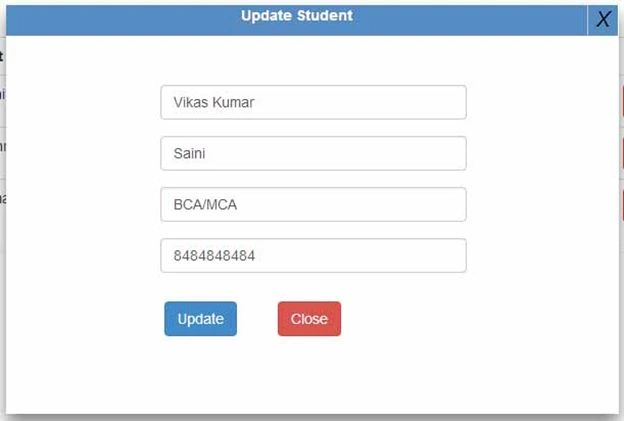
We add a delete view in the Student folder, delete.cshtml. This purpose is to delete a record in the stored record.
- @model CURDOperationFromFancybox.Models.StudentInformation
- @{
- ViewBag.Title = "Delete";
- Layout = null;
- }
- <html>
- <head>
- <title></title>
- <script src="~/Scripts/jquery-1.5.1.min.js"></script>
- <script src="~/Scripts/jquery.unobtrusive-ajax.min.js"></script>
- <script src="~/Scripts/jquery.validate.min.js"></script>
- <script src="~/Scripts/jquery.validate.unobtrusive.min.js"></script>
- <link href="~/Content/bootstrap.min.css" rel="stylesheet" />
- <link href="~/Content/bootstrap.css" rel="stylesheet" />
- <style type="text/css">
- .table-style {
- margin-left: 150px;
- }
- .table-style tr td {
- height: 30px;
- }
- </style>
- <script type="text/javascript">
- function OnSuccess(response) {
- if (response == "success") {
- parent.jQuery.fancybox.close();
- } else {
- alert("Error. Please check out");
- }
- }
- </script>
- </head>
- <body style="background-color:#fff;">
- <div style="height: 30px; width: 599.4px; background-color: #558cc3; border: 0px solid red; text-align: center;">
- <b style="color: white;">Are you sure to delete this student</b>
- <div style="float:right; height:30px; width:30px; border-left:1px solid #c8c8c8">
- <a href="javascript:parent.jQuery.fancybox.close();" style="color: red; cursor: pointer; text-decoration: none; ">
- <i style="font-size:20px; text-decoration:none">X</i></a>
- </div>
- </div><br />
- <table class="table-style">
- <tr>
- <td>@Html.DisplayNameFor(model => model.FirstName): </td>
- <td>@Html.DisplayFor(model => model.FirstName)</td>
- </tr>
- <tr>
- <td>@Html.DisplayNameFor(model => model.LastName): </td>
- <td>@Html.DisplayFor(model => model.LastName)</td>
-
- </tr>
- <tr>
- <td>@Html.DisplayNameFor(model => model.Course): </td>
- <td>@Html.DisplayFor(model => model.Course)</td>
- </tr>
- <tr>
- <td>@Html.DisplayNameFor(model => model.PhoneNo): </td>
- <td>@Html.DisplayFor(model => model.PhoneNo)</td>
- </tr>
- <tr>
- <td></td>
- <td></td>
- </tr>
- <tr>
- <td colspan="2">
- @using (Ajax.BeginForm("Delete", new AjaxOptions { HttpMethod = "POST", OnSuccess = "OnSuccess" }))
- {
- @Html.AntiForgeryToken()
- <div class="form-actions no-color">
- <input type="submit" value="Delete" class="btn btn-primary" />
-
- <a class="btn btn-danger" href="javascript:parent.jQuery.fancybox.close();"
- style="cursor: pointer; text-decoration: none; ">Close</a>
- </div>
- }
- </td>
- </tr>
- </table>
- </body>
- </html>
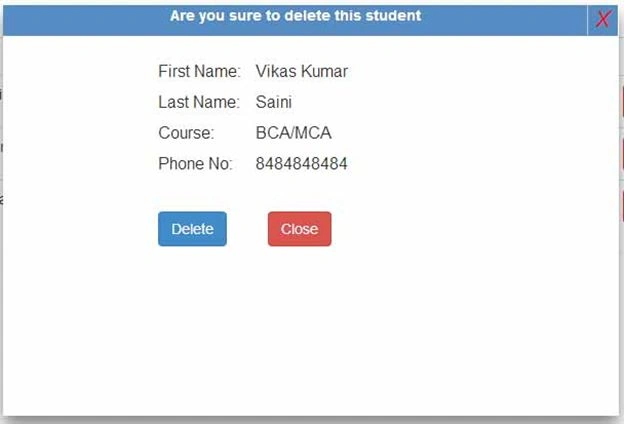
We add a detail view to the Student folder, details.cshtml. This purpose is to see the details of a record in an existing record.
- @model CURDOperationFromFancybox.Models.StudentInformation
- @{
- ViewBag.Title = "Delete";
- Layout = null;
- }
- <html>
- <head>
- <title></title>
- <script src="~/Scripts/jquery-1.5.1.min.js"></script>
- <script src="~/Scripts/jquery.unobtrusive-ajax.min.js"></script>
- <script src="~/Scripts/jquery.validate.min.js"></script>
- <script src="~/Scripts/jquery.validate.unobtrusive.min.js"></script>
- <link href="~/Content/bootstrap.min.css" rel="stylesheet" />
- <link href="~/Content/bootstrap.css" rel="stylesheet" />
- <style type="text/css">
- .table-style {
- margin-left: 150px;
- }
-
- .table-style tr td {
- height: 30px;
- }
- </style>
- <script type="text/javascript">
- function OnSuccess(response) {
- if (response == "success") {
- parent.jQuery.fancybox.close();
- } else {
- alert("Error. Please check out");
- }
- }
- </script>
-
- </head>
- <body style="background-color:#fff;">
- <div style="height: 30px; width: 599.4px; background-color: #558cc3; border: 0px solid red; text-align: center;">
- <b style="color: white;">Are you sure to delete this student</b>
- <div style="float:right; height:30px; width:30px; border-left:1px solid #c8c8c8">
- <a href="javascript:parent.jQuery.fancybox.close();" style="color: red; cursor: pointer; text-decoration: none; ">
- <i style="font-size:20px; text-decoration:none">X</i></a>
- </div>
- </div><br />
- <table class="table-style">
- <tr>
- <td>@Html.DisplayNameFor(model => model.FirstName): </td>
- <td>@Html.DisplayFor(model => model.FirstName)</td>
- </tr>
-
- <tr>
- <td>@Html.DisplayNameFor(model => model.LastName): </td>
- <td>@Html.DisplayFor(model => model.LastName)</td>
- </tr>
- <tr>
- <td>@Html.DisplayNameFor(model => model.Course): </td>
- <td>@Html.DisplayFor(model => model.Course)</td>
- </tr>
- <tr>
- <td>@Html.DisplayNameFor(model => model.PhoneNo): </td>
- <td>@Html.DisplayFor(model => model.PhoneNo)</td>
- </tr>
- <tr>
- <td></td>
- <td></td>
- </tr>
- <tr>
- <td colspan="2">
- @using (Ajax.BeginForm("Delete", new AjaxOptions { HttpMethod = "POST", OnSuccess = "OnSuccess" }))
- {
- @Html.AntiForgeryToken()
- <div class="form-actions no-color">
- <input type="submit" value="Delete" class="btn btn-primary" />
-
- <a class="btn btn-danger" href="javascript:parent.jQuery.fancybox.close();"
- style="cursor: pointer; text-decoration: none; ">Close</a>
- </div>
- }
- </td>
- </tr>
- </table>
- </body>
- </html>
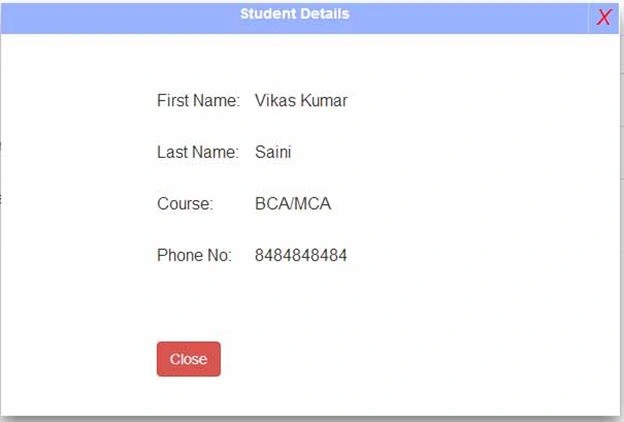
I have finished the model and Create, Edit, Delete, Details, Index View. Now we will explain the controller class, StudentController.cs
- [RoutePrefix("StudentInformation")]
- public class StudentController : Controller
- {
- private DbConnectionContext db = new DbConnectionContext();
- [Route("Index")]
- public ActionResult Index()
- {
- return View(db.Students.ToList());
- }
- public ActionResult Details(Guid? id)
- {
- if (id == null)
- {
- return new HttpStatusCodeResult(HttpStatusCode.BadRequest);
- }
- StudentInformation studentinformation = db.Students.Find(id);
- if (studentinformation == null)
- {
- return HttpNotFound();
- }
- return View(studentinformation);
- }
- public ActionResult Create()
- {
- return View();
- }
- [HttpPost]
- [ValidateAntiForgeryToken]
- public ActionResult Create([Bind(Include = "ID,FirstName,LastName,Course,PhoneNo")] StudentInformation studentinformation)
- {
- if (ModelState.IsValid)
- {
- studentinformation.ID = Guid.NewGuid();
- db.Students.Add(studentinformation);
- db.SaveChanges();
- return Content("success");
- }
- return View(studentinformation);
- }
- public ActionResult Edit(Guid? id)
- {
- if (id == null)
- {
- return new HttpStatusCodeResult(HttpStatusCode.BadRequest);
- }
- StudentInformation studentinformation = db.Students.Find(id);
- if (studentinformation == null)
- {
- return HttpNotFound();
- }
- return View(studentinformation);
- }
-
- [HttpPost] [ValidateAntiForgeryToken]
- public ActionResult Edit([Bind(Include = "ID,FirstName,LastName,Course,PhoneNo")] StudentInformation studentinformation)
- {
- if (ModelState.IsValid)
- {
- db.Entry(studentinformation).State = EntityState.Modified;
- db.SaveChanges();
- return Content("success")
- }
- return View(studentinformation);
- }
- public ActionResult Delete(Guid? id)
- {
- if (id == null)
- {
- return new HttpStatusCodeResult(HttpStatusCode.BadRequest);
- }
- StudentInformation studentinformation = db.Students.Find(id);
- if (studentinformation == null)
- {
- return HttpNotFound();
- }
- return View(studentinformation);
- }
- [HttpPost, ActionName("Delete")]
- [ValidateAntiForgeryToken]
- public ActionResult DeleteConfirmed(Guid id)
- {
- StudentInformation studentinformation = db.Students.Find(id);
- db.Students.Remove(studentinformation);
- db.SaveChanges();
- return Content("success");
- }
- protected override void Dispose(bool disposing)
- {
- if (disposing)
- {
- db.Dispose();
- }
- base.Dispose(disposing);
- }
- }
If you have any problem with this code then you can download the code from this link:
https://onedrive.live.com/redir?resid=1F9E67EA808B03D8%21276


Balasubramanian RPosted May 3, 2022, 6:49 AM
I have a doubt. In studentcontroller DeleteConfirmed action, how the guid is getting passed