

In this article you will see how to create a GroupUserAdded event receiver in SharePoint 2013.
Introduction
An event receiver is custom code to be called when a triggering action such as adding, updating, deleting, moving, checking in, and checking out occurs on a specified SharePoint object such as site collections, sites, lists, and workflows. SharePoint 2013 introduced a new event receiver class called SPSecurityEventReceiver. The custom event receiver class must derive from SPSecurityEventReceiver (please refer to: http://msdn.microsoft.com/en-us/library/microsoft.sharepoint.spsecurityeventreceiver.roleassignmentadded.aspx). In this article we will see how to create a group user added event receiver in SharePoint 2013. I have created a custom list called "Group Details" when a user is added to a group, a new item will be created in "Group Details" that will specify the user name and to which group the user is added.
Create the Project
Use the following procedure to create an empty SharePoint Project:
- Open Visual Studio 2012 (Run as administrator).
- Go to "File" => "New" => "Project...".
- Select "SharePoint 2013 Project" template from the installed templates.
- Enter the Name as "GroupUserAddedEventReceiver" and then click on "Ok".
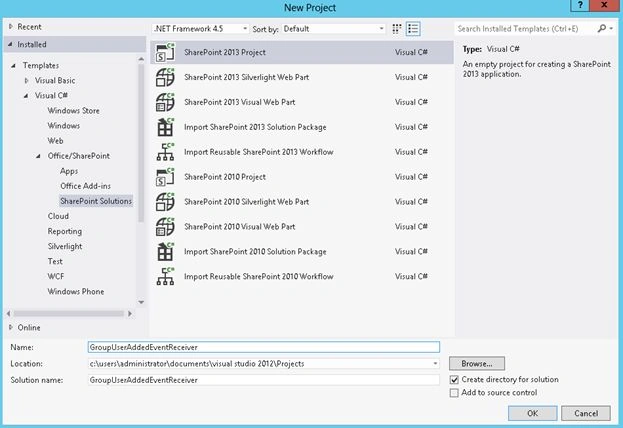
Figure 1: New Project template
- Select the site and security level for debugging.
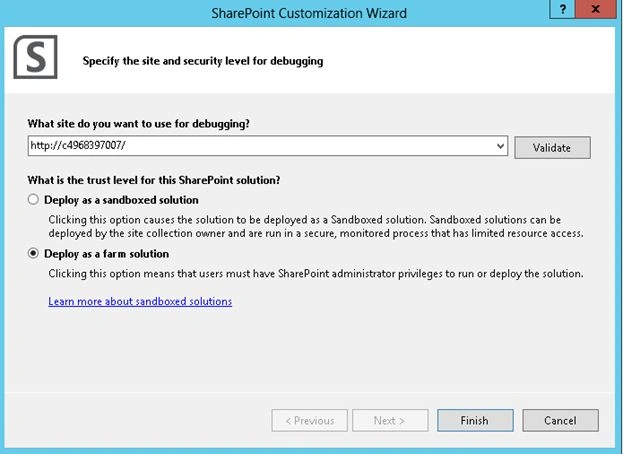
Figure 2: Specify the site and security level for debugging - Click on Finish.
Add Feature to the project
Use the following procedure to add the group user added feature::
- In the Solution Explorer, right-click on the Features folder.
- Click on "Add Feature".
- Rename the Feature1 to "GroupUserAddedFeature".
- Double-click on GroupUserAddedFeature and specify the Title & Description.

Figure 3: GroupUserAddedFeature
Add Event Receiver to the Feature
Feature Events receivers are methods that execute when one of the following feature related events occur in SharePoint:
- A feature is installed
- A feature is activated
- A feature is deactivated
- A feature is removed
Please refer to http://msdn.microsoft.com/en-us/library/ee231604.aspx to "Add Feature Event Receivers". On feature activated, please use members of the SPEventReceiverDefinition class to register a GroupUserAdded event receiver.
- In the Solution Explorer, right-click on "GroupUserAddedFeature".
- Click on "Add Event Receiver".
- Double-click on "GroupUserAddedFeature.EventReceiver.cs".
- Replace the code with the following:
using System;
using System.Reflection;
using System.Runtime.InteropServices;
using System.Security.Permissions;
using Microsoft.SharePoint;
namespace GroupUserAddedEventReceiver.Features.GroupUserAddedFeature
{
/// <summary>
/// This class handles events raised during feature activation, deactivation, installation, uninstallation, and upgrade.
/// </summary>
/// <remarks>
/// The GUID attached to this class may be used during packaging and should not be modified.
/// </remarks>
[Guid("397207d7-d73d-4cb0-bce9-0753b6185444")]
public class GroupUserAddedFeatureEventReceiver : SPFeatureReceiver
{
public override void FeatureActivated(SPFeatureReceiverProperties properties)
{
SPWeb web = properties.Feature.Parent as SPWeb;
//Adding the GroupUserAdded event
SPEventReceiverDefinition grpUserAdded = web.EventReceivers.Add();
grpUserAdded.Name = "Event Receiver GroupUserAdded";
grpUserAdded.Type = SPEventReceiverType.GroupUserAdded;
grpUserAdded.Assembly = Assembly.GetExecutingAssembly().FullName;
grpUserAdded.Class = "GroupUserAddedEventReceiver.GroupUserAddedEvent";
grpUserAdded.Update();
web.Update();
}
}
}
Add a custom event receiver class
Use the following procedure to add a custom event receiver class:
-
In the Solution Explorer, right-click on the project and click on "Add".
-
Click on "New Item".
-
Select the "Class" template from the installed templates.
-
Enter the name and click on "Add".
Figure 4: Add new item -
Replace "GroupUserAddedEvent.cs" with the following code:
using System;
using System.Collections.Generic;
using System.Linq;
using System.Text;
using System.Threading.Tasks;
using Microsoft.SharePoint;namespace GroupUserAddedEventReceiver
{
class GroupUserAddedEvent:SPSecurityEventReceiver
{
publicoverridevoid GroupUserAdded(SPSecurityEventProperties properties)
{
base.GroupUserAdded(properties);// Get the added user details
SPUser userAdded = properties.Web.AllUsers.GetByID(properties.GroupUserId);// Get the group details to which the user is added
SPGroup groupAdded = properties.Web.Groups.GetByID(properties.GroupId);// Get the group details list
SPList list = properties.Web.Lists.TryGetList("Group Details");// Check if the list exists
if (list != null)
{
// Add a new item
SPListItem item = list.Items.Add();
// update the title column
item["Title"] = "User: " + userAdded.Name + " added to the group - " + groupAdded.Name;
// Update the item
item.Update();
// Update the list
list.Update();
}
}
}
}
-
Solution Explorer looks like the following:

Figure 5: Solution Explorer
Deploy and test the solution
Use the following procedure to deploy and test the solution:
-
Right-click on the solution and click on "Deploy".
-
Navigate to the SharePoint site.
-
Click on "Site Settings".
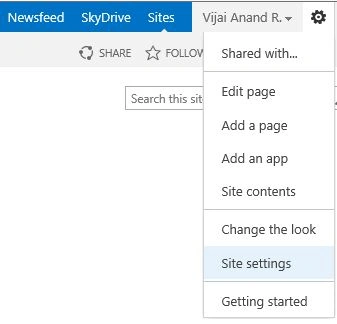
Figure 6: Site Settings -
Click on "People and groups" which is available under the "Users and Permissions" section.
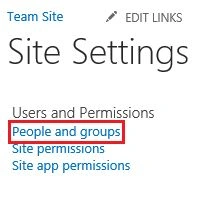
Figure 7: People and groups -
Click on "My Custom Group" in the Quick Launch Bar.
-
Click on "New".
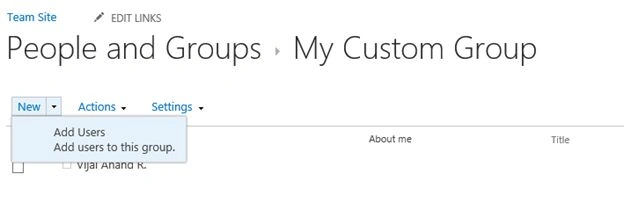
Figure 8: Add user to the group -
Enter the user name and click on "Share".
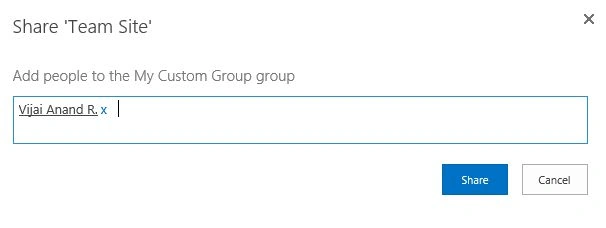
Figure 9: Add user to the group -
The user is added to the group.
-
Click on "Group Details" in the Quick Launch Bar.
-
A new item is created as shown in Figure 10.
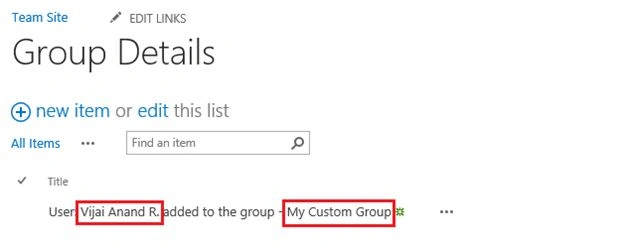
Figure 10: A new item created in Group Details list
Summary
Thus in this article you have seen how to create a group user added event receiver in SharePoint 2013.
Jacob RobinsonPosted Jul 29, 2015, 2:58 AM
Good One..