
I have created a custom list named “K2 Workflow Tutorials” in which a K2 workflow is created for creating a new list item. The new item will be created in the custom list named “Ram_K2 Testing”. Please refer to my previous article to create a K2 workflow in SharePoint 2013 Online.
Go to K2 designer, drag and drop a Create List Item step from the List Item workflow steps in the ribbon interface.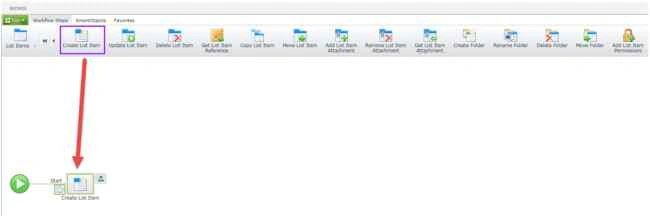
Select a site collection and then click the Next button.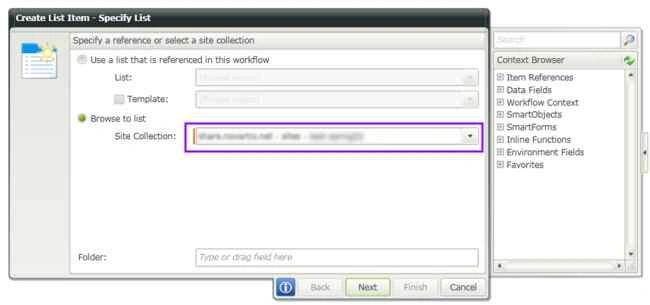
Specify the list to which the item must be added, then click the Next button.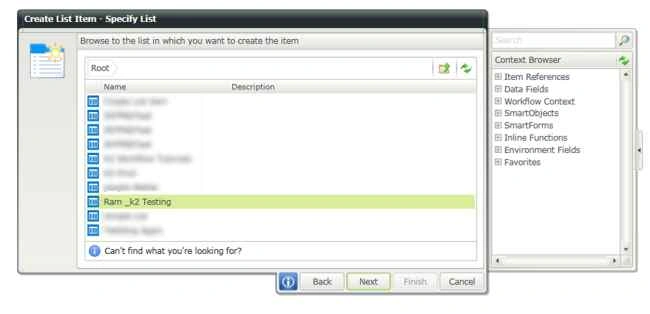
Specify properties for the list item, then click the Finish button.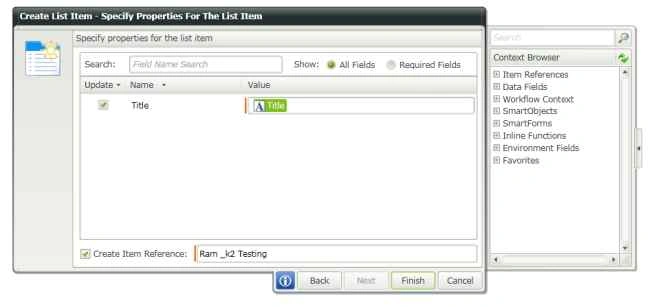
Deploy the workflow. Create a list item in “K2 Workflow Tutorials”. After a few minutes the workflow will be completed and the new list item will be created in the “Ram_K2 Testing” list.

Create List Item Using K2 Workflow in SharePoint 2013 Online
Join the conversation! Your thoughts help the community grow.
Sign in to leave a comment
It is the same account you read, post and publish with — and you will come straight back to this page.
Kumaresh RajalingamPosted Mar 24, 2016, 10:02 AM
Nice share sir
Kumaresh RajalingamPosted Mar 24, 2016, 10:02 AM
Nice share sir
Rajeesh MenothPosted Aug 23, 2015, 2:45 AM
Thank you for sharing
RakeshPosted Aug 23, 2015, 1:04 AM
Nice one sir
Gowtham KPosted Aug 22, 2015, 10:10 PM
Good one
Abhay ShankerPosted Aug 22, 2015, 9:52 PM
nice one..
Karthikeyan KPosted Aug 22, 2015, 9:33 PM
Thanks for sharing sir..
Santhakumar MunuswamyPosted Aug 22, 2015, 6:31 AM
Thanks for sharing