

Introduction
Hi guys. In this article we are going to
understand the creation of login and registration pages in Windows Phone 7. The login page is
the one important aspect of each and every application. A new user needs to register first.
Here are the steps to follow:
Step 1: Open your Visual Studio - select
new - project - select Silverlight Windows Phone - select Windows Phone
Application.
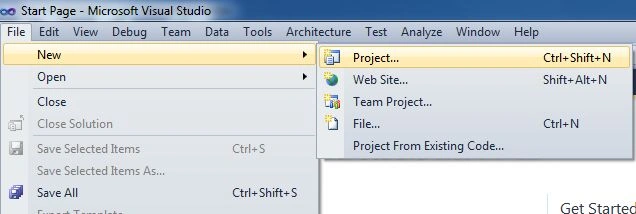
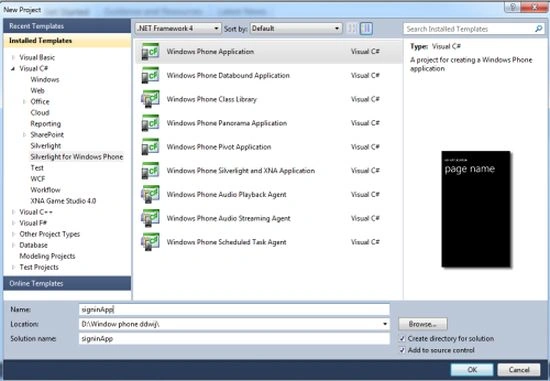
Step 2 : Designing Part. CreateTake two textboxes, a textblock and a button in your
form, so your phone looks like:
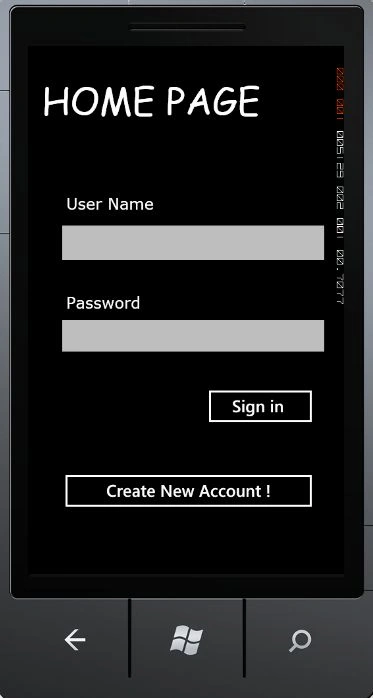
Design code for above form or MainPage.xaml
<phone:PhoneApplicationPage
x:Class="signin_App.MainPage"
xmlns="http://schemas.microsoft.com/winfx/2006/xaml/presentation"
xmlns:x="http://schemas.microsoft.com/winfx/2006/xaml"
xmlns:phone="clr-namespace:Microsoft.Phone.Controls;assembly=Microsoft.Phone"
xmlns:shell="clr-namespace:Microsoft.Phone.Shell;assembly=Microsoft.Phone"
xmlns:d="http://schemas.microsoft.com/expression/blend/2008"
xmlns:mc="http://schemas.openxmlformats.org/markup-compatibility/2006"
mc:Ignorable="d"
d:DesignWidth="480"
d:DesignHeight="768"
FontFamily="{StaticResource
PhoneFontFamilyNormal}"
FontSize="{StaticResource
PhoneFontSizeNormal}"
Foreground="{StaticResource
PhoneForegroundBrush}"
SupportedOrientations="Portrait"
Orientation="Portrait"
shell:SystemTray.IsVisible="True">
<!--LayoutRoot
is the root grid where all page content is placed-->
<Grid
x:Name="LayoutRoot"
Background="Transparent">
<Grid.RowDefinitions>
<RowDefinition
Height="Auto"/>
<RowDefinition
Height="*"/>
</Grid.RowDefinitions>
<!--TitlePanel contains the name of the application and page
title-->
<StackPanel
x:Name="TitlePanel"
Grid.Row="0"
Margin="12,17,0,28">
<TextBlock
x:Name="PageTitle"
Text="HOME
PAGE"
Margin="9,-7,0,0"
Style="{StaticResource
PhoneTextTitle1Style}"
FontSize="56"
FontFamily="Comic
Sans MS" />
</StackPanel>
<!--ContentPanel - place additional content here-->
<Grid
x:Name="ContentPanel"
Grid.Row="1"
Margin="12,0,12,0">
<Grid.Background>
<ImageBrush
/>
</Grid.Background>
<TextBox
Height="76"
HorizontalAlignment="Left"
Margin="28,111,0,0"
Name="textBox1"
Text=""
VerticalAlignment="Top"
Width="422"
/>
<TextBox
Height="72"
HorizontalAlignment="Left"
Margin="28,254,0,0"
Name="textBox2"
Text=""
VerticalAlignment="Top"
Width="422"
/>
<Button
Content="Sign
in "
Height="72"
HorizontalAlignment="Left"
Margin="251,361,0,0"
Name="button1"
VerticalAlignment="Top"
Width="180"
Click="button1_Click"
/>
<Button
Content="Create
New Account !"
Height="72"
HorizontalAlignment="Left"
Margin="33,489,0,0"
Name="button2"
VerticalAlignment="Top"
Width="398"
Click="button2_Click"
/>
<TextBlock
Height="30"
HorizontalAlignment="Left"
Margin="46,75,0,0"
Name="textBlock1"
Text="User
Name"
VerticalAlignment="Top"
Foreground="White"
FontWeight="Normal"
FontFamily="Verdana"
FontSize="24"
/>
<TextBlock
Height="30"
HorizontalAlignment="Left"
Margin="46,0,0,396"
Name="textBlock2"
Text="Password"
VerticalAlignment="Bottom"
Foreground="White"
FontWeight="Normal"
FontFamily="Verdana"
FontSize="24"
/>
</Grid>
</Grid>
</phone:PhoneApplicationPage>
Coding for the Home page or
MainPage.xaml.cs
using
System;
using
System.Collections.Generic;
using
System.Linq;
using System.Net;
using
System.Windows;
using
System.Windows.Controls;
using
System.Windows.Documents;
using
System.Windows.Input;
using
System.Windows.Media;
using
System.Windows.Media.Animation;
using
System.Windows.Shapes;
using
Microsoft.Phone.Controls;
using
System.IO.IsolatedStorage;
using
System.Xml.Serialization;
using System.IO;
namespace
signin_App
{
public partial
class MainPage
: PhoneApplicationPage
{
// Constructor
public MainPage()
{
InitializeComponent();
}
private void
button1_Click(object sender,
RoutedEventArgs e)
{
}
private void
button2_Click(object sender,
RoutedEventArgs e)
{
NavigationService.Navigate(new
Uri("/registration.xaml",
UriKind.Relative));
}
}
}
Step 3 :
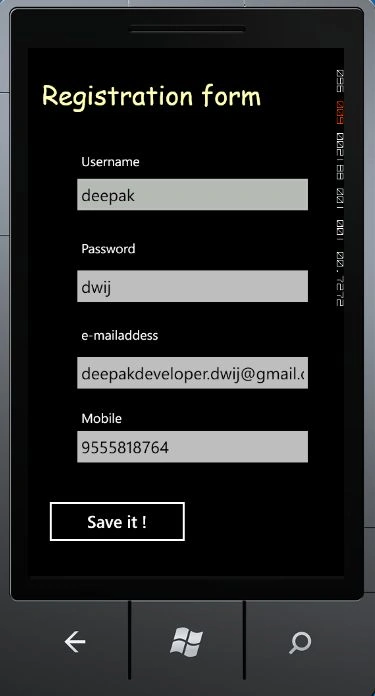
For new account creation just click the create
New account button then you get a registration form.
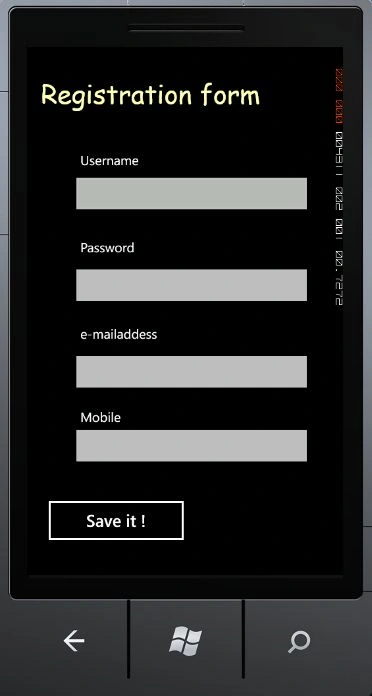
Design code for above form or
registration.xaml
<!--LayoutRoot is the root grid where all page content is placed-->
<Grid
x:Name="LayoutRoot"
Background="Transparent">
<Grid.RowDefinitions>
<RowDefinition
Height="Auto"/>
<RowDefinition
Height="*"/>
</Grid.RowDefinitions>
<!--TitlePanel contains the name of the application and page
title-->
<StackPanel
x:Name="TitlePanel"
Grid.Row="0"
Margin="12,17,0,28">
<TextBlock
x:Name="PageTitle"
Text="Registration
form"
Margin="9,-7,0,0"
Style="{StaticResource
PhoneTextTitle1Style}"
FontSize="40"
FontFamily="Comic
Sans MS"
Foreground="#FFFFFFB2"
/>
</StackPanel>
<!--ContentPanel - place additional content here-->
<Grid
x:Name="ContentPanel"
Grid.Row="1"
Margin="12,0,12,0">
<TextBox
Height="72"
HorizontalAlignment="Left"
Margin="51,60,0,0"
Name="textBox1"
Text="TextBox"
VerticalAlignment="Top"
Width="374"
Background="#BFF8F8F8"
/>
<TextBox
Height="72"
HorizontalAlignment="Left"
Margin="51,199,0,0"
Name="textBox2"
Text="TextBox"
VerticalAlignment="Top"
Width="374"
/>
<TextBox
Height="72"
HorizontalAlignment="Left"
Margin="51,330,0,0"
Name="textBox3"
Text="TextBox"
VerticalAlignment="Top"
Width="374"
/>
<TextBox
Height="72"
HorizontalAlignment="Left"
Margin="51,442,0,0"
Name="textBox4"
Text="TextBox"
VerticalAlignment="Top"
Width="374"
/>
<Button
Content="Save
it !"
Height="83"
HorizontalAlignment="Left"
Margin="9,550,0,0"
Name="button1"
VerticalAlignment="Top"
Width="229"
Click="button1_Click"
/>
<TextBlock
Height="37"
HorizontalAlignment="Left"
Margin="69,31,0,0"
Name="textBlock1"
Text="Username"
VerticalAlignment="Top"
/>
<TextBlock
Height="30"
HorizontalAlignment="Left"
Margin="69,163,0,0"
Name="textBlock2"
Text="Password"
VerticalAlignment="Top"
/>
<TextBlock
Height="30"
HorizontalAlignment="Left"
Margin="69,294,0,0"
Name="textBlock3"
Text="e-mailaddess"
VerticalAlignment="Top"
/>
<TextBlock
Height="30"
HorizontalAlignment="Left"
Margin="69,420,0,0"
Name="textBlock4"
Text="Mobile
"
VerticalAlignment="Top"
/>
</Grid>
</Grid>
Coding for
the registration.cs file
using System;
using
System.Collections.Generic;
using
System.Linq;
using System.Net;
using
System.Windows;
using
System.Windows.Controls;
using
System.Windows.Documents;
using
System.Windows.Input;
using
System.Windows.Media;
using
System.Windows.Media.Animation;
using
System.Windows.Shapes;
using
Microsoft.Phone.Controls;
using System.Xml;
using
System.IO.IsolatedStorage;
using
System.Xml.Serialization;
using System.IO;
namespace
signin_App
{
public partial
class registration
: PhoneApplicationPage {
public registration()
{
InitializeComponent();
textBox1.Text = "";
textBox2.Text = "";
textBox3.Text = "";
textBox4.Text = "";
}
public class
UserInfo
{
string uname;
string pwd;
string email;
int mno;
public
string Username
{
get {
return uname; }
set { uname =
value; }
}
public
string Password
{
get {
return pwd; }
set { pwd =
value; }
}
public
string EmailAdd
{
get {
return email; }
set { email =
value; }
}
public
int Mobile
{
get {
return mno; }
set { mno =
value; }
}
}
private void
button1_Click(object sender,
RoutedEventArgs e)
{
if (textBox1.Text ==
"") {
MessageBox.Show("Plz. enter the username");
}
if (textBox2.Text ==
"") {
MessageBox.Show("Plz. enter the Password");
}
if (textBox3.Text ==
"") {
MessageBox.Show("Plz. enter the e-mail add");
}
if (textBox4.Text ==
"") {
MessageBox.Show("Plz. enter the mobile
number"); }
// Write to the Isolated Storage
XmlWriterSettings
xmlWriterSettings = new
XmlWriterSettings();
xmlWriterSettings.Indent = true;
using (IsolatedStorageFile
myIsolatedStorage = IsolatedStorageFile.GetUserStoreForApplication())
{
using (IsolatedStorageFileStream
stream = myIsolatedStorage.OpenFile("People.xml",
FileMode.Create))
{
XmlSerializer serializer
= new
XmlSerializer(typeof(List<UserInfo>));
using (XmlWriter
xmlWriter = XmlWriter.Create(stream,
xmlWriterSettings))
{
serializer.Serialize(xmlWriter, GeneratePersonData());
NavigationService.Navigate(new
Uri("/congate.xaml",
UriKind.Relative));
}
}
}
}
private
List<UserInfo> GeneratePersonData()
{
List<UserInfo>
data = new List<UserInfo>();
UserInfo ui =
new UserInfo();
ui.Username = textBox1.Text;
ui.Password = textBox2.Text;
ui.EmailAdd = textBox3.Text;
ui.Mobile = Convert.ToInt32(textBox4.Text);
data.Add(ui);
return data;
}
}
}
Step 4 :
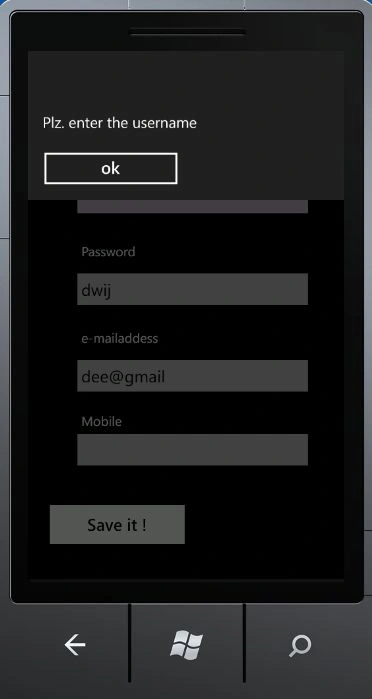
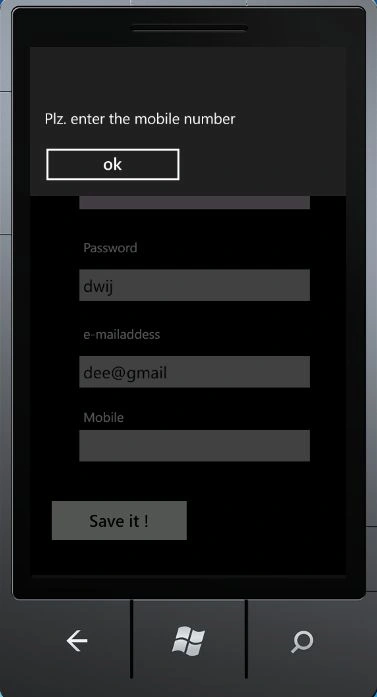
Give the inputs to the entries and if you leave some entries unfilled the
validation part appears. Suppose you didn't fill in the username and mobile number; when you
try to save it then the application shows the messages.
For a missing unfilled mobile number:
For correct entries:
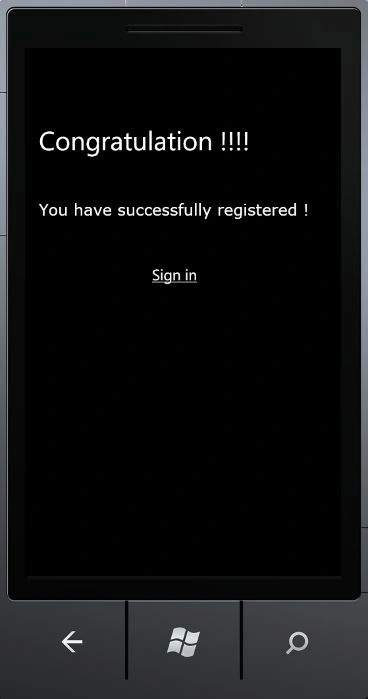
Step 5 : After successful entries into the
registration.xaml
and pressing the save it button you will successfully registered your self.
Design code for above form or
congate.xaml
<!--LayoutRoot is the root grid where all page content is placed-->
<Grid
x:Name="LayoutRoot"
Background="Transparent">
<Grid.RowDefinitions>
<RowDefinition
Height="Auto"/>
<RowDefinition
Height="*"/>
</Grid.RowDefinitions>
<!--TitlePanel contains the name of the application and page
title-->
<StackPanel
x:Name="TitlePanel"
Grid.Row="0"
Margin="12,17,0,28"></StackPanel>
<!--ContentPanel - place additional content here-->
<Grid
x:Name="ContentPanel"
Grid.Row="1"
Margin="12,0,12,0">
<HyperlinkButton
Content="Sign
in "
Height="30"
HorizontalAlignment="Left"
Margin="118,251,0,0"
Name="hyperlinkButton1"
VerticalAlignment="Top"
Width="200"
Click="hyperlinkButton1_Click"
/>
<TextBlock
Height="106"
HorizontalAlignment="Left"
Margin="9,153,0,0"
Name="textBlock1"
Text="You
have successfully registered !"
VerticalAlignment="Top"
Width="441"
FontFamily="Verdana"
FontSize="24"
TextWrapping="Wrap"
FontStretch="Normal"
/>
<TextBlock
Height="84"
HorizontalAlignment="Left"
Margin="9,35,0,0"
Name="textBlock2"
Text="Congratulation
!!!! "
VerticalAlignment="Top"
Width="379"
FontSize="40"
/>
</Grid>
</Grid>
Coding for
congate.xaml.cs file
using
System;
using
System.Collections.Generic;
using
System.Linq;
using
System.Net;
using
System.Windows;
using
System.Windows.Controls;
using
System.Windows.Documents;
using
System.Windows.Input;
using
System.Windows.Media;
using
System.Windows.Media.Animation;
using
System.Windows.Shapes;
using
Microsoft.Phone.Controls;
namespace
signin_App
{
public partial
class congate
: PhoneApplicationPage
{
public congate()
{
InitializeComponent();
}
private void
hyperlinkButton1_Click(object sender,
RoutedEventArgs e)
{
NavigationService.Navigate(new
Uri("/MainPage.xaml",
UriKind.Relative));
}
}
}
When you click the "Sign in" hyperlink of
congate.xaml, you will be returned to the Home page.
Thanks !
Lucky LaxmanPosted Jun 23, 2015, 6:54 AM
i'm getting error running the app , for error message :- Deployment failed because no Windows Phone was detected. Make sure a phone is connected and powered on.
Lucky LaxmanPosted Jun 23, 2015, 6:53 AM
Good one...Thanks,
Oluwatobi OmotayoPosted Apr 15, 2015, 8:58 AM
I want to do the application data storage in roaming folder for windows phone 8.1 using the Windows.Storage namespace how do i do it.
reena sharmaPosted Mar 21, 2015, 2:48 AM
Thanks alot as i am new to windows app development....Thanks :)
ahzhj zshjPosted Sep 30, 2013, 7:28 AM
thanks (Y)
Michael LucasPosted Aug 14, 2013, 2:14 PM
Having trouble with the XmlSerializer reference what version of this dll should I be using?
sajid rajaPosted Jul 22, 2013, 2:33 PM
How can i manage Sessions in Windows phone
Jesper PedersenPosted May 24, 2013, 3:09 AM
What is the code for the sign in button, and how to retrieve the registration data from registration
tester testereditedPosted Aug 13, 2012, 4:47 AMEdited Aug 13, 2012, 4:49 AM
after signing in, if you press the back button, what will happen?
Vijay PrativadiPosted Jan 8, 2012, 1:59 PM
Good Article...Thanks for Sharing Deepak!!!