
Introduction
This article demonstrates an interesting and very useful concept in LINQ-to-SQL.
Question: What is creating and deleting database via LINQ-to-SQL?
In simple terms "It provides the flexibility to create or delete data dynamically. The database can be created with a table as determined by user-defined requirements".
Step 1: Create a new web application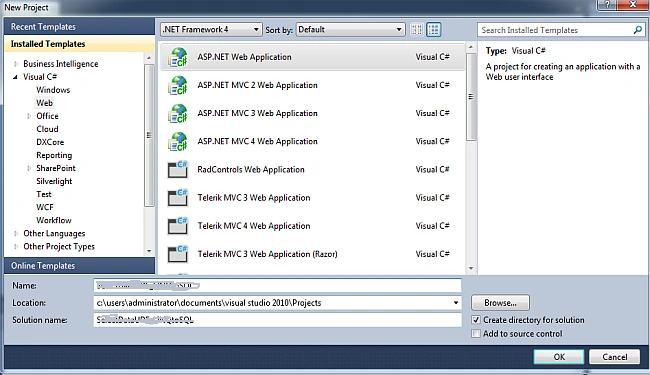
Step 2: Adding new LINQ-to-SQL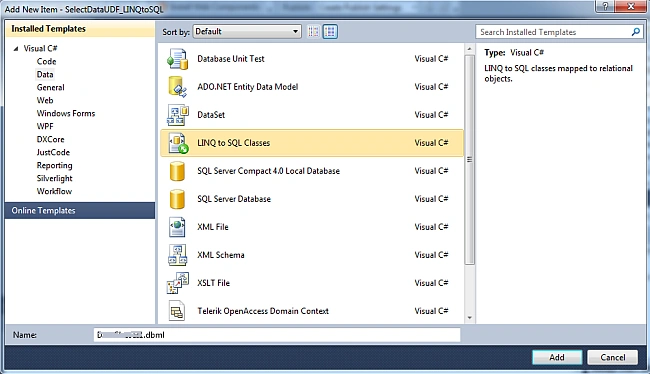
Step 3: The complete code of DataClasses1.designer.cs is as in the following:
#pragma warning disable 1591
//------------------------------------------------------------------------------
// <auto-generated>
// This code was generated by a tool.
// Runtime Version:4.0.30319.17929
//
// Changes to this file may cause incorrect behavior and will be lost if
// the code is regenerated.
// </auto-generated>
//------------------------------------------------------------------------------
namespace Create_Delete_DB_LINQtoSQL
{
using System.Data.Linq;
using System.Data.Linq.Mapping;
using System.Data;
using System.Collections.Generic;
using System.Reflection;
using System.Linq;
using System.Linq.Expressions;
using System.ComponentModel;
using System;
public partial class DataClasses1DataContext : System.Data.Linq.DataContext
{
public Table<Employee> Employees;
private static System.Data.Linq.Mapping.MappingSource mappingSource = new AttributeMappingSource();
#region Extensibility Method Definitionspartial void OnCreated();
#endregion
public DataClasses1DataContext(string connection): base(connection, mappingSource)
{
OnCreated();
}
public DataClasses1DataContext(System.Data.IDbConnection connection): base(connection, mappingSource)
{
OnCreated();
}
public DataClasses1DataContext(string connection, System.Data.Linq.Mapping.MappingSource mappingSource): base(connection, mappingSource)
{
OnCreated();
}
public DataClasses1DataContext(System.Data.IDbConnection connection, System.Data.Linq.Mapping.MappingSource mappingSource): base(connection, mappingSource)
{
OnCreated();
}
[Table(Name = "tblEmployee")]
public class Employee
{
[Column(IsPrimaryKey = true)]public int Id;
[Column]public string FirstName;
[Column]public string LastName;
[Column]public int Age;
}
}
}
#pragma warning restore 1591
Step 4: The complete code of WebForm1.aspx is as in the following:
<%@ Page Language="C#" AutoEventWireup="true" CodeBehind="WebForm1.aspx.cs" Inherits="Create_Delete_DB_LINQtoSQL.WebForm1" %>
<!DOCTYPE html PUBLIC "-//W3C//DTD XHTML 1.0 Transitional//EN" "http://www.w3.org/TR/xhtml1/DTD/xhtml1-transitional.dtd">
<html xmlns="http://www.w3.org/1999/xhtml">
<head id="Head1" runat="server">
<title></title>
</head>
<body>
<form id="form1" runat="server">
<center>
<div>
<table>
<tr>
<td colspan="4" align="center">
<asp:Label ID="Label1" runat="server" Text="Create | Delete DB via LINQ-to-SQL" Font-Bold="true" Font-Size="Large" Font-Names="Verdana"
ForeColor="Maroon"></asp:Label></td>
</tr>
<tr>
<td colspan="3" align="center">
<asp:Label ID="Label2" runat="server" Text="Please Enter DB Name" Font-Bold="true" Font-Names="Verdana"></asp:Label></td>
<td colspan="3" align="center">
<asp:TextBox ID="TextBox1" runat="server"></asp:TextBox></td>
</tr>
<tr>
<td colspan="2" align="center">
<asp:Button ID="Button1" runat="server" Text="Create DB" Font-Names="Verdana" Width="213px" BackColor="Orange" Font-Bold="True" OnClick="Button1_Click" /></td>
<td colspan="2" align="center">
<asp:Button ID="Button2" runat="server" Text="Delete DB" Font-Names="Verdana" Width="213px" BackColor="Orange" Font-Bold="True" OnClick="Button2_Click" /></td>
</tr>
<tr>
<td colspan="4" align="center">
<asp:Label ID="Label3" runat="server" Font-Bold="true" Font-Names="Verdana"></asp:Label></td>
</tr>
</table>
</div>
</center>
</form>
</body>
</html>
Step 5: The complete code of WebForm1.aspx.cs is as in the following:
using System;
using System.Collections.Generic;
using System.Linq;
using System.Web;
using System.Web.UI;
using System.Web.UI.WebControls;
namespace Create_Delete_DB_LINQtoSQL
{
public partial class WebForm1 : System.Web.UI.Page
{
protected void Page_Load(object sender, EventArgs e) { }
protected void Button1_Click(object sender, EventArgs e)
{
if (string.IsNullOrEmpty(TextBox1.Text))
{
Label3.Text = "Please Enter DB Name";
Label3.ForeColor = System.Drawing.Color.Red;
}
else
{
DataClasses1DataContext objContext = new DataClasses1DataContext(@"c:\" + TextBox1.Text + ".mdf");
objContext.CreateDatabase();
Label3.Text = "DB Creation Successful";
Label3.ForeColor = System.Drawing.Color.Green;
TextBox1.Text = string.Empty;
}
}
protected void Button2_Click(object sender, EventArgs e)
{
if (string.IsNullOrEmpty(TextBox1.Text))
{
Label3.Text = "Please Enter DB Name";
Label3.ForeColor = System.Drawing.Color.Red;
}
else
{
DataClasses1DataContext objContext = new DataClasses1DataContext(@"c:\" + TextBox1.Text + ".mdf");
objContext.DeleteDatabase();
Label3.Text = "DB Deletion Successful";
Label3.ForeColor = System.Drawing.Color.Green;
TextBox1.Text = string.Empty;
}
}
}
}
Step 6: The output of the application is as in the following: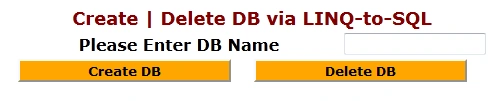
Step 7: The created database output of the application is as in the following: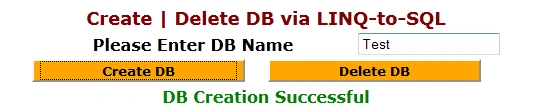
Step 8: The deleted database output of the application is as in the following: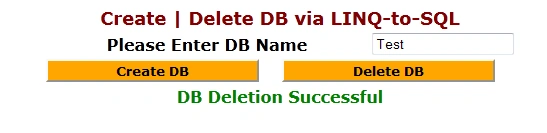
I hope this article was useful for you.

Create or Delete Database Via LINQ-to-SQL
Join the conversation! Your thoughts help the community grow.
Sign in to leave a comment
It is the same account you read, post and publish with — and you will come straight back to this page.
Gowtham RajamanickamPosted Apr 7, 2015, 6:24 AM
good one..