

Introduction
In this article we will create a register and login page in MVC using LINQ to SQL with Model Validation.
Database structure
Create a table in the database with the name register.
The following is the create table code for the register table:
- CREATE TABLE [dbo].[register]
- (
- [id] [int] IDENTITY(1,1) NOT NULL,
- [name] [nvarchar](50) NULL,
- [emailid] [nvarchar](50) NULL,
- [userpassword] [nvarchar](50) NULL,
- )
Go to File => New => Project.
Step 2
Choose "ASP.NET MVC 4 Web Application" from the list, then provide the application name as "loginuser" and set the path in the location input where you want to create the application.
Step 3
Now choose the Project Template "Empty".
Adding a LINQ to SQL Class
Step 1
Right-click on the project and select "Add new item". Then, select Data from the templates.
Step 2
Choose "LINQ to SQL classes" from the list and provide a name. Now, after clicking on Add, you can see the .dbml file in the project.
Step 3
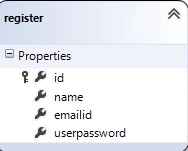
Drag the department and register table from the database in the Server Explorer.
Create Model Class
The MVC model contains all the application logic validation, business logic and data access logic. We can create a login class under the Model Folder.
- using System;
- using System.Collections.Generic;
- using System.Linq;
- using System.Web;
- using System.ComponentModel.DataAnnotations;
- using System.Data.SqlClient;
- namespace loginuser.Models
- {
- public class login
- {
- public int id { get; set; }
- [Required]
- [Display(Name="Name")]
- public string Name { get; set; }
- [Required]
- [Display(Name="Email id")]
- [RegularExpression(@"\A(?:[a-z0-9!#$%&'*+/=?^_`{|}~-]+(?:\.[a-z0-9!#$%&'*+/=?^_`{|}~-]+)*@(?:[a-z0-9](?:[a-z0-9-]*[a-z0-9])?\.)+[a-z0-9](?:[a-z0-9-]*[a-z0-9])?)\Z",
- ErrorMessage = "Please enter correct email address")]
- public string Emailid { get; set; }
- [Display(Name = "Password")]
- [DataType(DataType.Password)]
- [Required(ErrorMessage = "Password required")]
- public string Userpassword { set; get; }
- [Display(Name = "Confirm new password")]
- [Required(ErrorMessage = "Enter Confirm Password")]
- [Compare("Userpassword", ErrorMessage = "The password and confirmation password do not match.")]
- [DataType(DataType.Password)]
- public string c_pwd { get; set; }
- }
- public class Enterintotable
- {
- public void InsertUser(login li)
- {
- DataClasses1DataContext db = new DataClasses1DataContext();
- register rs = new register();
- rs.id = li.id;
- rs.name = li.Name;
- rs.emailid = li.Emailid;
- rs.userpassword = li.Userpassword;
- db.registers.InsertOnSubmit(rs);
- db.SubmitChanges();
- }
- }
- public class Searchuser
- {
- public string searchk(login li)
- {
- DataClasses1DataContext db = new DataClasses1DataContext();
- register rs = new register();
- string passout = "";
- // var pass = from m in db.registers where m.emailid == li.Emailid select m.userpassword;
- var pass = from m in db.registers where m.emailid == li.Emailid select m.userpassword;
- foreach (string query in pass)
- {
- passout = query;
- }
- return passout;
- }
- }
- }
- using System;
- using System.Collections.Generic;
- using System.Linq;
- using System.Web;
- using System.Web.Mvc;
- using loginuser.Controllers;
- namespace loginuser.Controllers
- {
- public class LoginuserController : Controller
- {
- //
- // GET: /Loginuser/
- public ActionResult Index()
- {
- return View();
- }
- public ActionResult Signup(loginuser.Models.login li)
- {
- return View(li);
- }
- public ActionResult SubmitData(loginuser.Models.login li)
- {
- if (ModelState.IsValid)
- {
- loginuser.Models.Enterintotable en = new Models.Enterintotable();
- en.InsertUser(li);
- ViewBag.name = li.Name;
- // return View();
- return View("SubmitData");
- }
- else
- {
- return View("Signup");
- }
- }
- public ActionResult login(loginuser.Models.login li)
- {
- return View(li);
- }
- public ActionResult Loginsearch(loginuser.Models.login li)
- {
- loginuser.Models.Searchuser ss = new Models.Searchuser();
- string pass= ss.searchk(li);
- if (pass == li.Userpassword)
- {
- return View("loadlogin");
- }
- @ViewBag.data = "invalide user";
- return View("login" );
- }
- public ActionResult loadlogin()
- {
- return View();
- }
- }
- }
The Controller has four ActionMethods. In the signup method on the create of a simple register view. If we will click on the create button the value of the textboxes are stored in the database using the submitdata method.
Create a view for the user registration as in the following:
- @model loginuser.Models.login
- @{
- Layout = null;
- }
- <!DOCTYPE html>
- <html>
- <head>
- <meta name="viewport" content="width=device-width" />
- <title>Signup</title>
- </head>
- <body>
- @using (Html.BeginForm("SubmitData", "Loginuser"))
- {
- @Html.ValidationSummary(true)
- {
- <fieldset>
- <legend> Register</legend>
- <div class="editor">
- @Html.LabelFor(model => model.Name)
- @Html.TextBoxFor(model => model.Name)
- @Html.ValidationMessageFor(model => model.Name)
- </div>
- <div class="editor">
- @Html.LabelFor(model => model.Emailid)
- @Html.TextBoxFor(model => model.Emailid)
- @Html.ValidationMessageFor(model => model.Emailid)
- </div>
- <div class="editor">
- @Html.LabelFor(model => model.Userpassword)
- @Html.PasswordFor(Model=>Model.Userpassword)
- @Html.ValidationMessageFor(model => model.Userpassword)
- </div>
- <div class="editor">
- @Html.LabelFor(model => model.c_pwd)
- @Html.PasswordFor(Model=>Model.c_pwd)
- @Html.ValidationMessageFor(model => model.c_pwd)
- </div>
- <div class="editor">
- <input type="submit" value="create" />
- </div>
- @Html.ActionLink("login", "login");
- </fieldset>
- }
- }
- </body>
- </html>
The following is the output of the preceding code.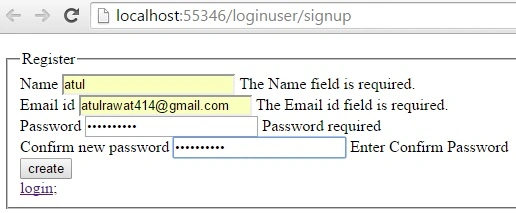
If we click on the create button. the page redirects to another view name, submitdata.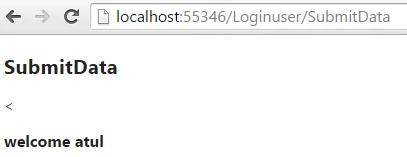
Create a view for the user login as in the following:
- @model loginuser.Models.login
- @{
- ViewBag.Title = "login";
- //Layout = "~/Views/_ViewStart.cshtml";
- }
- <h2>login</h2>
- @using (Html.BeginForm("Loginsearch", "Loginuser"))
- {
- @Html.ValidationSummary(true)
- {
- <fieldset>
- <legend>Login</legend>
- <div class="editor">
- @Html.LabelFor(model => model.Emailid)
- <br />
- @Html.TextBoxFor(model => model.Emailid)
- @Html.ValidationMessageFor(model => model.Emailid)
- </div>
- <div class="editor">
- @Html.LabelFor(model => model.Userpassword)
- <br />
- @Html.PasswordFor(Model=>Model.Userpassword)
- @Html.ValidationMessageFor(model => model.Userpassword)
- </div>
- <input type="submit" value="login" />
- @ViewBag.data
- </fieldset>
- }
- }
The following is the output of the preceding code.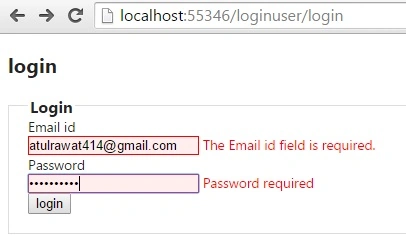
If we click on the login button the page redirects to another view named home page.
Summary
In this article we learned how to create a register and login page in MVC using LINQ to SQL with model validation.
Maulesh PatelPosted May 23, 2018, 7:01 AM
Hi can you able to share code for this even though it is working some of the view is not matching with tutorial. It would be great help if that can works it out.
Himanshu SharmaPosted Aug 3, 2017, 2:10 AM
How to drag table from database in the server Explorer?
Vivek KumarPosted Apr 28, 2016, 2:46 PM
Nice share
Sibeesh VenuPosted May 28, 2015, 2:20 AM
Good One.
Atul RawatPosted May 28, 2015, 12:10 AM
thanx for reading sir....
Santhakumar MunuswamyPosted May 27, 2015, 3:27 PM
Good