

Introduction
In this article, we are going to learn how to create restore points manually in Windows 8 that later can be used to restore Windows at any time.
System Restore points are created for system backups of Windows 8. The restore point is for restoring the system to an earlier state without harming the current files and folders. You can easily restore your system.
However the Operating System also creates a restore point automatically using a scheduled task, but you can create restore points manually at any time.
This article will show you how to create a restore point that can be used to do a system restore within Windows 8.
Note
You must be logged in as an administrator to be able to create a restore point in Windows 8.
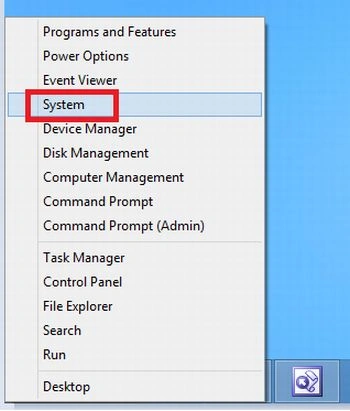
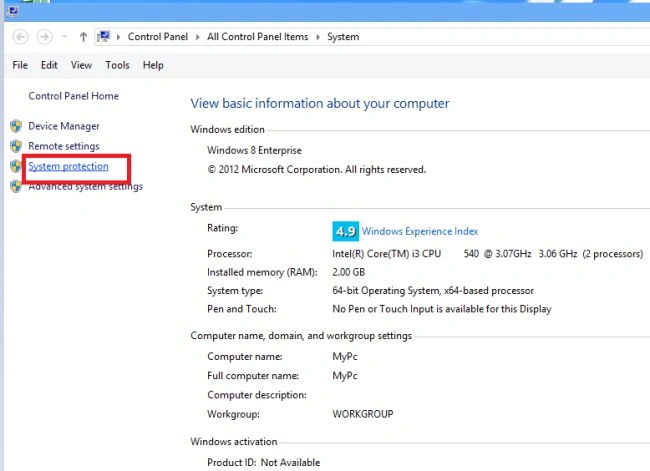
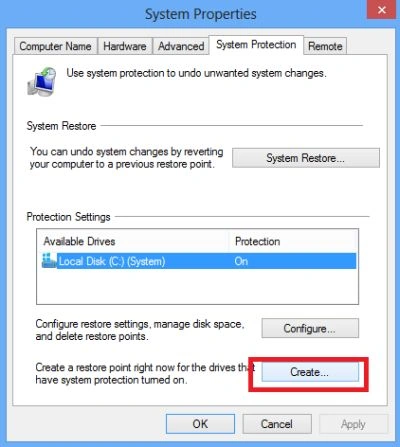
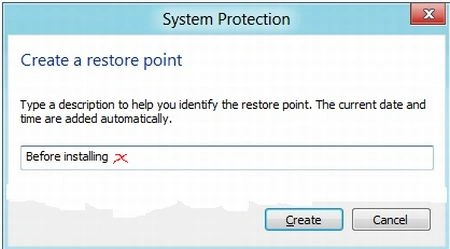
The current date and time are added automatically to the restore point.
Step 5
When it's finished creating the restore point, click on Close.


Summary
In this article, we learned about Create a Restore Point in Windows 8.
Join the conversation! Your thoughts help the community grow.