
Here's an article on how we can create a Textbox where one can write “text” into the Textbox and then apply various “effects” on that particular “text”.
So let’s get started
I have mentioned the Step s to guide how to do this activity.
Step 1: Open visual studio 2010 or any version you have.
Step 2: Click on the file tab, then new and project. Under installed templates select C#, then windows and ”Windows Form Application”.
Step 3: Once all the formalities of providing the proper name to the project and providing the path is finished you will be redirected to one default “form”.
Step 4: All you need to do is simply drag one RichTextbox from the toolbox and 7 buttons.
Step 5: Now you can go to the properties window by right clicking each control and change some of the properties as per your requirement.
Step 6: Once creating the user interface part is over simply double click on buttons to generate the click event and then write the codes as in the following:

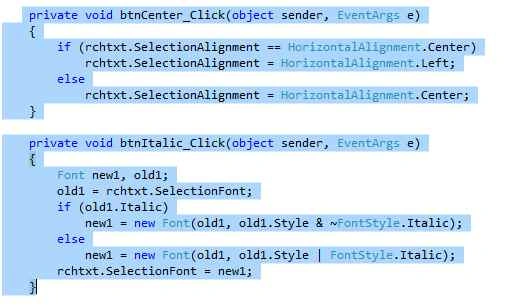
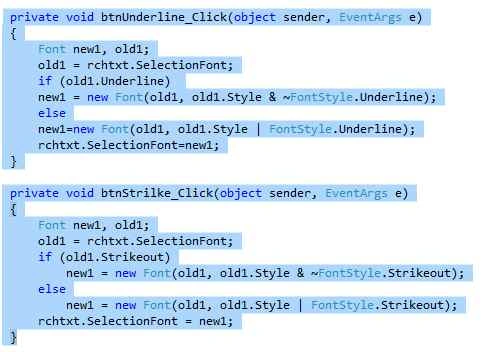
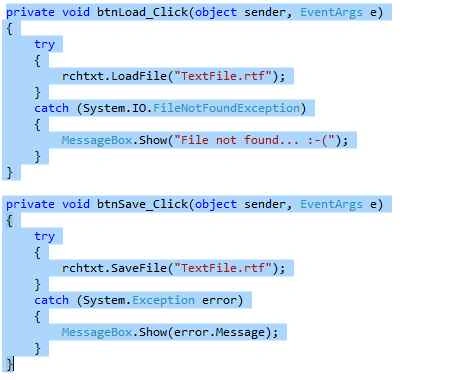

Step 7: Once you write all these codes in there particular events handlers, simply run your project and check everything is working fine.
Step 8: Congrats you have now made one project,
Output:
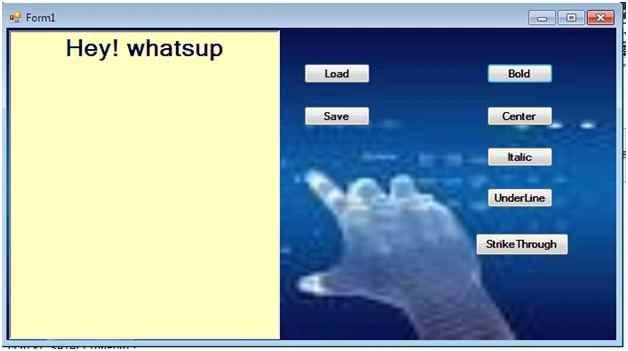

Create RichTextBox In C#
Join the conversation! Your thoughts help the community grow.
Sign in to leave a comment
It is the same account you read, post and publish with — and you will come straight back to this page.
Sumedh WaghrePosted Oct 19, 2015, 9:05 AM
thanks for ur valuable comment
Yuva VPosted Sep 28, 2015, 4:27 AM
Thank you very much..
Shakti SaxenaPosted Sep 11, 2015, 8:49 AM
Good work. :)
Pankaj Kumar ChoudharyPosted Sep 8, 2015, 8:53 AM
Nice Start.......
Ajeet MishraPosted Sep 8, 2015, 3:58 AM
really nice
Rajeesh MenothPosted Sep 8, 2015, 12:44 AM
Nice Share
Karthikeyan KPosted Sep 8, 2015, 12:04 AM
Thanks for sharing...