
An RSS Feed is generally used to return the output in plain text or XML format.
To parse the results from our application we use the RSS feed result that can be easily parsed.
We have a tag format for the RSS.
It's main tag is the channel tag:
<channel> </channel>
The other tags inside the channel tag are title, link and description.
Title tag
The name of the channel is similar to the title of a website or web page.
Example: Make RSS Feeds
Tag: <title></title>
Link tag
The URL to the HTML website.
Example: http://www.make-rss-feed.com
Tag: <link></link>
Description Tag
The phrase(s) or sentence(s) describing the content of the entire feed.
Example: Details RSS feed creation in a step-by-step fashion
Tag: <description></description>
All together they look like:
- <HeaderTemplate>
- <rss version="2.0">
- <channel>
- <title>RSS Example</title>
- <link>http://www.test.com/RSS.aspx</link>
- <description>
- RSS For Article
- </description>
- </HeaderTemplate>
STEP 1
Create a new RSS.aspx page and remove all the HTML markup from RSS.aspx.
The code will look like:
- <%@ Page Language="C#" ContentType="text/xml" AutoEventWireup="true" CodeBehind="RSS.aspx.cs" Inherits="AndroitWebApp.RSS.RSS" %>
Now add a Repeater Control on the page:
- <%@ Page Language="C#" ContentType="text/xml" AutoEventWireup="true" CodeBehind="RSS.aspx.cs" Inherits="AndroitWebApp.RSS.RSS" %>
- <asp:repeater ID="RSS" runat="server">
- </asp:repeater>
Pick query string values for the variables:
- protected void Page_Load(object sender, EventArgs e)
- {
- int SVID = Convert.ToInt32(Request["SVID"].ToString());
- int RVID = Convert.ToInt32(Request["RVID"].ToString());
- GetChatmsg(SVID,RVID);
- }
- protected void GetChatmsg(int SVID, int RVID)
- {
- try
- {
- using (SqlCommand cmd = new SqlCommand())
- {
- cmd.CommandText = "spr_Visitor_View_UserChatMsgs";
- cmd.Parameters.AddWithValue("@SVID", SVID.ToString());
- cmd.Parameters.AddWithValue("@RVID", RVID.ToString());
- //System.Data.DataTable dt = DBHelper.SqlExecuteReader(cmd);
- RSS.DataSource = DBHelper.SqlExecuteReader(cmd);
- RSS.DataBind();
- }
- }
- catch (Exception ex)
- {
- throw ex;
- }
- }
Here we used the DBHelper class for the SQL Connection.
DBHelper.cs
- public class DBHelper
- {
- private DBHelper()
- {
- //
- // TODO: Add constructor logic here
- //
- }
- #region Connection String
- private static string conn = "Data Source=SQL6; uid=sa; pwd=SQL@345; Initial catalog=NewApp";
- #endregion
- public static DataTable SqlExecuteReader(SqlCommand cmd)
- {
- DataTable dt = new DataTable();
- using (SqlConnection con = new SqlConnection(conn))
- {
- cmd.CommandType = CommandType.StoredProcedure;
- cmd.Connection = con;
- con.Open();
- SqlDataReader dr = cmd.ExecuteReader();
- dt.Load(dr);
- con.Close();
- }
- return dt;
- }
- }
Procedure To Bind Data
- CREATE PROC spr_Visitor_View_UserChatMsgs
- @SVID INT,
- @RVID INT
- AS
- BEGIN
- SET NOCOUNT ON
- IF EXISTS( SELECT Visitorid from tblVisitorMaster where VisitorID=@RVID and IsActive=1)
- BEGIN
- SELECT VM.VisitorID ReceiverVID ,VM.VisitorName ReceiverName,VMM.VisitorID SenderVID,VMM.VisitorName SenderName,CM.ChatMsg,Convert(datetime,CM.EnteredOn,103) EnteredOn
- from tblChatMessages CM INNER JOIN tblVisitorMaster VM ON CM.RVID=VM.VisitorID
- INNER JOIN tblVisitorMaster VMM ON CM.SVID=VMM.VisitorID WHERE CM.RVID=@RVID AND CM.SVID=@SVID AND CM.Delivered=0 AND CM.IsActive=1
- END
- END
STEP 4
Now create a function to remove all illegal characters from the values.
- protected string RemoveIllegalChar (object val)
- {
- // cast the input to a string
- string data = val.ToString();
- // replace illegal characters in XML documents with their entity references
- data = data.Replace("&", "&");
- data = data.Replace("\"", """);
- data = data.Replace("'", "'");
- data = data.Replace("<", "<");
- data = data.Replace(">", ">");
- return data;
- }
STEP 5
Now create RSS tags in the RSS.aspx page and bind the Repeater.
- <%@ Page Language="C#" ContentType="text/xml" AutoEventWireup="true" CodeBehind="RSS.aspx.cs" Inherits="AndroitWebApp.RSS.RSS" %>
- <asp:repeater ID=" RSS " runat="server">
- <HeaderTemplate>
- <rss version="2.0">
- <channel>
- <title>RSS Example</title>
- <link>http://www.test.com/RSS.aspx</link>
- <description>
- RSS For Article
- </description>
- </HeaderTemplate>
- <ItemTemplate>
- <item>
- <RVID><%# DataBinder.Eval(Container.DataItem, "ReceiverVID")%></RVID>
- <RName><%# RemoveIllegalChar (DataBinder.Eval(Container.DataItem, "ReceiverName"))%></RName>
- <SVID><%# RemoveIllegalChar (DataBinder.Eval(Container.DataItem, "SenderVID"))%></SVID>
- <SName><%# RemoveIllegalChar (DataBinder.Eval(Container.DataItem, "SenderName"))%></SName>
- <Message><%# RemoveIllegalChar (DataBinder.Eval(Container.DataItem, "ChatMsg"))%></Message>
- <ChatDate><%# String.Format("{0:R}", DataBinder.Eval(Container.DataItem, "EnteredOn"))%></ChatDate>
- </item>
- </ItemTemplate>
- <FooterTemplate>
- </channel>
- </rss>
- </FooterTemplate>
- </asp:repeater>
Sample To run this RSS:
http://localhost:52075/RSS/RSS.aspx?SVID=3&RVID=4
The output will look like this: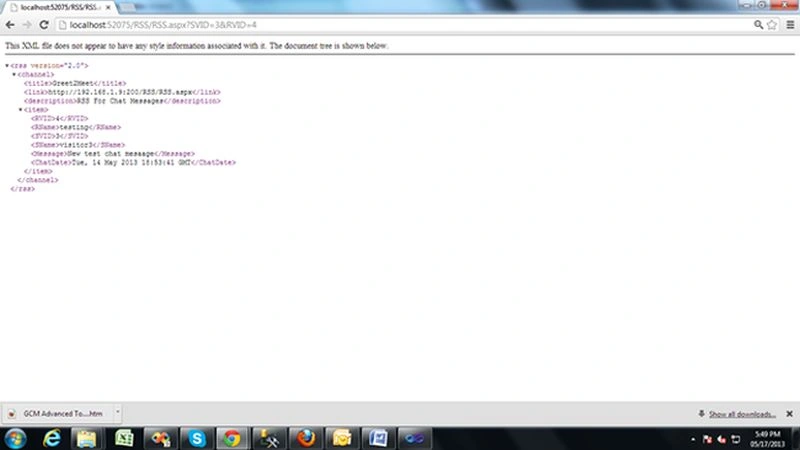
r kPosted Apr 14, 2021, 3:51 PM
Please let me know how will I bind my values to a repeater control, I want to show my datatable subject, messages etc in repeater control just like RSS FEEDS
abhejeet singhPosted Jan 8, 2014, 9:54 AM
This code is not working.i checked