

Introduction
In this article, I will discuss how to create, run, stop, refresh, log, and delete web jobs in Azure.
Azure web job is like a service that can run the task in the background. It doesn’t contain any user interface and it is the same as our Windows service.
The scenarios where we use Azure web jobs are.
- Image processing or other CPU-intensive background work.
- Queue processing.
- File maintenance, such as aggregating or cleaning up log files.
- Long-running tasks such as sending emails.
Prerequisites
Microsoft Azure account.
Agenda
- Create a web job.
- Run web job.
- Stop the web job.
- Refresh web job.
- Logs of web job.
- Delete web job.
Create Web Job
Below, I will explain how to create a web job in the Azure portal.
- Login to your Azure account with the proper credentials.
- Go to app services and click on a particular app service that you want to select.
- Go to web jobs.
- Click on add and a new popup will come from the right-hand side.
- In the popup, add a name, upload zip file (zip file of our console application), select type as continuous and select scale as multi-instance/ single instance, and click on ok which is shown in the below figure.

It will take some time to create a web job and after that, the web job will show under the web jobs section.
To know more about the type of web jobs follow this link, Types Of Web Job
Run Web Job
Below, I will explain how to run a web job in the Azure portal.
- Login to your Azure account with the proper credentials.
- Go to app services and click on a particular app service that you want to select.
- Go to web jobs.
- Select a particular web job and click on the run which is shown in the below figure.
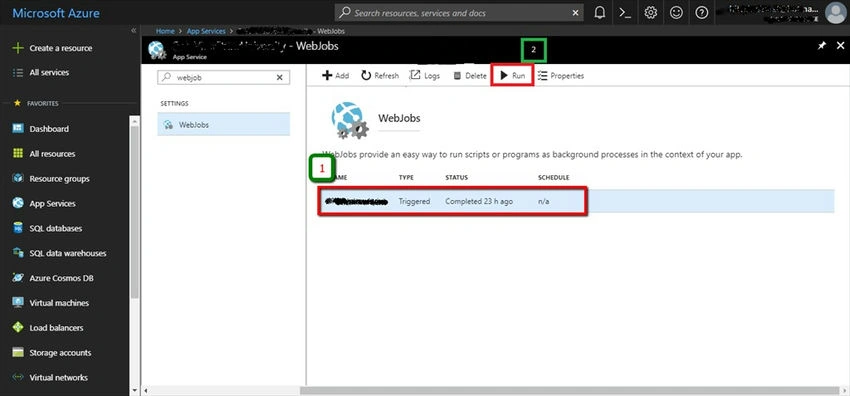
- After clicking on the run button, the current status of the web job will change to running which will be shown in the status column.
Stop Web Job
Below, I will explain how to stop a web job in the Azure portal.
- Login to your Azure account with the proper credentials.
- Go to app services and click on a particular app service that you want to select.
- Go to web jobs.
- Click on the web job which is in running status and right-click on it.
- Select a stop and which will stop the web job which is shown in the below figure.

Refresh Web Job
Below, I will explain how to refresh a web job in the Azure portal.
- Login to your Azure account with the proper credentials.
- Go to app services and click on a particular app service that you want to select.
- Go to web jobs.
- Select web job and click on refresh which is shown in the below figure.
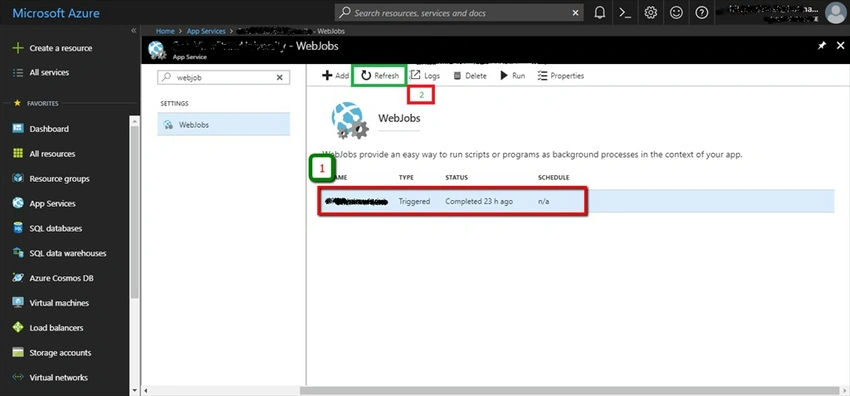
- After clicking on the refresh button, it will update the latest status of a web job.
Logs of Web Job
Below, I will explain how to check the logs of a web job in the Azure portal.
- Login into your Azure account with proper credentials.
- Go to app services and click on a particular app service that you want to select.
- Go to web jobs.
- Select the web job and click on Logs which is shown in the below figure.
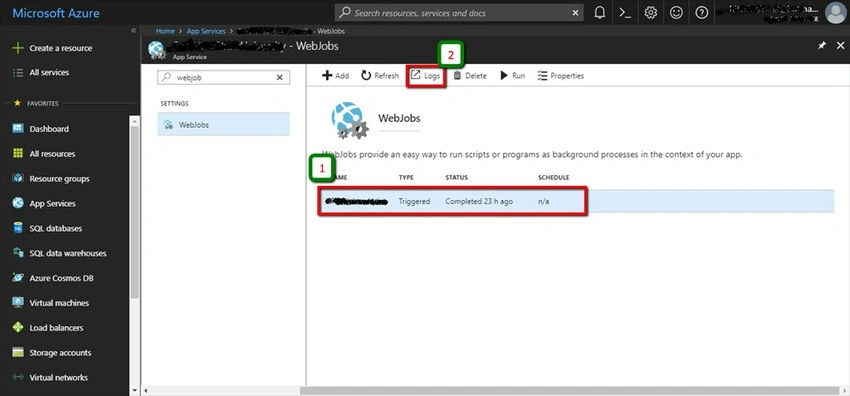
- After clicking on logs, it will open a new window and there it will show all the logs of that particular web job and which is shown in the below figure.

- Click on the particular link in the name sections which will show a list of recent jobs.
- Again click on a particular job then it will show details which are shown in the below figure.
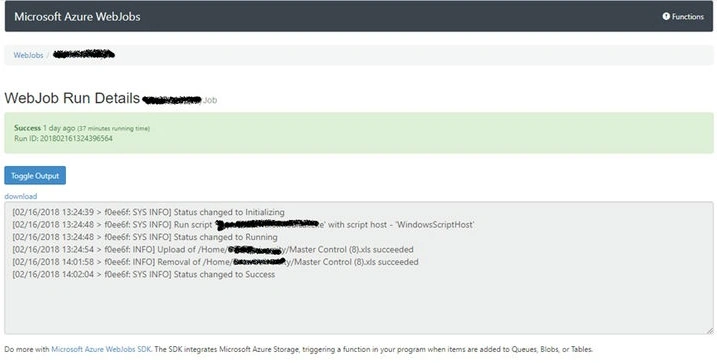
Delete Web Job
Below, I will explain how to delete a web job in the Azure portal.
- Login into your Azure account with proper credentials.
- Go to app services and click on a particular app service that you want to select.
- Go to web jobs.
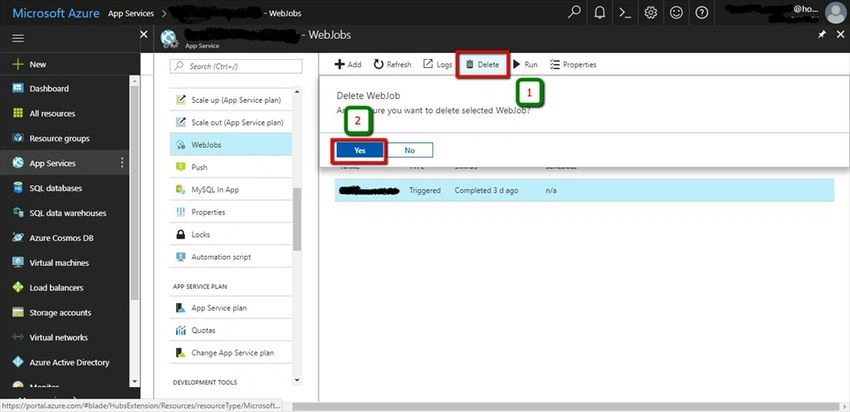
- Select a web job and click on the delete button.
- In the confirmation window if we press ‘yes’ then it will delete the web job otherwise not which is shown in the below figure.
Ninad JoshiPosted Jun 11, 2023, 3:33 AM
Hi, when i try to delete the webjob its says Failed to delete,
Jaimin ShethiyaPosted Jan 6, 2020, 11:48 PM
Nice article :)
Dipa MehtaPosted Jan 6, 2020, 11:34 AM
Nice article on Azure jobs