

Introduction
This is a step by step Web API tutorial that explains what Web API is, and how to create a simple Web API using ASP.NET MVC and C#.
Web API Definition
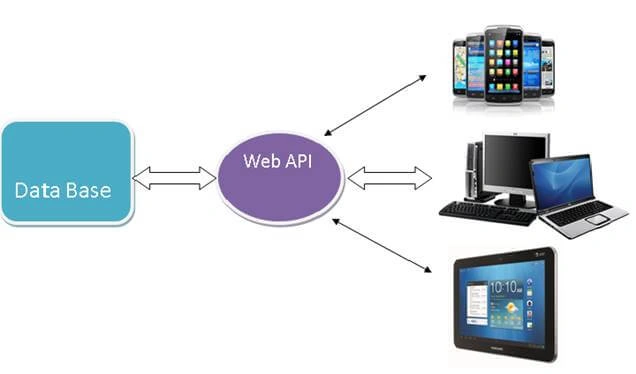
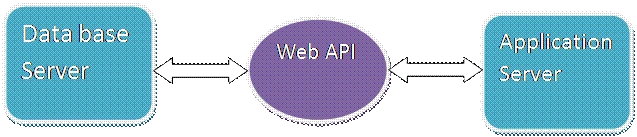
Web API is an application programming interface (API) that is used to enable communication or interaction with software components with each other. ASP.NET Web API is a framework that makes it easy to build HTTP Service that reaches a broad range of clients, including browsers and mobile devices. Using ASP.NET, web API can enable communication by different devices from the same database.
Uses of Web API
- It is used to access service data in web applications as well as many mobile apps and other external devices.
- It is used to create RESTful web services. REST stands for Representational State Transfer, which is an architectural style for networked hypermedia applications.
- It is primarily used to build Web Services that are lightweight, maintainable, and scalable, and support limited bandwidth.
- It is used to create a simple HTTP Web Service. It supports XML, JSON, and other data formats.
Let's go through these step by step tutorial to create a simple Web API using ASP.NET MVC, C#, and Visual Studio.
Step 1. Create ASP.NET Web Application in Visual Studio
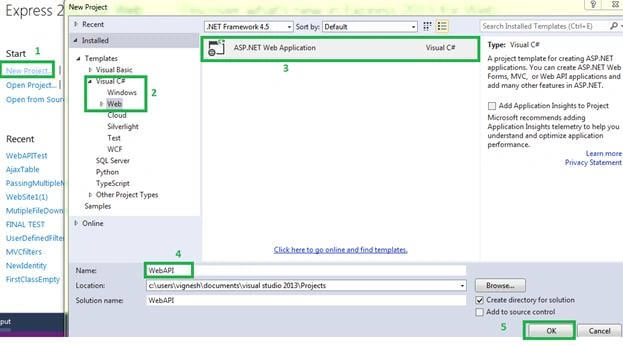
Open Visual Studio and open a new project. Select Visual C# >> Web >> ASP.NET Web Application. After selecting all, give the project name and click OK.
Step 2. Select Web API Template
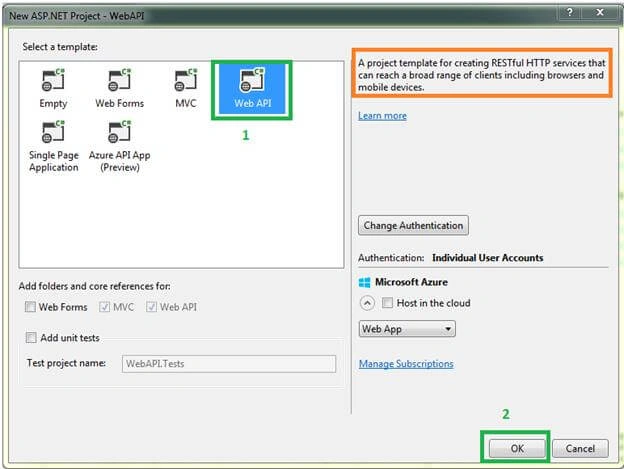
Select Web API in the template window. After selecting Web API, we can see some messages on the right side in the template window. Now, click the OK button.
Step 3. Review Project Files
Now, you're in Visual Studio with project files listed under the project name. We can see in the Solution Explorer on the right side with all the important files and folders like MVC. The
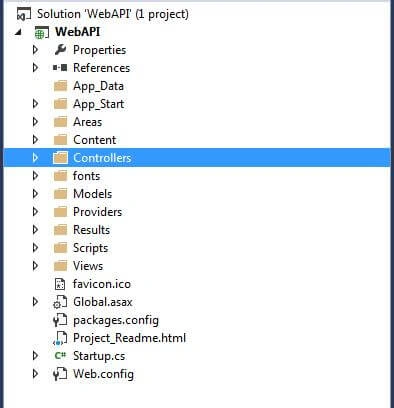
Step 4. Add a Controller
Now, go to Controller and expand the controller. Now, we can see “ValuesController.cs”. It is the main class for Web API. This controller is created by default. If we need a new controller or one with a different name, we can create that in the following way.
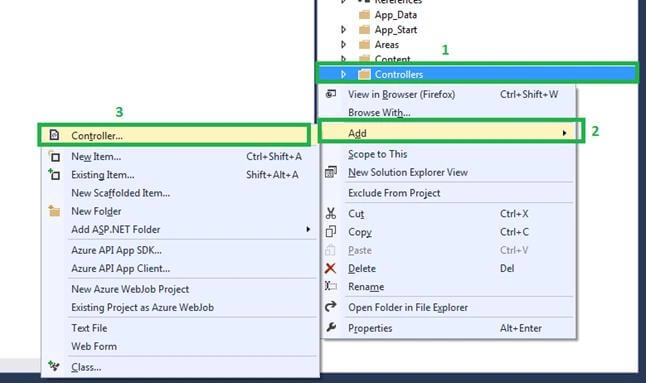
Select and right-click Controllers >>Add >> Controller, just like the below screen.
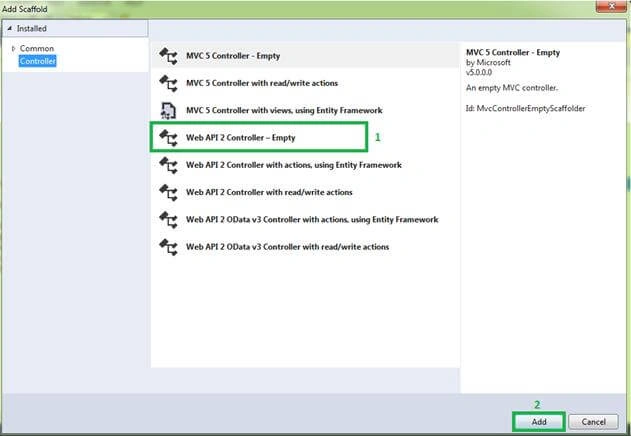
Select “Web API 2 Controller - Empty” and click the "Add" button from the "Add Scaffold" window.
Here is what the screen looks like.
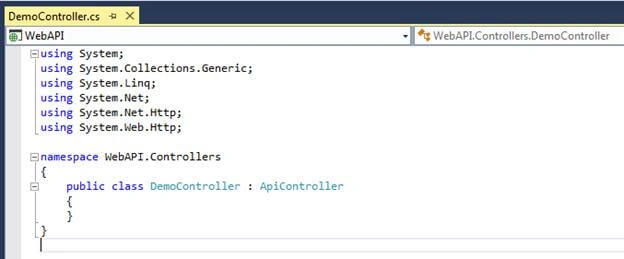
In Web API, the Controller is inherited by the “ApiController” abstract class. It is very important and basic for Web APIs. The namespace for this class is “System.Web.Http”.
Step 5. Add Controller Method
Now, create a simple method in Controller, build the application, and run it finally. In web API, we use the method name as “Get ()". We can use any other method name. Let's write the below code in the Demo controller.
using System.Net;
using System.Net.Http;
using System.Web.Http;
namespace WebAPI.Controllers {
    public class DemoController: ApiController {
        public string Get() {
            return "Welcome To Web API";
        }
        public List < string > Get(int Id) {
            return new List < string > {
                "Data1",
                "Data2"
            };
        }
    }
}
URL Format to run Web API
We need to run the Web API “api/Controller_Name” URL format. For example, in MVC we define URL format using “RouteConfig” class and “RegisterRoutes” static methods. The same for Web API; we are using the “WebApiConfig” and “Register” static method. Go to the “Global.aspx” file we can see in detail.
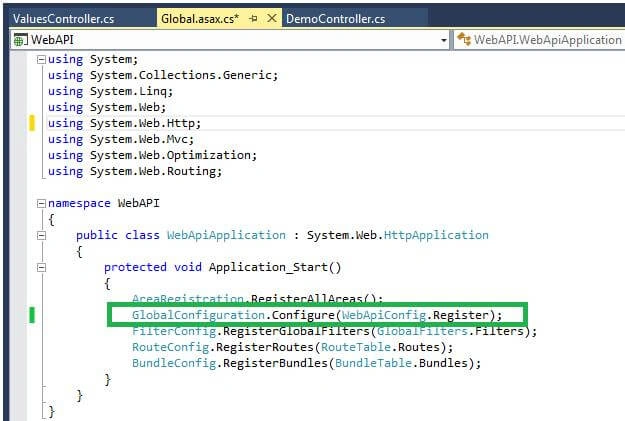
We define the Web API URL format using “GlobalConfiguration” and “Configure” static method. We are passing the “Register” method from the “WebApiConfig” class as an argument into the “Configure” method. If we go to the “WebApiConfig” class, we can see Web API routes.
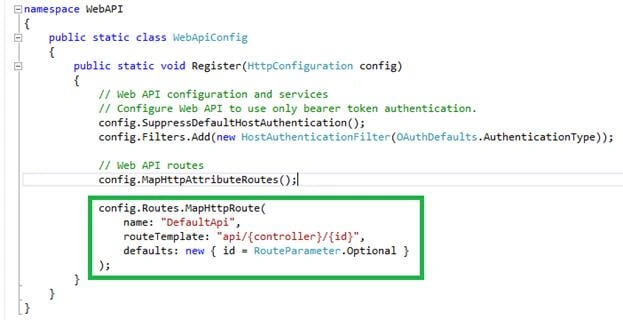
Step 6
Now, build your project and run the above-mentioned URL format. Our Controller name is “Demo”, so we will run the following
URL.“http://localhost:53027/api/Demo”.
Web API has returned a result in XML or JSON format. Our output looks like below.
I run http://localhost:53027/api/Demo, it will call “Get ()”. Since there is no parameter, the output looks like below.

I run http://localhost:53027/api/Demo/1, it will call “Get (int id)”. When there is a parameter in the method, the output looks like below.
Outputs return as XML format.

Conclusion
This article will help new learners, students, and freshers. In the next article, we learned how to create a Web API using ASP.NET, C#, and Visual Studio.
CynthiaPosted Nov 22, 2021, 9:52 AM
Good Article
Pouria shPosted Jul 9, 2021, 2:25 PM
So what now just creating an api??
Roshan RathodPosted Jul 25, 2020, 12:22 AM
Very good article such a helpful
Nata NataPosted Jul 12, 2020, 12:33 AM
Have tested it by deploying it as application as well as website. Response is same
Nata NataPosted Jul 12, 2020, 12:29 AM
Have created new projee webservice as mentioned in this link. In my local system, response is good after second call. But when I deployed the package in staging environment - windows 2012R2 IiS 8.5, response is taking about 30seconds(approx) for all requests. Any advise on what went wrong.
Nata NataPosted Jul 12, 2020, 12:29 AM
Have created new project and implement ed simple webservice as mentioned in this link. In my local system, response is good after second call. But when I deployed the package in staging environment - windows 2012R2 IiS 8.5, response is taking about 30seconds(approx) for all requests. Any advise on what went wrong.
Ramdutt PathakPosted Nov 27, 2019, 3:49 AM
Please help how to check tempdata value of mvc to api controller
Anomigen AnomigenPosted Oct 27, 2019, 9:22 AM
Sir I am having a hard time in deploying the API using IIS
kanika singhPosted Jul 22, 2019, 1:47 AM
Unable to understand the concept after "URL format to run API". Pls elaborate it more!
Raj PandeyPosted Jun 24, 2019, 12:44 PM
In this example you have chosen WebAPi Project which has included MVC and API both. I only want to create WebAPi project without MVC template. Is that possible. I chose empty project with below WebAPI chekbox but not able to run and access the API. It's throwing error.
Steven LewisPosted Jun 5, 2019, 10:32 AM
SaMol P use Demo?index=0 instead.
SaMol PPosted Apr 25, 2019, 7:45 AM
When i passed with this id , If run http://localhost:53027/api/Demo/1, it is not getting called, am getting the same old result. any idea why this is happening?
P.Suresh KumarPosted Mar 23, 2019, 12:34 AM
Hello Vignesh Mani, it was a very nice and useful article. Can you please put up a article on how to connect the database in web api using angularjs?
Angel GonzalezPosted Jan 29, 2019, 1:55 AM
Hi, sorry but I dont understand why we use /api/demo when controller's name is DemoController. Can you tell me please? Dont know where have you defined "demo" as name of the controller Thank you a lot
Arun PrasadPosted Dec 10, 2018, 6:08 AM
Worth information but it wont helpful for the beginners who knows only C# other than MVC.
chan chanPosted Oct 11, 2018, 5:22 AM
Hi nice details provided. I am using .net3.5 in VS2012 and created simple web services and I am facing "HTTP Error 404.3 - Not Found" error while trying to open from IIS. I need to host it in IIS and access it from anywhere within the network, but I am unable to resolve. Could you please help me in resolving this issue, Please. My contact is [email protected]. just needs solutions for hosting a webservice in IIS. I have tried all possibilities
TaraPosted Feb 26, 2018, 2:31 AM
Sir, I have to work on a project which has only 3 screens and these screens will display data on page load. I am in dilemma, which one to choose for development? can i simply go for asp.net webforms or asp.net web api? which one is better?, as it uses only GET method to load data. please suggest me on this.
Iti TyagiPosted Jan 16, 2018, 7:51 AM
Is it demo or democontroller?
Savadamuthu SaravananPosted Nov 30, 2017, 9:52 AM
Very Clear Article of Web API.
Arslan jappaPosted Aug 6, 2017, 12:25 PM
Sir my question is when we create project in wcf after completion we can use the project service in other project too by writing just local address in in references so is it possible same thing in web api projects??sir plz ans i am very new to it.
ritika manchandaPosted Jul 8, 2017, 12:44 PM
What modifications are required to make the response of GET method in JSON format?
Sarath MayaPosted Jan 28, 2017, 3:25 AM
Which version are you using, I mean vs and sql?
anouar habliliPosted Jan 25, 2017, 7:29 AM
Thank you, sample and usefull.
Vignesh ManiPosted Jan 19, 2017, 6:47 AM
Thank you so much your feedback!!.
Joe WilsonPosted Jan 15, 2017, 6:28 AM
Well, Thank you very much for your article.
Humayun Kabir MamunPosted Jan 15, 2017, 1:13 AM
Thanks for this nice article...
Ranjit PowarPosted Jan 11, 2017, 12:01 AM
I think web api is not part of ASP.NET MVC. WebAPI and mvc are two different project templates. please correct this.
Anu VPosted Jan 10, 2017, 11:51 PM
Thanks for sharing.. nice article