

Implementation
- Get Host Web Context
- Get Site Content Types Collection
- Define new Content Type
- Add the new Content Type to collection
Get Started:
- Create a SharePoint –hosted ‘Apps for SharePoint 2013’ project using Visual Studio 2012/2013.
- Provide required permission to App for creating Content Type in AppManifest.xml.
- Add a button on page to create Content Type.
- <%-- The markup and script in the following Content element will be placed in the <body> of the page --%>
- <asp:Content ContentPlaceHolderID="PlaceHolderMain" runat="server">
- <div>
- <input type="button" id="btnCreateContent Type" value="Create Content Type" onclick="createContentType()" />
- </div>
- </asp:Content>
- Modify App.js file and replace its content by the following code.
- 'use strict';
- var context = SP.ClientContext.get_current(); //App Web Context
- var hostWebUrl, hostWebContext;
- // This code runs when the DOM is ready and creates a context object which is needed to use the SharePoint object model
- $(document).ready(function () {
- //Get the URI decoded URLs.
- hostWebUrl = decodeURIComponent(getQueryStringParameter("SPHostUrl"));
- hostWebContext = new SP.AppContextSite(context, hostWebUrl);
- });
- // Retrieve a query string value.
- function getQueryStringParameter(paramToRetrieve) {
- var params = document.URL.split("?")[1].split("&");
- for (var i = 0; i < params.length; i = i + 1) {
- var singleParam = params[i].split("=");
- if (singleParam[0] == paramToRetrieve) return singleParam[1];
- }
- }
- //Create Content Type
- function createContentType() {
- if (hostWebContext != undefined && hostWebContext != null) {
- var hostWeb = hostWebContext.get_web();
- var contentTypeCollection = hostWeb.get_contentTypes();
- //Get Document Content type by its Id. We will use Document Content Type as Base Content Type
- //to create a new Content Type.
- //Refer article for Ids of other Content Types.
- var contentType = contentTypeCollection.getById("0x0101");
- //Creating new Content Type
- var newContentType = new SP.ContentTypeCreationInformation();
- newContentType.set_name('Employee');
- newContentType.set_group('Employee Details');
- newContentType.set_description('Content Type for Employee Details.');
- //Set Base Content Type
- newContentType.set_parentContentType(contentType);
- contentTypeCollection.add(newContentType);
- context.load(contentTypeCollection);
- context.executeQueryAsync(
- function () {
- alert('Content type created successfully on Host Web.');
- },
- function onContenttypeFailed(sender, args) {
- alert('Content type creation failed. Error: ' + args.get_message() + '\n' + args.get_stackTrace());
- });
- }
- }
- Build and Deploy the solution.
- Click on ‘Create Content Type’ button, Content Type will be created on Host Web.
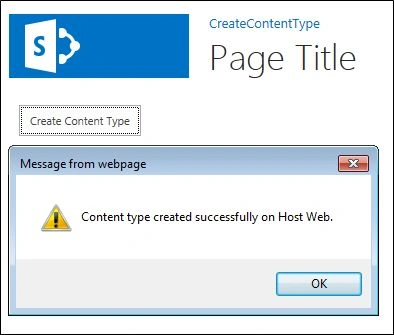
- Navigate to Host Web Site Content types, you will see ‘Employee’ Content Type under ‘Employee Details’ group.

Additional Data
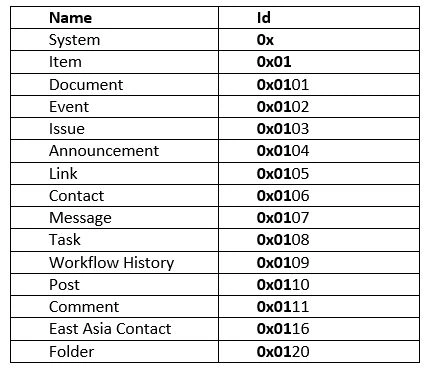
The following table shows Content Type Ids, which can be used as Base Content Type.
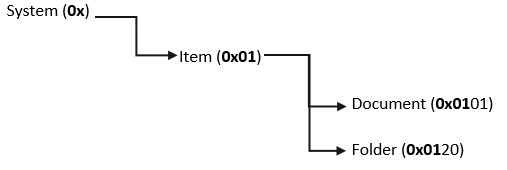
Hierarchy:
Conclusion
Using this JSOM, you can create Content Type on Host Web. By using only App Web context, you can create Content type on App Web. To use any other Content type as Base Content type, you can refer to the above table. If you do not provide any base Content type, by default it is set to ‘Item’ Content type.
Gowtham RajamanickamPosted Apr 10, 2016, 1:31 AM
thanks for sharing
Gowtham RajamanickamPosted Apr 10, 2016, 1:31 AM
Good article
Mohammad KhalidPosted Mar 23, 2016, 3:17 AM
Good article ! Keep posting content to help SharePoint developers.
Egidio SantoroPosted Feb 27, 2016, 9:07 PM
great coding! tks for sharing!
Santhakumar MunuswamyPosted Oct 18, 2015, 5:33 AM
Good one
Nilesh JadavPosted Oct 7, 2015, 1:48 AM
Nice one sir