

After I've installed SharePoint Server 2013 on a Windows Server 2012 R2 I ran the configuration wizard to finalize and configure the installation.
At the step "Specify Configuration Database Setting" I chose to use my local machine as my database server (because it a development machine) and I left the default database name unchanged.
At the "Specify Database Access Account" section I typed my current local account since I'm working on my local home development machine and I'm not connected to a domain as in the following: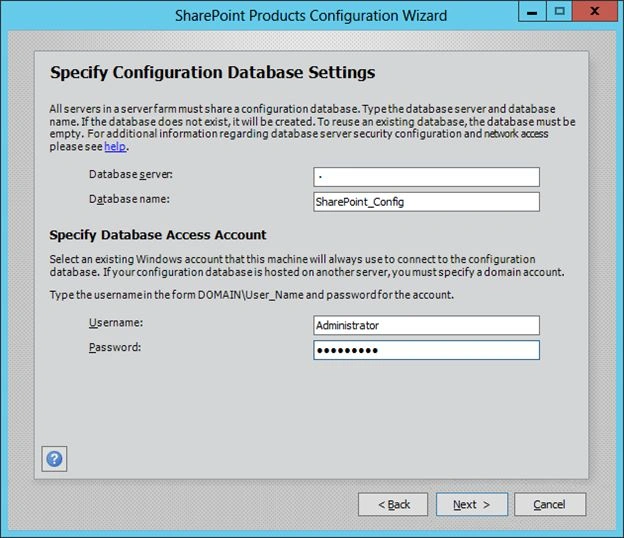
I got this error after clicking Next: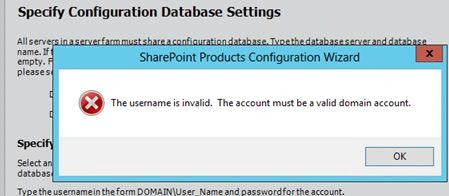
Apparently SharePoint doesn't allow creating the configuration database with a local user account.
The good news is that there is a work around, all you need is to create the database manually using SharePoint 2013 Management Shell.
Open SharePoint 2013 Management Shell and type the following command:
New-SPConfigurationDatabase
Hit enter; it will ask about the following:
- Database Name
- Database Server
- FarmCredential
- PassPhrase
Type the required info then hit Enter again:
This will create all necessary databases, you can re-run the Configuration Wizard and select the option “Connect to an existing farm”.
Extra note
I'm using SQL Server 2008 R2 when I first tried to create the configuration databases and I got this error: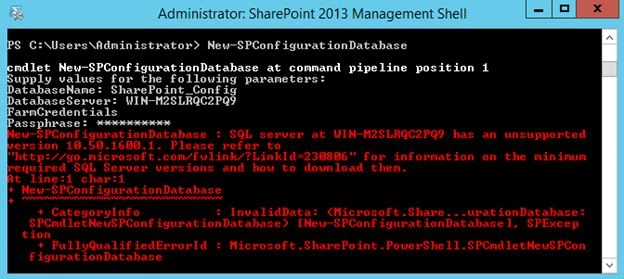
SharePoint 2013 supports SQL Server 2008 R2 Service Pack 1 and higher versions so the error disappeared when I installed SP2.
I hope that will help.
Mahesh ChandPosted Aug 25, 2014, 3:13 PM
Great. Good to see you back after long time.
Amr MonjidPosted Aug 25, 2014, 3:03 PM
Hey Mahesh, i'm back :) everything is great :) thx
Mahesh ChandPosted Aug 25, 2014, 2:25 PM
Welcome back Amr. Long time no see. Hope all is well.