

Create your first CLR Trigger for SQL Server 2008 using C#.
What are CLR Triggers?
- CLR triggers are trigger based on CLR.
- CLR integration is new in SQL Server 2008. It allows for the database objects (such as a trigger) to be coded in .NET.
- Objects that have heavy computation or that require a reference to an object outside SQL are coded in the CLR.
- We can code both DDL and DML triggers by using a supported CLR language like C#.
Steps to Create a CLR trigger
Step 1: Create the CLR class. We code the CLR class module with a reference to the namespace required to compile CLR database objects.
Add the following references:
- using Microsoft.SqlServer.Server;
- using System.Data.SqlTypes;
- using System;
- using System.Collections.Generic;
- using System.Linq;
- using System.Text;
- using System.Data.Sql;
- using System.Data.SqlClient;
- using Microsoft.SqlServer.Server;
- using System.Data.SqlTypes;
- using System.Text.RegularExpressions;
- namespace CLRTrigger
- {
- public class CLRTrigger
- {
- public static void showinserted()
- {
- SqlTriggerContext triggContext = SqlContext.TriggerContext;
- SqlConnection conn = new SqlConnection(" context connection =true ");
- conn.Open();
- SqlCommand sqlComm = conn.CreateCommand();
- SqlPipe sqlP = SqlContext.Pipe;
- SqlDataReader dr;
- sqlComm.CommandText = "SELECT pub_id, pub_name from inserted";
- dr = sqlComm.ExecuteReader();
- while (dr.Read())
- sqlP.Send((string)dr[0] + "," + (string)dr[1]);
- }
- }
- }
Step 3: Now we will use T-SQL command to execute to create the assembly for CLRTrigger.dll. For that we will use CREATE ASSEMBLY in SQL Server.
- CREATE ASSEMBLY triggertest
- FROM 'C:\CLRTrigger\CLRTrigger.dll'
- WITH PERMISSION_SET = SAFE
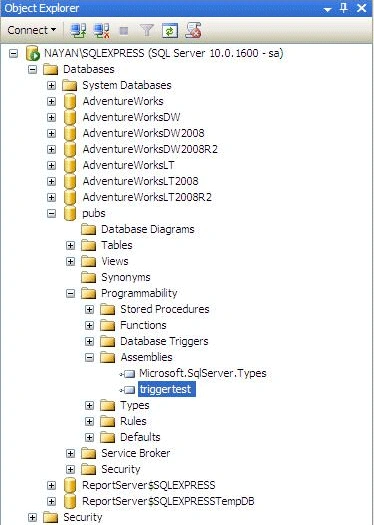
Step 4: The final step is to create the trigger that references the assembly. Now we will write the following T-SQL commands to add a trigger on the publishers table in the Pubs database.
- CREATE TRIGGER tri_Publishes_clr
- ON publishers
- FOR INSERT
- AS
- EXTERNAL NAME triggertest.CLRTrigger.showinserted
- ALTER DATABASE pubs
- SET COMPATIBILITY_LEVEL = 100
Step 5: Enable CLR Stored procedure on SQL Server. For this run the following code:
- EXEC sp_configure 'show advanced options' , '1';
- reconfigure;
- EXEC sp_configure 'clr enabled' , '1' ;
- reconfigure;
- EXEC sp_configure 'show advanced options' , '0';
- reconfigure;
- INSERT publishers(pub_id, pub_name) values ('9922','Vishal Nayan')
-----------------------------------------------------
9922,Vishal Nayan
(1 row(s) affected)
The line of code which is printing the query result is actually the following code written in a managed environment.
- while (dr.Read())
- sqlP.Send((string)dr[0] + "," + (string)dr[1]);
Conclusion
The tri_Publishes_clr trigger demonstrates the basic steps for creating a CLR trigger. The true power of CLR triggers lies in performing more complex calculations, string manipulations and things of this nature that can be done much more efficiently with CLR programming languages than they can in T-SQL.
manoj sagarPosted Jul 4, 2018, 4:45 AM
Thanks for sharing...
John PatelPosted Jun 17, 2017, 7:06 AM
Thank you for explaining in detail
SubashPosted Sep 16, 2016, 12:43 AM
What is ASSEMBLY in SQL SERVER
SubashPosted Sep 16, 2016, 12:43 AM
Nice
Markus Sveinn MarkussonPosted Nov 25, 2011, 11:51 PM
Thank you, excellent article :-) I had to make a minor adjustment to the trigger creation because of the namespace. CREATE TRIGGER tri_Publishes_clr ON publishers FOR INSERT AS EXTERNAL NAME triggertest.[CLRTrigger.CLRTrigger].showinserted Your demo included a select command. How about updates to multiple other columns in the newly inserted row of the table? I believe a CLR function is not allowed to alter data when called from a trigger. I did try that but got an error indicating that the INSERTED and DELETED tables cannot be updated. Maybe the CLR function can somehow be configured to return a string array and have the trigger do the updates? Regards, Markus Sveinn Markusson
Dinesh BeniwalPosted May 5, 2011, 3:26 AM
Thanks for Sharing...