

Introduction
You already know what kernel is.
The first part of writing an operating system is to write a bootloader in 16-bit assembly (real mode). A bootloader is a piece of program that runs on any operating system is running. It is used to boot other operating systems. Usually, each operating system has a set of bootloaders specific for it.
Go to the following link to create your own bootloader in 16-bit assembly.
Go to the following link to create your own bootloader in 16-bit assembly.
- Creating Your Own Operating System
- https://createyourownos.blogspot.in/
Bootloaders generally select a specififc operating system and starts it's process and then operating system loads itself into memory.
If you are writing your own bootloader for loading a kernel you need to know the overall addressing/interrupts of memory as well as BIOS.
Mostly each operating system has specific bootloader for it.
There are lots of bootloaders available out there in online market.
But there are some proprietary bootloaders such as Windows Boot Manager for Windows operating systems or BootX for Apple's operating systems.
But there are lots of free and open source bootloaders.see the comparison,
There are lots of bootloaders available out there in online market.
But there are some proprietary bootloaders such as Windows Boot Manager for Windows operating systems or BootX for Apple's operating systems.
But there are lots of free and open source bootloaders.see the comparison,
- https://en.wikipedia.org/wiki/Comparison_of_boot_loaders
Among most famous is GNU GRUB - GNU Grand Unified Bootloader package from the GNU project for Unix like systems.
- https://en.wikipedia.org/wiki/GNU_GRUB
We will use GNU GRUB to load our kernel because it supports a multiboot of many operating systems.
Requirements
Requirements
- GNU/Linux - I am using GNU/Kali Linux 2017 i386 distribution .
- Assembler - I am using GNU Assembler(gas) to instruct the bootloader for loading the starting point of our kernel.
- GCC - GNU Compiler Collection a cross compiler. A newer version of GCC. I am using 7.2.0 version of GCC. The most important thing.
- If you use old version you may face multiboot header not found error.
- Xorriso - A package that creates, loads, manipulates ISO 9660 filesystem images.(man xorriso)
- grub-mkrescue - Make a GRUB rescue image, this package internally calls the xorriso functionality to build an iso image.
- QEMU - Quick EMUlator to boot our kernel in virtual machine without rebooting the main system.
Start
Alright, writing a kernel from scratch is to print something on screen. So we have a VGA(Visual Graphics Array), a hardware system that controls the display.
For more details,
https://en.wikipedia.org/wiki/Video_Graphics_Array
For more details,
https://en.wikipedia.org/wiki/Video_Graphics_Array
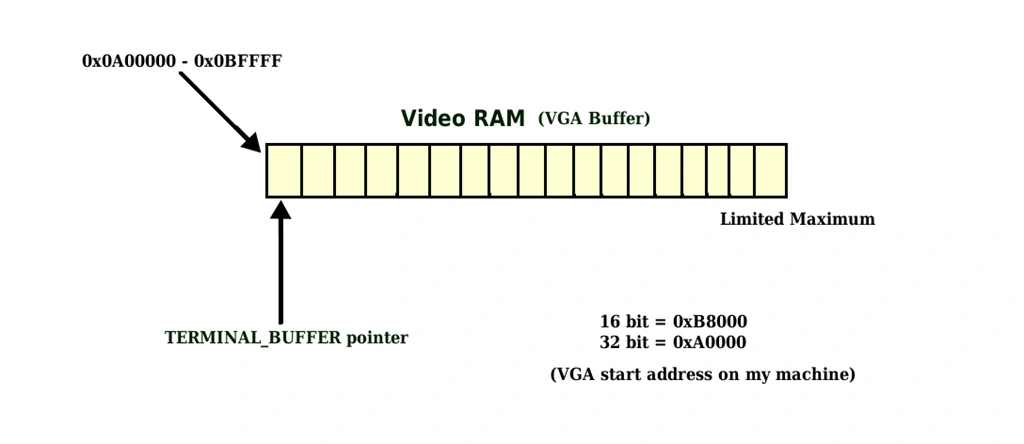
- VGA has a fixed amount of memory and addresssing is 0xA0000 to 0xBFFFF.
- 0xA0000 for EGA/VGA graphics modes (64 KB)
- 0xB0000 for monochrome text mode (32 KB)
- 0xB8000 for color text mode and CGA-compatible graphics modes (32 KB)
First you need a multiboot bootloader file that instruct the GRUB to load it. Following fields must be define.
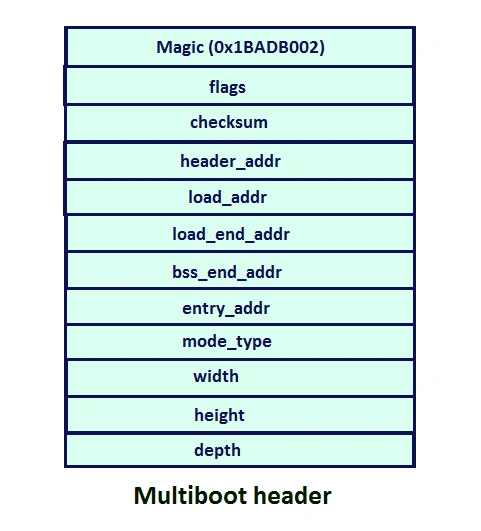
- Magic :- A fixed hexadecimal number identified by the bootloader as the header(starting point) of the kernel to be loaded.
- flags :- If bit 0 in the flags word is set, then all boot modules loaded along with the operating system must be aligned on page (4KB) boundaries.
- checksum :- which is used by special purpose by bootloader and its value must be the sum of magic no and flags.
We don't need other information,
but for more details
but for more details
- https://www.gnu.org/software/grub/manual/multiboot/multiboot.pdf
Ok lets write a GAS assembly code for above information. we dont need some fields as shown in above image.
boot.S
- # set magic number to 0x1BADB002 to identified by bootloader
- .set MAGIC, 0x1BADB002
- # set flags to 0
- .set FLAGS, 0
- # set the checksum
- .set CHECKSUM, -(MAGIC + FLAGS)
- # set multiboot enabled
- .section .multiboot
- # define type to long for each data defined as above
- .long MAGIC
- .long FLAGS
- .long CHECKSUM
- # set the stack bottom
- stackBottom:
- # define the maximum size of stack to 512 bytes
- .skip 512
- # set the stack top which grows from higher to lower
- stackTop:
- .section .text
- .global _start
- .type _start, @function
- _start:
- # assign current stack pointer location to stackTop
- mov $stackTop, %esp
- # call the kernel main source
- call KERNEL_MAIN
- cli
- # put system in infinite loop
- hltLoop:
- hlt
- jmp hltLoop
- .size _start, . - _start
We have defined a stack of size 512 bytes and managed by stackBottom and stackTop identifiers. Then in _start, we are storing a current stack pointer, and calling the main function of a kernel. As you know, every process consists of different sections such as data, bss, rodata and text. You can see the each sections by compiling the source code without assembling it.
e.g.: Run the following command,
gcc -S kernel.c
and see the kernel.S file.
And this sections requires a memory to store them, this memory size is provided by the linker image file. Each memory is aligned with the size of each block. It mostly require to link all the object files together to form a final kernel image.
Linker image file provides how much size should be allocated to each of the sections. The information is stored in the final kernel image. If you open the final kernel image(.bin file) in hexeditor, you can see lots of 00 bytes.
The linker image file consists of an entry point,(in our case it is _start defined in file boot.S) and sections with size defined in the BLOCK keyword aligned from how much spaced.
linker.ld
e.g.: Run the following command,
gcc -S kernel.c
and see the kernel.S file.
And this sections requires a memory to store them, this memory size is provided by the linker image file. Each memory is aligned with the size of each block. It mostly require to link all the object files together to form a final kernel image.
Linker image file provides how much size should be allocated to each of the sections. The information is stored in the final kernel image. If you open the final kernel image(.bin file) in hexeditor, you can see lots of 00 bytes.
The linker image file consists of an entry point,(in our case it is _start defined in file boot.S) and sections with size defined in the BLOCK keyword aligned from how much spaced.
linker.ld
- /* entry point of our kernel */
- ENTRY(_start)
- SECTIONS
- {
- /* we need 1MB of space atleast */
- . = 1M;
- /* text section */
- .text BLOCK(4K) : ALIGN(4K)
- {
- *(.multiboot)
- *(.text)
- }
- /* read only data section */
- .rodata BLOCK(4K) : ALIGN(4K)
- {
- *(.rodata)
- }
- /* data section */
- .data BLOCK(4K) : ALIGN(4K)
- {
- *(.data)
- }
- /* bss section */
- .bss BLOCK(4K) : ALIGN(4K)
- {
- *(COMMON)
- *(.bss)
- }
- }
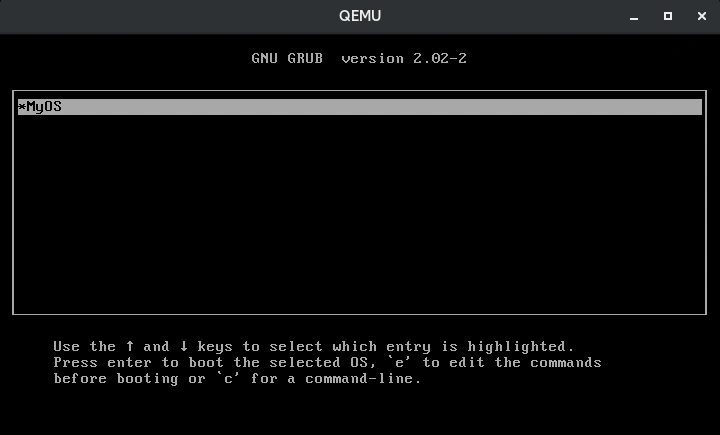
Now you need a configuration file that instruct the grub to load menu with associated image file
grub.cfg
grub.cfg
- menuentry "MyOS" {
- multiboot /boot/MyOS.bin
- }
Now let's write a simple HelloWorld kernel code.
kernel_1
- #ifndef _KERNEL_H_
- #define _KERNEL_H_
- #define VGA_ADDRESS 0xB8000
- #define WHITE_COLOR 15
- typedef unsigned short UINT16;
- UINT16* TERMINAL_BUFFER;
- #endif
Here we are using 16 bit, on my machine the VGA address is starts at 0xB8000 and 32 bit starts at 0xA0000. An unsigned 16 bit type terminal buffer pointer that points to VGA address.
It has 8*16 pixel font size.
see above image.
kernel.c
It has 8*16 pixel font size.
see above image.
kernel.c
- #include"kernel.h"
- static UINT16 VGA_DefaultEntry(unsigned char to_print) {
- return (UINT16) to_print | (UINT16)WHITE_COLOR << 8;
- }
- void KERNEL_MAIN()
- {
- TERMINAL_BUFFER = (UINT16*) VGA_ADDRESS;
- TERMINAL_BUFFER[0] = VGA_DefaultEntry('H');
- TERMINAL_BUFFER[1] = VGA_DefaultEntry('e');
- TERMINAL_BUFFER[2] = VGA_DefaultEntry('l');
- TERMINAL_BUFFER[3] = VGA_DefaultEntry('l');
- TERMINAL_BUFFER[4] = VGA_DefaultEntry('o');
- TERMINAL_BUFFER[5] = VGA_DefaultEntry(' ');
- TERMINAL_BUFFER[6] = VGA_DefaultEntry('W');
- TERMINAL_BUFFER[7] = VGA_DefaultEntry('o');
- TERMINAL_BUFFER[8] = VGA_DefaultEntry('r');
- TERMINAL_BUFFER[9] = VGA_DefaultEntry('l');
- TERMINAL_BUFFER[10] = VGA_DefaultEntry('d');
- }
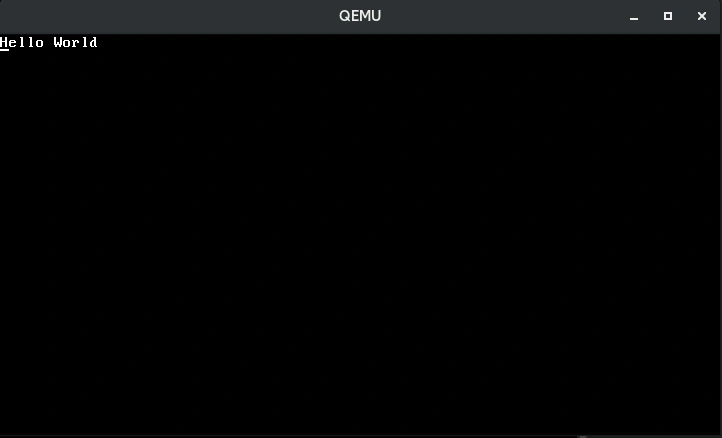
The value returned by VGA_DefaultEntry() function is the UINT16 type with highlighting the character to print with white color. The value is stored in the buffer to display the characters on a screen.
First lets point our pointer TERMINAL_BUFFER to VGA address 0xB8000.
Now you have an array of VGA, you just need to assign specific value to each index of array according to what to print on a screen as we usually do in assigning the value to array.
See the above code that prints each character of HelloWorld on a screen.
Ok lets compile the source. type sh run.sh command on terminal.
run.sh
First lets point our pointer TERMINAL_BUFFER to VGA address 0xB8000.
Now you have an array of VGA, you just need to assign specific value to each index of array according to what to print on a screen as we usually do in assigning the value to array.
See the above code that prints each character of HelloWorld on a screen.
Ok lets compile the source. type sh run.sh command on terminal.
run.sh
- #assemble boot.s file
- as boot.s -o boot.o
- #compile kernel.c file
- gcc -c kernel.c -o kernel.o -std=gnu99 -ffreestanding -O2 -Wall -Wextra
- #linking the kernel with kernel.o and boot.o files
- gcc -T linker.ld -o MyOS.bin -ffreestanding -O2 -nostdlib kernel.o boot.o -lgcc
- #check MyOS.bin file is x86 multiboot file or not
- grub-file --is-x86-multiboot MyOS.bin
- #building the iso file
- mkdir -p isodir/boot/grub
- cp MyOS.bin isodir/boot/MyOS.bin
- cp grub.cfg isodir/boot/grub/grub.cfg
- grub-mkrescue -o MyOS.iso isodir
- #run it in qemu
- qemu-system-x86_64 -cdrom MyOS.iso
the output is,
As you can see, it is a overhead to assign each and every value to VGA buffer, so we can write a function for that, which can print our string on a screen (means assigning each character value to VGA buffer from a string).
kernel_2
kernel.h
- #ifndef _KERNEL_H_
- #define _KERNEL_H_
- #define VGA_ADDRESS 0xB8000
- #define WHITE_COLOR 15
- typedef unsigned short UINT16;
- int DIGIT_ASCII_CODES[10] = {0x30, 0x31, 0x32, 0x33, 0x34, 0x35, 0x36, 0x37, 0x38, 0x39};
- unsigned int VGA_INDEX;
- #define BUFSIZE 2200
- UINT16* TERMINAL_BUFFER;
- #endif
DIGIT_ASCII_CODES are hexadecimal values of characters 0 to 9. we need them when we want to print them on a screen.
VGA_INDEX is the our VGA array index. VGA_INDEX is increased when value is assigned to that index.
BUFSIZE is the limit of our VGA.
Following function prints a string on a string by assigning each character to VGA.
Following function prints a string on a string by assigning each character to VGA.
- void printString(char *str)
- {
- int index = 0;
- while(str[index]){
- TERMINAL_BUFFER[VGA_INDEX] = VGA_DefaultEntry(str[index]);
- index++;
- VGA_INDEX++;
- }
- }
To print an 32 bit integer, first you need to convert it into a string.
- int digitCount(int num)
- {
- int count = 0;
- if(num == 0)
- return 1;
- while(num > 0){
- count++;
- num = num/10;
- }
- return count;
- }
- void itoa(int num, char *number)
- {
- int digit_count = digitCount(num);
- int index = digit_count - 1;
- char x;
- if(num == 0 && digit_count == 1){
- number[0] = '0';
- number[1] = '\0';
- }else{
- while(num != 0){
- x = num % 10;
- number[index] = x + '0';
- index--;
- num = num / 10;
- }
- number[digit_count] = '\0';
- }
- }
- void printInt(int num)
- {
- char str_num[digitCount(num)+1];
- itoa(num, str_num);
- printString(str_num);
- }
To print a new line, you have to skip some bytes in VGA pointer(TERMINAL_BUFFER) according to the pixel font size. For this we need another variable that stores the current Y th index.
- static int Y_INDEX = 1;
- void printNewLine()
- {
- if(Y_INDEX >= 55){
- Y_INDEX = 0;
- Clear_VGA_Buffer(&TERMINAL_BUFFER);
- }
- VGA_INDEX = 80*Y_INDEX;
- Y_INDEX++;
- }
And in KERNEL_MAIN(), just call the functions,
- void KERNEL_MAIN()
- {
- TERMINAL_BUFFER = (UINT16*) VGA_ADDRESS;
- printString("Hello World!");
- printNewLine();
- printInt(1234567890);
- printNewLine();
- printString("GoodBye World!");
- }
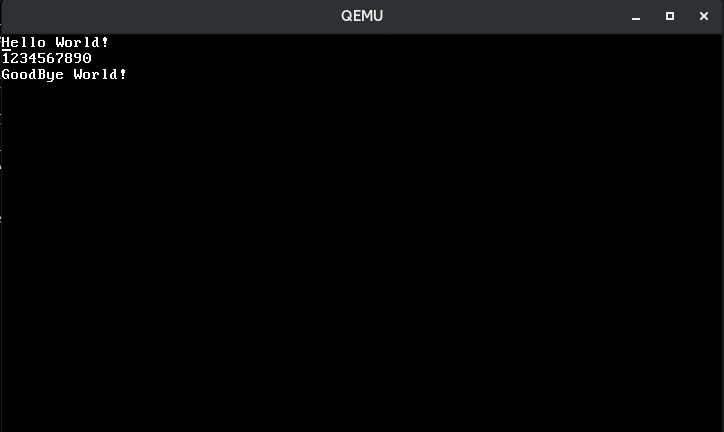
As you can see it is the overhead to call each and every function for displaying values, that's why C programming provides a printf() function with format specifiers which print/set specific value to standard output device with each specifier with literals such as \n \t \r etc.
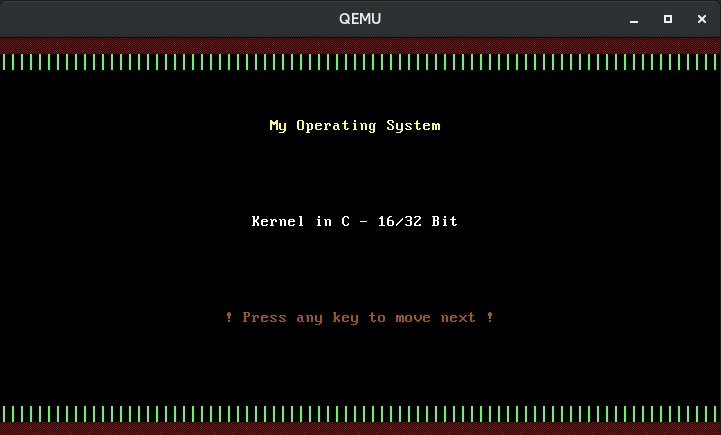
kernel_3
VGA provides 15 colors,
BLACK = 0,
BLUE = 1,
GREEN = 2,
CYAN = 3,
RED = 4,
MAGENTA = 5,
BROWN = 6,
LIGHT_GREY = 7,
DARK_GREY = 8,
LIGHT_BLUE = 9,
LIGHT_GREEN = 10,
LIGHT_CYAN = 11,
LIGHT_RED = 12,
LIGHT_MAGENTA = 13,
YELLOW = 14,
WHITE = 15,
Just change the function name VGA_DefaultEntry() to some another with UINT8 type of color parameter with replacing the WHITE_COLOR to it.
For keyboard interrupt, you have inX function provided by gas, where X could be byte,word,dword or long etc. The BIOS keyboard interrupt value is 0x60, which is in bytes, passed to the parameter as to inb instruction.
- UINT8 IN_B(UINT16 port)
- {
- UINT8 ret;
- asm volatile("inb %1, %0" :"=a"(ret) :"Nd"(port) );
- return ret;
- }
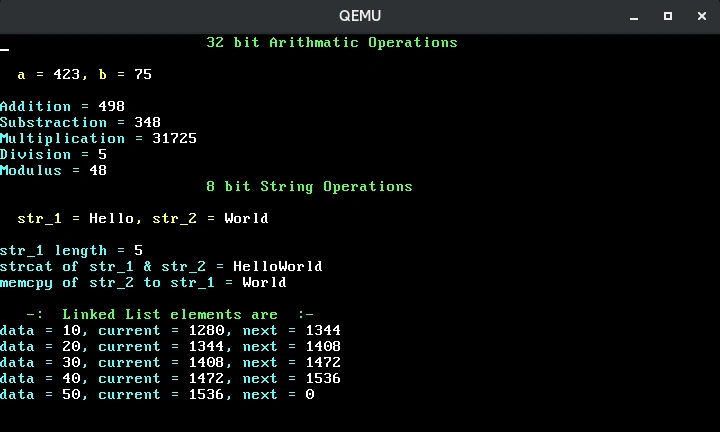
We can also create a simple linked list data structure, as a starting point of an file system. let's say we have following record,
- typedef struct list_node{
- int data;
- struct list_node *next;
- }LIST_NODE;
but we need memory to allocate this block because there is no malloc() function exists. Instead we use a memory address assigning to pointer to structure for storing this data block. well you can use any memory address but not those addresses who are used for special purposes.
0x00000000 - 0x000003FF - Real Mode Interrupt Vector Table
0x00000400 - 0x000004FF - BIOS Data Area
0x00000500 - 0x00007BFF - Unused
0x00007C00 - 0x00007DFF - Our Bootloader
0x00007E00 - 0x0009FFFF - Unused
0x000A0000 - 0x000BFFFF - Video RAM (VRAM) Memory
0x000B0000 - 0x000B7777 - Monochrome Video Memory
0x000B8000 - 0x000BFFFF - Color Video Memory
0x000C0000 - 0x000C7FFF - Video ROM BIOS
0x000C8000 - 0x000EFFFF - BIOS Shadow Area
0x000F0000 - 0x000FFFFF - System BIOS
In above addresses range, 0x00000500 - 0x00007BFF or 0x00007E00 - 0x0009FFFF can be used to store our linked list data. You can access the whole memory(RAM) if you know the limit of it or can be stored in a stack.
Download the source code.
So here's a function that return a allocated LIST_NODE memory block with starting at address 0x00000500,
Download the source code.
So here's a function that return a allocated LIST_NODE memory block with starting at address 0x00000500,
- LIST_NODE *getNewListNode(int data)
- {
- LIST_NODE *newnode = (LIST_NODE*)0x00000500 + MEM_SIZE;
- newnode->data = data;
- newnode->next = NULL;
- MEM_SIZE += sizeof(LIST_NODE);
- return newnode;
- }
References
- http://wiki.osdev.org/Expanded_Main_Page
- http://www.brokenthorn.com/
- http://mikeos.sourceforge.net/
Demir OzdemirPosted Jan 7, 2020, 1:42 PM
How can I make it a command line interfaced os?
Ravishankar VelladuraiPosted Jan 14, 2018, 3:22 AM
Very nice article bro...