Background
Today's application need to be communicated on all cross platforms to fulfil the need of today's modern application, to fulfil these requirement lots of technologies are invented and they are used as per requirement. The Web API is one of the latest technology to fulfil the requirement of enterprise application.
Let's learn about it step by step.
What is ASP.NET Web API?
The ASP.NET Web API is one of the Microsoft open source technology to build the powerful REST Services which will communicate across all platform and devices over HTTP.
Let us implement it practically by creating one sample application.
Step 1. Create ASP.NET Web API Service.
- "Start", then "All Programs" and select "Microsoft Visual Studio 2015".
- "File", then "New" and click "Project", then select "ASP.NET Web Application Template" and provide the Project a name as you wish and click on OK, then the following windows will appear; select empty template and check on Web API as in the following image.
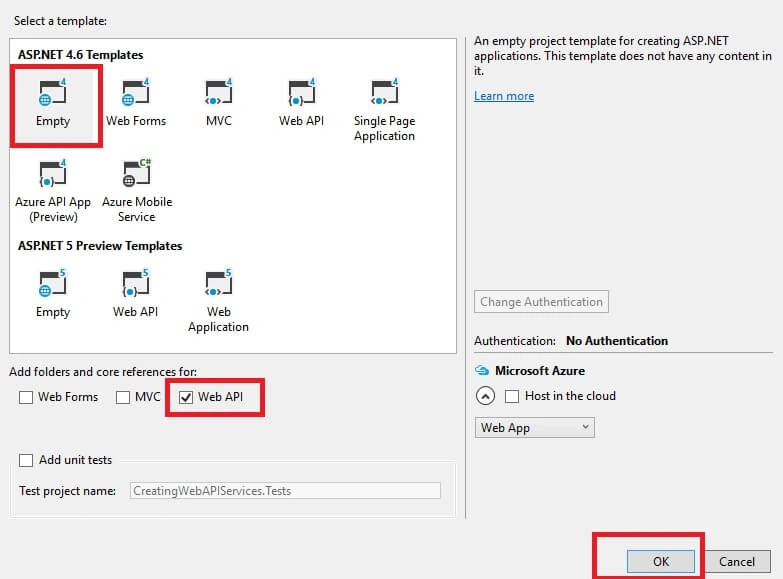
- Choose MVC empty application option and click OK.
- Now after adding the MVC project, the Solution Explorer will look like the following.
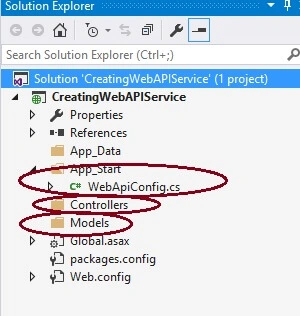
After creating the ASP.NET Web API project, the preceding folder structure and files are added into the project by default which are same as MVC project, so let us learn about them in brief as in the following.
- App_Start folder:This folder contains the application configuration details such as routing, authentication, filtering of URL and so on.
- Controller: This folder contains the controller and their methods. The controller is responsible for processing the user request and return output as a view.
- Models: This folder contains the entities or properties used to store the input values.
Step 2. Create Model Class.
Right click on Model folder in the created Web API application, give the class name EmpModel or as you wish and click on OK.
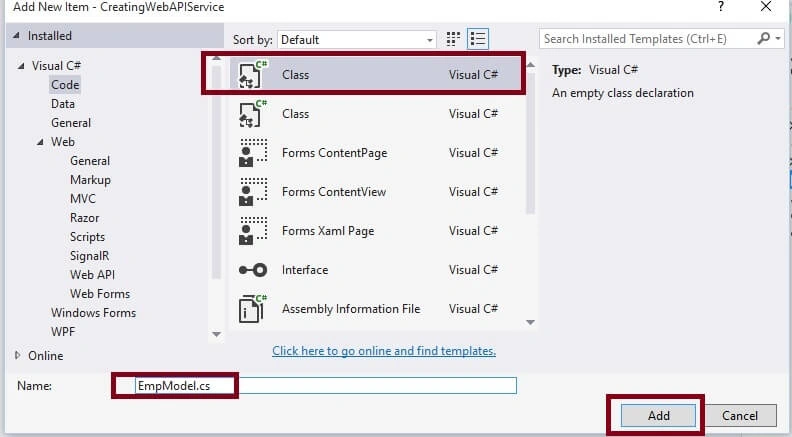
Now write the following code into the EmpModel Class.
EmpModel.cs
public class EmpModel
{
    public string Name { get; set; }
    public string City { get; set; }
}
Step 3. Add Web API Controller.
Right click on Controller folder in the created Web API application and Web API 2 Empty controller as in the following.
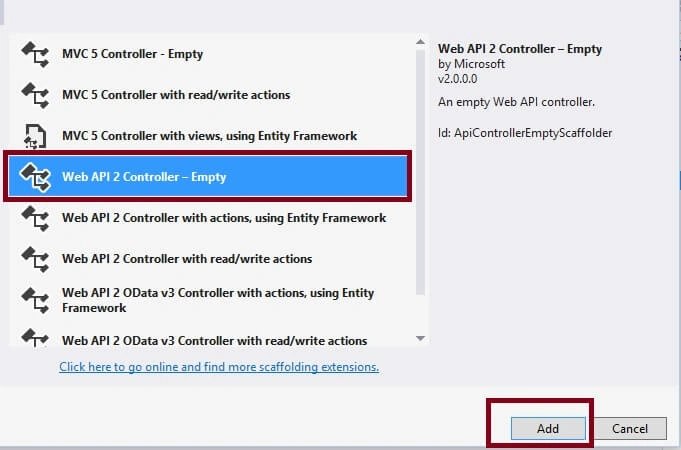
Now click on add and give the class name Home or as you wish and click OK as.

Now we have added Model class and web API controller class. Let's create the method into the HomeController class as in the following.
HomeController.cs
using System;
using System.Web.Http;

namespace CreatingWebAPIService.Controllers
{
    public class HomeController : ApiController
    {
        [HttpPost]
        public bool AddEmpDetails()
        {
            // write insert logic
            return true;
        }

        [HttpGet]
        public string GetEmpDetails()
        {
            return "Vithal Wadje";
        }

        [HttpDelete]
        public string DeleteEmpDetails(string id)
        {
            return "Employee details deleted having Id " + id;
        }

        [HttpPut]
        public string UpdateEmpDetails(string Name, string Id)
        {
            return "Employee details Updated with Name " + Name + " and Id " + Id;
        }
    }
}
In this above code we have created four methods for Insert, Update, Display and delete the records .The above web API controller methods defined with HTTP methods which are the following,
- GET: Get the resource (Records) from particular source such as SQL database.
- POST: Used to insert the records into the particular source such as SQL, Oracle database.
- PUT: Used to modify the resource or records.
- DELETE : Used to delete the specific resource or record from particular source.
Step 4. Run the application.
Now everything is ready lets run the application, it will throw the following error.
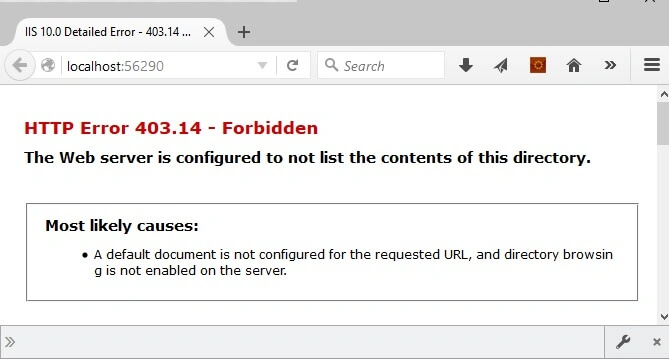
The reason of above error is we are not following the url structure which are set into the routing of web API application. The following is the default URL structure of ASP.NET Web API defined into the WebApiConfig.cs file.
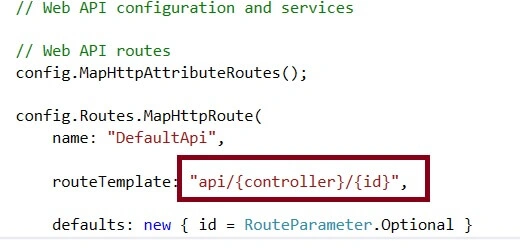
From the above routing structure, we can access the resource using url format i.e Base url+api+apicontroller. Unlike MVC controller the web controller by default access all the methods just using controller name. Now our service is ready. Let's test it using REST client browser extension because browser only supports Get request directly from URL not others .
Our REST Service URL will be http://localhost:56290/api/Home which is described as follows.
- http://localhost:56290: Is the base address of web API service, It can be different as per your server.
- Api: It is the used to differentiate between Web API controller and MVC controller request .
- Home: This is the Web API controller name.
Step 5. Testing Web API REST service using REST client.
Now let us test the application using REST client as.
POST
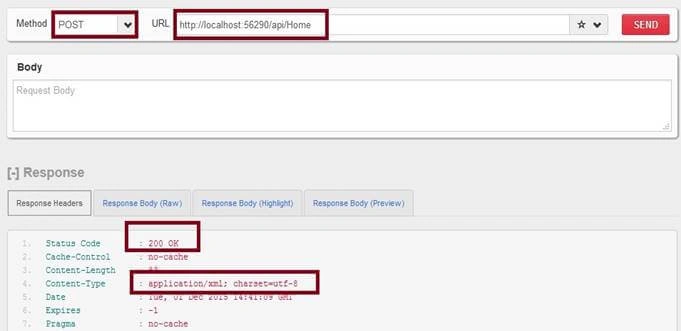
In the above image Web API REST Service, HTTP POST method returns the 200 Status code means REST service is successfully executed.
GET Method
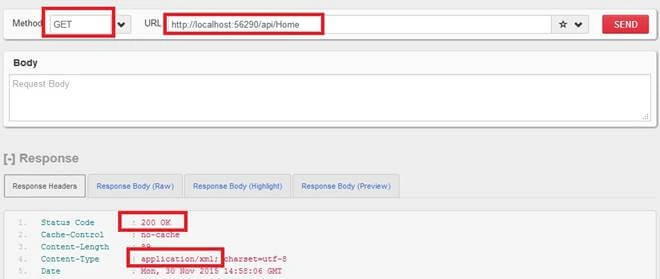
In the above image Web API REST Service, HTTP GET method returns the 200 Status code means REST service is successfully executed and return the XML format output.
Note
- The Web API REST service by default return the output as per browser default message header such as XML or JSON.
The above XML output return in Firefox browser., Now let's change the browser as IE, then output will return in JSON format as in the following,
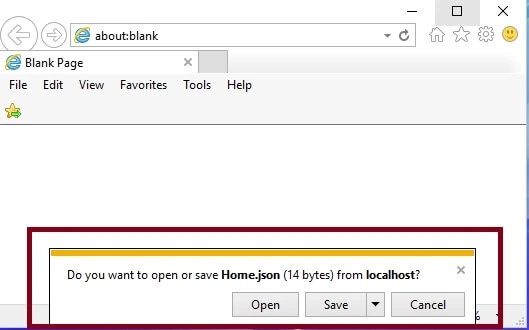
From the above output its clear that output format by default depend on browser message format header.
Delete Method
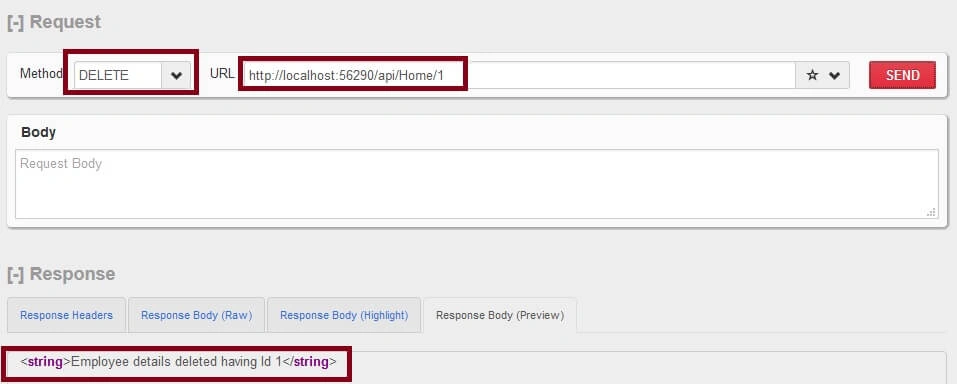
In the above image Web API REST Service, HTTP Delete method returns the 200 Status code means REST service is successfully executed and return the XML format output. I hope from the preceding examples we learned how to create Web API REST Service.
Note
- Download the Zip file of the sample application for a better understanding.
- In my next article, Introduction ASP.NET Web API we will learn what is Web API REST Service, When and where to use Web API REST Service.
Summary
I hope this article is useful for all readers. If you have any suggestions, then please mention it in the comment section.


Pritha ChatterjeePosted Jan 18, 2022, 4:04 PM
Hi there is no method in Web or WebAPi soluciton named as GetAllEmployees, can you please provide this method..its not there in zip files too.
Asht TPosted Nov 10, 2021, 6:30 AM
Explain webhooks programmatically using pay u biz gateway
Sujay AnandPosted Jan 22, 2020, 11:59 AM
How to pass the data as json using Web API?
Sunil BhagwatPosted Aug 24, 2019, 9:22 AM
How to test service pl give detail information. since due to not known I am not able to test above step 5 onwards download rclient extension for chrome and tested found 200 response thanks if any other type to test pl let me know
Jayesh SawantPosted Aug 18, 2019, 1:43 PM
Thanks vithal. Nice one
anil sunkesulaPosted May 23, 2018, 1:53 AM
Thanks Vithal, Nice Article
Gabi RojasPosted Dec 20, 2017, 5:16 PM
Donde estan los metodos de getallEmployed?
z xPosted Dec 8, 2017, 3:33 AM
Thank you. Really fast & handy tutorial.
Khaled KokahPosted Oct 12, 2017, 2:36 PM
Excellent and straight forward, well done.
V CPosted Jun 13, 2017, 11:00 PM
How can programmatically change connection string based on login? for example, there is a drop down to select "live", "staging", and "dev". When user select one of the option with login detail. it will connect and access to the right database.
Saravanakumar SekaranPosted May 21, 2017, 10:18 AM
Wow very nice article
Arvind ChourasiyaPosted Mar 6, 2017, 10:50 AM
Nice article. i have one doubt here URL contains localhost when we call this service from another application like android will it work or this is just demo web service you are showing
Prasad pPosted Mar 5, 2017, 11:06 AM
How can i consume this web api from a ajax html controls within a html page?
Prasad pPosted Mar 5, 2017, 11:06 AM
How to connect with SQL DB and access the records thats get request only? should i use sql user authentication or windows authentication?
Former memberPosted Feb 8, 2017, 3:34 AM
How to explain REST in interview because often interviewer ask to explain what is rest with example. can you please explain what is rest with easy example. thanks
Vithal WadjePosted Feb 28, 2016, 11:38 PM
Thanks
Asfend YarPosted Feb 27, 2016, 10:00 AM
I need your help !
Asfend YarPosted Feb 27, 2016, 10:00 AM
good
Vithal WadjePosted Dec 7, 2015, 10:34 PM
Yes agree ,john theisen
Guest UserPosted Dec 7, 2015, 7:27 PM
thanks for sharing, it's really important that developers understand the power that REST services can provide to your applications , if you are serious about developing line of business applications i think its the most important part of the app because it's where your business logic will live and by using REST you can open your system up to all kinds of users, the possibilities are unlimited, you can wrap legacy systems in REST services and open it up to other web and mobile developers, I've seen 30 year old IBM MAINFRAME legacy systems opened using web services ,helping replace the mainframe green screens with mobile apps using the web services, so thanks for sharing, its something good for all developers to understand
Vithal WadjePosted Dec 3, 2015, 12:36 AM
Thanks
Atul RawatPosted Dec 3, 2015, 12:00 AM
nice article sir
Vithal WadjePosted Dec 2, 2015, 4:25 AM
Thanks sir
Ankur MistryPosted Dec 2, 2015, 3:32 AM
Nice simple and easy
Vithal WadjePosted Dec 2, 2015, 2:59 AM
Thanks Humayun Kabir Mamun sir
Vithal WadjePosted Dec 2, 2015, 2:50 AM
Thanks Mukesh Kumar sir
Vithal WadjePosted Dec 2, 2015, 2:46 AM
Thanks Harshad Pansuriya sir
Manoj KulkarniPosted Dec 2, 2015, 1:17 AM
Nice article. Thank you for sharing
Humayun Kabir MamunPosted Dec 2, 2015, 12:56 AM
Nice...
Mukesh KumarPosted Dec 1, 2015, 11:59 PM
Nice Share
Harshad PansuriyaPosted Dec 1, 2015, 11:31 PM
Nice one
Vithal WadjePosted Dec 1, 2015, 11:29 PM
Thanks Nitin Pandit sir
Nitin PanditPosted Dec 1, 2015, 10:57 PM
great ....
Vithal WadjePosted Dec 1, 2015, 2:10 PM
Thanks john theisen sir
Guest UserPosted Dec 1, 2015, 1:52 PM
Thanks, I want to get started writing REST services, and this is a good way to get me started in the right direction thanks again
Vithal WadjePosted Dec 1, 2015, 1:45 PM
Thanks..
Ajay GandhiPosted Dec 1, 2015, 1:32 PM
Good one