(This is an update of the Blog article from ASP.NET 1.0 to ASP.NET 2.0). It also corrects the problem of displaying the most recent blog entry first)
Introduction
I still haven't gotten used to the name Blog. I can't even find it in the dictionary. For all I know its a coined word from the phrase "blind hog" or "blue fog". More likely it's coined from the words "bland pedagogue" or "blabbering monologue". If someone knows where this word originates, kindly add it to the blog you create from this article. Anyway, blogs seem to becoming pervasive and there is no end to people spilling their stream of consciousness onto the internet. This can make for some entertaining reading. If you want to search for a blog in a particular area of interest, check out Google's new blog search.
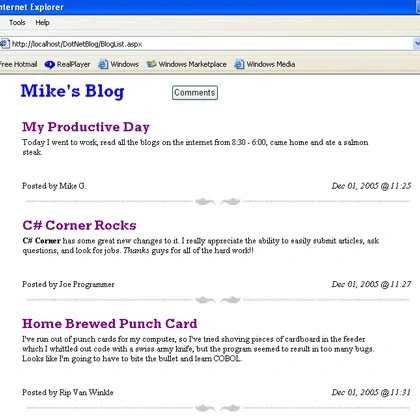
Figure 1 - ASP.NET Blog
Design
This is a very simple blog design consisting of two aspx web pages. BlogList.aspx contains the blogs, and BlogEntry.aspx allows you to enter your own blog comments. The blogs are persisted through a XML file which is read and written by a data set. Upon reading the data set, the codebehind builds the blogs dynamically using a System.Web.UI.WebControls.Table.
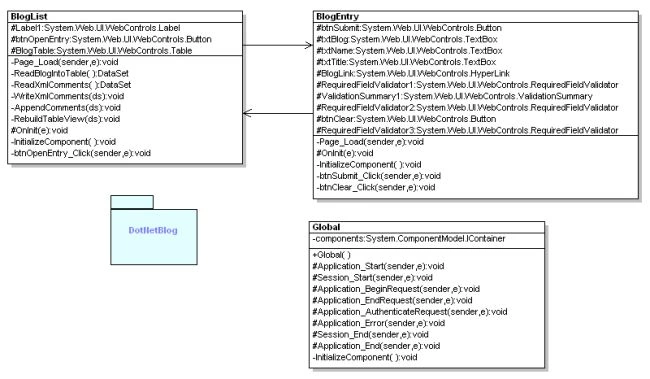
Figure 2 - UML Diagram of Blog Design Reverse Engineered using WithClass
Code
When the BlogList.aspx page starts, it calls the Page_Load method and initializes the page from the Comments.XML file and reads it into a data set. The Session["Changed"] hash is used to track where the Page_Load originated from. If the Page_Load was triggered by a hyperlink, you don't need to append anything to the data set. If the Page_Load was triggered by a redirect from the BlogEntry.aspx page, then the data set will append the Session["Title"], Session["Blog"], and Session["Name"] data to a new data set row.
Listing 1 - Upon initial entry into the BlogList.aspx page, load the Blog
|
private void Page_Load(object sender, System.EventArgs e)
{
// Put user code to initialize the page here
if (IsPostBack)
{
}
else
{
// initialize Blog and read it into a data set
data set ds = ReadBlogIntoTable();
// if we created a new entry, append it to the BlogList
// and save it to the xml file
if ( (bool)Session["Changed"])
{
AppendComments(ds);
WriteXmlComments(ds);
Session["Changed"] = false;
}
// Dynamically build the blog into a WebControls.Table
RebuildTableView(ds);
}
} |
The ReadBlogIntoTable method, reads the data set and data set structure from the Comments.Xml file. If there is no file to read, then it simply constructs the data set structure.
Our blog data set structure consists of 4 columns: Name, Time, Title, and Blog.
Listing 2 - Reads the Blog into a DataSet or creates an empty DataSet structure if the File doesn't exist
|
private DataSet ReadBlogIntoTable()
{
// construct the DataSet
DataSet ds = new DataSet();
// form the server path of the blog database
string filename = Server.MapPath(".\\") + "comments.xml";
// if the file exists, read the blog database into the data set
if (File.Exists(filename))
{
ds.ReadXml(filename);
}
else
{
// otherwise we need to create a new new in-memory
// database table from scratch
DataTable theTable = new DataTable("Comments");
ds.Tables.Add(theTable);
// add a name, time, title, and blog columns to our mock-up blog database
theTable.Columns.Add("Name", Type.GetType("System.String"));
theTable.Columns.Add("Time", Type.GetType("System.DateTime"));
theTable.Columns.Add("Title", Type.GetType("System.String"));
theTable.Columns.Add("Blog", Type.GetType("System.String"));
}
return ds;
} |
If someone just entered a blog, we need to append it to the DataSet. This is accomplished by the AppendComments method. This method simply creates a new DataRow and assigns the new blog values to each column in the row. The row is then added into the DataSet. Finally the DataSet is written out to the Comments.XML file.
Listing 3 - Appending a Blog to the DataSet
|
/// <summary>
/// Append comments to xml file
/// </summary>
/// <param name="ds"></param>
void AppendComments(DataSet ds)
{
// create a new DataRow
DataRow dr = ds.Tables["Comments"].NewRow();
// Populate the row from the text boxes filled by the user
dr[0] = Session["Name"];
dr[1] = DateTime.Now;
dr[2] = Session["Title"];
dr[3] = Session["Blog"];
// add the row to the DataSet
ds.Tables["Comments"].Rows.Add(dr);
// persist the blog in an xml file
WriteXmlComments(ds);
} |
Once the data set is updated, we can render the contents of the data set onto the web page. We use the RebuildTableView method to create and populate the WebControls.Table dynamically from the data set. In this method, we loop through each row of the DataTable in the data set and create a new table row on the page. We can then copy the data row data into the individual cells of the web table row.
Listing 4 - Building the Blog on the Web Page
|
void RebuildTableView(DataSet ds)
{
string previousUser = ""; // track previous
// loop through each row in the data set and create
// the row on the web page in a web table
foreach (DataRow dr in ds.Tables[0].Rows)
{
// add title (use a single column)
TableRow tr = new TableRow();
tr.Cells.Add(new TableCell());
// change title color slightly
tr.Cells[0].ForeColor = Color.Navy;
tr.Cells[0].Width = 400;
// make the text title big and purple
tr.Cells[0].Text = "<FONT SIZE=5 COLOR=purple FACE=Rockwell><B>" + dr[2].ToString() + "</B></FONT>";
this.BlogTable.Rows.Add(tr);
// add blog in a single column and span 2 columns
tr = new TableRow();
tr.Cells.Add(new TableCell());
tr.Cells[0].Width = 550;
tr.Cells[0].ColumnSpan = 2;
tr.Cells[0].Text = dr[3].ToString();
this.BlogTable.Rows.Add(tr);
// add user who posted and date (use two columns in the row - one for poster, one for date)
tr = new TableRow();
tr.Height = 50;
tr.HorizontalAlign = HorizontalAlign.Left;
tr.VerticalAlign = VerticalAlign.Bottom;
tr.Cells.Add(new TableCell());
tr.Cells.Add(new TableCell());
tr.Cells[0].Text = "Posted by " + dr[0].ToString();
DateTime postTime = DateTime.Parse(dr[1].ToString());
tr.Cells[1].HorizontalAlign = HorizontalAlign.Right;
tr.Cells[1].Text = String.Format("<i>{0}</i>", postTime.ToString("MMM dd, 2005 @ hh:mm"));
this.BlogTable.Rows.Add(tr);
// add separator graphic and span 2 columns
tr = new TableRow();
tr.Cells.Add(new TableCell());
tr.Cells.Add(new TableCell());
tr.Cells[0].ColumnSpan = 2;
this.BlogTable.Rows.Add(tr);
string imageFile = this.ResolveUrl( @".\images\separator.jpg");
System.Web.UI.WebControls.Image separator = new System.Web.UI.WebControls.Image();
separator.ImageUrl = imageFile;
separator.Width = 600;
separator.Height = 32;
separator.Visible = true;
tr.Cells[0].Controls.Add(separator);
tr.Cells[0].HorizontalAlign = HorizontalAlign.Center;
}
} |
Blog Entry
Figure 3 illustrates the blog entry screen (BlogEntry.aspx) which is activated by hitting the Comments button on the BlogList.aspx web page. This allows the user to enter their blog and append it to the main blog page.
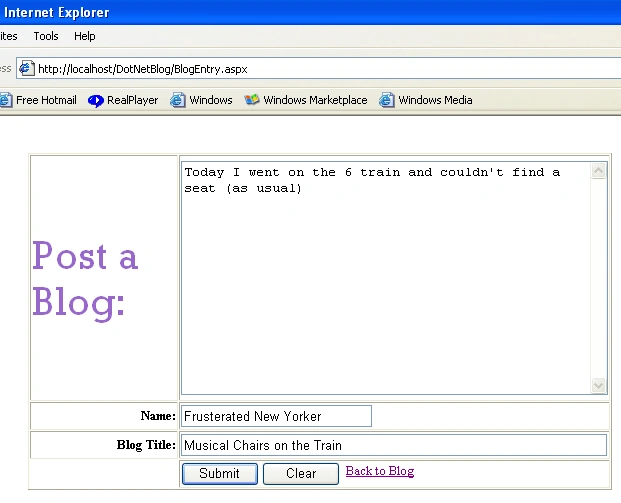
Figure 3 - Blog Entry Web Page
Upon hitting the Submit button, the Session map is filled with the values entered and then we redirect the page to the BlogList.aspx page. We also set a Changed boolean flag in the Session to indicate that we came from the BlogList.aspx page rather than from some other page.
Listing 5 - Submitting your blog
|
private void btnSubmit_Click(object sender, System.EventArgs e)
{
// record the blog data in the Session State
Session["Title"] = this.txtTitle.Text;
Session["Blog"] = this.txtBlog.Text;
Session["Name"] = this.txtName.Text;
Session["Changed"] = true;
// redirect back to the main blog page
this.Response.Redirect("BlogList.aspx");
} |
Conclusion
Blogs are an interesting way to share your thoughts with the rest of the world. This blog application should get you started for your own web site in ASP.NET. One additional feature that you may want to add would be a user login page that allows someone to become a 'member' of your blog. Also, note that I turned off the validation request switch in this application so that you can post html tags to your blog. However, be forewarned that this may not be the most secure choice, so you can turn the validation back on by changing this line in the config file.
<pages validateRequest="false" />
to
<pages validateRequest="true" />
Enjoy creating your blogs, but don't get blogged down in the details, simply use this web application compliments of the power of ASP.NET!


Evelyn ChurchPosted Mar 25, 2022, 2:42 PM
Object-Oriented Programming languages like C# and VB.NET are used to create ASP.NET. Object-Oriented Programming (OOP) provides a framework and methods for reusing and organizing code. Read More https://mmcgbl.com/what-is-c-sharp-development/
Ritika GoswamiPosted Aug 5, 2019, 3:08 AM
Nice good information such helpful blog to read keep sharing more thanks for it https://www.exltech.in/dot-net-training.html
Anna HarrisPosted Dec 10, 2018, 6:31 AM
Nice informative post. Thanks for sharing.
Dhanik SahniPosted Dec 16, 2015, 7:11 AM
Perfect way to start
Anil KumarPosted Sep 22, 2015, 4:31 AM
Thanks..
Vladimir BogoevskiPosted Jul 21, 2015, 4:53 AM
Thank you Mike, can you show me how to comment on a blog post?
Subhasis DasPosted Jul 13, 2015, 11:10 AM
Thanks a lot. It is working fine. :)
Maheswaran BPosted Dec 11, 2014, 8:29 AM
when I run this solution I got the error port"1735" is in use..plz help me to resolve the probs..Thanks
Kanwaldeep KaurPosted Mar 17, 2014, 1:21 PM
Its useful :)
Bhushan GuptaPosted Mar 10, 2014, 8:12 AM
good
George CokerPosted Jan 24, 2014, 8:49 AM
How do you comment on a blog?
Abbas AlEryaniPosted Jan 19, 2014, 12:21 PM
how to add comments?
ugur yildirimPosted Jan 4, 2014, 9:24 AM
so good
Janice SheffieldPosted Aug 11, 2013, 6:30 PM
here is the error: 'dataType' argument cannot be null., the web host customer server said they couldn't help unless I know what type of database I'm creating.
Janice SheffieldPosted Aug 11, 2013, 6:29 PM
what type of database does this create? Microsoft sql server or what, I'm getting errors while running it live. This is part of the error:
Shawn RhealPosted Jun 30, 2013, 6:18 PM
I get an error when I want to go to the bloglist with out posting something it says Object reference not set to an instance of an object on the if((bool)Session["Changed"]) it requires that I post something to read the blog
Jodey GristPosted May 23, 2013, 5:11 AM
I always thought the word blog came from web log as it was originally a place on the web to log your thoughts about anything.
bijan gbnPosted May 3, 2013, 2:16 AM
Thank you Mike...purely useful for a beginner like me !
Ganesh PateeditedPosted Mar 19, 2013, 3:06 AMEdited Mar 19, 2013, 3:08 AM
when i build program build success, but when i run this it showing URL "localhost:2918/DotnetBlog/BlogEntry.aspx" but not display anything.."New Tab" is coming. Please reply..
Philip JohnsonPosted Jan 28, 2013, 6:31 AM
This is lovely, thank you very much.
bharathi neditedPosted Dec 28, 2012, 3:34 AMEdited Dec 28, 2012, 3:34 AM
please extend the blog to give reply and delete the particular posts and create account for the blog or community... please do implement i need it for my practice purpose
Akshay JadhavPosted Dec 27, 2012, 2:07 AM
The source code link is not available.
Sylvania StephensPosted Oct 29, 2012, 12:34 PM
Good article, thanks for the zip, works good! Nice chuckle from the sample blog posts :)
Shikha GroverPosted Sep 8, 2012, 9:49 AM
can you please tell what is blogtable and writexmlcomments() and code for it?
Jugdeep SidanaeditedPosted Sep 2, 2012, 2:31 PMEdited Sep 2, 2012, 2:31 PM
Thanks
Deepak KumarPosted Jul 25, 2012, 1:19 AM
Thanks for Giving The idea for creating blog.
Deepak KumarPosted Jul 25, 2012, 1:19 AM
Thanks for Giving The idea for creating blog.
denver masundaPosted Apr 30, 2012, 7:38 PM
this is really good im trying to build a small blog for my site www.yoopica.com
aditya kumarPosted Apr 24, 2012, 9:33 AM
uhbnyufgguhjkl
Ankush GuptaPosted Apr 22, 2012, 7:53 AM
It Helps a lot....Thanks .. :)
saurabh mehtaPosted Mar 5, 2012, 9:13 AM
Error 2 It is an error to use a section registered as allowDefinition='MachineToApplication' beyond application level. This error can be caused by a virtual directory not being configured as an application in IIS. F:\project\blog\Backup\New folder\Web.config 40 how to get rid of this?
saqib haidrePosted Oct 27, 2011, 12:56 AM
ddd
Vimlendra TripathiPosted Sep 20, 2011, 8:12 AM
Hi, I am facing problem to download the source code. Can you send me the source code on my mail address [email protected]. Thanks
cherry singhPosted Apr 20, 2011, 10:24 AM
hi thanks, but i want to create html page and it will be always new one
Siyabulela MnyamanaPosted Apr 15, 2011, 6:28 AM
when I create a blog on VS 2010 using this your code, i get a error. if ( (bool)Session["Changed"])**on this line***("Object reference not set to an instance of an object") { AppendComments(ds); WriteXmlComments(ds); Session["Changed"] = false; }
Ashish gargPosted Mar 25, 2011, 4:29 AM
i read your code of blogs but u did not tell how to create a data base for blog
ernest kumarPosted Feb 11, 2011, 12:46 AM
hi pls tel me the procedure to connect my sap.net page with sqlserver2000 . i am using visual studio 2005 . i have placed sqldata source in my design page and made connections , when i test the connection it displays the table which i wanted . but when i run the asp page it shows error . pls tel what to do.
abdhesh mishraPosted Jan 5, 2011, 6:19 AM
thank you very much for post.
anuj vermaPosted Dec 27, 2010, 7:35 AM
i have need search engine code please pos me
sri nishaPosted Dec 13, 2010, 1:38 AM
This is really a different post. I felt very surprised to see because the content you explained is really good.But one thing i need to suggest is, i need definition for WriteXMLComments. Apart from this, there is no doubt your post is very informative. http://godwinsblog.cdtech.in/2010/12/requested-page-cannot-be-accessed.html
Venkatesh SPosted Nov 30, 2010, 9:49 AM
Can u provide the source code for the Windows Azure and also Telerik... tools
wew TimmPosted Oct 28, 2010, 5:29 PM
Hi. I'm a student at durban university of technology in south afrca. I'm currently working on a project that is requiring a blog on asp.net c#. It'll be a great pleasure if can help me with how to do it. regards Inathi
Vicky KanojiyaPosted Sep 9, 2010, 10:27 AM
thanks a lot mikeeeeee
anu anuPosted Jul 6, 2010, 7:35 AM
Its working Mr.Mike thanks a lot its amazing...
mahesh shitolePosted May 4, 2010, 7:47 AM
Nice , its very helpful !!!
amit kumarPosted May 12, 2009, 3:59 AM
It is realy helpful for me.
Former memberPosted Apr 27, 2009, 12:13 PM
can anyone sent me the codes for this blog? [email protected] thanks so much
DotNetGuts DNGPosted Nov 16, 2008, 8:31 AM
Good Information. Thanks, DotNetGuts http://dotnetguts.blogspot.com
maha lakshmiPosted Mar 19, 2008, 8:57 AM
Hi mike can u mail the code for writexmlcomments() to [email protected] please?...i am unable to download it
Kaushal SinghPosted Mar 8, 2008, 6:50 AM
Can u send me the WriteXMLComments function at [email protected] Regards JasArora
sanjeev kumarPosted Feb 20, 2008, 3:42 AM
hi
sandy fghPosted Jan 14, 2008, 7:04 AM
Hi great example thanks for that is it possible to view the xml dump at all? Thanks
soumya p nPosted Dec 17, 2007, 2:50 AM
where is the WriteXmlComments(ds) function defined...???
JohnyPosted Aug 28, 2007, 7:28 AM
I would appreciate if anyone can send me the complete code. my email id is [email protected]. Thanks tho. Great tutorial, XML is fun ! :)
Nauman IkrameditedPosted Jul 12, 2007, 3:35 AMEdited Jul 12, 2007, 3:39 AM
Hi i am Nauman. I can face a probelm when I can download the source code. Is it possible to send me the source code on my mail address. I am very thankfull to you. My mail address is [email protected]
josh bolesPosted Jul 8, 2006, 2:58 PM
This all looks very good, however, it appears to be missing a definition for WriteXMLComments. i don't see this function anywhere.
M MikePosted Apr 4, 2006, 5:30 PM
Can u show up the blog entries in the reverse in which the latest blog gets on the top. Can u modify the code please...
Douglas BasseditedPosted Jan 21, 2006, 4:14 PMEdited Dec 18, 2006, 5:30 AM
I noticed the downloadable files. There is a typo in the article listings, saying "data set" when it should say "DataSet"
Douglas BassPosted Jan 21, 2006, 4:03 PM
Can you provide the code for WriteXMLComments? Am I correct in assuming that I should just create the design part you've provided myself?