
Introduction
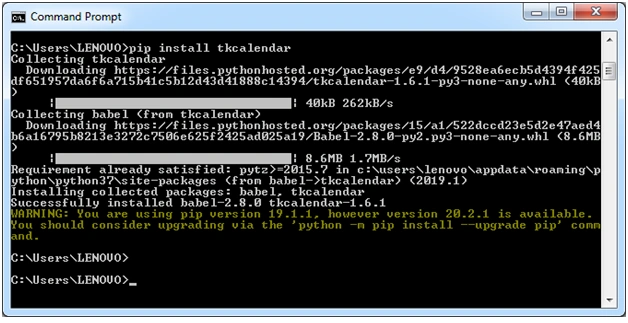
This is a simple CRUD(Create, Retrieve, Update, and Delete) database record desktop application. Its name is Student Management System. A record with Student’s FirstName, LastName, ContactNo, City, State, and date of birth are inserted into a table named student_master in the student database. MySQL Database Server. Python 3.6, Tkinter, GUI builder, and MySQL-connector are used. For choosing the date of birth, the tkcalendar widget is used. Installation of the tkcalender widget from the command prompt is displayed below.

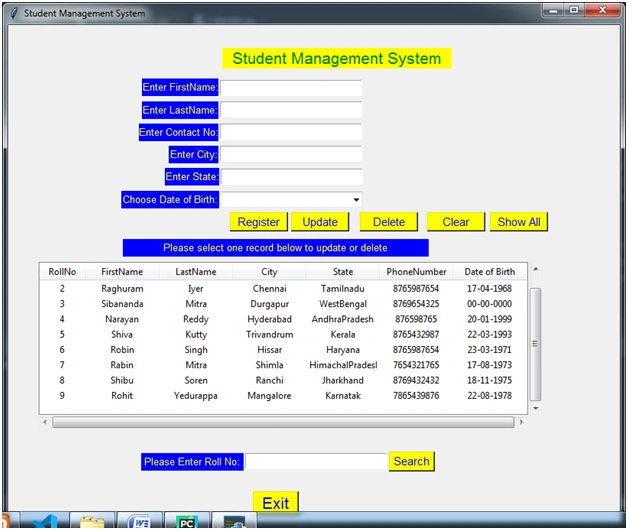
The name of the Python code file is StudentManager.py. After executing the file, the application window is displayed below. In that window, a new student record can be added. All the added records in MySQL database table are displayed in a Tkinter Treeview widget, shown below.
Inserting Student Record
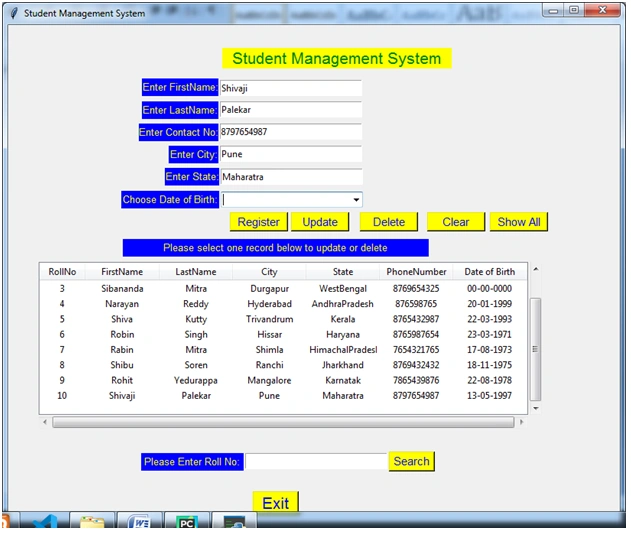
All the student data is filled up and the date of birth is chosen from a drop-down calendar widget, as shown below, and the register button is clicked to add the record to the database.

The Student Record is inserted successfully and displayed below.
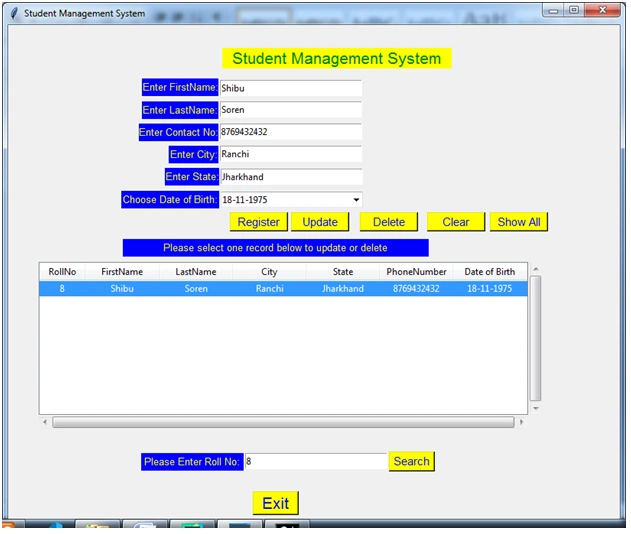
If the inserted record state name is spelled wrong or we want to change the date of birth, the record must be updated. Please select the record in the displayed widget by clicking it. All data is displayed in the above boxes to update and delete the record.
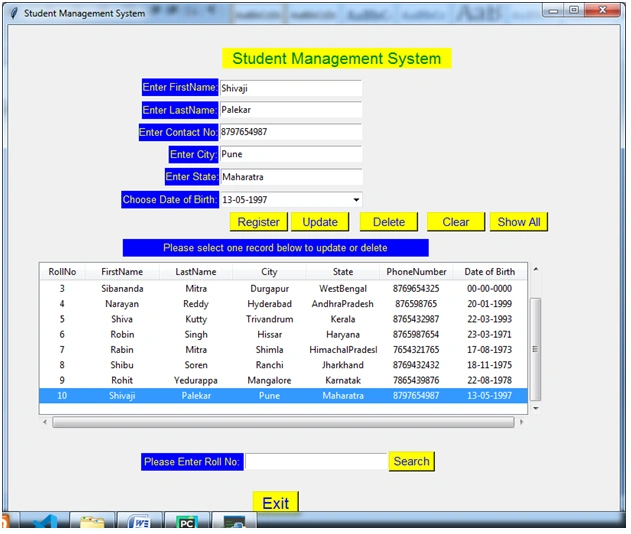
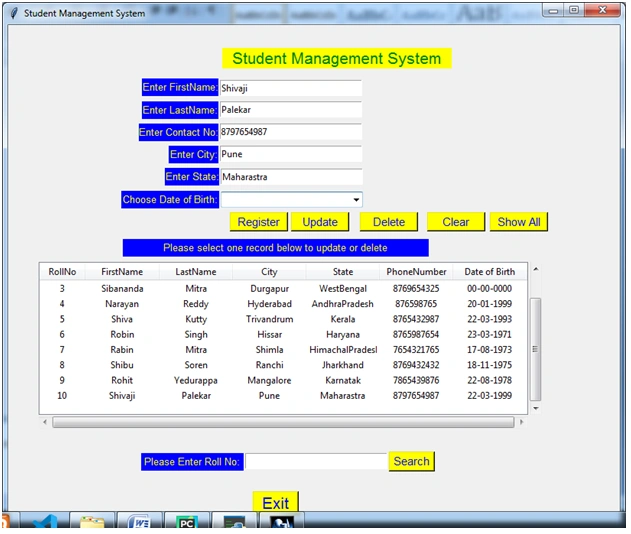
Please edit the fields displayed in boxes and update them by clicking the Update button.

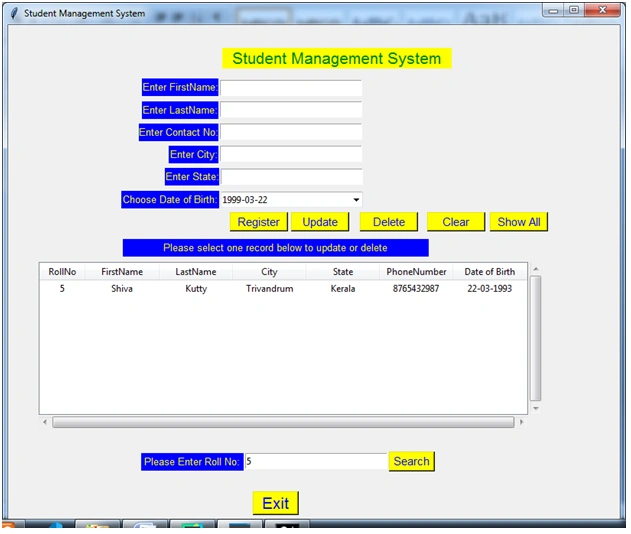
A student record can be searched by entering roll no and clicking the search button as shown above.

To display all records, please click the Show All button.
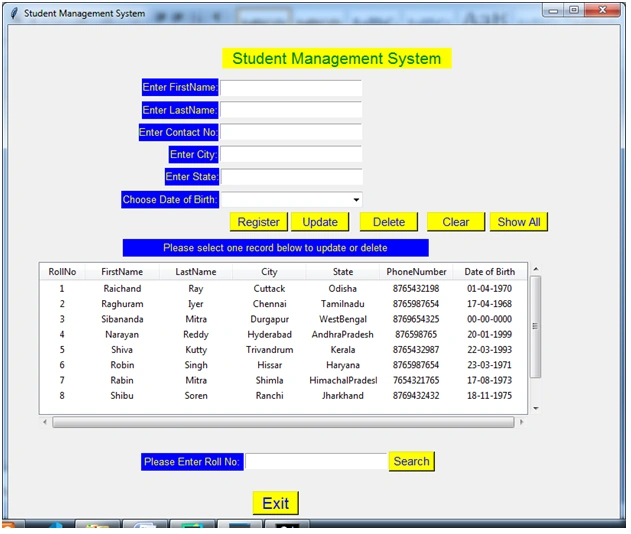

To Delete a record, select the record in the display widget and click the delete button.

StudentManager.py Code
- from tkcalendar import Calendar, DateEntry
- import tkinter as tk
- import tkinter.messagebox as mb
- import tkinter.ttk as ttk
- ## Connecting to the database
- ## importing 'mysql.connector' for connection to mysql database
- import mysql.connector
- ## connecting to the database using 'connect()' method
- ## it takes 3 required parameters 'host', 'user', 'password'
- #Please change user and password values to your
- #user and password values to connect to MySQL Database server
- db_connection = mysql.connector.connect(
- host="localhost",
- user="raichand70",
- password="1America")
- # creating database_cursor to perform SQL operation
- db_cursor = db_connection.cursor(buffered=True) # "buffered=True".makes db_cursor.row_count return actual number of records selected otherwise would return -1
- class StudentApp(tk.Tk):
- def __init__(self):
- super().__init__()
- self.title("Student Management System")
- self.geometry("800x650+351+174")
- self.lblTitle = tk.Label(self, text="Student Management System", font=("Helvetica", 16), bg="yellow", fg="green")
- self.lblFName = tk.Label(self, text="Enter FirstName:", font=("Helvetica", 10), bg="blue", fg="yellow")
- self.lblLName = tk.Label(self, text="Enter LastName:", font=("Helvetica", 10), bg="blue", fg="yellow")
- self.lblContactNo = tk.Label(self, text="Enter Contact No:", font=("Helvetica", 10), bg="blue", fg="yellow")
- self.lblCity = tk.Label(self, text="Enter City:", font=("Helvetica", 10), bg="blue", fg="yellow")
- self.lblState = tk.Label(self, text="Enter State:", font=("Helvetica", 10), bg="blue", fg="yellow")
- self.lblDOB = tk.Label(self, text="Choose Date of Birth:", font=("Helvetica", 10), bg="blue", fg="yellow")
- self.lblSelect = tk.Label(self, text="Please select one record below to update or delete", font=("Helvetica", 10), bg="blue", fg="yellow")
- self.lblSearch = tk.Label(self, text="Please Enter Roll No:",font=("Helvetica", 10), bg="blue", fg="yellow")
- self.entFName = tk.Entry(self)
- self.entLName = tk.Entry(self)
- self.entContact = tk.Entry(self)
- self.entCity = tk.Entry(self)
- self.entState = tk.Entry(self)
- self.calDOB = DateEntry(self, width=12, background='darkblue',
- foreground='white', borderwidth=2, year=1950,locale='en_US', date_pattern='y-mm-dd')
- #self.entDOB = tk.Entry(self)
- self.entSearch = tk.Entry(self)
- self.btn_register = tk.Button(self, text="Register", font=("Helvetica", 11), bg="yellow", fg="blue",
- command=self.register_student)
- self.btn_update = tk.Button(self,text="Update",font=("Helvetica",11),bg="yellow", fg="blue",command=self.update_student_data)
- self.btn_delete = tk.Button(self, text="Delete", font=("Helvetica", 11), bg="yellow", fg="blue",
- command=self.delete_student_data)
- self.btn_clear = tk.Button(self, text="Clear", font=("Helvetica", 11), bg="yellow", fg="blue",
- command=self.clear_form)
- self.btn_show_all = tk.Button(self, text="Show All", font=("Helvetica", 11), bg="yellow", fg="blue",
- command=self.load_student_data)
- self.btn_search = tk.Button(self, text="Search", font=("Helvetica", 11), bg="yellow", fg="blue",
- command=self.show_search_record)
- self.btn_exit = tk.Button(self, text="Exit", font=("Helvetica", 16), bg="yellow", fg="blue",command=self.exit)
- columns = ("#1", "#2", "#3", "#4", "#5", "#6", "#7")
- self.tvStudent= ttk.Treeview(self,show="headings",height="5", columns=columns)
- self.tvStudent.heading('#1', text='RollNo', anchor='center')
- self.tvStudent.column('#1', width=60, anchor='center', stretch=False)
- self.tvStudent.heading('#2', text='FirstName', anchor='center')
- self.tvStudent.column('#2', width=10, anchor='center', stretch=True)
- self.tvStudent.heading('#3', text='LastName', anchor='center')
- self.tvStudent.column('#3',width=10, anchor='center', stretch=True)
- self.tvStudent.heading('#4', text='City', anchor='center')
- self.tvStudent.column('#4',width=10, anchor='center', stretch=True)
- self.tvStudent.heading('#5', text='State', anchor='center')
- self.tvStudent.column('#5',width=10, anchor='center', stretch=True)
- self.tvStudent.heading('#6', text='PhoneNumber', anchor='center')
- self.tvStudent.column('#6', width=10, anchor='center', stretch=True)
- self.tvStudent.heading('#7', text='Date of Birth', anchor='center')
- self.tvStudent.column('#7', width=10, anchor='center', stretch=True)
- #Scroll bars are set up below considering placement position(x&y) ,height and width of treeview widget
- vsb= ttk.Scrollbar(self, orient=tk.VERTICAL,command=self.tvStudent.yview)
- vsb.place(x=40 + 640 + 1, y=310, height=180 + 20)
- self.tvStudent.configure(yscroll=vsb.set)
- hsb = ttk.Scrollbar(self, orient=tk.HORIZONTAL, command=self.tvStudent.xview)
- hsb.place(x=40 , y=310+200+1, width=620 + 20)
- self.tvStudent.configure(xscroll=hsb.set)
- self.tvStudent.bind("<<TreeviewSelect>>", self.show_selected_record)
- self.lblTitle.place(x=280, y=30, height=27, width=300)
- self.lblFName.place(x=175, y=70, height=23, width=100)
- self.lblLName.place(x=175, y=100, height=23, width=100)
- self.lblContactNo.place(x=171, y=129, height=23, width=104)
- self.lblCity.place(x=210, y=158, height=23, width=65)
- self.lblState.place(x=205, y=187, height=23, width=71)
- self.lblDOB.place(x=148, y=217, height=23, width=128)
- self.lblSelect.place(x=150, y=280, height=23, width=400)
- self.lblSearch.place(x=174, y=560, height=23, width=134)
- self.entFName.place(x=277, y=72, height=21, width=186)
- self.entLName.place(x=277, y=100, height=21, width=186)
- self.entContact.place(x=277, y=129, height=21, width=186)
- self.entCity.place(x=277, y=158, height=21, width=186)
- self.entState.place(x=278, y=188, height=21, width=186)
- self.calDOB.place(x=278, y=218, height=21, width=186)
- self.entSearch.place(x=310, y=560, height=21, width=186)
- self.btn_register.place(x=290, y=245, height=25, width=76)
- self.btn_update.place(x=370, y=245, height=25, width=76)
- self.btn_delete.place(x=460, y=245, height=25, width=76)
- self.btn_clear.place(x=548, y=245, height=25, width=76)
- self.btn_show_all.place(x=630, y=245, height=25, width=76)
- self.btn_search.place(x=498, y=558, height=26, width=60)
- self.btn_exit.place(x=320, y=610, height=31, width=60)
- self.tvStudent.place(x=40, y=310, height=200, width=640)
- self.create_table()
- self.load_student_data()
- def clear_form(self):
- self.entFName.delete(0, tk.END)
- self.entLName.delete(0, tk.END)
- self.entContact.delete(0, tk.END)
- self.entCity.delete(0, tk.END)
- self.entState.delete(0, tk.END)
- self.calDOB.delete(0, tk.END)
- def exit(self):
- MsgBox = mb.askquestion('Exit Application', 'Are you sure you want to exit the application', icon='warning')
- if MsgBox == 'yes':
- self.destroy()
- def delete_student_data(self):
- MsgBox = mb.askquestion('Delete Record', 'Are you sure! you want to delete selected student record', icon='warning')
- if MsgBox == 'yes':
- if db_connection.is_connected() == False:
- db_connection.connect()
- db_cursor.execute("use Student") # Interact with Student Database
- # deleteing selected student record
- Delete = "delete from student_master where RollNo='%s'" % (roll_no)
- db_cursor.execute(Delete)
- db_connection.commit()
- mb.showinfo("Information", "Student Record Deleted Succssfully")
- self.load_student_data()
- self.entFName.delete(0, tk.END)
- self.entLName.delete(0, tk.END)
- self.entContact .delete(0, tk.END)
- self.entCity.delete(0, tk.END)
- self.entState.delete(0, tk.END)
- self.calDOB.delete(0, tk.END)
- def create_table(self):
- if db_connection.is_connected() == False:
- db_connection.connect()
- # executing cursor with execute method and pass SQL query
- db_cursor.execute("CREATE DATABASE IF NOT EXISTS Student") # Create a Database Named Student
- db_cursor.execute("use Student") # Interact with Student Database
- # creating required tables
- db_cursor.execute("create table if not exists Student_master(Id INT(10) NOT NULL PRIMARY KEY AUTO_INCREMENT,rollno INT(15),fname VARCHAR(30),lname VARCHAR(30),city VARCHAR(20),state VARCHAR(30),mobileno VARCHAR(10),dob date)AUTO_INCREMENT=1")
- db_connection.commit()
- def register_student(self):
- if db_connection.is_connected() == False:
- db_connection.connect()
- fname = self.entFName.get() # Retrieving entered first name
- lname = self.entLName.get() # Retrieving entered last name
- contact_no = self.entContact.get() # Retrieving entered contact number
- city = self.entCity.get() # Retrieving entered city name
- state = self.entState.get() # Retrieving entered state name
- dob = self.calDOB.get() # Retrieving choosen date
- # validating Entry Widgets
- if fname == "":
- mb.showinfo('Information', "Please Enter Firstname")
- self.entFName.focus_set()
- return
- if lname == "":
- mb.showinfo('Information', "Please Enter Lastname")
- self.entLName.focus_set()
- return
- if contact_no == "":
- mb.showinfo('Information', "Please Enter Contact Number")
- self.entContact.focus_set()
- return
- if city == "":
- mb.showinfo('Information', "Please Enter City Name")
- self.entCity.focus_set()
- return
- if state == "":
- mb.showinfo('Information', "Please Enter State Name")
- self.entState.focus_set()
- return
- if dob == "":
- mb.showinfo('Information', "Please Choose Date of Birth")
- self.calDOB.focus_set()
- return
- # Inserting record into student_master table of student database
- try:
- rollno =int(self.fetch_max_roll_no())
- print("New Student Id: " + str(rollno))
- query2 = "INSERT INTO student_master (rollno, fname,lname,city,state,mobileno,dob) VALUES (%s, %s,%s, %s,%s, %s, %s)"
- # implement query Sentence
- db_cursor.execute(query2, (rollno, fname, lname, city, state, contact_no,dob))
- mb.showinfo('Information', "Student Registration Successfully")
- # Submit to database for execution
- db_connection.commit()
- self.load_student_data()
- except mysql.connector.Error as err:
- print(err)
- # Rollback in case there is any error
- db_connection.rollback()
- mb.showinfo('Information', "Data insertion failed!!!")
- finally:
- db_connection.close()
- def fetch_max_roll_no(self):
- if db_connection.is_connected() == False:
- db_connection.connect()
- db_cursor.execute("use Student") # Interact with Student Database
- rollno = 0
- query1 = "SELECT rollno FROM student_master order by id DESC LIMIT 1"
- # implement query Sentence
- db_cursor.execute(query1) # Retrieving maximum student id no
- print("No of Record Fetched:" + str(db_cursor.rowcount))
- if db_cursor.rowcount == 0:
- rollno = 1
- else:
- rows = db_cursor.fetchall()
- for row in rows:
- rollno = row[0]
- rollno = rollno + 1
- print("Max Student Id: " + str(rollno))
- return rollno
- def show_search_record(self):
- if db_connection.is_connected() == False:
- db_connection.connect()
- s_roll_no = self.entSearch.get() # Retrieving entered first name
- print(s_roll_no)
- if s_roll_no == "":
- mb.showinfo('Information', "Please Enter Student Roll")
- self.entSearch.focus_set()
- return
- self.tvStudent.delete(*self.tvStudent.get_children()) # clears the treeview tvStudent
- # Inserting record into student_master table of student database
- db_cursor.execute("use Student") # Interact with Bank Database
- sql = "SELECT rollno,fname,lname,city,state,mobileno,date_format(dob,'%d-%m-%Y') FROM student_master where rollno='" + s_roll_no + "'"
- db_cursor.execute(sql)
- total = db_cursor.rowcount
- #if total ==0:
- #mb.showinfo("Info", "Nothing To Display,Please add data")
- #return
- print("Total Data Entries:" + str(total))
- rows = db_cursor.fetchall()
- RollNo = ""
- First_Name = ""
- Last_Name = ""
- City = ""
- State = ""
- Phone_Number = ""
- DOB =""
- for row in rows:
- RollNo = row[0]
- First_Name = row[1]
- Last_Name = row[2]
- City = row[3]
- State = row[4]
- Phone_Number = row[5]
- DOB = row[6]
- print( Phone_Number)
- self.tvStudent.insert("", 'end', text=RollNo, values=(RollNo, First_Name, Last_Name, City, State, Phone_Number,DOB))
- def show_selected_record(self, event):
- self.clear_form()
- for selection in self.tvStudent.selection():
- item = self.tvStudent.item(selection)
- global roll_no
- roll_no,first_name,last_name,city,state,contact_no,dob = item["values"][0:7]
- self.entFName.insert(0, first_name)
- self.entLName.insert(0, last_name)
- self.entCity.insert(0, city)
- self.entState .insert(0, state)
- self.entContact.insert(0, contact_no)
- self.calDOB.insert(0, dob)
- return roll_no
- def update_student_data(self):
- if db_connection.is_connected() == False:
- db_connection.connect()
- print("Updating")
- db_cursor.execute("use Student") # Interact with Student Database
- First_Name = self.entFName.get()
- Last_Name = self.entLName.get()
- Phone_Number = self.entContact.get()
- City = self.entCity.get()
- State = self.entState.get()
- DOB = self.calDOB.get()
- print( roll_no)
- Update = "Update student_master set fname='%s', lname='%s', mobileno='%s', city='%s', state='%s', dob='%s' where rollno='%s'" % (
- First_Name, Last_Name, Phone_Number, City, State,DOB, roll_no)
- db_cursor.execute(Update)
- db_connection.commit()
- mb.showinfo("Info", "Selected Student Record Updated Successfully ")
- self.load_student_data()
- def load_student_data(self):
- if db_connection.is_connected() == False:
- db_connection.connect()
- self.calDOB.delete(0, tk.END)#clears the date entry widget
- self.tvStudent.delete(*self.tvStudent.get_children()) # clears the treeview tvStudent
- # Inserting record into student_master table of student database
- db_cursor.execute("use Student") # Interact with Bank Database
- sql = "SELECT rollno,fname,lname,city,state,mobileno,date_format(dob,'%d-%m-%Y') FROM student_master"
- db_cursor.execute(sql)
- total = db_cursor.rowcount
- #if total ==0:
- #mb.showinfo("Info", "Nothing To Display,Please add data")
- #return
- print("Total Data Entries:" + str(total))
- rows = db_cursor.fetchall()
- RollNo = ""
- First_Name = ""
- Last_Name = ""
- City = ""
- State = ""
- Phone_Number = ""
- DOB =""
- for row in rows:
- RollNo = row[0]
- First_Name = row[1]
- Last_Name = row[2]
- City = row[3]
- State = row[4]
- Phone_Number = row[5]
- DOB = row[6]
- self.tvStudent.insert("", 'end', text=RollNo, values=(RollNo, First_Name, Last_Name, City, State, Phone_Number,DOB))
- if __name__ == "__main__":
- app = StudentApp()
- app.mainloop()
References
- Tkinter GUI application development cookbook by Alejandro Rodas de Paz of Packt Publications
- Home and Learn website https://www.homeandlearn.uk/index.html for learning python language.
- Stackoverflow.com
Ivo RomeroPosted Jul 23, 2021, 4:28 PM
Thanks is a Good Code
Raichand RayPosted Jul 10, 2021, 8:32 AM
Download the attached WinRAR file unzip it then run the python file.
george tzPosted Jul 5, 2021, 6:50 PM
Can you correct the spacing so i can copy paste it and run it?
Raichand RayPosted Jun 14, 2021, 4:56 PM
Search the error in google. you would certainly find a solution.
Atallah htyPosted Jun 12, 2021, 10:19 AM
I am using python 3.9.5 64 bit
Atallah htyPosted Jun 12, 2021, 10:18 AM
No connection could be made because the target machine actively refused it
Roshan RathodPosted Aug 16, 2020, 12:39 PM
Nice Ray..