

Welcome to my blog. I assume that you are working in Office UI Fabric React components and you want to create a horizontal menu component in your React solution. Unfortunately, the normal Nav component in the Office UI Fabric doesn’t give you this option. And somehow you reached this post by searching for a solution to implement the horizontal menu. You are in the right place then. Let’s skip the talking and jump into the code. I hope you will like this article. Let’s start coding.
BackgroundAs I mentioned in the introduction, there is no option to make a horizontal menu if you are using UI Fabric Nav component. And I also ended up in spending some time playing with the Nav component to make it horizontal, but it wasn’t working as expected. And I found a different way to achieve the same, hereby I am sharing it as I couldn’t find such a solution on the internet.
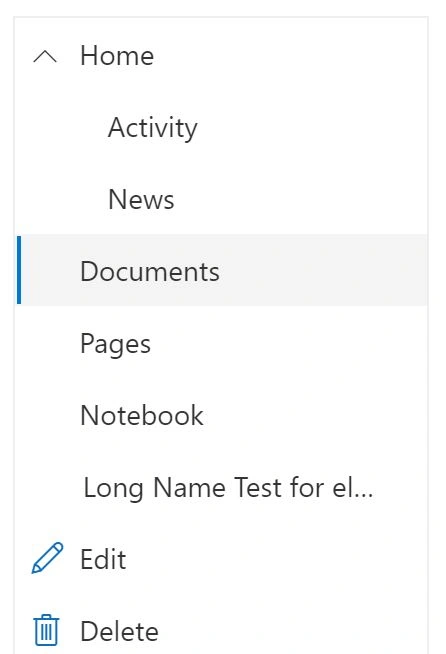
Nav menu vertical
I believe that you have already created your solution and you are just trying to create a new Menu web part in the existing solution. If you haven’t created a solution, you can create one using the below command.
MenuWebPart.ts
Once you have created a new web part, you can see that there is a file called MenuWebPart.ts. This is the file we are going to edit first. You can see the content of that file below.
- import * as React from 'react';
- import * as ReactDom from 'react-dom';
- import {
- Version
- } from '@microsoft/sp-core-library';
- import {
- BaseClientSideWebPart,
- IPropertyPaneConfiguration,
- PropertyPaneTextField
- } from '@microsoft/sp-webpart-base';
- import * as strings from 'MenuWebPartStrings';
- import Menu from './components/Menu';
- import {
- IMenuProps
- } from './components/IMenuProps';
- export interface IMenuWebPartProps {
- description: string;
- }
- export default class MenuWebPart extends BaseClientSideWebPart < IMenuWebPartProps > {
- public render(): void {
- const element: React.ReactElement < IMenuProps > = React.createElement(Menu, {
- items: [{
- name: 'Home',
- url: '',
- key: 'key3'
- }, {
- name: 'Admin',
- key: 'key4'
- }]
- });
- ReactDom.render(element, this.domElement);
- }
- protected onDispose(): void {
- ReactDom.unmountComponentAtNode(this.domElement);
- }
- protected get dataVersion(): Version {
- return Version.parse('1.0');
- }
- protected getPropertyPaneConfiguration(): IPropertyPaneConfiguration {
- return {
- pages: [{
- header: {
- description: strings.PropertyPaneDescription
- },
- groups: [{
- groupName: strings.BasicGroupName,
- groupFields: [
- PropertyPaneTextField('description', {
- label: strings.DescriptionFieldLabel
- })
- ]
- }]
- }]
- };
- }
- }
As you can see I am calling the Menu component here with the property items, this is where you need to mention the contents of your menu.
Menu.tsx
Now let’s start editing the code in Menu.tsx file.
- import * as React from 'react';
- import { IMenuProps } from './IMenuProps';
- import { CommandBar } from 'office-ui-fabric-react/lib/CommandBar';
- export default class Menu extends React.Component<IMenuProps, {}> {
- constructor(props: IMenuProps) {
- super(props);
- }
- public render(): React.ReactElement<IMenuProps> {
- const { items } = this.props;
- return (
- <div>
- <CommandBar items={items} />
- </div>
- );
- }
- }
As you can see I am using CommandBar here which accepts the item property which we have set before.
IMenuProps.ts
You would also need to add the item property in the IMenuProps.ts file.
- import {
- IContextualMenuItem
- } from "office-ui-fabric-react/lib/ContextualMenu";
- export interface IMenuProps {
- items: IContextualMenuItem[];
- }
If you have configured the CommandBar component in an above-mentioned way, you would have seen a horizontal menu by now. Please keep in mind that there are some limitations in using CommandBar. I would use this until Microsoft introduces a new property in the existing Nav component to make it horizontal.
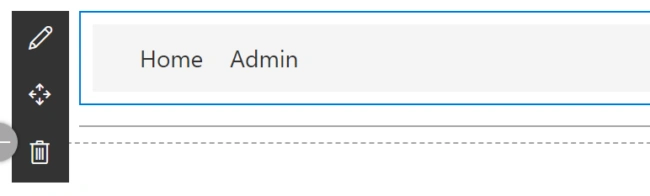
Nav horizontal
Thanks a lot for reading. Did I miss anything that you may think is needed? Did you find this post useful? I hope you liked this article. Please share with me your valuable suggestions and feedback.
The source code can be found here.
A blog isn’t a blog without comments, but do try to stay on topic. If you have a question unrelated to this post, you’re better off posting it on C# Corner, Code Project, Stack Overflow, or Asp.Net Forum instead of commenting here. Tweet or email me a link to your question there and I’ll definitely try to help if I can.
Join the conversation! Your thoughts help the community grow.