

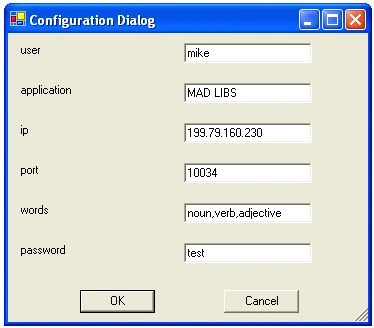
Figure 1 - Dynamic Configuration Dialog
Introduction
I often find myself using the app.config file for storing name-value pairs to be used as configuration parameters for my application. It suddenly dawned on me that wouldn't it be nice if I could create a dynamic dialog from these name-value pairs so that I could edit my configuration inside my application? Yes it would! Thus I created the Dynamic Configuration Dialog. Without writing a line of code, you can allow the user of your app to edit any of the name value pairs listed in the appSettings section of your configuration file.
Design
The design of the dynamic app configuration dialog consists of three classes: The AppConfigDialog that displays the name value pairs to the user, the ConfigReaderWriter that performs all the file reading and writing on the myapp.exe.config file, and the FieldFactory used to create the dynamic label and textbox controls for the name value pairs to edit. When the AppConfigDialog is constructed, it reads each name-value pair in the app.config file and uses the FieldFactory to create the corresponding controls. After the user edits the AppConfigDialog with new configuration settings and clicks OK, the ConfigReaderWriter is used to write out the new configuration settings from the dialog.
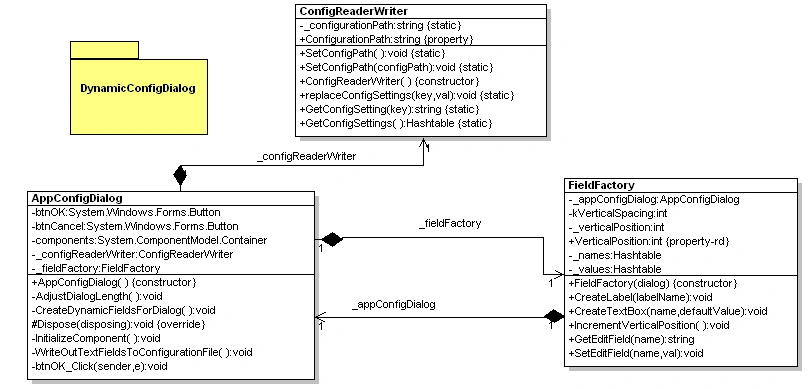
Figure 2 - UML Design of the Dynamic Configuration Dialog Reverse engineered using the WithClass UML Tool
The Code
As described in the design section, the Dynamic Dialog is created in the constructor of the AppConfigDialog class as shown in Listing 1. After all the existing controls in the dialog are initialized, the configuration file is read and the edit fields of the dialog are dynamically created with the FieldFactory. After all the controls are created in the dialog, the dialog is stretched vertically to fit the additional controls to the dialog, and the okay and cancel button are shifted down to the bottom of the dialog.
Listing 1 - Creating the Dynamic Application Configuration Dialog
|
public AppConfigDialog() |
When we are ready to save the configuration file(after we made a change in the dialog), we use the ConfigReaderWriter class's replaceConfigSettings method. This method will alllow us to save the new changes to a name-value pair made inside the dialog. Since the configuration file is an XML file, we can load it into an XmlDocument. Then we use XPath on the XmlDocument to find the node containing the key-value pair that we want to change. Once we found the correct node, we simply set the new value and resave the configuration file as shown in listing 2:
Listing 2 - Replacing the key-value pair in the configuration file and saving it
|
/// <summary> |
Usage
It's easy to use the dynamic configuration dialog. You simply construct it and show it. The internal classes and methods described above do the rest.
Listing 3 - Using the Dynamic Configuration Dialog
|
private void button1_Click(object sender, System.EventArgs e) |
Conclusion
Sometimes its nice to have some reusable GUI controls in your programming arsenal. This simple control will give your user the power to edit any standard configuration file containing name-value pairs by dynamically building a dialog from the appSettings in the file. This way it is more a-pair-ent to your user on how to edit their preferences with the help of C# and .NET.
praveen jeganathanPosted Apr 26, 2013, 8:21 AM
Awesome, Great work.