

Introduction
In this article, I describe how to convert a list of objects into a lookup collection. A sample project is also attached with this article.
Sometimes when we have a list of objects and we need to look up that collection by a member item in the object, we could easily benefit from converting a List collection into a Lookup collection. For example, we need to look up an entire product's inventory in a store by their Supply Date or by their price etc.
So, to get a Lookup from a list we use the extension method "ToLookup" available in a List collection's extension methods.
As per MSDN documentation
List.ToLookup(
    Func<T, TKey> KeySelector,
    Func<T, TElement> ElementSelector,
    IEqualityComparer<TKey> Comparer
)
creates a Lookup<TKey, TElement> from an IEnumerable<T> (i.e. in this case our List) depending on the specified key selector and element selector functions.
Basically, a lookup is like a dictionary where the value associated with a key isn't one element but a sequence of elements. Lookups are generally used when duplicate keys are expected as part of normal operation.
Now we delve into the implementation of the Lookup conversion. Suppose we have a class "Product" having members (ID, Name, Price, Model, Brand, Availability, SaleItem). The class's Product declaration is as
public class Product
{
    public int ID { get; set; }
    public string Name { get; set; }
    public double Price { get; set; }
    public string Model { get; set; }
    public string Brand { get; set; }
    public string Availability { get; set; }
    public string SaleItem { get; set; }

    public Product(int id, string name, double price, string model, string brand, string availability, string sale)
    {
        this.ID = id;
        this.Name = name;
        this.Price = price;
        this.Model = model;
        this.Brand = brand;
        this.Availability = availability;
        this.SaleItem = sale;
    }
}
Then we create a list of Product objects as
List<Product> listProduct = new List<Product>()
{
    new Product(1, "Mobile", 339.99, "ZZZ-B090-ZZZ-5", "Samsung", "Available", "In Sale !"),
    new Product(2, "Laptop", 514.99, "RRR-111-RRR-2", "Toshiba", "Available", "Not in Sale"),
    new Product(3, "Laptop", 554.99, "RRR-111-RRR-3", "Sony", "Available", "In Sale !"),
    new Product(4, "Laptop", 414.99, "RRR-111-RRR-4", "HP", "Not Available", "Not in Sale"),
    new Product(5, "Phone", 112.99, "AAA-22-AAA-1", "Samsung", "Not Available", "Not in Sale"),
    new Product(6, "Phone", 156.99, "AAA-22-AAA-12", "Samsung", "Available", "Not in Sale"),
    new Product(7, "PC", 313.69, "WWW-343-WWWW-03", "HP", "Not Available", "Not in Sale"),
    new Product(8, "PC", 363.69, "WWW-343-WWW-04", "Acer", "Available", "In Sale !"),
    new Product(9, "AC", 413.99, "NNN-80-NNN-342", "GE", "Not Available", "Not in Sale"),
    new Product(10, "Heater", 109.99, "TTT-318-TTT-424", "Philips", "Available", "Not in Sale"),
    new Product(11, "Heater", 79.99, "TTT-318-TTT-425", "GE", "Not Available", "In Sale !"),
    new Product(12, "Heater", 69.99, "TTT-318-TTT-426", "Philips", "Available", "In Sale !"),
};
Now suppose we need to show the collection by their brands, then we create a Lookup by their Brands in the following way
ILookup<string,Product> lookupByBrand = listProduct.ToLookup(x => x.Brand, x => x);
Here the "x => x.Brand" portion serves as the KeySelector and the "x => x" portion serves as the ElementSelector.
Let us see how to iterate them. To iterate using a foreach loop, we may use a generic "var" OR IGrouping<string,Product >.
// foreach (var product in lookupByBrand)
foreach (IGrouping<string, Product> product in lookupByBrand)
{
    Console.WriteLine("\nItems of " + product.Key + " Brand [Quantity " + product.Count() + "]:\n");

    foreach (Product p in product)
    {
        Console.Write(p.ID + "\t" + p.Name + "\t" + p.Model + "\t" + p.Price
            + "\t" + p.Brand + "\t" + p.Availability + "\t" + p.SaleItem);
        Console.WriteLine();
    }
}
Output

Next we create a lookup that contains items by their availability. For that the code is as
ILookup<string, Product> lookupByAvailablity = listProduct.ToLookup(x => x.Availability, x => x);
foreach (var product in lookupByAvailablity)
{
    Console.WriteLine("\nFollowing items are '" + product.Key + "':\n");

    foreach (Product p in product)
    {
        Console.Write(p.ID + "\t" + p.Name + "\t" + p.Model + "\t" + p.Price
            + "\t" + p.Brand + "\t" + p.Availability + "\t" + p.SaleItem);
        Console.WriteLine();
    }
}
Output

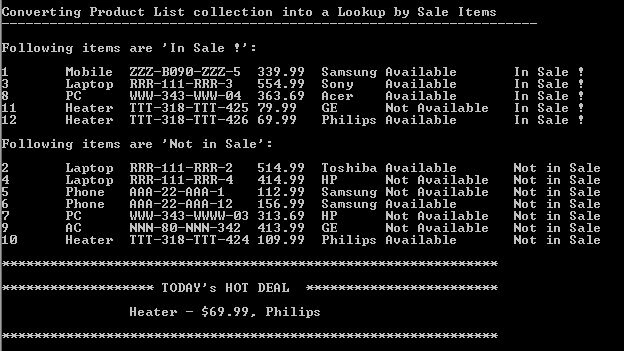
In the next piece of code, we create a collection such that we could easilydetermine which items are on "Sale" .
ILookup<string, Product> lookupBySale = listProduct.ToLookup(x => x.SaleItem, x => x);

foreach (IGrouping<string, Product> product in lookupBySale)
{
    Console.WriteLine("\nFollowing items are '" + product.Key + "':\n");

    foreach (Product p in product)
    {
        Console.Write(p.ID + "\t" + p.Name + "\t" + p.Model + "\t" + p.Price
            + "\t" + p.Brand + "\t" + p.Availability + "\t" + p.SaleItem);
        Console.WriteLine();
    }
}
Now suppose we are interested in finding the item that has a minimum price in the sale item list. This can be done easily by applying a lambda expression in the extension method as follows
Product p1 = lookupBySale["In Sale !"].First(m => m.Price == (lookupBySale["In Sale !"].Min(y => y.Price)));
We can find more detailof how to use a lambda expression over a list (in any Enumerable object) in one of my previous articles
Output
So far everytime we create a lookup, we set "KeySelector" as a Field and "ElementSelector" as an entire Product Object. We can also set our Key in the lookup as a part of a field (e.g. First letter of a Product Name) or any matching criteria. Similarly we are also free to choose any number of fields or an entire object in the ElementSelector part. See the following code
ILookup<string, string> lookupByProductName =
    listProduct.ToLookup(x => x.Name.Substring(0, 1), x => x.Name + "\t ($" + x.Price + ",\t" + x.Brand + ")");

foreach (IGrouping<string, string> productName in lookupByProductName)
{
    Console.WriteLine("\nItem list with Letter '" + productName.Key + "':\n");

    foreach (string p in productName.Distinct())
    {
        Console.Write(p);
        Console.WriteLine();
    }
}
Output

Hope the preceding explanation about "Getting Lookups from a List" will work for you!
Join the conversation! Your thoughts help the community grow.