

Previous part: Using Icon Fonts in MAUI .NET 9 [GamesCatalog] - Part 7
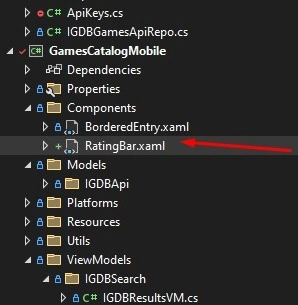
Step 1. Let's create a component named RatingBar.
Step 2. Let's define the initial code for RatingBar.xaml.
<VerticalStackLayout
    x:Class="GamesCatalog.Components.RatingBar"
    xmlns="http://schemas.microsoft.com/dotnet/2021/maui"
    xmlns:x="http://schemas.microsoft.com/winfx/2009/xaml"
    xmlns:Icons="clr-namespace:GamesCatalog.Resources.Fonts"
    x:Name="This">
</VerticalStackLayout>
We will reference our icon font and define a variable to control the visibility of the component.
Step 2.1. Let's create a hidden label to expose the rating variable so we can interact with its value.
<Label IsVisible="false" Text="{Binding Source={x:Reference this}, Path=Rate}" />
Step 2.2. Let's create a grid to allocate a rating from 1 to 10.
<Grid Margin="0,10,0,10" HorizontalOptions="Center">
    <Grid.ColumnDefinitions>
        <ColumnDefinition Width="Auto" />
        <ColumnDefinition Width="Auto" />
        <ColumnDefinition Width="Auto" />
        <ColumnDefinition Width="Auto" />
        <ColumnDefinition Width="Auto" />
        <ColumnDefinition Width="Auto" />
        <ColumnDefinition Width="Auto" />
        <ColumnDefinition Width="Auto" />
        <ColumnDefinition Width="Auto" />
        <ColumnDefinition Width="Auto" />
    </Grid.ColumnDefinitions>
</Grid>
Step 2.3. Let's create the labels that will be linked to the rating inside the grid.
<Label
    Margin="0,0,3,0"
    FontFamily="FontAwesomeIcons"
    FontSize="20"
    HorizontalOptions="Center"
    Text="{x:Static Icons:IconFont.Star}"
    TextColor="{Binding Source={x:Reference this}, Path=Star1Color}">
    <Label.GestureRecognizers>
        <TapGestureRecognizer
            Command="{Binding Source={x:Reference this}, Path=Star1Command}"
            CommandParameter="1" />
    </Label.GestureRecognizers>
</Label>

<Label
    Grid.Column="1"
    Margin="0,0,3,0"
    FontFamily="FontAwesomeIcons"
    FontSize="20"
    HorizontalOptions="Center"
    Text="{x:Static Icons:IconFont.Star}"
    TextColor="{Binding Source={x:Reference this}, Path=Star2Color}">
    <Label.GestureRecognizers>
        <TapGestureRecognizer
            Command="{Binding Source={x:Reference this}, Path=Star2Command}"
            CommandParameter="1" />
    </Label.GestureRecognizers>
</Label>

<Label
    Grid.Column="2"
    Margin="0,0,3,0"
    FontFamily="FontAwesomeIcons"
    FontSize="20"
    HorizontalOptions="Center"
    Text="{x:Static Icons:IconFont.Star}"
    TextColor="{Binding Source={x:Reference this}, Path=Star3Color}">
    <Label.GestureRecognizers>
        <TapGestureRecognizer
            Command="{Binding Source={x:Reference this}, Path=Star3Command}"
            CommandParameter="1" />
    </Label.GestureRecognizers>
</Label>

<Label
    Grid.Column="3"
    Margin="0,0,3,0"
    FontFamily="FontAwesomeIcons"
    FontSize="20"
    HorizontalOptions="Center"
    Text="{x:Static Icons:IconFont.Star}"
    TextColor="{Binding Source={x:Reference this}, Path=Star4Color}">
    <Label.GestureRecognizers>
        <TapGestureRecognizer
            Command="{Binding Source={x:Reference this}, Path=Star4Command}"
            CommandParameter="1" />
    </Label.GestureRecognizers>
</Label>

<Label
    Grid.Column="4"
    Margin="0,0,3,0"
    FontFamily="FontAwesomeIcons"
    FontSize="20"
    HorizontalOptions="Center"
    Text="{x:Static Icons:IconFont.Star}"
    TextColor="{Binding Source={x:Reference this}, Path=Star5Color}">
    <Label.GestureRecognizers>
        <TapGestureRecognizer
            Command="{Binding Source={x:Reference this}, Path=Star5Command}"
            CommandParameter="1" />
    </Label.GestureRecognizers>
</Label>

<Label
    Grid.Column="5"
    Margin="0,0,3,0"
    FontFamily="FontAwesomeIcons"
    FontSize="20"
    HorizontalOptions="Center"
    Text="{x:Static Icons:IconFont.Star}"
    TextColor="{Binding Source={x:Reference this}, Path=Star6Color}">
    <Label.GestureRecognizers>
        <TapGestureRecognizer
            Command="{Binding Source={x:Reference this}, Path=Star6Command}"
            CommandParameter="1" />
    </Label.GestureRecognizers>
</Label>

<Label
    Grid.Column="6"
    Margin="0,0,3,0"
    FontFamily="FontAwesomeIcons"
    FontSize="20"
    HorizontalOptions="Center"
    Text="{x:Static Icons:IconFont.Star}"
    TextColor="{Binding Source={x:Reference this}, Path=Star7Color}">
    <Label.GestureRecognizers>
        <TapGestureRecognizer
            Command="{Binding Source={x:Reference this}, Path=Star7Command}"
            CommandParameter="1" />
    </Label.GestureRecognizers>
</Label>

<Label
    Grid.Column="7"
    Margin="0,0,3,0"
    FontFamily="FontAwesomeIcons"
    FontSize="20"
    HorizontalOptions="Center"
    Text="{x:Static Icons:IconFont.Star}"
    TextColor="{Binding Source={x:Reference this}, Path=Star8Color}">
    <Label.GestureRecognizers>
        <TapGestureRecognizer
            Command="{Binding Source={x:Reference this}, Path=Star8Command}"
            CommandParameter="1" />
    </Label.GestureRecognizers>
</Label>

<Label
    Grid.Column="8"
    Margin="0,0,3,0"
    FontFamily="FontAwesomeIcons"
    FontSize="20"
    HorizontalOptions="Center"
    Text="{x:Static Icons:IconFont.Star}"
    TextColor="{Binding Source={x:Reference this}, Path=Star9Color}">
    <Label.GestureRecognizers>
        <TapGestureRecognizer
            Command="{Binding Source={x:Reference this}, Path=Star9Command}"
            CommandParameter="1" />
    </Label.GestureRecognizers>
</Label>

<Label
    Grid.Column="9"
    Margin="0,0,3,0"
    FontFamily="FontAwesomeIcons"
    FontSize="20"
    HorizontalOptions="Center"
    Text="{x:Static Icons:IconFont.Star}"
    TextColor="{Binding Source={x:Reference this}, Path=Star10Color}">
    <Label.GestureRecognizers>
        <TapGestureRecognizer
            Command="{Binding Source={x:Reference this}, Path=Star10Command}"
            CommandParameter="1" />
    </Label.GestureRecognizers>
</Label>
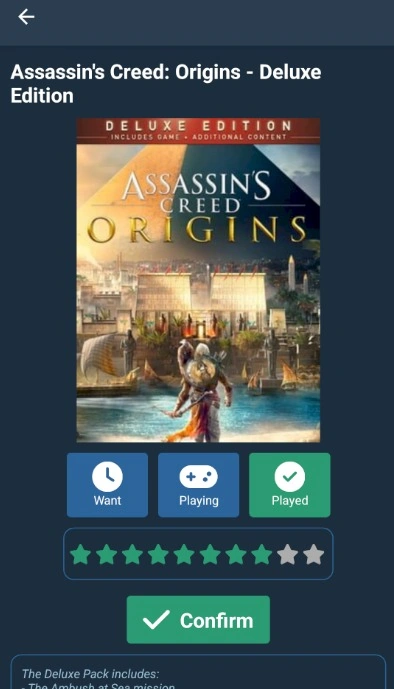
Basically, we have 10 star icons, and we will control their color and set the rating via the tap command on each one.
Join the conversation! Your thoughts help the community grow.