

This is my first article on SharePoint 2010. In this article we will see how to create a simple Console Application in SharePoint 2010 and determine the various site users in your SharePoint site.
Creating a Console Application
Use the following procedure to create a a Console Application.
Execute Visual Studio 2010 then click "File" -> "New" -> "Project..." -> "Console Application" then give a name to the Console Application and save it.
Adding Microsoft.SharePoint.dll file to your application
Use the following procedure to add the "Microsoft.sharepoint.dll" file to your Console Application.
In Solution Explorer, right-click on the project and click "Add" -> "Reference..." then a window will open; click on ".Net" and select the "Microsoft.sharepoint.dll" and click "Ok".
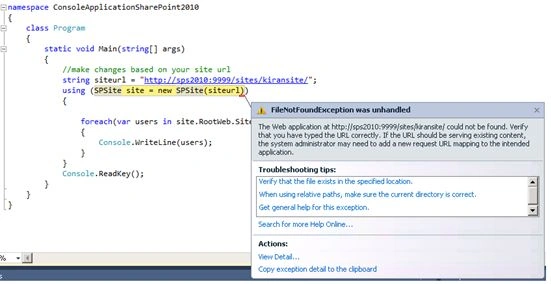
Write the following code in you Console Application to determine the site users in your SharePoint site.
class Program
{
static void Main(string[] args)
{
//make changes based on your site url
string siteurl = "http://sps2010:9999/sites/kiransite/";
using (SPSite site = new SPSite(siteurl))
{

Supreeth JPosted Oct 8, 2015, 9:56 AM
Nice, Tq for Sharing