
Introduction
In this article, I have explained how to create a WEBAPI POST method to retrieve data from an SQL database using ASP.NET MVC Application.
Open SQL Management Studio then create a new table and write the stored procedure for the table.
Column name and datatype of table based on your requirement.

Create proc [dbo].[UserInfo]
(
@UserName nvarchar(100)
)
as
(
select UserId,UserName,Address,IsActive,UserTypeId from WebAPI
where
UserName=@UserName
)
Once you have successfully created the SQL store procedure then Create a new MVC WebAPI Application using visual studio.
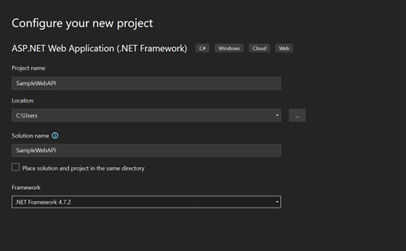
provide the project name and project location.
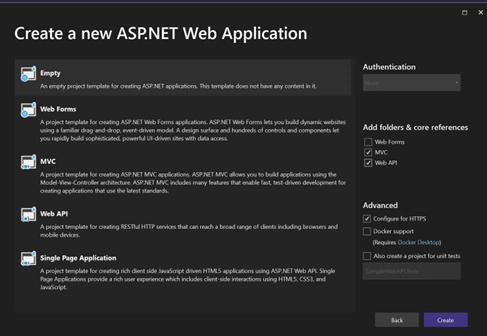
Choose Empty project then select the MVC and WEB API options from the right side core references section.
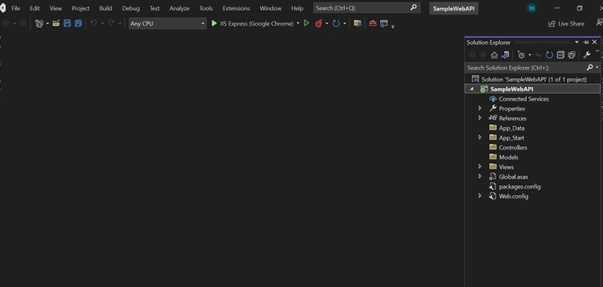
Now the project has been created successfully.
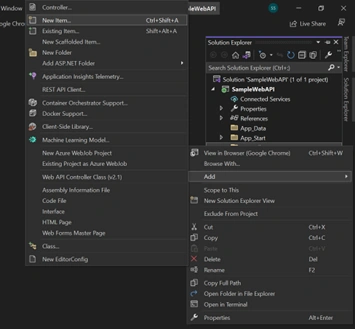
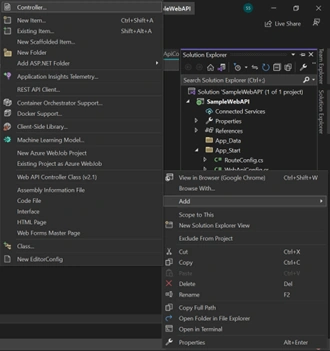
Once the project has been created then Right click on the Models folder, choose to add, and click New item.
Add the class file to the Models Folder.
From the C# node then choose the class definition and provide the class file name UserEntity.cs.
Once we added the class file to our project solution.
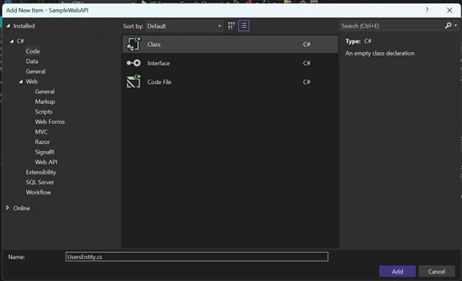
Use the below code in UsersEntity.cs file.
using Microsoft.SqlServer.Server;
using Newtonsoft.Json.Linq;
using System;
using System.Collections.Generic;
using System.Linq;
using System.Net.Http.Headers;
using System.Net.Http;
using System.Threading.Tasks;
using System.Web;
using System.Web.UI.WebControls;
using Microsoft.Office.SharePoint.Tools;
using static System.Net.Mime.MediaTypeNames;
using System.Data;

namespace SampleWebAPI.Models
{
    public class UsersEntity
    {

        public string UserId { get; set; }

        public string UserName { get; set; }

        public string Address { get; set; }

        public string UserTypeId { get; set; }

        public string IsActive { get; set; }

        public UsersEntity()
        {

        }
     }

}
Likewise create a new logger.cs and ErrorDetails.cs class file to capture the logs and error details in the Models folder.
Use the below code in Logger.cs file.
using System;
using System.Collections.Generic;
using System.Linq;
using System.Web;

namespace SampleWebAPI.Models
{
    public class Logger
    {
         // To capture the log details
        #region "-- Class Level Variable / Object Declaration --"
        private static readonly log4net.ILog logger = log4net.LogManager.GetLogger(System.Reflection.MethodBase.GetCurrentMethod().DeclaringType);
        #endregion
        #region "-- Public Functions --"
        public static void LogError(string msg, Exception ex)
        {
            logger.Error(msg, ex); //This for error msg
        }
        public static void LogDebug(string msg, Exception ex)
        {
            logger.Debug(msg, ex);
        }
        public static void LogFatal(string msg, Exception ex)
        {
            logger.Fatal(msg, ex);
        }
        public static void LogInfo(string msg)
        {
            logger.Info(msg);
        }
        public static void LogWarn(string msg, Exception ex)
        {
            logger.Warn(msg, ex);
        }
        public static void LogInfo(string msg, Exception ex)
        {
            logger.Info(msg, ex);
        }
    }
    #endregion
}
Use the below code in ErrorDetails.cs file.
using System;
using System.Collections.Generic;
using System.Linq;
using System.Web;

namespace SampleWebAPI.Models
{
//This Class used for error msg
    public class ErrorDetails
    {
        public List<string> schemas { get; set; }
        public string details { get; set; }
        public int status { get; set; }
    }
}
Rathrola Prem KumarPosted Aug 23, 2023, 1:55 PM
Great Article , Keep sharing :)