Introduction
An MDI (Multiple Document Interface) application is an application in which we can view and work with several
documents at once like Microsoft Excel or Visual Studio 2010.
MDI applications having a feature of MDI child forms and its very essential
element of it.
Get to Work
With the help of
below given example, you can learn how to create an MDI Form and a MDI Child Form
and by using default MDI Form control you can generate the new MDI child form. Here are the step required to build an MDI child Form support.
Step to Create
and Implement MDI Child Form
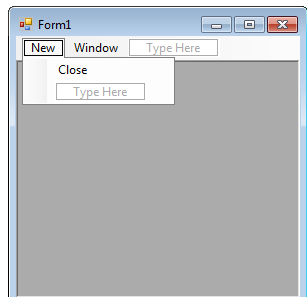
- Create a MDI parent form
with a MenuStrip which containing the values New and Windows and Close in the
sub menu of New.
- Now go to
Properties Window, select the all menu items and set the the MdiList
property to true.
Now add
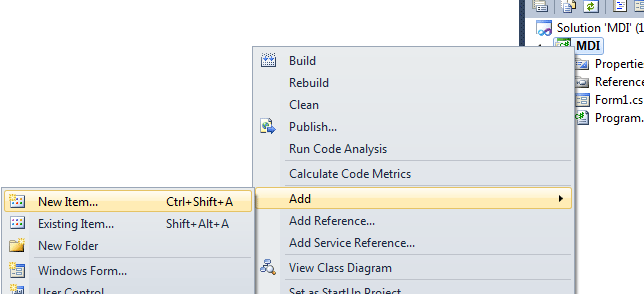
MDI child forms by going in Solution Explorer, right-click the project, select
Add New Item from Add Menu.
A Dialog
box appear, now select Windows Form give the name as Form2 and click on open button. A New Form Name as Form2 added.

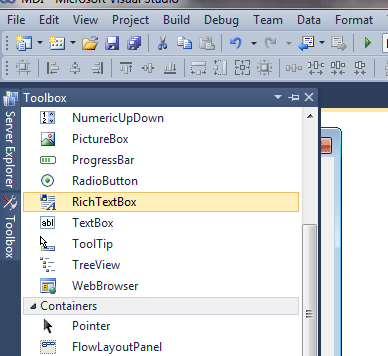
Add a RichTextBox Control to the Form from Toolbox.
Now go on
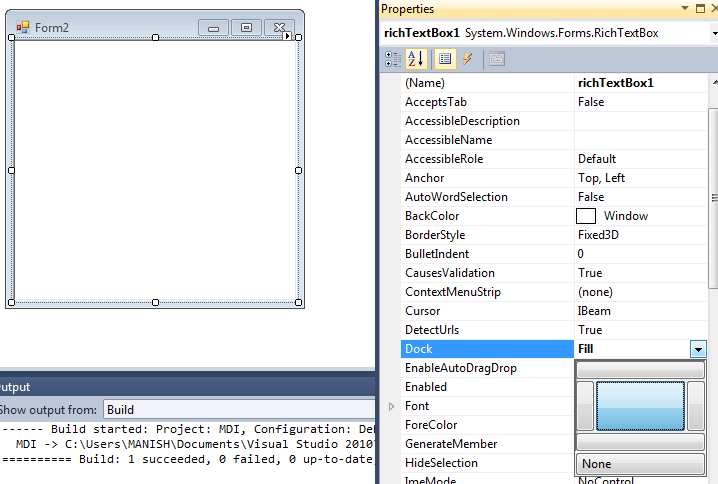
Property Window and Set Properties for the RichTextbox. Set Anchor property to
Top, Left and the Dock property to Fill.
Click on
New Menu Item and generate a Click Event Handler on it.
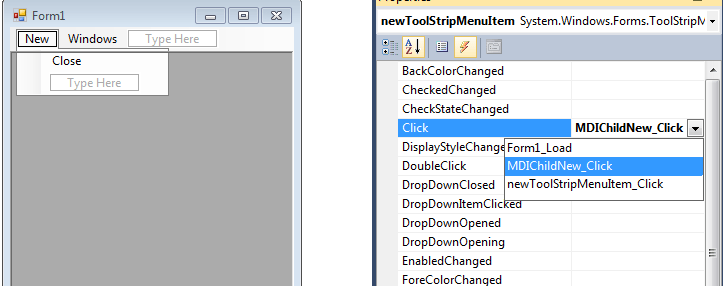
Now
Double click on New Menu Item and Write down the following Code.

protectedvoid
MDIChildNew_Click(object
sender, System.EventArgs
e)
{
Form2
newMDIChild = newForm2();
// Set the
Parent Form of the Child window.
newMDIChild.MdiParent =this;
// Display
the new form.
newMDIChild.Show();
}
Now Run the application,
And from output window you can create a new MDI child form by clicking on New
Menu Item.
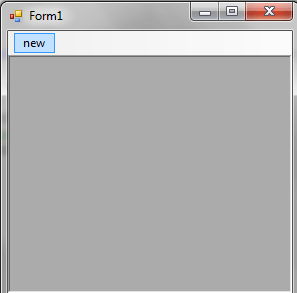
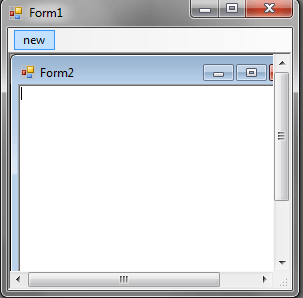
SummaryIn this article, we discussed how to build Windows Forms application with an MDI Child form support using Visual Studio 2010 and C#.


ArYa SuReShPosted Sep 15, 2021, 1:10 PM
If you are click the new button it will show form2 again , how to lock this
Hemant KonadePosted Aug 26, 2016, 10:46 AM
Now go to Properties Window, select the all menu items and set the the MdiList property to true. i can't understand where it is.
Sonu ChaudharyPosted Apr 4, 2016, 12:45 PM
good one
Rajesh SinghPosted Dec 28, 2015, 6:53 AM
Good work.
Aamer SaeedPosted Mar 9, 2015, 6:36 AM
What if we don't want to add richtextbox control on the second form????? actually i want to my child form to be within the mdiparent form and maximize as well.
Ashok KaralePosted Oct 10, 2013, 1:06 AM
such a nice artical but could you let us know how to open a single form at a time in MDI..???
somnath bansodePosted Mar 5, 2013, 1:27 AM
nice solution
shahid khanPosted Dec 28, 2012, 2:35 AM
s dsf sdf d d sd sd fsd fsf sf s fsf sf f s f sf ss fd
Sunit TrivediPosted Oct 18, 2012, 3:07 AM
Thank you very much Dude...
Rachna kambojPosted May 22, 2012, 2:53 PM
thnk u,
HardikPosted Mar 6, 2012, 12:35 AM
Friend i try it. but in My Project i don't want the MENU BAR. and i want to try it Without MENUBAR. can i make a Form which is work as a MDI child Form?? Plzzz Reply me soon.. again Thanks for Help me...
Shah ShovonPosted Sep 23, 2011, 5:14 AM
Thank you Brother. Nice job:)
Md Nuruzzaman MithunPosted Sep 20, 2011, 2:20 AM
Hi, I am working newly in visual studio 2010. As per direction of your article, I follow the steps but I can't find the MDI List Property in visual studio 2010.Can you please describe briefly how can I select all the menu items and where is MDI list property??? Thanks
baraiya nileshPosted Feb 5, 2011, 12:13 AM
very very thanks my friends