

Memories Photo Album is asp.net application which allows you to easily create online photo album just by specifying folder containing subfolders and images. I created this application to share personal photos with friends and family, last month I converted it to .Net Framework 2.0 and decided to share with community.
What kind of Photo Album it is?
It's a simple web application which watches the folder containing your images and displays it as an organized web based album. It caches folder structure on first request so that next request is quick, caching mechanism has dependency over your folder structure so when you make changes in folder it automatically deletes cache.
It creates thumbnails and resized images dynamically on first request to that image. To make navigation easy it displays bread crumb which will allow you to navigate to parent.
It's file system based and do not use any database. It does not have any user interface to allow upload of images, but you can always create ftp or simple web application to allow others to upload images, but frankly if you are looking for album where users can upload images then this application is not for you, this application will be ideal for you if you have big folder structure with images and you want to put that online.
How to install application?
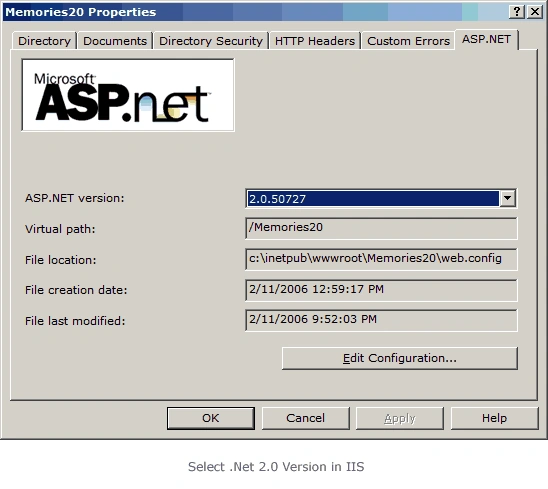
1) Create new website in IIS and unzip all source code files into application directory, make sure that new website uses .Net 2.0
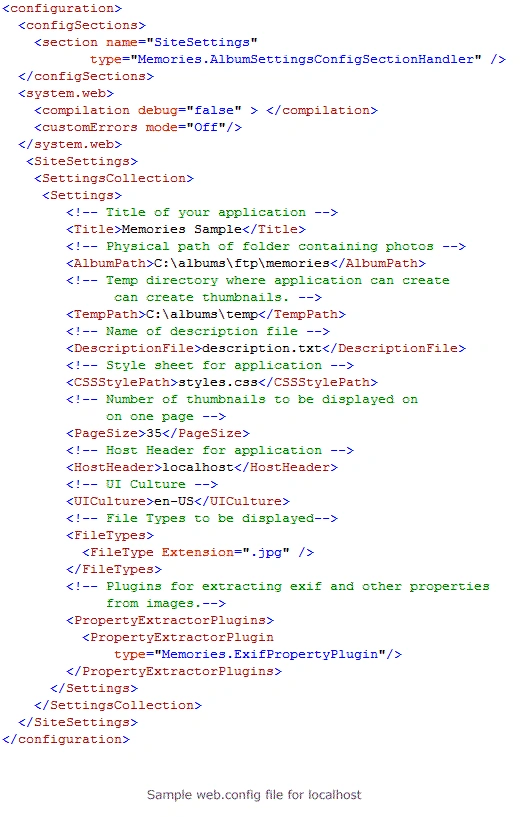
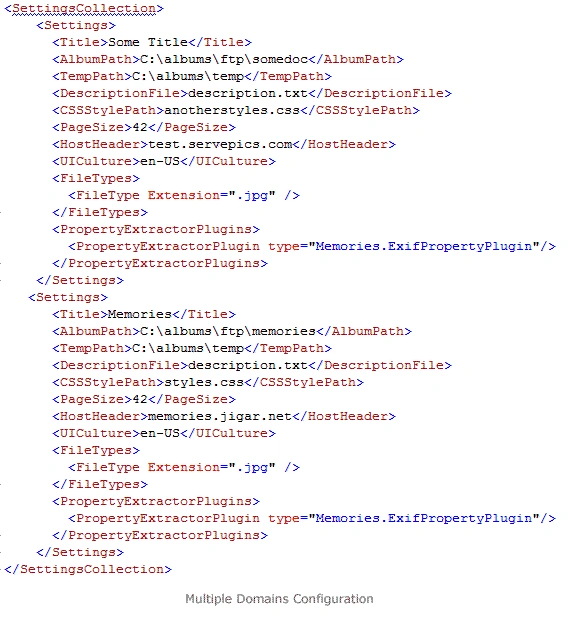
2) Open web.config file with any text editor and make changes according to your requirement, Settings have following properties.
- Title as name suggests is title of your web application.
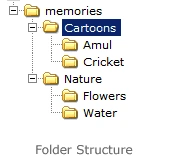
- AlbumPath is the physical path of folder containing photos, this folder can have any numbers of sub folders, just make sure that your web application has read permission on that folder.
- TempPath is the physical path of folder where application can create temporary thumbnails and images, application needs write access on this folder.
- DescriptionFile is name of file that application reads and uses its contents as description of folder, description can contain html tags.
- CSSStylePath is relative path of cascading style sheet.
- PageSize is number of thumbnails to be displayed in one page.
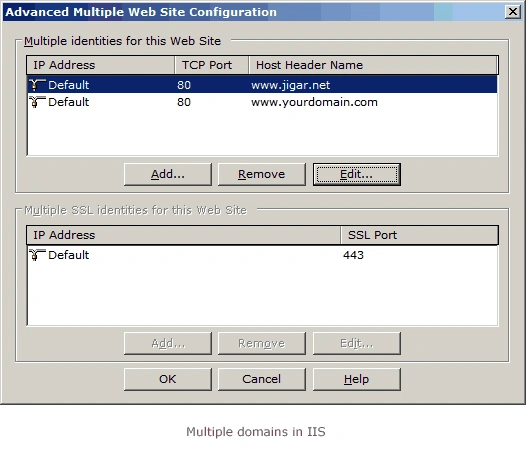
- HostHeader is hostname of application, if you are testing this application on your local IIS then use localhost other wise use actual hostname like www.yoursite.com
- UICulture use en-US for US-English, if you want to use another culture then you will have to create resource file for that culture and drop in App_GlobalResources folder
- FileTypes lists type of files you want to display for now use only .jpg, you might need to change code if you want to support other types of files.
- PropertyExtractorPlugins is list of plug-in that can extract metadata information from image you can create your own plug-in but it has to inherit from Memories.IPropertyPlugin, application has a plug-in which extracts Windows XP Title and Comment information from image.

Kaushal KumawatPosted Jan 3, 2011, 1:42 AM
could u help how to play slide show
cleetus antonyPosted Dec 3, 2009, 3:21 PM
Jigar Desai, this is super sourc code. i was looking for the same for last 3 months. thank you so much for sharing this brilliant code.
Kyle LibbertPosted Aug 27, 2009, 2:21 PM
Jigar, Nice work. I don't see the Slide Show feature in the Source? Was this an afterthought, or something you decided not to share. Thanks
Svetoslav PetkoveditedPosted Nov 25, 2007, 8:23 AMEdited Nov 25, 2007, 8:25 AM
Hi I got the same error. But I got it when I tried to debug something :). Accessing form the Internet was OK. I saw your oppinions and realised that the application Albums rely on the host. (The author tells it, but who's reading :) ) If you want to debug change the HostHeader to localhost. If you want to access is through the internet you MUST change the HostHeader to your domain or IP address. This is something that the application rely on. Hope this helps you.
Scott DorsettPosted Jun 8, 2007, 9:33 AM
How can I get the EXIF metadata to show up in the photo detail view?
MattPosted May 11, 2007, 11:17 AM
Hello, When testing locally my photos and thumbnails show up correctly when testing on server, they all just show X boxes when photos dont display. I had cleared out the thumbnails before moving to the server, and they were newly created any ideas why it might not be showing?...the server is windows 2000 and my computer is XP. Thanks Matt
WaseemPosted May 1, 2007, 5:56 PM
I had the path error due to not setting the correct path in the web.config file - i think.( i downloaded the whole app again and started from scratch) The gdi+ error occurred because I hadn't created a temp directory referenced int the web.config (make sure you give the aspnet account full control) I am just uploading to my host - will let you know how it goes!
JeroenPosted Jan 2, 2007, 6:45 AM
Hi there, really great application. Is there a simple way to sort the album list on folder creationdate? I can't figure out to do this. The app. is now sorting on first character of the foldername. Thanks, Jeroen
fabio bradachPosted Oct 3, 2006, 1:01 PM
As stated in the subject, jpg images are not shown. Only if I select to download the full image I can see it in the browser window. Plus if I run the website in visual web developer to test it I get an "A generic error occurred in GDI+" when the application step into this instruction imgOut.Save(savePath, imgIn.RawFormat); in the image.ashx routine.
Franco FinstadPosted May 19, 2006, 5:16 PM
First of all... fantastic app!! Just what I was looking for. But, is there any way to up the quality of the preview images -- both thumbnail and the larger image. They both are showing some bubbling as you see in low quality JPGs. Only when you click the "Download full image" link do I see the high-quality JPGs that I actually have in the image folder. Any help is appreciated. Thanks, Franco
Thomas NielsenPosted May 2, 2006, 1:55 PM
Hi Thanks for a great article. I have a question abot the support for exif information. As far as I can understand from your article - "comments" and "titles" should be displayed on the detailspage. i have some jpeg files - where I have tried to add all sorts of info, captions, comments. But none of it displays. Do you I have to something special to activate the support for displaying comments,titles ? Best Regards Thomas
IavoreditedPosted Apr 27, 2006, 6:56 AMEdited Jun 4, 2006, 1:50 PM
Server Error in '/' Application. Configuration Error Description: An error occurred during the processing of a configuration file required to service this request. Please review the specific error details below and modify your configuration file appropriately. Parser Error Message: Unrecognized configuration section SiteSettings. Source Error: Line 8: <customErrors mode="Off"/> Line 9: </system.web> Line 10: <SiteSettings> Line 11: <SettingsCollection> Line 12: <Settings> Source File: ***********\web.config Line: 10 Version Information: Microsoft .NET Framework Version:2.0.50727.42; ASP.NET Version:2.0.50727.42 Can u help me?:) I too, have this same error. I have godaddy hosting my server. It only occurs when I do certain commands in c# like upload a file to a specific location.<!-- [ConfigurationErrorsException]: Unrecognized configuration section SiteSettings. (C:\Inetpub\vhosts\jlabz.net\subdomains\photos\httpdocs\web.config line 10) at System.Configuration.ConfigurationSchemaErrors.ThrowIfErrors(Boolean ignoreLocal) at System.Configuration.BaseConfigurationRecord.ThrowIfParseErrors(ConfigurationSchemaErrors schemaErrors) at System.Configuration.BaseConfigurationRecord.GetSectionRecursive(String configKey, Boolean getLkg, Boolean checkPermission, Boolean getRuntimeObject, Boolean requestIsHere, Object& result, Object& resultRuntimeObject) at System.Configuration.BaseConfigurationRecord.GetSection(String configKey, Boolean getLkg, Boolean checkPermission) at System.Configuration.BaseConfigurationRecord.GetSection(String configKey) at System.Web.Configuration.RuntimeConfig.GetSectionObject(String sectionName) at System.Web.Configuration.RuntimeConfig.GetSection(String sectionName, Type type, ResultsIndex index) at System.Web.Configuration.RuntimeConfig.get_HealthMonitoring() at System.Web.Configuration.HealthMonitoringSectionHelper..ctor() at System.Web.Management.HealthMonitoringManager..ctor() at System.Web.Management.HealthMonitoringManager.Manager() at System.Web.Management.WebBaseEvent.RaiseRuntimeError(Exception e, Object source) at System.Web.HttpResponse.ReportRuntimeError(Exception e, Boolean canThrow, Boolean localExecute) at System.Web.HttpRuntime.FinishRequest(HttpWorkerRequest wr, HttpContext context, Exception e) --><!-- This error page might contain sensitive information because ASP.NET is configured to show verbose error messages using <customErrors mode="Off"/>. Consider using <customErrors mode="On"/> or <customErrors mode="RemoteOnly"/> in production environments.-->