

Use the following to create an ASP.NET MVC APP with a WCF Service using an ADO.NET Entity Data Model:
SQL Server DB -> WCF Service (ORM) -> MVC Application -> User (Browser).
This small app works in a 4-tier architecture as in the following:
- User Tier
- MVC app Tier
- WCF Service Tier
- SQL Server Tier
Project 1: WCF Project
Step 1
Go to VS 2012 and select "File" -> "New Website" then select "WCF Service" then provide the name “WcfMvc”.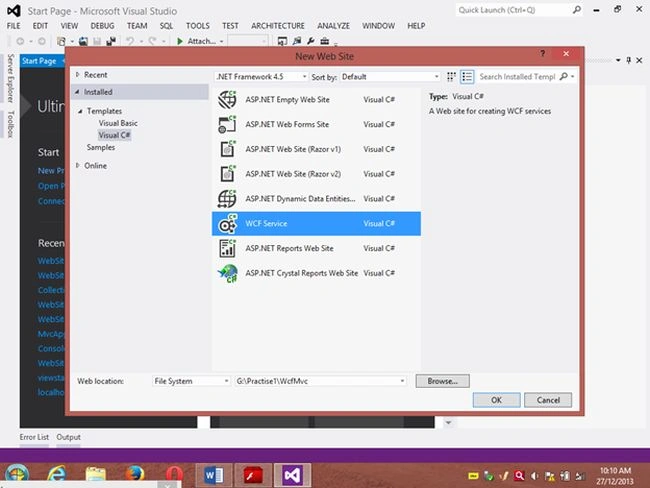
Click "OK".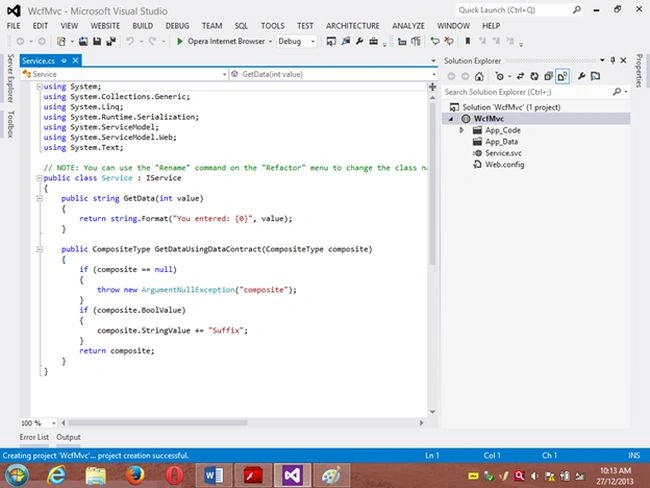
Step 2
Go to the Solution Explorer then go to "WcfMvc application" then right-click on it then seelct "Add" -> "Add new item" -> "Add ADO .Net Entity data model". Then click the "Add" button then place the file in the App_code Folder.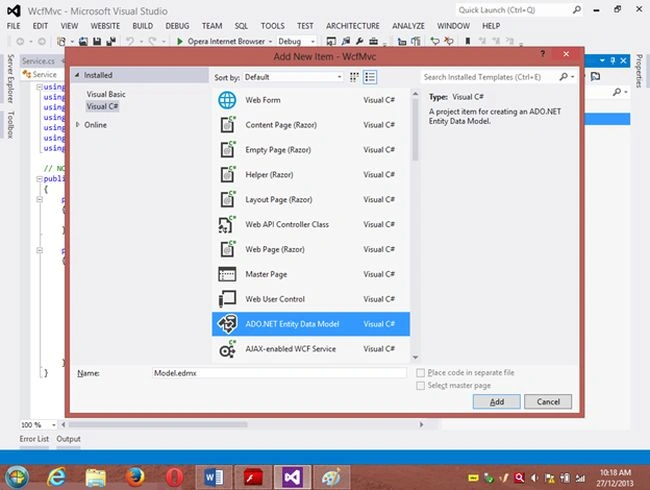
Step 3
Then the Entity Data Model Wizard will be shown. Select "Generate data from database" then click the "Next" button .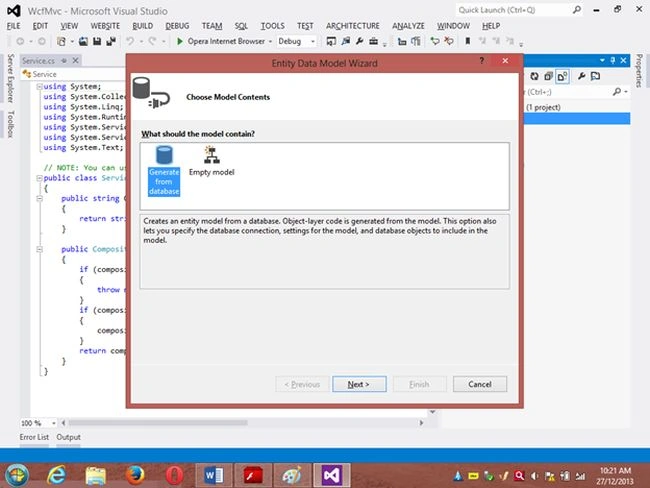
Step 4
Choose your data connection. I’m selecting My “ran” database of SqlServer 2012.
Activate the radio button “Yes include the sensitive data in the connection string”.
Save the connection string in the config file by enabling the check box “Save entity connection setting in web.config as:“ then click the "Next" button.
Or
go to the new connection and create your connection then provide the server name then provide the authentication type then select either Windows Authentication or SQL Authentication then provide the database name then click the "Ok" button. A new connection will then be generated.
Activate the Radio Button “Yes include the sensitive data in the connection string”.
Save the connection string in the config file by enabling the check box “save entity connection setting in web.config as: “ then click the "Next" button.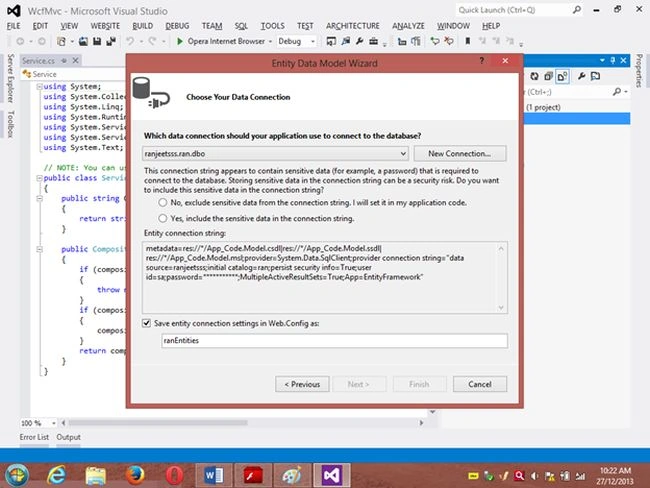
Step 5
Choose which database object you want in your model.
I’m selecting the “Customer” table. The table definition is as follows:
Create table customer
Custno int constraint pk primary key,
custname varchar(30) not null,
custcity varchar(30),
custbalance money);
You can use the above table or create your own table and use it
Then provide a Model Namespace of your choice.. I’m using “ranjeet” Namespace.
Click the "Finish" button.
Please ensure that in the Solution Explorer under the App_code folder the Model.edmx file has been created.
Your entity data model is ready for use.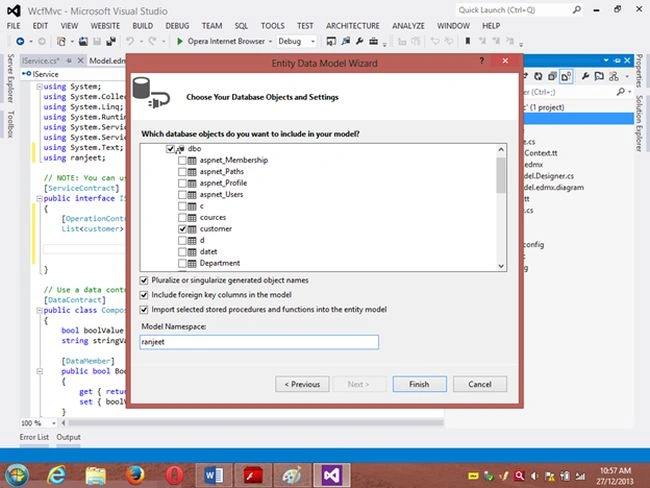
Step 6
Go to Solution Explorer then expand the App_code Folder then go to the Iservice.cs file.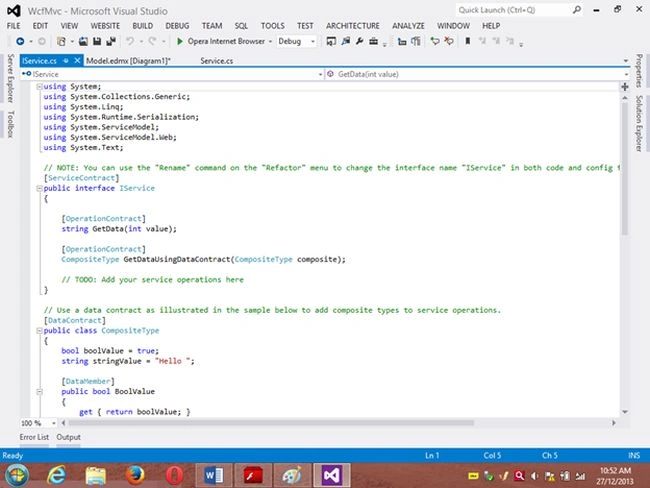
Step 7
Delete the Getdata() and GetDataUsingDataContract() methods.
Then
I’m writing one method GetCustomer() as follows.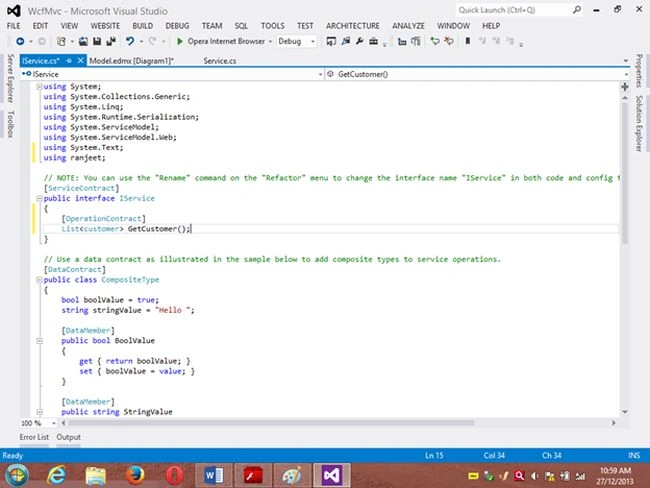
Step 8
Then go to the Sevice.cs file and implement the method declared in the IService.cs interface.
In the Service.cs file right-click the Iservice Interface then select "Implement Interface" -> "Implement Interface".
Delete the already present method in the Service.cs the file.
And write the following code in the “public List<customer> GetCustomer()” method.
“ranEntities1” is a class name given when the connection is created.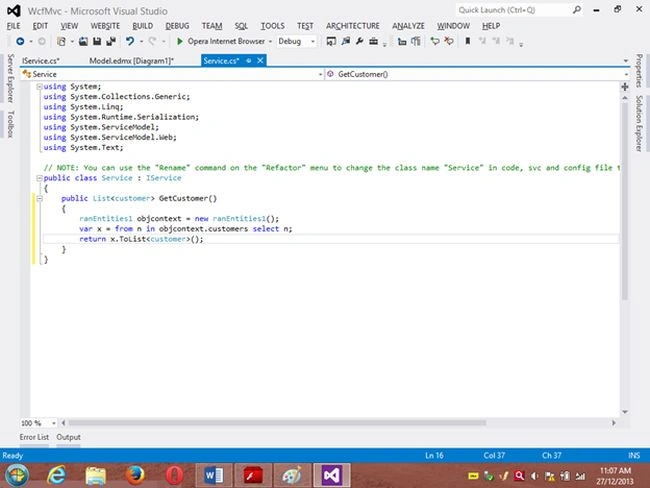
Step 9
Open the Service.svc file and now run the project.
A new window will open; copy the URL present in that window and paste it into any text file. This URL will be used in the next project.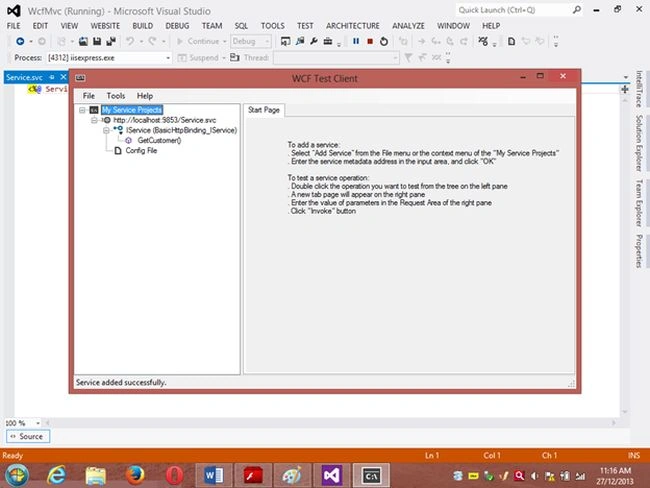
Project 2: MVC Application 4
Step 1
Ensure that the WCF project is open then start another instance of VS 2012. Then go to "File" -> "New" -> "Project..." then create an ASP.NET MVC 4 Web Application. Name it “MvcWcfApplication” then click "ok" Button. Then select the Project Template “Internet Application” then click the "Ok" button.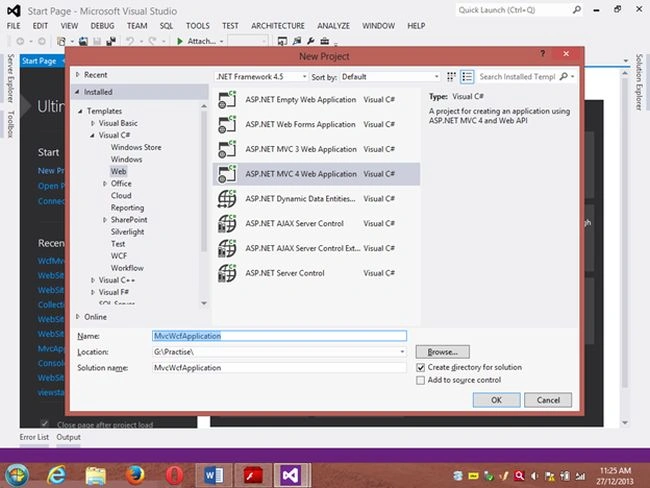
Step 2
Create a Proxy using “Add Service Reference” by right-clicking on MvcWcfApplication in the Solution Explorer.
(Note: Proxy is a class that converts a local request into a remote request.)
A new window will open. Paste the URL that you copied from the WcfMvc project into the Address TextBox then click "Go".
In other words, a proxy class is created successfully..
(Caution: if it has been created and in the project you can’t use the ServiceReference1 namespace Pl then don’t worry; it is a VS 2012 Automation Error. To solve it go to the Solution Explorer then select ServiceReference1 then right-click on it then select "Configure Service Reference". A new window will open then in it uncheck the “Reuse types in referenced assemblies” checkbox..)
A serviceReference1 will added into your project.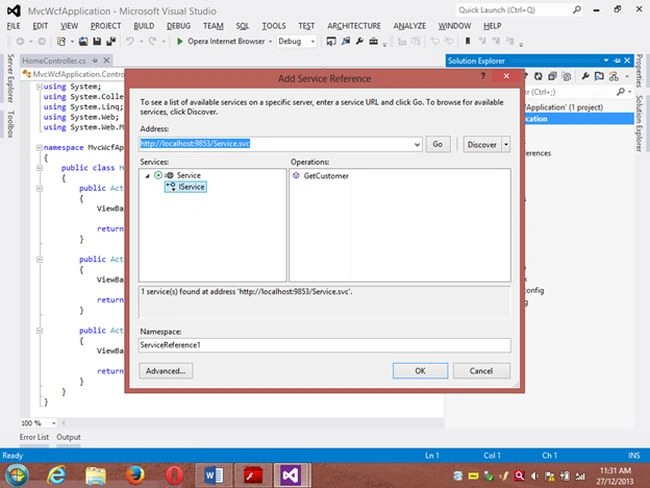
Step 3
Now add a new Controller then in Solution Explorer seelct "Controller" then right-click on it then select "Add Controller" (Ctrl+m, Ctrl+c).
Name it DbController. Click the "Add" button.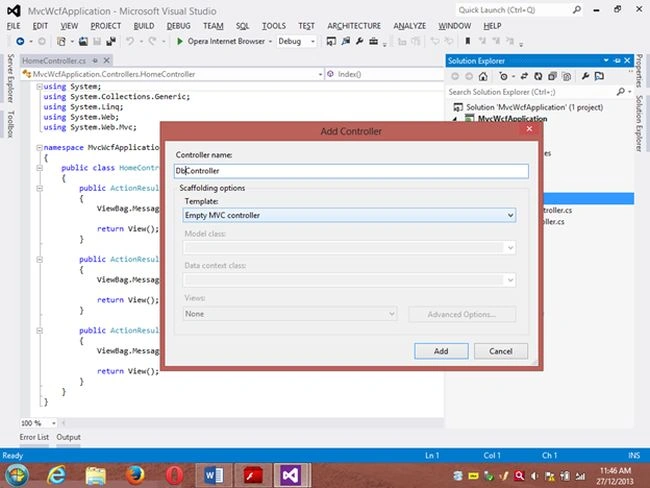
Step 4
Add the following code in the DbController.cs file.
Please build the project.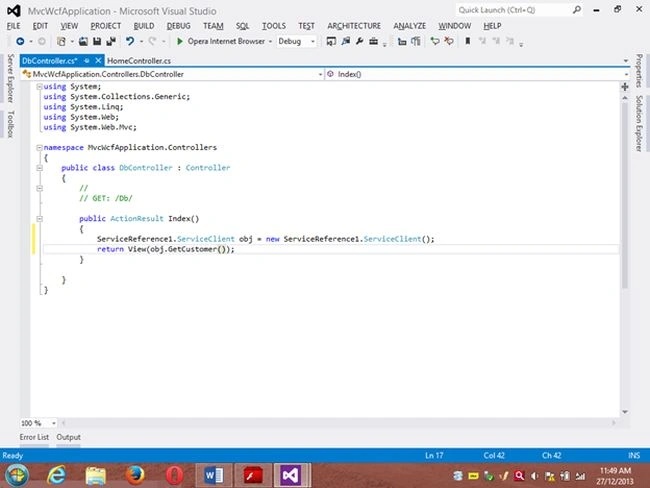
Step 5
Now right-click inside the Index() Method then select "Add View" (Ctrl+m, Ctrl+v) then click on “Create a Strongly Typed View” checkbox then select the Model Class we created, in other words “customer (MvcWcfApplication.ServiceReference1)” then select "Scaffold template List"then click the "Add" button.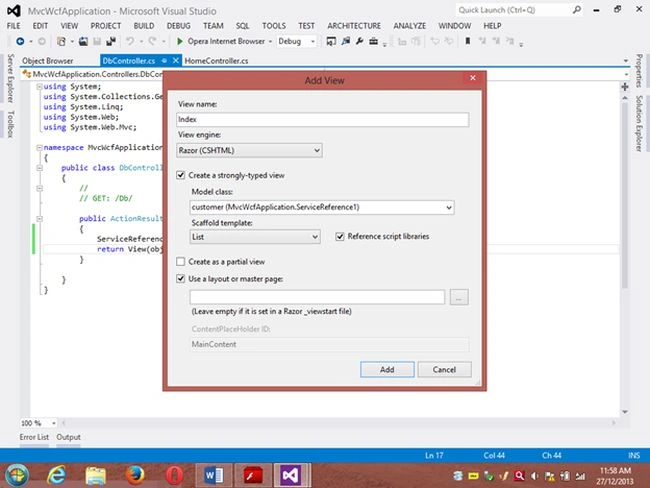
Step 6
Run the application.
In the browser type: http://localhost:<Port>/Db
And see the results. All the data in the customer table is shown below the using WCF Service.
If you like this then please comment below.
THANK YOU.
Dinesh GabhanePosted Nov 13, 2019, 12:52 AM
Nice article Ranjeet
Denis HomezPosted Jun 6, 2019, 6:43 PM
Does this approach improve the performance of the site? Pls answer guys
Md Eqbal AnsariPosted Apr 15, 2018, 2:31 AM
Can u please tell me where is proxy class
Shailendar NaiduPosted Oct 9, 2017, 6:20 AM
Nice artical for WCF beginners.
Srinivas PPosted Jun 6, 2017, 2:03 AM
Nice article Ranjeet
Ankita NandgaonkarPosted Oct 24, 2016, 6:10 AM
An error occurred while receiving the HTTP response to http://localhost:59919/Service.svc. This could be due to the service endpoint binding not using the HTTP protocol. This could also be due to an HTTP request context being aborted by the server (possibly due to the service shutting down). Do i need to add any thing in web.config files
Arjun DhilodPosted Aug 2, 2016, 3:03 AM
Ranjeet Really very nice
Lucky LaxmanPosted Jun 1, 2016, 7:09 AM
Hi Ajith, Once you create WCF service and take a service url add the url in service reference then try to get the added service object in hour controller and model.
Ajith kpPosted May 2, 2016, 8:44 AM
How to bind WCF Service result model into MVC model ?
Arvind UpadhyayPosted Apr 2, 2016, 5:27 AM
Thank you....Bhai..
Jithil JohnPosted Feb 22, 2016, 10:57 PM
Good one
Sushant ShindePosted Feb 18, 2016, 6:32 AM
Thanks Ranjeet..
Pari McaPosted Feb 13, 2016, 1:19 AM
Hi Ranjeet, I am Pari. I'm fresher in WCF, Please give me sample source code.. THanks
Mukesh KumarPosted Nov 8, 2015, 12:28 PM
Great Job
Ravi IsotiyaPosted Jul 6, 2015, 6:22 AM
Thank for making this kind of articles for us.
Gustavo FelixPosted May 27, 2015, 9:51 AM
Simple and Clear
kamal mohanPosted Feb 12, 2015, 7:43 AM
Thanks a bunch ranjeet
somnath bansodePosted Jan 12, 2015, 8:33 AM
Thank u so much Ranjeet Patiya. i got so many things, how to use WCF service and some MCV concept. Put like this articles that may be helps to others. may god bless you. again thanks u so much.
Marc McElrathPosted Dec 3, 2014, 2:34 PM
Thank you for posting this, I got it to work with a little bit of effort due to the fact that I am working with MVC 5. For instance, this code: public List<gpsData> GetGPSData() { ranEnities1 objcontext = new ranEnities1(); var x = from n in objcontext.customers select n; return x.ToList<customer>(); } I needed to change objcontext to obcontext. Also the "controller" and "view" creation options are different in MVC 5 like there is no “Create a Strongly Typed View” option. In summary the tutorial was really great for me since I did not know how to use WCF, this will get me going in the right direction to change my existing MVC 5 project to a 3-tier architecture. Please consider updating for MVC 5 as well, since the differences are minor.
Lucky LaxmanPosted Dec 2, 2014, 4:34 AM
Thanks So much Ranjeet , I don't no about Wcf But now i am very clear about Wfc you explain very well . keep write more articles like this . Thanks.
Ranjeet PatilPosted Nov 24, 2014, 2:05 PM
Friends thanx for ur response...:)
Alexander VolchetskyPosted Nov 16, 2014, 4:56 PM
Thank you so much!
premkumar gandhimathiPosted Aug 26, 2014, 7:56 AM
Thanks man, I worked on WCF,EF,Linq and practiced MVC several time, but when i was asked to use all this to develop an application,i had very little idea to integrate , your sample application helped me a lot, its a quickstarter for me.
Agnes JeyPosted Jun 18, 2014, 8:33 AM
Hi Ranjeet, A very good article.Thank you so much for sharing.But I couldn't understand about this Scaffold template list.Could you please explain that?
suresh nPosted Apr 15, 2014, 1:17 AM
nice example....
dinesh kanagarajPosted Apr 7, 2014, 7:41 AM
Nice Sample Example for WCF Learners... Very easy to understand this example.
napoleon chavezPosted Jan 13, 2014, 11:19 AM
Excelent!!