

SQL Database is a Cloud based database service built for application developers. It lets us scale on-the-fly, without downtime by efficiently delivering our applications. Built-in advisors quickly learn our application's unique characteristics and dynamically adapt to maximize the performance, reliability, and data protection.
SQL Database logical server can host databases and elastic database pools for SQL Database or host SQL Data Warehouse databases, or be used as the remote endpoint for a SQL Server stretch database.
Prerequisites
- Azure account.
Now, let's get started with the following steps.
Create an Azure SQL Database logical server
Step 1: Sign in to the online Microsoft Azure Portal.

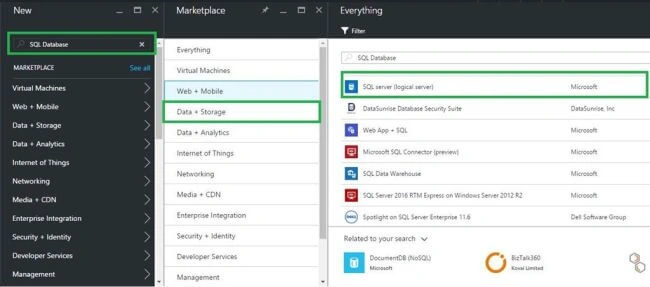
Step 2: Click New, type SQL Database in the Marketplace, and then click SQL Database (logical server).
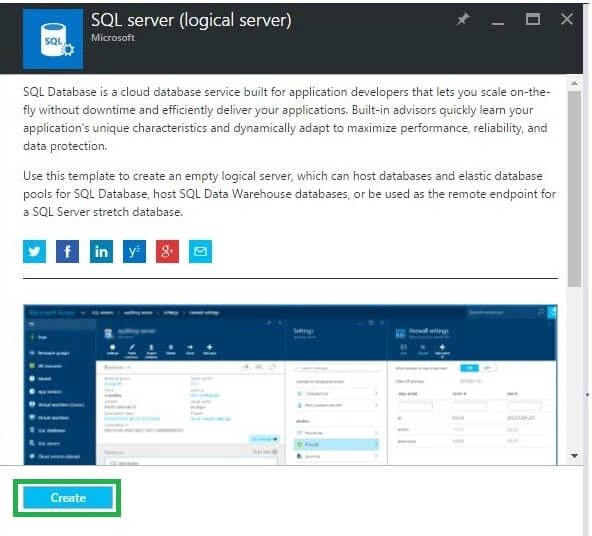
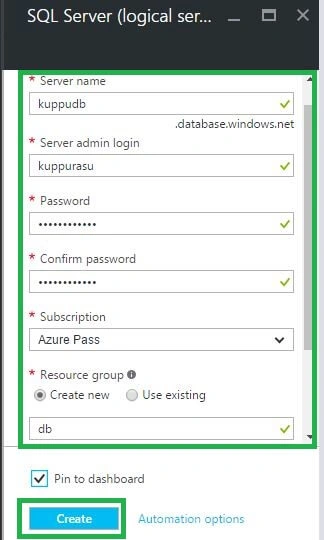
Step 4: In the New Logical Server account blade, specify the values for the following server properties: Server name, Server admin login, Password, Subscription (only if you have multiple subscriptions), Resource group (new or existing) and Location. Finally, click Create button.
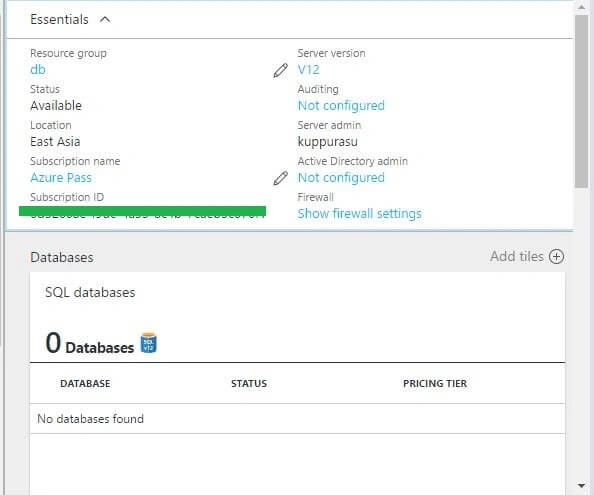
In the notification area, we can see that deployment has started. Then, a few minutes later, we get New Azure SQL Database logical server.
In this article, we discussed the steps of creating an Azure SQL Database logical server, by using Azure Portal.
Vignesh ManiPosted Sep 12, 2016, 8:46 AM
Good one Sir
Hemant MahajanPosted Sep 12, 2016, 7:13 AM
What is Logical server mean?
Nikhil SanganiPosted Sep 10, 2016, 12:05 AM
Nice One
Anu VPosted Sep 9, 2016, 11:57 PM
Nice...