

Overview
This article teaches how to create a ChatGPT application in Blazor WebAssembly using OpenAI API. ChatGPT is a powerful language model developed by OpenAI that has been trained to generate human-like text based on input prompts. This model produces engaging and natural language responses, making it ideal for conversational interfaces.
Introduction
Blazor is an innovative and modern open-source framework that enables the creation of web applications using C# and .NET. This framework represents a new and cutting-edge approach to developing rich and interactive user interfaces that are fast, efficient, and user-friendly. With Blazor, you can harness the power of WebAssembly to run .NET code in the browser, creating a seamless and integrated experience for the end user.
One of the interesting applications that can be built using Blazor is a chatbot, which can generate human-like text based on user inputs. ChatGPT is a large language model developed by OpenAI, which has been trained on a massive amount of data and can generate responses similar to those written by a human. Using the OpenAI API, we can access this model and generate responses based on user inputs.
Requirements
To create our ChatGPT application, we will begin by setting up our development environment. This will involve installing the necessary tools and dependencies, including the .NET SDK and Blazor WebAssembly. Next, we will create a new Blazor WebAssembly project and configure it to use the OpenAI API for ChatGPT. This will involve creating an API key and setting up the appropriate endpoints for communication between our application and the OpenAI API.
Once we have our environment set up, we will proceed to the implementation of our application. This will involve creating a simple and intuitive user interface that allows the user to input a prompt and receive a response from ChatGPT.
To handle the communication between our application and the OpenAI API, we will use the HttpClient class in C#. This class provides a convenient way to make HTTP requests and receive responses from a web API. We will use this class to send the user's input prompt to the OpenAI API and receive the response from ChatGPT.
Taking questions and showing responses in frontend
In the following code, you can see an input field whose data is bound to the variable “@message”,
this will be our question to pass into the API call and for which we will get an answer as a response.
Once we have the response, we must render it into the UI. For this application, we have created a simple UI using the razor components like razor pages provided by Blazor.
@page "/" <PageTitle>Chat GPT - Blazor WASM </PageTitle>
<div class="h1 mb-4 text-center"> Welcome to Chat GPT Made with Blazor Web Assembly </div>
<div style="line-height:40px;" class="h4 mb-4 text-center"> Here you can search for anything, and even impress your friends or colleagues by making one yourself. </div>
<div class="form-group text-center">
  <input class="form-control my-4 text-center py-2 m-auto" style="max-width:600px;" type="text" @bind="@message" placeholder="Type your message here" />
  <button class="btn btn-success mb-4 px-2" style="max-width:200px;" onclick="@GetResponseFromGPT3">Find Answer</button>
</div>
<div class="d-flex justify-content-center text-center">
  <div style="min-width:600px; min-height:260px; max-width:700px;" class="mt-2container border border-1 rounded-2 p-3 text-center">@generatedText</div>
</div>
The fetched response will be stored in “@generatedText” and then shown inside our div.
Calling OpenAI API
So let's get started, and take a look at the code.
First, we need to inject the required services into our application. This is done using the Inject attribute, allowing us to use the HttpClient, NavigationManager, and IJSRuntime services in our code.
[Inject] HttpClient httpClient { get; set; }
[Inject] NavigationManager _navigationManager { get; set; }
[Inject] IJSRuntime _jsRuntime { get; set; }
Next, we have two string properties that will store the input prompt and the response generated by the model. The message property will store the input prompt, and the "@generatedText" property will store the response.
public string message { get; set; }
public string generatedText { get; set; } = "Answer will be displayed here.";
We also have an API key that will be used to access the OpenAI API.
public string _apiKey = "sk-p0wTFw23mEtFX8LvfSihT3BlbkFJ24CXXXXXXXXXXXXXXX"; // You API Key
The heart of this application is the GetResponseFromGPT3() method. This method calls the OpenAI API, passing the input prompt stored in the message property. The result of the API call is stored in the answer variable, which is then assigned to the "@generatedText" property.
private async Task GetResponseFromGPT3()
{
    generatedText = "Finding Answer...";
    string answer = string.Empty;
    var openai = new OpenAIAPI(_apiKey);
    CompletionRequest completion = new CompletionRequest();
    completion.Prompt = message;
    completion.Model = OpenAI_API.Model.DavinciText;
    completion.MaxTokens = 5000;
    var result = await openai.Completions.CreateCompletionAsync(completion);
    if (result != null)
    {
      foreach(var item in result.Completions)
      {
       GPT3Response.Response = item.Text;
      }
    generatedText = GPT3Response.Response;
    }
    StateHasChanged()
}
Finally, we have the GPT3Response class, which stores the response generated by the OpenAI model. This class has a single property called "Response", which will store the generated text from the model. This class is important as it will allow us to store the response in a structured manner, which makes it easier to work with the generated text in our Blazor WebAssembly application.
public class GPT3Response
{
    public string Response { get; set; }
}
Sample Output
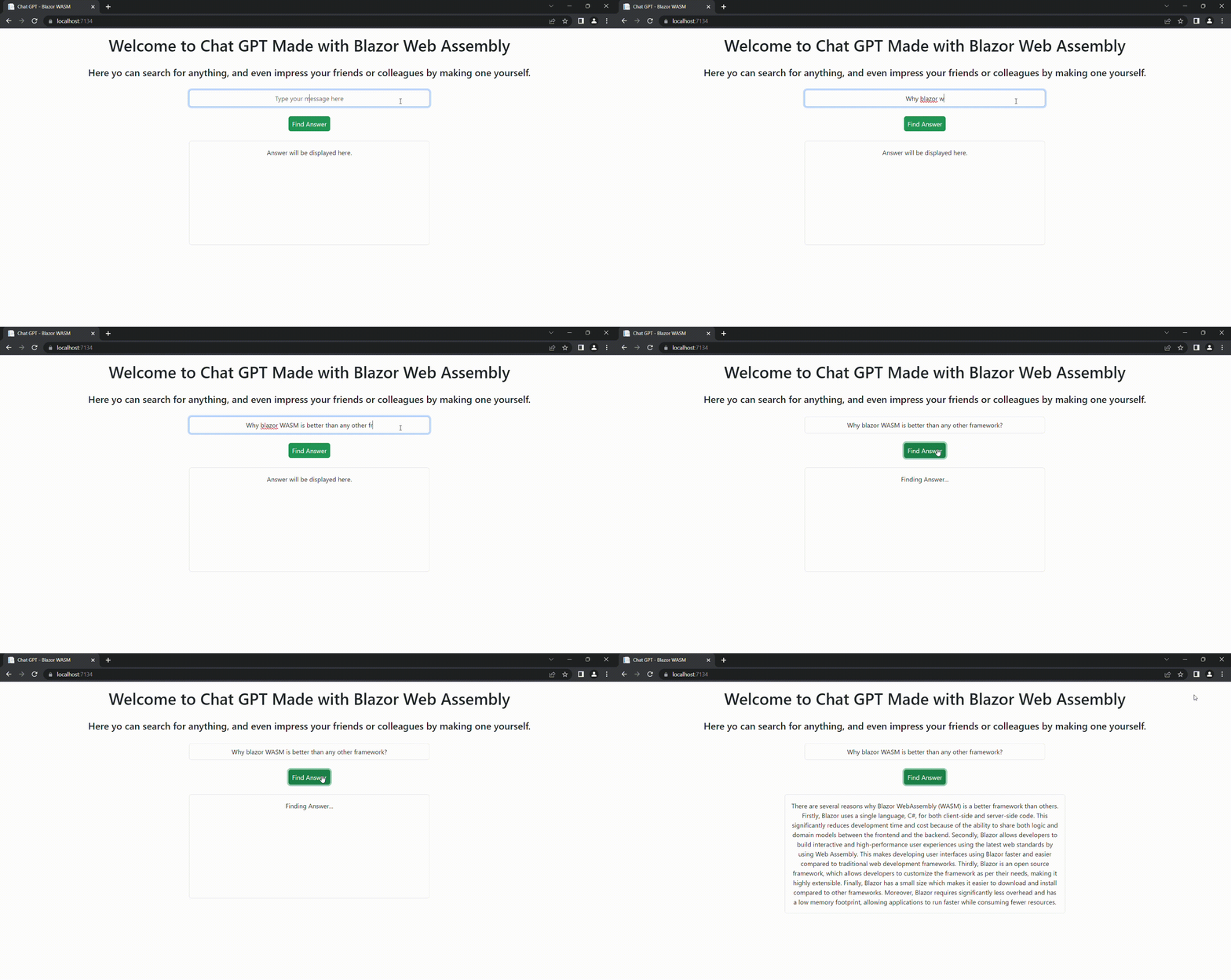
Conclusion
In conclusion, the ChatGPT application in Blazor WebAssembly is a simple and efficient solution that enables developers to create interactive and engaging user interfaces. With the help of the OpenAI API, this application can generate human-like text based on the input prompt, providing a rich and dynamic experience for the end users. Blazor WebAssembly is a framework that enables developers to build high-performance web applications that run seamlessly in the browser, providing a smooth and seamless experience for the users.
If you're looking to explore the capabilities of Blazor, or if you're interested in creating your ChatGPT application, I highly recommend giving it a try. With the help of Blazor and the OpenAI API, you can build a powerful and engaging web application that can help you impress your friends, colleagues, or clients. Whether you're a seasoned developer or just starting, Blazor provides the tools and resources you need to build high-quality and performant web applications. So why wait? I have already uploaded my project onto Github, which you can access from here, go and give Blazor a try and see what you can build!
Graeme WellingtonPosted Apr 23, 2023, 1:57 AM
Hi Yash - I am working on Net7 and found a problem in the code which I think this fixes: // completion.Model = OpenAI_API.Model.DavinciText; completion.Model = OpenAI_API.Models.Model.DavinciText;
power developerPosted Feb 15, 2023, 7:31 AM
Is there any way to train ChatGpt for our business?
Vinay AyinapurapuPosted Feb 13, 2023, 9:40 PM
Nice writeup Yash..
John IwaszPosted Feb 13, 2023, 8:16 PM
Overall, a good article, but one comment regarding error handling. If you are going to rethrow an error without logging or otherwise handling it, don’t catch it. It’s a waste of CPU cycles. Also, avoid throw ex; as that resets the stack trace. If you must rethrow use throw; instead.
Mahesh ChandPosted Feb 13, 2023, 4:24 PM
Nice, Yash. The Github link doesn't work. Also, can you upload the code for this article?