

Introduction
Steps to create and use a class library in ASP.NET/Visual Studio.
Create and use a class library
Step 1
Start Microsoft Visual Studio
Step 2
On the Menu Bar, click File -> New Project.
Step 3
In the left list, click Windows under Visual C#.
Step 4
In the right list, click ClassLibrary
Step 5
Change the Name to SampleLibrary and click OK
Step 6
Click OK.
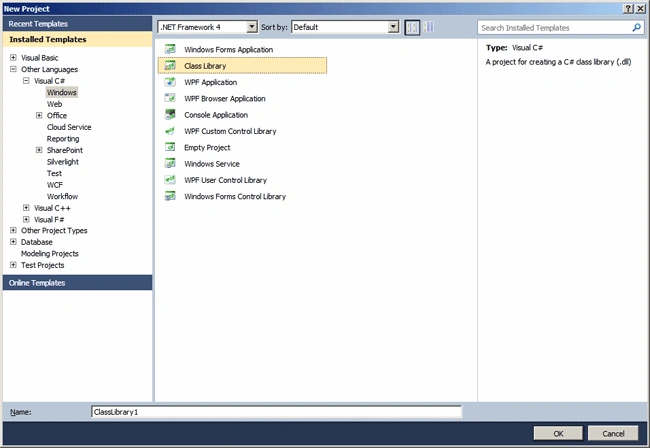
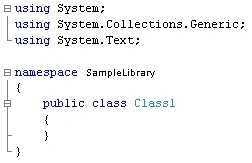
When you click OK, C# will create a Namespace with the Name you've just used, and you'll be looking at the code window.
Step 7
Change the class name to say "Algebra" and create any methods of your wish under Algebra template file opened.
using System;
using System.Collections.Generic;
using System.Text;
namespace SampleLibrary
{
    public class Algebra
    {
        public double Addition(double x, double y)
        {
            return x + y;
        }
        public double Subtraction(double x, double y)
        {
            return x - y;
        }
        public double Multiplication(double x, double y)
        {
            return x * y;
        }
        public double Division(double x, double y)
        {
            return x / y;
        }
    }
}
Step 8
Build the Library: Since you would be creating a library and not an executable, to compile the project:
- On the main menu, you can click Build -> Build ProjectName
- In the Solution Explorer, you can right-click the name of the project and click Build
- In the Class View, you can right-click the name of the project and click Build
Step 9
Create an ASP.NET WebApplication Project : After building the project, you can use it. You can use it in the same project where the library was built or you can use it in another project. If you are working in Microsoft Visual Studio, you can start by creating a new project. To use the library, you would have to reference the library. To do this:
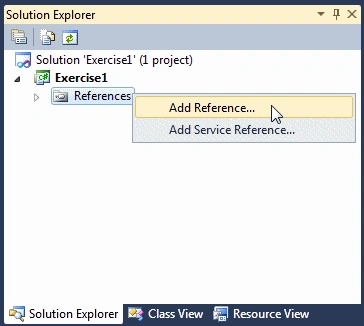
On the Menu bar, you would click Project -> Add Reference or In the Solution Explorer, you would right-click References and click Add Reference.
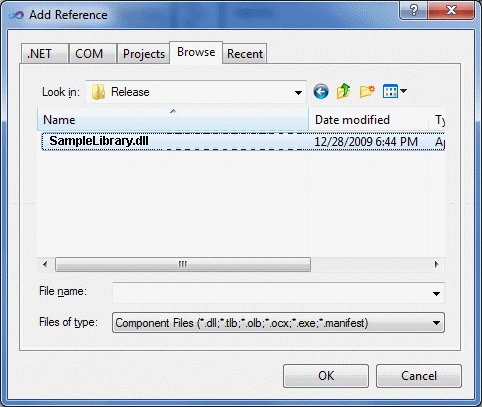
You can click the Browse tab, locate the folder where the library resides and select it.
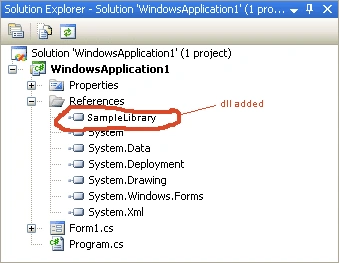
Step 10
Call the Library class methods in your application : After selecting the library, you can click OK. You can then use the classes and methods of the library like you would use those of the .NET Framework. Here is an example:
using System;
using SampleLibrary;
public class Exercise
{
    static void Main()
    {
        Algebra alg = new Algebra();
        double number1 = 100;
        double number2 = 50;
        double result = alg.Addition(number1, number2);
        Console.Write(number1);
        Console.Write(" + ");
        Console.Write(number2);
        Console.Write(" = ");
        Console.WriteLine(result);
    }
}
Step 11
Build and run the project.
Summary
In this article, we learned about Creating Class Library in Visual C#.
Happy Learning...
Keenan CollisonPosted Sep 7, 2022, 9:52 PM
I have an issue when using the method in the other program. It says 'Object reference not set to an instance of an object.' HELP PLEASE
Nikhil BhuriPosted May 25, 2022, 7:34 AM
It's really helpful for me, Thanks @Suresh
Cemal SenerPosted Sep 1, 2020, 3:27 AM
You said using in ASP.NET but did not show how, everybode knows so simple dll to creat and use in C#....
Samir BhogaytaPosted Dec 11, 2019, 7:03 AM
Nice article and helpful for beginners.
SubashPosted Feb 25, 2017, 12:03 PM
Very useful one suresh
Keertti Raj Thangavelu BabuPosted Mar 13, 2015, 12:54 AM
thanks suresh. this article is really helpful for beginners
Moderage WaasPosted Nov 23, 2010, 12:05 PM
Great! Here is a question worth considering. Some of us became developers before C# came ot this world. Is there a good book or online resource to learn and practice principles of Object Oriented Programming ? What I mean here is more about classes ( and things like polymorphism )
Steve HtmlPosted Nov 21, 2010, 1:59 AM
Reading your article, just wrote my first dll , referenced it, ran like Marion Jones ! The fog lifts slightly ! Thank You Very Much !
snake vietnamPosted Nov 15, 2010, 9:23 AM
Very useful for new member!
Mahesh ChandPosted Nov 15, 2010, 7:58 AM
Good step by step intro tutorial Suresh. Keep it up.