

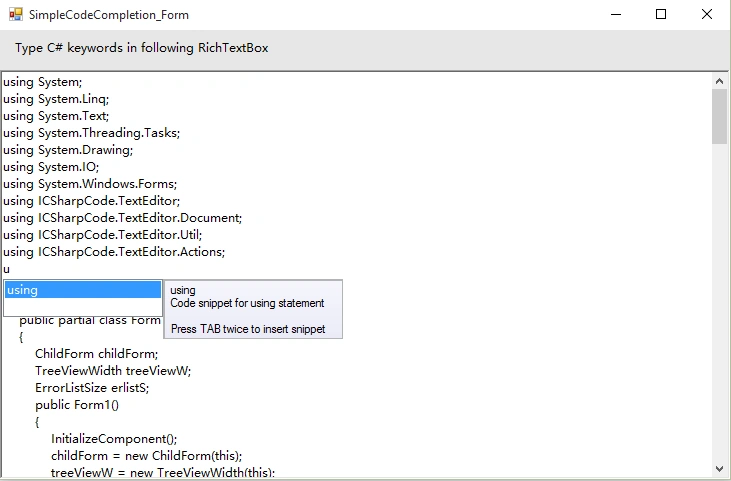
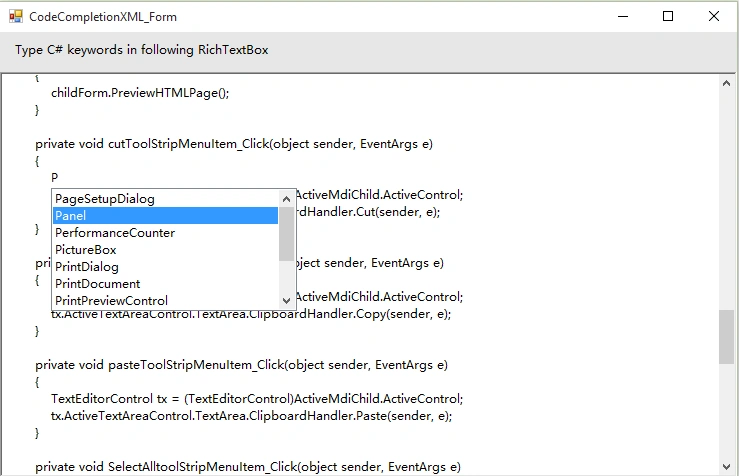
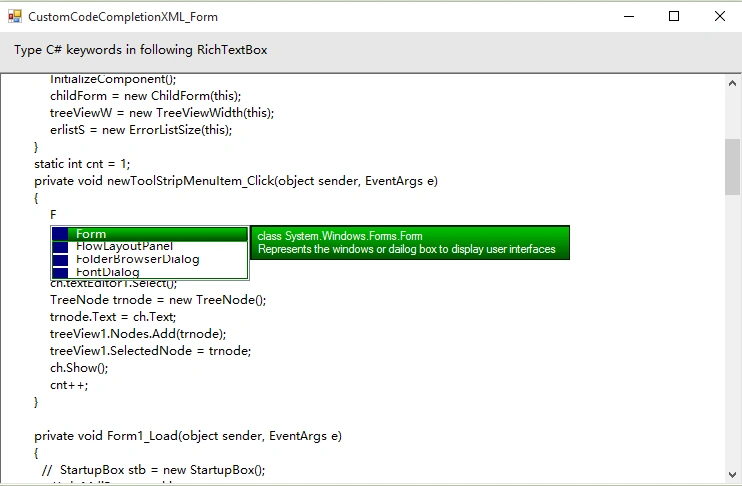
Introduction
In this article we will create a Code Completion window in C#.
Intelligent code completion is a context-aware code completion feature in some programming environments that speeds up the process of coding applications by reducing typos and other common mistakes. Attempts to do this are usually done through auto completion popups when typing, querying parameters of functions, query hints related to syntax errors, etc. Intelligent code completion and related tools serve as documentation and disambiguation for variable names, functions and methods using reflection.
Intelligent code completion appears in many program environments, an example implementation being Visual Studio's IntelliSense. The term was originally popularized as "picklist" and some implementations still refer to it as such.
How hard it is to build a code completion in C#?
I searched on the internet, I found no code instead of developed editors.
I knew that it is the list that can be shown while typing the code, but how to display that list onto the RichTextBox?
Before working on this code I thought it is so difficult to develop this, it needs so much professionalism, but I was wrong, it depends on your idea.
How is it so easy, Just create a ListBox object and add it to RichTextBox and get selected item from list box and insert it to the RichTextBox and then remove that ListBox.
You just need to Add or Remove items from list box.
You can customize your code completion window (ListBox) on your own (as shown in above image 3).
We will also complete the brackets automatically further (see AutoCompleteBrackets function)
In this article we will create simple code completion in C#. Download the code to see the code completion using XML.
It is nothing but the adding or removing ListBox.
See next algorithm for better understanding.
For understanding, read all comments carefully in the code (CCRichTextBox).
Algorithm to create a Code COmpletion in C#
- Create the ListBox object.(I am using CodeCompleteBox object name).
- Read X-Y coordinates from RichTextBox.
- Declare the Boolean variable to identify whether the CodeCompleteBox is added or not.(I am using isCodeCompleteBoxAdded variable) & String variable to identify the complete string(i am using EnteredKey variable).
- Declare array list of keywords.(I am using keywordslist).
- Add following events to RichTextBox
1. Key Press event in C#
- Identify pressed key is alphabet or not.
- Remove all items from CodeCompleteBox.
- Read each item from keywordslist.
- If each item from keywordslist is starts with pressed key character then add that item into the CodeCompleteBox.
- Read each item from keywordslist.
- If each item from keywordslist is starts with pressed key then set that item to selected.
- Set Default cursor to CodeCompleteBox.
- Set Size to CodeCompleteBox.
- Set Location to CodeCompleteBox by reading (x,y) coordinates from Step-2.
- Add CodeCompleteBox to RichTextBox.
- Set isCodeCompleteBoxAdded to true.
2. Text Changed event in C#
If RichTextBox Text is null then remove CodeCompleteBox from RichTextBox.Before removing first check if isCodeCompleteBoxAdded is true.
3. Key Down event in C#
- Check if Space,Enter,Escape & Back key is down then go to next;
- If isCodeCompleteBoxAdded is true then remove CodeCompleteBox from RichTextBox.
4. Mouse Click event in C#
If isCodeCompleteBoxAdded is true then remove CodeCompleteBox from RichTextBox.
5. VScroll event in C#
If isCodeCompleteBoxAdded is true then remove CodeCompleteBox from RichTextBox.
Now, Add the following events to CodeCompleteBox.
1. Key Down in C#
- Check if isCodeCompleteBoxAdded is true then go to next.
- If Enter or Space key is down then go to next.
- Read Selected item from CodeCompleteBox and insert that item in RichTextBox at SelectionStart position.
- Remove CodeCompleteBox from RichTextBox.
2. Key Press
It is used to insert a pressed character into RichTextBox and also select item in CodeCompleteBox.
3. Mouse Click in C#
Same as above Key Down event Step-3.
Note. Here, to display a tooltip or to display information about selected item of CodeCompleteBox we will use label to display information and will add this label to a Panel and this panel will be added to RichTextBox at specific location or next location to CodeCompleteBox. In this article we will not create a tooltip but download the source it contain the whole code with tooltips. All operations are same as CodeCompleteBox only adding Key Up event to CodeCompleteBox.
Example
I am creating a class CCRichTextBox with super class RichTextBox.
Firstly, lets see some important functions.
I used a function ProcessCodeCompletionAction(String key) to call whenever the key press event is generated in the program. I am reading the getWidth() & getHeight() function to set Width & Height to CodeCompleteBox but you can set them as default. Concat the pressed character with EnteredKey, perform all steps defined in Key Press in above algorithm.
Here we will not see adding of tooltip to CodeCompleteBox, so if you get errors then remove all components of tooltips.
public void ProcessCodeCompletionAction(string key)
{
    string EnteredKey = "";

    // Concatenate the key & EnteredKey postfix
    EnteredKey = EnteredKey + key;

    char ch;

    // Check if the pressed key on CCRichTextBox is a lowercase alphabet or not
    for (ch = 'a'; ch <= 'z'; ch++)
    {
        if (key == ch.ToString())
        {
            // Clear the CodeCompleteBox items
            CodeCompleteBox.Items.Clear();

            // Add each item to CodeCompleteBox
            foreach (string item in keywordslist)
            {
                // Check if the item starts with EnteredKey or not
                if (item.StartsWith(EnteredKey))
                {
                    CodeCompleteBox.Items.Add(item);
                }
            }

            // Read each item from CodeCompleteBox to set SelectedItem
            foreach (string item in keywordslist)
            {
                if (item.StartsWith(EnteredKey))
                {
                    CodeCompleteBox.SelectedItem = item;

                    // Set default cursor to CodeCompleteBox
                    CodeCompleteBox.Cursor = Cursors.Default;

                    // Set size to CodeCompleteBox
                    // Width = this.Width & Height = this.Height + (int)this.Font.Size
                    CodeCompleteBox.Size = new System.Drawing.Size(this.Width, this.Height + (int)this.Font.Size);

                    // Set location to CodeCompleteBox by calling getXYPoints() function
                    CodeCompleteBox.Location = this.getXYPoints();

                    // Adding controls of CodeCompleteBox to CCRichTextBox
                    this.Controls.Add(CodeCompleteBox);

                    // Set focus to CodeCompleteBox
                    CodeCompleteBox.Focus();

                    // Set isCodeCompleteBoxAdded to true
                    isCodeCompleteBoxAdded = true;

                    break;
                }
                else
                {
                    isCodeCompleteBoxAdded = false;
                }
            }
        }
        // Check if pressed key character is an uppercase letter or not
        else if (key == ch.ToString().ToUpper())
        {
            // Clear the CodeCompleteBox items
            CodeCompleteBox.Items.Clear();

            // Add each item to CodeCompleteBox
            foreach (string item in keywordslist)
            {
                // Check if the item starts with EnteredKey or not
                if (item.StartsWith(EnteredKey))
                {
                    CodeCompleteBox.Items.Add(item);
                }
            }

            // Read each item from CodeCompleteBox to set SelectedItem
            foreach (string item in keywordslist)
            {
                if (item.StartsWith(EnteredKey))
                {
                    CodeCompleteBox.SelectedItem = item;

                    // Set default cursor to CodeCompleteBox
                    CodeCompleteBox.Cursor = Cursors.Default;

                    // Set size to CodeCompleteBox
                    // Width = this.Width & Height = this.Height + (int)this.Font.Size
                    CodeCompleteBox.Size = new System.Drawing.Size(this.Width, this.Height + (int)this.Font.Size);

                    // Set location to CodeCompleteBox by calling getXYPoints() function
                    CodeCompleteBox.Location = this.getXYPoints();

                    // Adding controls of CodeCompleteBox to CCRichTextBox
                    this.Controls.Add(CodeCompleteBox);

                    // Set focus to CodeCompleteBox
                    CodeCompleteBox.Focus();

                    // Set isCodeCompleteBoxAdded to true
                    isCodeCompleteBoxAdded = true;

                    break;
                }
                else
                {
                    isCodeCompleteBoxAdded = false;
                }
            }
        }
    }
}
Okay, let's perform all steps according to above algorithm.
Step 1. Create ListBox Object,
publicListBoxCodeCompleteBox=newListBox();
Step 2. Read X-Y coordinates from RichTextBox.
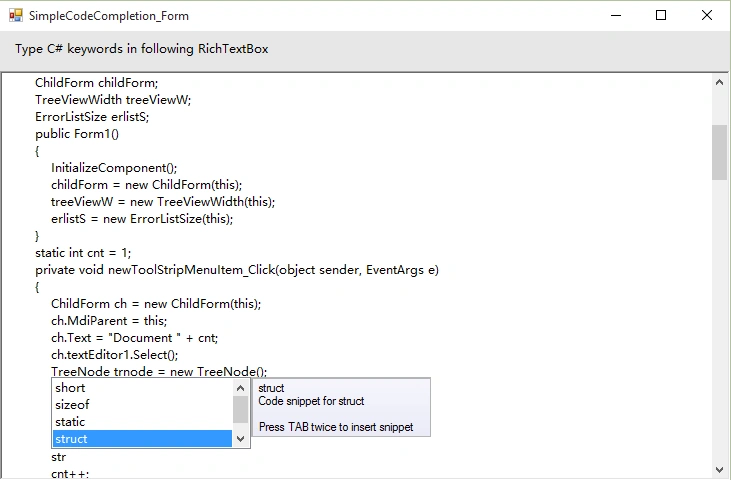
This function returns the (x,y) coordinates by adding or reducing the size of font of RichTextBox. See the following image that shows the x-y position up side down CodeCompleteBox.
public Point getXYPoints()
{
    // Get current caret position point from CCRichTextBox
    Point pt = this.GetPositionFromCharIndex(this.SelectionStart);

    // Increase the Y-coordinate size by 10 & Font size of CCRichTextBox
    pt.Y = pt.Y + (int)this.Font.Size + 10;

    // Check if the Y-coordinate value is greater than CCRichTextBox Height - CodeCompleteBox
    // for adding CodeCompleteBox at the Bottom of CCRichTextBox
    if (pt.Y > this.Height - CodeCompleteBox.Height)
    {
        pt.Y = pt.Y - CodeCompleteBox.Height - (int)this.Font.Size - 10;
    }

    return pt;
}
Step 3. Declare the Boolean variable to identify whether the CodeCompleteBox is added or not.
publicstaticBooleanisCodeCompleteBoxAdded=false;
String variable to identify the complete string.
publicstaticStringEnteredKey="";
Step 4. Declare array list of keywords. Here you can predefine the list in the program or can read the keywords using XML file. Download the source code, i have used both Array list & <List> of string. Here lets declare the array of list.
public string[] keywordslist =
{
    "bool",
    "break",
    "case",
    "catch",
    "char",
    "class",
    "const",
    "continue",
    "default",
    "do",
    "double",
    "else",
    "enum",
    "false",
    "float",
    "for",
    "goto",
    "if",
    "int"
};
Step 5. Add Key Press ,Text Changed, Key Down, Mouse Click, VScroll events to CCRichTextBox.
Key Press Event
Here we will directly call the ProcessCodeCompletionAction() function. But here we can perform some more actions like creating classes or datatypes. I have declared two extra variables Boolean isClassCreated = false; & Boolean isDataTypeDeclared = false; for identify that the inserted item from CodeCompleteBox is class/datatype or not.For that you need to declare the list of classes & datatypes.
E.g. Once you select the item from CodeCompleteBox then CodeCompleteBox will not appear until you will press =,;, because to create object of Form you can define it in two ways.
Form frm; or Form frm=new Form();
Download the source code, once you drag & drop the CCRichTextBox to your form, in Properties you can enter the list of keywords/classes/datatypes.
protected override void OnKeyPress(KeyPressEventArgs e)
{
    base.OnKeyPress(e);

    ProcessAutoCompleteBrackets(e);
    string key = e.KeyChar.ToString();

    if (isClassCreated && (key == "=" || key == ";"))
    {
        ProcessCodeCompletionAction(key);
        isClassCreated = false;
    }
    else if (isClassCreated && key != "=")
    {
        // Handle other cases for isClassCreated if needed
    }
    else if (isDataTypeDeclared && (key == ";" || key == "{" || key == "}" || key == "(" || key == ")"))
    {
        ProcessCodeCompletionAction(key);
        isDataTypeDeclared = false;
    }
    else if (isDataTypeDeclared && key != ";")
    {
        // Handle other cases for isDataTypeDeclared if needed
    }
    else
    {
        ProcessCodeCompletionAction(key);
    }
}
Text Changed Event
Remove CodeCompleteBox from CCRichTextBox if it's text is null.
protected override void OnTextChanged(EventArgs e)
{
    base.OnTextChanged(e);

    if (this.Text == "")
    {
        if (isCodeCompleteBoxAdded)
        {
            this.Controls.Remove(CodeCompleteBox);
            EnteredKey = "";
        }
    }
}
Key Down Event
Check if Space, Enter, Escape & Back key is down then remove CodeCompleteBox from CCRichTextBox. Here I have shown only about Space key, add other keys yourself.
protected override void OnKeyDown(KeyEventArgs e)
{
    base.OnKeyDown(e);

    switch (e.KeyCode)
    {
        case Keys.Space:
            if (isCodeCompleteBoxAdded)
            {
                this.Controls.Remove(CodeCompleteBox);
                EnteredKey = "";
            }
            break;
    }
}
Mouse Click Event
If isCodeCompleteBoxAdded is true then remove CodeCompleteBox from CCRichTextBox same as defined above.
VScroll Event
Code is same as above for Mouse Click.
Step 6. Add Key Down, Key Press & Mouse Click Events to CodeCompleteBox.
public CCRichTextBox()
{
    CodeCompleteBox.KeyDown += new KeyEventHandler(CodeCompleteBox_KeyDown);
    CodeCompleteBox.KeyUp += new KeyEventHandler(CodeCompleteBox_KeyUp);
    CodeCompleteBox.KeyPress += new KeyPressEventHandler(CodeCompleteBox_KeyPress);
    CodeCompleteBox.MouseClick += new MouseEventHandler(CodeCompleteBox_MouseClick);
}
Key Down Event
First identify that the down key is Enter/Space or not. Then identify that the CodeCompleteBox is added to CCRichTextBox or not then identify that the selected item from CodeCompleteBox starts with EnteredKey or not then read selected item from CodeCompleteBox. Read the length of EnteredKey, as per the length replace the first characters from selected item from CodeCompleteBox. Now insert that selected item into CCRichTextBox at SelectionStart position and then remove CodeCompleteBox from CCRichTextBox. If down key is Space then insert a single space next to the item. If down key is Left/Right then remove CodeCompleteBox from CCRichTextBox.
Here's the code for key Enter.
private void CodeCompleteBox_KeyDown(object sender, KeyEventArgs e)
{
    switch (e.KeyCode)
    {
        case Keys.Enter:
            if (isCodeCompleteBoxAdded)
            {
                if (EnteredKey != "")
                {
                    int sel = this.SelectionStart;
                    string text = CodeCompleteBox.SelectedItem.ToString();

                    if (EnteredKey.Length < text.Length)
                    {
                        text = text.Remove(0, EnteredKey.Length);
                    }

                    this.Text = this.Text.Insert(sel, text);
                    this.SelectionStart = sel + text.Length;
                    this.Controls.Remove(CodeCompleteBox);

                    this.ProcessDeclaredClasses(CodeCompleteBox.SelectedItem.ToString());
                    this.ProcessDeclaredDataTypes(CodeCompleteBox.SelectedItem.ToString());
                }
            }
            break;

        // If Left key is down, then remove CodeCompleteBox from this
        case Keys.Left:
            if (isCodeCompleteBoxAdded)
            {
                this.Controls.Remove(CodeCompleteBox);
                EnteredKey = "";
            }
            break;

        // If Right key is down, then remove CodeCompleteBox from this
        case Keys.Right:
            if (isCodeCompleteBoxAdded)
            {
                this.Controls.Remove(CodeCompleteBox);
                EnteredKey = "";
            }
            break;
    }
}
Key Press Event
This event is used to select the item that starts with EnteredKey after concatenation to it, then read all items from CodeCompleteBox and that item which starts with EnteredKey then set it to selected and also identify that the special character is pressed or not. If it is pressed then remove CodeCompleteBox from CCRichTextBox.
private void CodeCompleteBox_KeyPress(object sender, KeyPressEventArgs e)
{
    string str = e.KeyChar.ToString();

    // In this event, we must insert the pressed key to this because focus is on CodeCompleteBox

    // First, check if the pressed key is not Space, Enter, Escape, or Back
    // Space = 32, Enter = 13, Escape = 27, Back = 8
    if (Convert.ToInt32(e.KeyChar) != 13 && Convert.ToInt32(e.KeyChar) != 32 && Convert.ToInt32(e.KeyChar) != 27 && Convert.ToInt32(e.KeyChar) != 8)
    {
        if (isCodeCompleteBoxAdded)
        {
            // Insert the pressed key to CCRichTextBox at SelectionStart position
            int sel = this.SelectionStart;
            this.Text = this.Text.Insert(sel, str);
            this.SelectionStart = sel + 1;
            e.Handled = true;

            // Concatenate the EnteredKey and pressed key on CodeCompleteBox
            EnteredKey = EnteredKey + str;

            // Search for an item in CodeCompleteBox which starts with EnteredKey and set it to selected
            foreach (string item in CodeCompleteBox.Items)
            {
                if (item.StartsWith(EnteredKey))
                {
                    CodeCompleteBox.SelectedItem = item;
                    break;
                }
            }
        }
    }

    // If pressed key is Back, then set focus to CCRichTextBox
    else if (Convert.ToInt32(e.KeyChar) == 8)
    {
        this.Focus();
    }

    // If pressed key is not Back, then remove CodeCompleteBox from CCRichTextBox
    else if (Convert.ToInt32(e.KeyChar) != 8)
    {
        if (isCodeCompleteBoxAdded)
        {
            this.Controls.Remove(CodeCompleteBox);
            EnteredKey = "";
        }
    }

    // Check if the pressed key on CodeCompleteBox is a special character or not
    // If it is a special character, then remove CodeCompleteBox from CCRichTextBox
    switch (str)
    {
        case "~":
        case "`":
        case "!":
        case "@":
        case "#":
        case "$":
        case "%":
        case "^":
        case "&":
        case "*":
        case "-":
        case "_":
        case "+":
        case "=":
        case "(":
        case ")":
        case "[":
        case "]":
        case "{":
        case "}":
        case ":":
        case ";":
        case "\"":
        case "'":
        case "|":
        case "\\":
        case "<":
        case ">":
        case ",":
        case ".":
        case "/":
        case "?":
            if (isCodeCompleteBoxAdded)
            {
                this.Controls.Remove(CodeCompleteBox);
                EnteredKey = "";
            }
            break;
    }
}
Mouse Click Event
This event code is same as Enter key down event in CodeCompleteBox. That's it! All the steps of algorithm are performed. Download the source code to create code completion using XML file. In Properties, you can change the Backgroud & Foreground color of Code Completion window.
Faheem ChishtiPosted Mar 22, 2021, 12:36 PM
Very nice and awesome work
Pritam ZopePosted Feb 10, 2016, 7:07 AM
Thanks Vivek & Ehsan
Ehsan SajjadPosted Feb 8, 2016, 7:25 AM
Very good work, appreciated
Vivek KumarPosted Feb 4, 2016, 2:38 PM
Nice article
Pritam ZopePosted Feb 1, 2016, 2:07 AM
Thanks..........
Arul RPosted Jan 31, 2016, 11:06 AM
Nice share
Gowtham KPosted Jan 31, 2016, 12:20 AM
Great Work, Thanks for sharing:)
Raja TPosted Jan 29, 2016, 10:17 AM
Nice, Thanks for sharing
Santhakumar MunuswamyPosted Jan 29, 2016, 1:54 AM
Thanks for nice article
Shubham KumarPosted Jan 29, 2016, 1:36 AM
NICE KEEP SHARE