

Introduction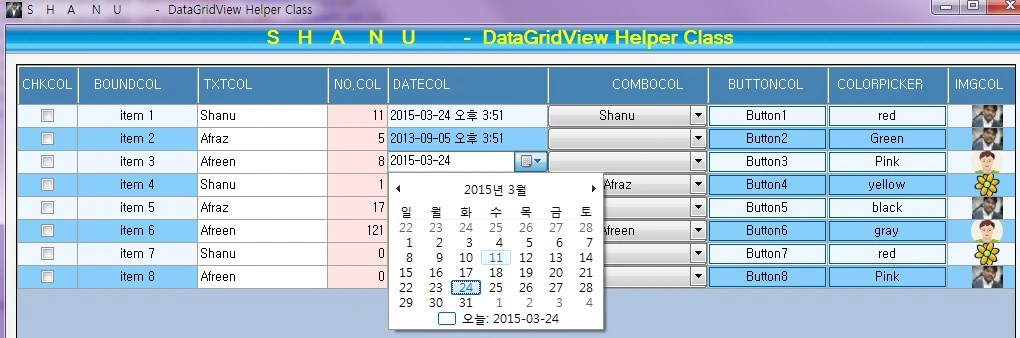
Why we need a helper class
- A helper class will make our code part Simple and Standard.
- All the events of a DataGridView can be defined in the Helper Class. In our form we can call the method from the helper class and make our code simple.
- A one-time design in the class can be used for the entire project.
- This will be useful if we change the design only in the class file and there is no need to redesign in each form.
What we have in a helper class
- Design your DataGridView, add the DataGridView to your controls like Panel, Tab or in your form
- Bound Column
- CheckBox Column
- TextBox Column
- Numeric TextBox Column
- ComboBox Column
- DateTimePicker Column
- Button Column
- Colour Dialog Column
- Image Column
- DataGridView Events like CellClick,CellContentClick and so on
Here is a sample with Color Dialog from the button Column.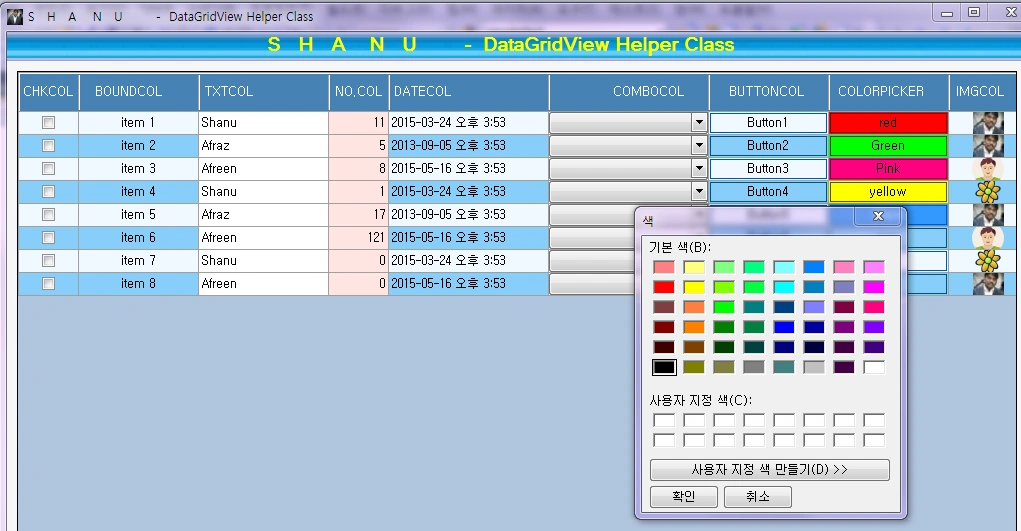
Using the code
First we can start with the helper class and then we can see how to use the helper class in Windows Forms. In my helper class I have the fallowing function to make the design and bind simple.
- Layout
- Generategrid
- Templatecolumn
- NumeriTextboxEvents
- DateTimePickerEvents
- DGVClickEvents
- colorDialogEvents
- datagridImageAddEvent
We can see a few important functions of the class and then I will paste my full class code here.
Layout: This method will set the BackgroundColor, BackColor, AllowUserToAddRows and so on for the DataGridView. In this method we pass our DataGridView and setting all the design part for grid.
- #region Layout
- public static void Layouts(DataGridView ShanuDGV, Color BackgroundColor, Color RowsBackColor, Color AlternatebackColor, Boolean AutoGenerateColumns, Color HeaderColor, Boolean HeaderVisual, Boolean RowHeadersVisible, Boolean AllowUserToAddRows, Color HeaderForeColor, int headerHeight) {
- //Grid Back ground Color
- ShanuDGV.BackgroundColor = BackgroundColor;
- //Grid Back Color
- ShanuDGV.RowsDefaultCellStyle.BackColor = RowsBackColor;
- //GridColumnStylesCollection Alternate Rows Backcolr
- ShanuDGV.AlternatingRowsDefaultCellStyle.BackColor = AlternatebackColor;
- // Auto generated here set to tru or false.
- ShanuDGV.AutoGenerateColumns = AutoGenerateColumns;
- // ShanuDGV.DefaultCellStyle.Font = new Font("Verdana", 10.25f, FontStyle.Regular);
- // ShanuDGV.ColumnHeadersDefaultCellStyle.Font = new Font("Calibri", 11, FontStyle.Regular);
- //Column Header back Color
- ShanuDGV.ColumnHeadersDefaultCellStyle.BackColor = HeaderColor;
- ShanuDGV.ColumnHeadersDefaultCellStyle.ForeColor = HeaderForeColor;
- ShanuDGV.ColumnHeadersHeight = headerHeight;
- //header Visisble
- ShanuDGV.EnableHeadersVisualStyles = HeaderVisual;
- // Enable the row header
- ShanuDGV.RowHeadersVisible = RowHeadersVisible;
- // to Hide the Last Empty row here we use false.
- ShanuDGV.AllowUserToAddRows = AllowUserToAddRows;
- }
- #endregion
Generategrid: In this method we pass our DataGridView and set the height, width and position and bind the DataGridView to our selected control.
- #region Generategrid
- public static void Generategrid(DataGridView ShanuDGV, Control cntrlName, int width, int height, int xval, int yval)
- {
- ShanuDGV.Location = new Point(xval, yval);
- ShanuDGV.Size = new Size(width, height);
- //ShanuDGV.Dock = docktyope.
- cntrlName.Controls.Add(ShanuDGV);
- }
- #endregion
TemplateColumn: This is the important method in the helperclass. Here we pass the DataGridView and define the columns as Bound, Checkbox, TextBox, DateTimePicker and so on. Here we set each column width, Alignment, visibility, BackColor, Font Color and so on.
- public static void Templatecolumn(DataGridView ShanuDGV, ShanuControlTypes ShanuControlTypes, String cntrlnames, String Headertext, String ToolTipText, Boolean Visible, int width, DataGridViewTriState Resizable, DataGridViewContentAlignment cellAlignment, DataGridViewContentAlignment headerAlignment, Color CellTemplateBackColor, DataTable dtsource, String DisplayMember, String ValueMember, Color CellTemplateforeColor) {
- switch (ShanuControlTypes) {
- case ShanuControlTypes.CheckBox:
- DataGridViewCheckBoxColumn dgvChk = new DataGridViewCheckBoxColumn();
- dgvChk.ValueType = typeof(bool);
- dgvChk.Name = cntrlnames;
- dgvChk.HeaderText = Headertext;
- dgvChk.ToolTipText = ToolTipText;
- dgvChk.Visible = Visible;
- dgvChk.Width = width;
- dgvChk.SortMode = DataGridViewColumnSortMode.Automatic;
- dgvChk.Resizable = Resizable;
- dgvChk.DefaultCellStyle.Alignment = cellAlignment;
- dgvChk.HeaderCell.Style.Alignment = headerAlignment;
- if (CellTemplateBackColor.Name.ToString() != "Transparent") {
- dgvChk.CellTemplate.Style.BackColor = CellTemplateBackColor;
- }
- dgvChk.DefaultCellStyle.ForeColor = CellTemplateforeColor;
- ShanuDGV.Columns.Add(dgvChk);
- break;
- case ShanuControlTypes.BoundColumn:
- DataGridViewColumn col = new DataGridViewTextBoxColumn();
- col.DataPropertyName = cntrlnames;
- col.Name = cntrlnames;
- col.HeaderText = Headertext;
- col.ToolTipText = ToolTipText;
- col.Visible = Visible;
- col.Width = width;
- col.SortMode = DataGridViewColumnSortMode.Automatic;
- col.Resizable = Resizable;
- col.DefaultCellStyle.Alignment = cellAlignment;
- col.HeaderCell.Style.Alignment = headerAlignment;
- if (CellTemplateBackColor.Name.ToString() != "Transparent") {
- col.CellTemplate.Style.BackColor = CellTemplateBackColor;
- }
- col.DefaultCellStyle.ForeColor = CellTemplateforeColor;
- ShanuDGV.Columns.Add(col);
- break;
- case ShanuControlTypes.TextBox:
- DataGridViewTextBoxColumn dgvText = new DataGridViewTextBoxColumn();
- dgvText.ValueType = typeof(decimal);
- dgvText.DataPropertyName = cntrlnames;
- dgvText.Name = cntrlnames;
- dgvText.HeaderText = Headertext;
- dgvText.ToolTipText = ToolTipText;
- dgvText.Visible = Visible;
- dgvText.Width = width;
- dgvText.SortMode = DataGridViewColumnSortMode.Automatic;
- dgvText.Resizable = Resizable;
- dgvText.DefaultCellStyle.Alignment = cellAlignment;
- dgvText.HeaderCell.Style.Alignment = headerAlignment;
- if (CellTemplateBackColor.Name.ToString() != "Transparent") {
- dgvText.CellTemplate.Style.BackColor = CellTemplateBackColor;
- }
- dgvText.DefaultCellStyle.ForeColor = CellTemplateforeColor;
- ShanuDGV.Columns.Add(dgvText);
- break;
- case ShanuControlTypes.ComboBox:
- DataGridViewComboBoxColumn dgvcombo = new DataGridViewComboBoxColumn();
- dgvcombo.ValueType = typeof(decimal);
- dgvcombo.Name = cntrlnames;
- dgvcombo.DataSource = dtsource;
- dgvcombo.DisplayMember = DisplayMember;
- dgvcombo.ValueMember = ValueMember;
- dgvcombo.HeaderText = Headertext;
- dgvcombo.ToolTipText = ToolTipText;
- dgvcombo.Visible = Visible;
- dgvcombo.Width = width;
- dgvcombo.SortMode = DataGridViewColumnSortMode.Automatic;
- dgvcombo.Resizable = Resizable;
- dgvcombo.DefaultCellStyle.Alignment = cellAlignment;
- dgvcombo.HeaderCell.Style.Alignment = headerAlignment;
- if (CellTemplateBackColor.Name.ToString() != "Transparent") {
- dgvcombo.CellTemplate.Style.BackColor = CellTemplateBackColor;
- }
- dgvcombo.DefaultCellStyle.ForeColor = CellTemplateforeColor;
- ShanuDGV.Columns.Add(dgvcombo);
- break;
- case ShanuControlTypes.Button:
- DataGridViewButtonColumn dgvButtons = new DataGridViewButtonColumn();
- dgvButtons.Name = cntrlnames;
- dgvButtons.FlatStyle = FlatStyle.Popup;
- dgvButtons.DataPropertyName = cntrlnames;
- dgvButtons.HeaderText = Headertext;
- dgvButtons.ToolTipText = ToolTipText;
- dgvButtons.Visible = Visible;
- dgvButtons.Width = width;
- dgvButtons.SortMode = DataGridViewColumnSortMode.Automatic;
- dgvButtons.Resizable = Resizable;
- dgvButtons.DefaultCellStyle.Alignment = cellAlignment;
- dgvButtons.HeaderCell.Style.Alignment = headerAlignment;
- if (CellTemplateBackColor.Name.ToString() != "Transparent") {
- dgvButtons.CellTemplate.Style.BackColor = CellTemplateBackColor;
- }
- dgvButtons.DefaultCellStyle.ForeColor = CellTemplateforeColor;
- ShanuDGV.Columns.Add(dgvButtons);
- break;
- case ShanuControlTypes.ImageColumn:
- DataGridViewImageColumn dgvnestedBtn = new DataGridViewImageColumn();
- dgvnestedBtn.Name = cntrlnames;
- dgvnestedBtn.Image = Image.FromFile("shanu.JPG"); //global::ShanuDGVHelper_Demo.Properties.Resources.toggle;
- dgvnestedBtn.HeaderText = Headertext;
- dgvnestedBtn.ToolTipText = ToolTipText;
- // dgvnestedBtn.DataPropertyName = cntrlnames;
- dgvnestedBtn.Visible = Visible;
- dgvnestedBtn.Width = width;
- dgvnestedBtn.SortMode = DataGridViewColumnSortMode.Automatic;
- dgvnestedBtn.Resizable = Resizable;
- dgvnestedBtn.DefaultCellStyle.Alignment = cellAlignment;
- dgvnestedBtn.HeaderCell.Style.Alignment = headerAlignment;
- ShanuDGV.Columns.Add(dgvnestedBtn);
- break;
- }
- }
NumerictextBoxEvent: In this method we pass the DataGridView and list of ColumnIndexes that need to be set as a NumbericTextbox Column. Using the EditingControlShowing Event of DataGridView, I check for all the columns that need to be accepted as only numbers from the TextBox.
- //Numeric Textbox event and check for key press event for accepting only numbers for the selected column
- #region Numeric Textbox Events
- public void NumeriTextboxEvents(DataGridView ShanuDGV, List < int > columnIndexs) {
- shanuDGVs = ShanuDGV;
- listcolumnIndex = columnIndexs;
- ShanuDGV.EditingControlShowing += new DataGridViewEditingControlShowingEventHandler(dShanuDGV_EditingControlShowing);
- }
- // grid Editing Control Showing
- private void dShanuDGV_EditingControlShowing(object sender, DataGridViewEditingControlShowingEventArgs e) {
- e.Control.KeyPress -= new KeyPressEventHandler(itemID_KeyPress); //This line of code resolved my issue
- if (listcolumnIndex.Contains(shanuDGVs.CurrentCell.ColumnIndex)) {
- TextBox itemID = e.Control as TextBox;
- if (itemID != null) {
- itemID.KeyPress += new KeyPressEventHandler(itemID_KeyPress);
- }
- }
- }
- //Grid Kyey press event
- private void itemID_KeyPress(object sender, KeyPressEventArgs e) {
- if (!char.IsControl(e.KeyChar) && !char.IsDigit(e.KeyChar)) {
- e.Handled = true;
- }
- }
- #endregion
DataGridView helperClass Full Source Code : Here is the full source code of the DataGridView helper class. I have created all the necessary methods that need to be used. If the user needs more functions then the user can add those functions as well here in this class and use in your projects.
- using System;
- using System.Collections.Generic;
- using System.ComponentModel;
- using System.Data;
- using System.Drawing;
- using System.Linq;
- using System.Text;
- using System.Windows.Forms;
- using System.Data;
- /// <summary>
- /// Author : Shanu
- /// Create date : 2014-11-11
- /// Description : ShanuDGVHelper
- /// Latest
- /// Modifier : Shanu
- /// Modify date : 2014-11-11
- /// </summary>
- namespace ShanuDGVHelper_Demo
- {
- class ShanuDGVHelper {#region Variables
- public DataGridView shanuDGVs = new DataGridView();
- List < int > listcolumnIndex;
- int DateColumnIndex = 0;
- int ColorColumnIndex = 0;
- int ClickColumnIndex = 0;
- DateTimePicker shanuDateTimePicker;
- String EventFucntions;
- int imgColumnIndex = 0;
- DataTable objDGVBind = new DataTable();
- Boolean imgBindchk = false;
- #endregion
- //Set all the telerik Grid layout
- #region Layout
- public static void Layouts(DataGridView ShanuDGV, Color BackgroundColor, Color RowsBackColor, Color AlternatebackColor, Boolean AutoGenerateColumns, Color HeaderColor, Boolean HeaderVisual, Boolean RowHeadersVisible, Boolean AllowUserToAddRows, Color HeaderForeColor, int headerHeight) {
- //Grid Back ground Color
- ShanuDGV.BackgroundColor = BackgroundColor;
- //Grid Back Color
- ShanuDGV.RowsDefaultCellStyle.BackColor = RowsBackColor;
- //GridColumnStylesCollection Alternate Rows Backcolr
- ShanuDGV.AlternatingRowsDefaultCellStyle.BackColor = AlternatebackColor;
- // Auto generated here set to tru or false.
- ShanuDGV.AutoGenerateColumns = AutoGenerateColumns;
- // ShanuDGV.DefaultCellStyle.Font = new Font("Verdana", 10.25f, FontStyle.Regular);
- // ShanuDGV.ColumnHeadersDefaultCellStyle.Font = new Font("Calibri", 11, FontStyle.Regular);
- //Column Header back Color
- ShanuDGV.ColumnHeadersDefaultCellStyle.BackColor = HeaderColor;
- ShanuDGV.ColumnHeadersDefaultCellStyle.ForeColor = HeaderForeColor;
- ShanuDGV.ColumnHeadersHeight = headerHeight;
- //header Visisble
- ShanuDGV.EnableHeadersVisualStyles = HeaderVisual;
- // Enable the row header
- ShanuDGV.RowHeadersVisible = RowHeadersVisible;
- // to Hide the Last Empty row here we use false.
- ShanuDGV.AllowUserToAddRows = AllowUserToAddRows;
- }
- #endregion
- //Add your grid to your selected Control and set height,width,position of your grid.
- #region Generategrid
- public static void Generategrid(DataGridView ShanuDGV, Control cntrlName, int width, int height, int xval, int yval) {
- ShanuDGV.Location = new Point(xval, yval);
- ShanuDGV.Size = new Size(width, height);
- //ShanuDGV.Dock = docktyope.
- cntrlName.Controls.Add(ShanuDGV);
- }
- #endregion
- //Template Column In this column we can add Textbox,Lable,Check Box,Dropdown box and etc
- #region Templatecolumn
- public static void Templatecolumn(DataGridView ShanuDGV, ShanuControlTypes ShanuControlTypes, String cntrlnames, String Headertext, String ToolTipText, Boolean Visible, int width, DataGridViewTriState Resizable, DataGridViewContentAlignment cellAlignment, DataGridViewContentAlignment headerAlignment, Color CellTemplateBackColor, DataTable dtsource, String DisplayMember, String ValueMember, Color CellTemplateforeColor) {
- switch (ShanuControlTypes) {
- case ShanuControlTypes.CheckBox:
- DataGridViewCheckBoxColumn dgvChk = new DataGridViewCheckBoxColumn();
- dgvChk.ValueType = typeof(bool);
- dgvChk.Name = cntrlnames;
- dgvChk.HeaderText = Headertext;
- dgvChk.ToolTipText = ToolTipText;
- dgvChk.Visible = Visible;
- dgvChk.Width = width;
- dgvChk.SortMode = DataGridViewColumnSortMode.Automatic;
- dgvChk.Resizable = Resizable;
- dgvChk.DefaultCellStyle.Alignment = cellAlignment;
- dgvChk.HeaderCell.Style.Alignment = headerAlignment;
- if (CellTemplateBackColor.Name.ToString() != "Transparent") {
- dgvChk.CellTemplate.Style.BackColor = CellTemplateBackColor;
- }
- dgvChk.DefaultCellStyle.ForeColor = CellTemplateforeColor;
- ShanuDGV.Columns.Add(dgvChk);
- break;
- case ShanuControlTypes.BoundColumn:
- DataGridViewColumn col = new DataGridViewTextBoxColumn();
- col.DataPropertyName = cntrlnames;
- col.Name = cntrlnames;
- col.HeaderText = Headertext;
- col.ToolTipText = ToolTipText;
- col.Visible = Visible;
- col.Width = width;
- col.SortMode = DataGridViewColumnSortMode.Automatic;
- col.Resizable = Resizable;
- col.DefaultCellStyle.Alignment = cellAlignment;
- col.HeaderCell.Style.Alignment = headerAlignment;
- if (CellTemplateBackColor.Name.ToString() != "Transparent") {
- col.CellTemplate.Style.BackColor = CellTemplateBackColor;
- }
- col.DefaultCellStyle.ForeColor = CellTemplateforeColor;
- ShanuDGV.Columns.Add(col);
- break;
- case ShanuControlTypes.TextBox:
- DataGridViewTextBoxColumn dgvText = new DataGridViewTextBoxColumn();
- dgvText.ValueType = typeof(decimal);
- dgvText.DataPropertyName = cntrlnames;
- dgvText.Name = cntrlnames;
- dgvText.HeaderText = Headertext;
- dgvText.ToolTipText = ToolTipText;
- dgvText.Visible = Visible;
- dgvText.Width = width;
- dgvText.SortMode = DataGridViewColumnSortMode.Automatic;
- dgvText.Resizable = Resizable;
- dgvText.DefaultCellStyle.Alignment = cellAlignment;
- dgvText.HeaderCell.Style.Alignment = headerAlignment;
- if (CellTemplateBackColor.Name.ToString() != "Transparent") {
- dgvText.CellTemplate.Style.BackColor = CellTemplateBackColor;
- }
- dgvText.DefaultCellStyle.ForeColor = CellTemplateforeColor;
- ShanuDGV.Columns.Add(dgvText);
- break;
- case ShanuControlTypes.ComboBox:
- DataGridViewComboBoxColumn dgvcombo = new DataGridViewComboBoxColumn();
- dgvcombo.ValueType = typeof(decimal);
- dgvcombo.Name = cntrlnames;
- dgvcombo.DataSource = dtsource;
- dgvcombo.DisplayMember = DisplayMember;
- dgvcombo.ValueMember = ValueMember;
- dgvcombo.HeaderText = Headertext;
- dgvcombo.ToolTipText = ToolTipText;
- dgvcombo.Visible = Visible;
- dgvcombo.Width = width;
- dgvcombo.SortMode = DataGridViewColumnSortMode.Automatic;
- dgvcombo.Resizable = Resizable;
- dgvcombo.DefaultCellStyle.Alignment = cellAlignment;
- dgvcombo.HeaderCell.Style.Alignment = headerAlignment;
- if (CellTemplateBackColor.Name.ToString() != "Transparent") {
- dgvcombo.CellTemplate.Style.BackColor = CellTemplateBackColor;
- }
- dgvcombo.DefaultCellStyle.ForeColor = CellTemplateforeColor;
- ShanuDGV.Columns.Add(dgvcombo);
- break;
- case ShanuControlTypes.Button:
- DataGridViewButtonColumn dgvButtons = new DataGridViewButtonColumn();
- dgvButtons.Name = cntrlnames;
- dgvButtons.FlatStyle = FlatStyle.Popup;
- dgvButtons.DataPropertyName = cntrlnames;
- dgvButtons.HeaderText = Headertext;
- dgvButtons.ToolTipText = ToolTipText;
- dgvButtons.Visible = Visible;
- dgvButtons.Width = width;
- dgvButtons.SortMode = DataGridViewColumnSortMode.Automatic;
- dgvButtons.Resizable = Resizable;
- dgvButtons.DefaultCellStyle.Alignment = cellAlignment;
- dgvButtons.HeaderCell.Style.Alignment = headerAlignment;
- if (CellTemplateBackColor.Name.ToString() != "Transparent") {
- dgvButtons.CellTemplate.Style.BackColor = CellTemplateBackColor;
- }
- dgvButtons.DefaultCellStyle.ForeColor = CellTemplateforeColor;
- ShanuDGV.Columns.Add(dgvButtons);
- break;
- case ShanuControlTypes.ImageColumn:
- DataGridViewImageColumn dgvnestedBtn = new DataGridViewImageColumn();
- dgvnestedBtn.Name = cntrlnames;
- dgvnestedBtn.Image = Image.FromFile("shanu.JPG"); //global::ShanuDGVHelper_Demo.Properties.Resources.toggle;
- dgvnestedBtn.HeaderText = Headertext;
- dgvnestedBtn.ToolTipText = ToolTipText;
- // dgvnestedBtn.DataPropertyName = cntrlnames;
- dgvnestedBtn.Visible = Visible;
- dgvnestedBtn.Width = width;
- dgvnestedBtn.SortMode = DataGridViewColumnSortMode.Automatic;
- dgvnestedBtn.Resizable = Resizable;
- dgvnestedBtn.DefaultCellStyle.Alignment = cellAlignment;
- dgvnestedBtn.HeaderCell.Style.Alignment = headerAlignment;
- ShanuDGV.Columns.Add(dgvnestedBtn);
- break;
- }
- }
- #endregion
- #region Image Column bind using Cellformatting
- public void datagridImageAddEvent(DataGridView ShanuDGV, int imgColIndex, DataTable objDGVBinds) {
- shanuDGVs = ShanuDGV;
- objDGVBind = objDGVBinds;
- imgColumnIndex = imgColIndex;
- shanuDGVs.CellFormatting += new DataGridViewCellFormattingEventHandler(shanuDGVs_CellFormatting);
- }
- private void shanuDGVs_CellFormatting(object sender, DataGridViewCellFormattingEventArgs e) {
- if (e.ColumnIndex == imgColumnIndex) {
- if (imgBindchk == false) {
- shanuDGVs.Rows[e.RowIndex].Cells[e.ColumnIndex].Value = Image.FromFile(objDGVBind.Rows[e.RowIndex][imgColumnIndex].ToString());
- if (e.RowIndex == objDGVBind.Rows.Count - 1) {
- imgBindchk = true;
- }
- }
- }
- }
- #endregion
- //Numeric Textbox event and check for key press event for accepting only numbers for the selected column
- #region Numeric Textbox Events
- public void NumeriTextboxEvents(DataGridView ShanuDGV, List < int > columnIndexs) {
- shanuDGVs = ShanuDGV;
- listcolumnIndex = columnIndexs;
- ShanuDGV.EditingControlShowing += new DataGridViewEditingControlShowingEventHandler(dShanuDGV_EditingControlShowing);
- }
- // grid Editing Control Showing
- private void dShanuDGV_EditingControlShowing(object sender, DataGridViewEditingControlShowingEventArgs e) {
- e.Control.KeyPress -= new KeyPressEventHandler(itemID_KeyPress); //This line of code resolved my issue
- if (listcolumnIndex.Contains(shanuDGVs.CurrentCell.ColumnIndex)) {
- TextBox itemID = e.Control as TextBox;
- if (itemID != null) {
- itemID.KeyPress += new KeyPressEventHandler(itemID_KeyPress);
- }
- }
- }
- //Grid Kyey press event
- private void itemID_KeyPress(object sender, KeyPressEventArgs e) {
- if (!char.IsControl(e.KeyChar) && !char.IsDigit(e.KeyChar)) {
- e.Handled = true;
- }
- }#endregion
- // Add an datTime Picker control to existing Textbox Column
- #region DateTimePicker control to textbox column
- public void DateTimePickerEvents(DataGridView ShanuDGV, int columnIndexs, ShanuEventTypes eventtype) {
- shanuDGVs = ShanuDGV;
- DateColumnIndex = columnIndexs;
- ShanuDGV.CellClick += new DataGridViewCellEventHandler(shanuDGVs_CellClick);
- //switch (eventtype)
- //{
- // case ShanuEventTypes.CellClick:
- // ShanuDGV.CellClick +=new DataGridViewCellEventHandler(shanuDGVs_CellClick);
- // break;
- // case ShanuEventTypes.cellContentClick:
- // ShanuDGV.CellContentClick +=new DataGridViewCellEventHandler(shanuDGVs_CellContentClick);
- // break;
- //}
- }
- // In this cell click event,DateTime Picker Control will be added to the selected column
- private void shanuDGVs_CellClick(object sender, DataGridViewCellEventArgs e) {
- if (e.ColumnIndex == DateColumnIndex) {
- shanuDateTimePicker = new DateTimePicker();
- shanuDGVs.Controls.Add(shanuDateTimePicker);
- shanuDateTimePicker.Format = DateTimePickerFormat.Short;
- Rectangle dgvRectangle = shanuDGVs.GetCellDisplayRectangle(e.ColumnIndex, e.RowIndex, true);
- shanuDateTimePicker.Size = new Size(dgvRectangle.Width, dgvRectangle.Height);
- shanuDateTimePicker.Location = new Point(dgvRectangle.X, dgvRectangle.Y);
- // shanuDateTimePicker.Visible = true;
- }
- }
- #endregion
- // Button Click evnet
- #region Button Click Event
- public void DGVClickEvents(DataGridView ShanuDGV, int columnIndexs, ShanuEventTypes eventtype)
- {
- shanuDGVs = ShanuDGV;
- ClickColumnIndex = columnIndexs;
- ShanuDGV.CellContentClick += new DataGridViewCellEventHandler(shanuDGVs_CellContentClick_Event);
- }
- private void shanuDGVs_CellContentClick_Event(object sender, DataGridViewCellEventArgs e) {
- if (e.ColumnIndex == ClickColumnIndex)
- {
- MessageBox.Show("Button Clicked " + shanuDGVs.Rows[e.RowIndex].Cells[e.ColumnIndex].Value.ToString());
- }
- }
- #endregion
- // Button Click Event to show Color Dialog
- #region Button Click Event to show Color Dialog
- public void colorDialogEvents(DataGridView ShanuDGV, int columnIndexs, ShanuEventTypes eventtype) {
- shanuDGVs = ShanuDGV;
- ColorColumnIndex = columnIndexs;
- ShanuDGV.CellContentClick += new DataGridViewCellEventHandler(shanuDGVs_CellContentClick);
- }
- private void shanuDGVs_CellContentClick(object sender, DataGridViewCellEventArgs e) {
- if (e.ColumnIndex == ColorColumnIndex) {
- MessageBox.Show("Button Clicked " + shanuDGVs.Rows[e.RowIndex].Cells[e.ColumnIndex].Value.ToString());
- ColorDialog cd = new ColorDialog();
- cd.ShowDialog();
- shanuDGVs.Rows[e.RowIndex].Cells[e.ColumnIndex].Style.BackColor = cd.Color;
- }
- }
- #endregion
- }
- }
- //Enam decalaration for DataGridView Column Type ex like Textbox Column ,Button Column
- public enum ShanuControlTypes {
- BoundColumn, TextBox, ComboBox, CheckBox, DateTimepicker, Button, NumericTextBox, ColorDialog, ImageColumn
- }
- public enum ShanuEventTypes {
- CellClick, cellContentClick, EditingControlShowing
- }
Now let’s see how to use this Helper Class in our Windows Forms project.
- Add the helperClass file to your project.
- In your form Load call a Method to create your DataGridView dynamically and call the functions to design, bind and set each column of your grid.
Here we can see I have created a method called "generatedgvColumns” and call this method in my Form Load Event.In this method i will set the Hegith,Width and styles to the datagridview,create all columns with Column type as TextboxColumn,ButtonColumn,CheckBoxColumn,ImageColumn,DateTimePickerColumn and etc,Set events for grid like CellContentClick event and etc, bind the Dataseource to the grid.
- public void generatedgvColumns()
- {
- //First generate the grid Layout Design
- ShanuDGVHelper.Layouts(shanuDGV, Color.LightSteelBlue, Color.AliceBlue, Color.LightSkyBlue, false, Color.SteelBlue, false, false, false, Color.White, 40);
- //Set Height,width and add panel to your selected control
- ShanuDGVHelper.Generategrid(shanuDGV, pnlShanuGrid, 1000, 600, 10, 10);
- // CheckboxColumn creation
- ShanuDGVHelper.Templatecolumn(shanuDGV, ShanuControlTypes.CheckBox, "Chk", "CHKCOL", "Check Box Column", true, 60, DataGridViewTriState.True, DataGridViewContentAlignment.MiddleCenter, DataGridViewContentAlignment.MiddleCenter, Color.Transparent, null, "", "", Color.Black);
- // BoundColumn creation
- ShanuDGVHelper.Templatecolumn(shanuDGV, ShanuControlTypes.BoundColumn, "DGVBoundColumn", "BOUNDCOL", "Bound Column", true, 120, DataGridViewTriState.True, DataGridViewContentAlignment.MiddleCenter, DataGridViewContentAlignment.MiddleCenter, Color.Transparent, null, "", "", Color.Black);
- // TextboxColumn creation
- ShanuDGVHelper.Templatecolumn(shanuDGV, ShanuControlTypes.TextBox, "DGVTXTColumn", "TXTCOL", "textBox Column", true, 130, DataGridViewTriState.True, DataGridViewContentAlignment.MiddleLeft, DataGridViewContentAlignment.MiddleLeft, Color.White, null, "", "", Color.Black);
- // NumerictextColumn creation
- ShanuDGVHelper.Templatecolumn(shanuDGV, ShanuControlTypes.TextBox, "DGVNumericTXTColumn", "NO.COL", "textBox Column", true, 60, DataGridViewTriState.True, DataGridViewContentAlignment.MiddleRight, DataGridViewContentAlignment.MiddleCenter, Color.MistyRose, null, "", "", Color.Black);
- // BoundColumn creation which will be used as Datetime picker
- ShanuDGVHelper.Templatecolumn(shanuDGV, ShanuControlTypes.BoundColumn, "DGVDateTimepicker", "DATECOL", "For Datetime Column", true, 160, DataGridViewTriState.True, DataGridViewContentAlignment.MiddleLeft, DataGridViewContentAlignment.MiddleLeft, Color.Transparent, null, "", "", Color.Black);
- // ComboBox Column creation
- ShanuDGVHelper.Templatecolumn(shanuDGV, ShanuControlTypes.ComboBox, "DGVComboColumn", "COMBOCOL", "Combo Column", true, 160, DataGridViewTriState.True, DataGridViewContentAlignment.MiddleCenter, DataGridViewContentAlignment.MiddleRight, Color.Transparent, dtName, "Name", "Value", Color.Black);
- // Button Column creation
- ShanuDGVHelper.Templatecolumn(shanuDGV, ShanuControlTypes.Button, "DGVButtonColumn", "BUTTONCOL", "Button Column", true, 120, DataGridViewTriState.True, DataGridViewContentAlignment.MiddleCenter, DataGridViewContentAlignment.MiddleRight, Color.Transparent, null, "", "", Color.Black);
- // Color Dialog Column creation
- ShanuDGVHelper.Templatecolumn(shanuDGV, ShanuControlTypes.Button, "DGVColorDialogColumn", "COLORPICKER", "Button Column", true, 120, DataGridViewTriState.True, DataGridViewContentAlignment.MiddleCenter, DataGridViewContentAlignment.MiddleRight, Color.Transparent, null, "", "", Color.Black);
- // Image Column creation
- ShanuDGVHelper.Templatecolumn(shanuDGV, ShanuControlTypes.ImageColumn, "DGVImgColumn", "IMGCOL", "IMG Column", true, 80, DataGridViewTriState.True, DataGridViewContentAlignment.MiddleCenter, DataGridViewContentAlignment.MiddleRight, Color.Transparent, null, "", "", Color.Black);
- // Numeric Textbox Setting and add the Numeric Textbox column index to list
- lstNumericTextBoxColumns = new List < int > ();
- lstNumericTextBoxColumns.Add(shanuDGV.Columns["DGVNumericTXTColumn"].Index);
- //Numeric textbox events to allow only numeric is that column
- objshanudgvHelper.NumeriTextboxEvents(shanuDGV, lstNumericTextBoxColumns);
- //Image Column bind image
- objshanudgvHelper.datagridImageAddEvent(shanuDGV, shanuDGV.Columns["DGVImgColumn"].Index, dtSource);
- // Datetime Picker Bind to an existing textbox Column
- objshanudgvHelper.DateTimePickerEvents(shanuDGV, shanuDGV.Columns["DGVDateTimepicker"].Index, ShanuEventTypes.CellClick);
- // Add Color Dialog to Button Column
- objshanudgvHelper.colorDialogEvents(shanuDGV, shanuDGV.Columns["DGVColorDialogColumn"].Index, ShanuEventTypes.cellContentClick);
- // DGV button Click Event
- objshanudgvHelper.DGVClickEvents(shanuDGV, shanuDGV.Columns["DGVButtonColumn"].Index, ShanuEventTypes.cellContentClick);
- // Bind data to DGV.
- shanuDGV.DataSource = dtSource;
- }
- #endregion
"ShanuDGVHelper.Layouts()" this method sets the layout of the grid, like autogenrated or not, BackgroundColor, AlternatebackColor, RowHeadersVisible and so on.
"ShanuDGVHelper.Generategrid()" this method sets the Height, Width and adds the DataGridView to our selected control, for example here I have added the DGV to a panel control.
" ShanuDGVHelper.Templatecolumn" this method defines our Column type as Checkbox,TextBox, Combobox and so on. For this method we pass the Column Name, Column Header Text, Column Width, Column Back Color and so on.
ramesh manoPosted Mar 24, 2019, 8:58 AM
Thank you bro. Very useful. Thanks for sharing.
Syed ShanuPosted Apr 11, 2015, 11:28 PM
Thabk You Santhakumar
Santhakumar MunuswamyPosted Apr 11, 2015, 1:28 PM
Good work
Syed ShanuPosted Mar 27, 2015, 2:15 AM
Thank You Gowtham.
Gowtham RajamanickamPosted Mar 27, 2015, 1:57 AM
explained very easily..
Gowtham RajamanickamPosted Mar 27, 2015, 1:56 AM
great
Syed ShanuPosted Mar 27, 2015, 12:35 AM
Thank You Tom and Manish
Manish Kumar ChoudharyPosted Mar 27, 2015, 12:31 AM
Very useful. Thanks for sharing.
Tom MohanPosted Mar 26, 2015, 11:05 PM
useful
Vithal WadjePosted Mar 26, 2015, 2:18 PM
nice one
Pankaj Kumar ChoudharyPosted Mar 26, 2015, 12:08 PM
good article Sir..............
Syed ShanuPosted Mar 26, 2015, 2:40 AM
Thank You Khargesh Rajput
Khargesh RajputPosted Mar 26, 2015, 2:12 AM
good work sir