

Introduction
This article describes a simple approach to creating Excel/Word/HTML documents using C#, ADO.Net dataset. Codes internally generate XML and XSL documents and then transform them into well-formatted HTML documents. Since both Excel and Word support HTML thus we can create these documents from HTML sources. We can also change the appearance of data using CSS.
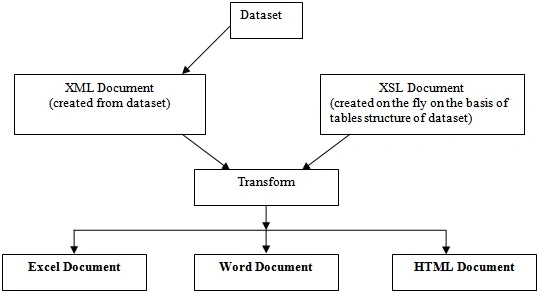
Create document function
The CreateDocument function has four parameters i.e., the path of the file, the name of the file, the dataset object, and the type of file to be created.
XmlXslToExcel.CreateDocument(filePath, "test", ds, XmlXslToExcel.DocumentType.Excel);
CreateDocument function internally calls CreateXMLDocument() and CreateXSLDocument(), then transforms the XML document using XSL document and creates the specified file.
public static bool CreateDocument(string filePath, string fileName, DataSet ds, DocumentType docType)
{
    XmlDocument xmlDoc = null;
    XslCompiledTransform xslTran = null;
    FileStream excelFileStream = null;
    bool isFileCreated;
    try
    {
        if (ds == null || ds.Tables.Count == 0) return false;
        xmlDoc = CreateXmlDocument(ds);
        xslTran = CreateXslDocument(ds);
        if (xmlDoc == null || xslTran == null) return false;
        // Append xls extention in file name to create an excel file (we can also use doc extention to create word or html document file)
        switch (docType)
        {
            case DocumentType.Excel:
                filePath = filePath + "\\Excel\\" + fileName + ".xls";
                break;
            case DocumentType.Word:
                filePath = filePath + "\\Word\\" + fileName + ".doc";
                break;
            case DocumentType.HTML:
                filePath = filePath + "\\HTML\\" + fileName + ".htm";
                break;
            default:
                filePath = filePath + "\\HTML\\" + fileName + ".htm";
                break;
        }

        // Create FileStream object with file mode as Create
        excelFileStream = new System.IO.FileStream(filePath, System.IO.FileMode.Create);

        // Create XmlTextWriter object for the FileStream
        System.Xml.XmlTextWriter xtw = new System.Xml.XmlTextWriter(excelFileStream, System.Text.Encoding.Unicode);

        // Now transform xml document into specified stream
        // Or we can also specify the output file which is to be created by transformation
        xslTran.Transform(xmlDoc, null, xtw);
        //xslTran.Transform(xmlDoc, fileName);
        xtw.Flush();
        excelFileStream.Flush();
        xtw.Close();
        excelFileStream.Close();
        xtw = null;
        excelFileStream = null;
        // check for file existence
        isFileCreated = File.Exists(filePath);
    }
    catch (Exception ex)
    {
        throw ex;
    }
    finally
    {
        if (excelFileStream != null)
            excelFileStream.Close();
        excelFileStream = null;
        xmlDoc = null;
        xslTran = null;
    }
    return isFileCreated;
}
Excel limitations
The following are a few limitations of this approach
-
This approach will not work where you want to create multiple sheets from the available data.
-
There is also a limitation on the number of records per sheet ( you can populate only 65536 rows per sheet)
raggedy andyPosted Aug 21, 2011, 7:25 PM
Like the methods/classes for CreateXmlDocument and CreateXslDocument. Without them, the article is of little (no) value. With them, the article would be very useful.
saifullah khanPosted Jan 20, 2011, 5:16 AM
sir its a good effort,please tell me how can i create spreadsheet in asp.net
kishore kumarPosted Jan 19, 2011, 4:35 AM
i want to create a ribbon in c#.net,i dont know how to start also,so pls tel me procedure to create a ribbon in c#,including namespaces also.....pls help me..... thank u
saifullah khanPosted Nov 3, 2010, 2:55 AM
100/100
Roahn LuoPosted Jun 11, 2009, 11:33 PM
Thanks a lot for sharing.
srilakshmi BPosted Mar 6, 2009, 4:11 AM
Hi I am Srilakshmi.I am unable to download zip file.Could you please send the code CreateXmlDocument() pls.