

Introduction
Here is Part 2
If we are building a large website, we might need to create multiple levels of
Master Pages. For example, we might want to create a single site-wide Master
Page that applies to all the content pages in our website. In addition, we might
need to create multiple section-wide Master Pages that apply to only the pages
contained in a particular section. Remember, we cannot work with nested Master
Pages in Visual Web Developer or Visual Studio 2005 or earlier while in Design
view. If we need to nest Master Pages, then we need to stick to Source view. We
can nest Master Pages as many levels deep as we need to.
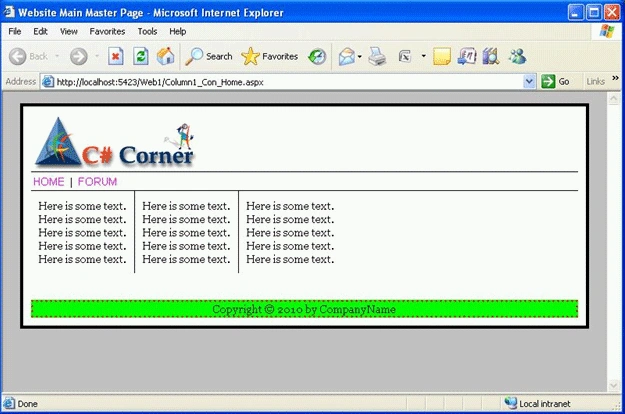
For example the code given below contains a Master Page named Site_Main.master,
which displays a logo image and contains a single content area. It also contains
site-wide navigation links.
<%@ Master Language="VB" CodeFile="Site_Main.master.vb" Inherits="MasterPage" %>
<!DOCTYPE html PUBLIC "-//W3C//DTD XHTML 1.0 Transitional//EN" "http://www.w3.org/TR/xhtml1/DTD/xhtml1-transitional.dtd">
<html>
<head id="Head1" runat="server">
<style type="text/css">
html
{
background-color:Silver;
font:14px Georgia,Serif;
}
.content
{
width:700px;
margin:auto;
border-style:solid;
background-color:white;
padding:10px;
}
.tabstrip
{
padding:3px;
border-top:solid 1px black;
border-bottom:solid 1px black;
}
.tabstrip a
{
font:14px Arial;
color:Fuchsia;
text-decoration:none;
}
.column
{
float:left;
padding:10px;
border-right:solid 1px black;
}
.rightColumn
{
float:left;
padding:10px;
}
.footer
{
background-color:Lime;
border:3px dotted red;
text-align:center;
}
.clear
{
clear:both;
}
</style>
<title>Website
Main Master Page</title>
</head>
<body>
<form id="form1" runat="server">
<div class="content">
<asp:Image
id="imgLogo"
ImageUrl="~/adds/CSSiteLogo.gif"
AlternateText="Logo"
Runat="server" />
<div class="tabstrip">
<asp:HyperLink
id="lnkProducts"
Text="HOME"
NavigateUrl="~/Column1_Con_Home.aspx"
Runat="server" />
|
<asp:HyperLink
id="lnkServices"
Text="FORUM"
NavigateUrl="~/Column2_Con_About.aspx"
Runat="server" />
</div>
<asp:contentplaceholder id="ContentPlaceHolder1" runat="server">
</asp:contentplaceholder>
<br class="clear" />
<br />
<br />
<div class="footer">
Copyright © 2010
by CompanyName
</div>
</div>
</form>
</body>
</html>
There are two Master Pages Column1.master and Column2.master given below which
are nested Master Pages. Both Master Pages include a MasterPageFile attribute
that points to the Site.master Master Page.
Column1.Master
<%@ Master Language="VB" MasterPageFile="~/Site_Main.master" AutoEventWireup="false"CodeFile="Column1.master.vb" Inherits="Column1" %>
Join the conversation! Your thoughts help the community grow.