

iText is a library that allows you to create and manipulate PDF documents. It enables developers looking to enhance a web or other application with dynamic PDF document generation and/or manipulation.
Developers can use iText to:
- Serve PDF to a browser
- Generate dynamic documents from XML files or databases
- Use a PDF's many interactive features
- Add bookmarks, page numbers, watermarks, etc
- Split, concatenate, and manipulate PDF pages
- Automate filling out of PDF forms
- Add digital signatures to a PDF file
iText is available in Java as well as in C#.
Find some links below that will help you to explore this:
Official Website: https://itextpdf.com/products/itext-7
Knowledge Base: https://kb.itextpdf.com/home
Assemblies Download: https://sourceforge.net/projects/itextsharp/
So, now if you want to use this in ASP.NET application, I have created sample solution for you; just follow the steps to understand it.
Step 1
First of all you need to download the components (dll) from here.
Step 2
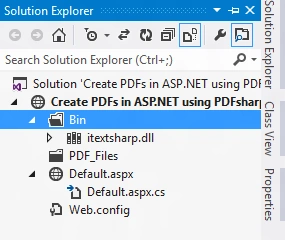
Now, open the Visual Studio and create a simple website and add a "Bin" folder in the project.
Step 3
If you are done with the above, right-click on the "Bin" folder and select "Add Reference" and in the dialog box that appears click on the Browse button and locate the dll we have saved in step 1.
Step 4
Now in the code-behind add the two namespaces iTextSharp.text and iTextSharp.text.pdf and add a folder named "PDF_Files" on the root. Remember, if you are using hosting then you need to allow Read and Write permission on this folder.
Step 5
Okay, use the following code-behind code:
var doc1 = new iTextSharp.text.Document();
string path = Server.MapPath("PDF_Files");
PdfWriter.GetInstance(doc1, new FileStream(path + "/Doc1.pdf", FileMode.Create));
doc1.Open();
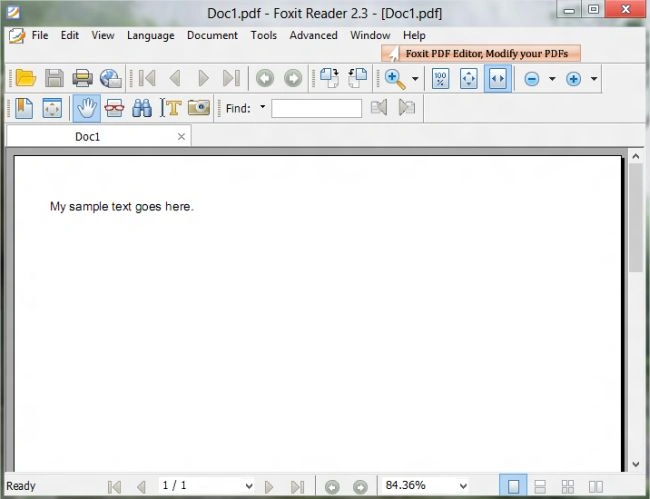
doc1.Add(new Paragraph("My sample text goes here."));
doc1.Close();
Step 6
After doing the above, run the project and test it; the complete code is:
Code-Behind
using System
using System.Collections.Generic;using System.IO;
using System.Linq;
using System.Web;
using System.Web.UI;
using System.Web.UI.WebControls;
using iTextSharp.text;
using iTextSharp.text.pdf;

public partial class _Default : System.Web.UI.Page
{
    protected void Page_Load(object sender, EventArgs e)
    {
        var doc1 = new iTextSharp.text.Document();
        string path = Server.MapPath("PDF_Files");
        PdfWriter.GetInstance(doc1, new FileStream(path + "/Doc1.pdf", FileMode.Create));
        doc1.Open();
        doc1.Add(new Paragraph("My sample text goes here."));
        doc1.Close();
    }
}
If you want to explore it more, please visit here http://itextpdf.com/summit.php.
I hope you like it. Thanks.
Former memberPosted Feb 26, 2018, 1:00 PM
Adding something beneficial to this amazing blog, that 'ZetPDF' is one of the amazing PDF software besides these as well.It includes support for annotating the PDF files, having bookmarks navigation and its own PDF the rendering engine, ability to add and remove file attachments, and other similar features.
Former memberPosted Oct 25, 2013, 4:28 AM
Aspose.PDF for .NET is another .NET Library that allows you to create, read, modify and even convert pdf documents to other formats. Check out this App here: http://www.aspose.com/.net/pdf-component.aspx
Sonu SingheditedPosted Dec 28, 2012, 6:35 AMEdited Dec 29, 2012, 11:35 AM
easy n working process.... but how to add whole page in pdf..(how to print full page in pdf)
Sonu SinghPosted Dec 28, 2012, 6:34 AM
very nice article it helps me to create a pdf document for office use..thanks for it..
Honey ChawlaPosted Dec 24, 2012, 12:46 PM
very good article but one thing, if i want to display it in browser then? if you can help me then please send me the code with explanation. Reply Soon
syed tanveerPosted Dec 9, 2012, 2:07 AM
its iTextSharp.dll
syed tanveerPosted Dec 9, 2012, 2:05 AM
when i run this code in my website ..it shows me blank web page....i also added iSharpText dll in it.... ................................................................ my email id is [email protected] ........ plz send me a demo of this project using System; using System.Collections.Generic;using System.IO; using System.Linq; using System.Web; using System.Web.UI; using System.Web.UI.WebControls; using iTextSharp.text; using iTextSharp.text.pdf; public partial class _Default : System.Web.UI.Page { protected void Page_Load(object sender, EventArgs e) { var doc1 = new iTextSharp.text.Document(); string path = Server.MapPath("PDF_Files"); PdfWriter.GetInstance(doc1, new FileStream(path + "/Doc1.pdf", FileMode.Create)); doc1.Open(); doc1.Add(new Paragraph("My sample text goes here.")); doc1.Close(); } }
syed tanveerPosted Dec 9, 2012, 2:02 AM
when i run the website after writing this code ..it shw mw blank web page..i need r help code is as follows using System; using System.Collections.Generic;using System.IO; using System.Linq; using System.Web; using System.Web.UI; using System.Web.UI.WebControls; using iTextSharp.text; using iTextSharp.text.pdf; public partial class _Default : System.Web.UI.Page { protected void Page_Load(object sender, EventArgs e) { var doc1 = new iTextSharp.text.Document(); string path = Server.MapPath("PDF_Files"); PdfWriter.GetInstance(doc1, new FileStream(path + "/Doc1.pdf", FileMode.Create)); doc1.Open(); doc1.Add(new Paragraph("My sample text goes here.")); doc1.Close(); } }
Terrence HlabanePosted Jul 2, 2012, 7:32 AM
Great article, I like it. Question using this code to add Sql Parameters / data from textbox control to creat the pdf file paragram?
Lajapathy ArunPosted Jun 26, 2012, 8:45 AM
Thank you. Every time you bringing new things to my corner.