

Xamarin is a development platform that allows us to code native, cross-platform iOS, Android, and Windows Phone apps in C#.
Requirements
- Xamrain Studio or Visual Studio
- Minimum 8 Gb ram
- Above i3 processor
- Fundamentals of C# programming language
Steps should be followed
Please follow my steps to create PhoneWord and use this tutorial effectively.
Step 1
Launch the Visual Studio 2017 and go to file new project.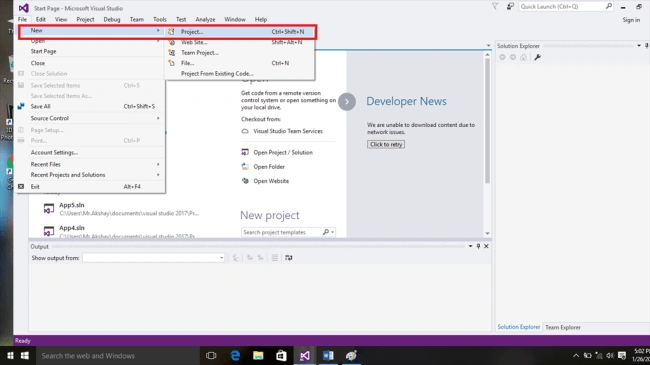
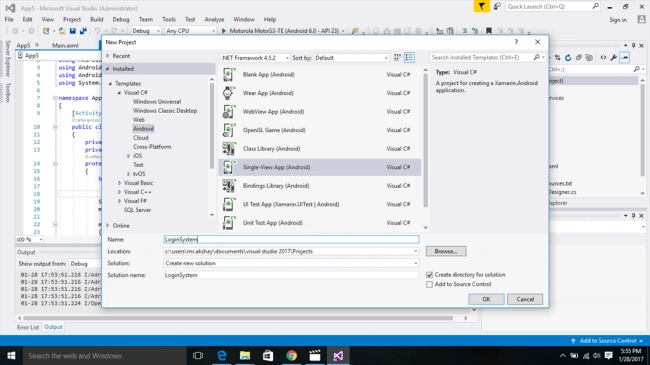
Then you need to select the Android template from the List and then name the application and press to create the Project and select where to save the project.
Step 3
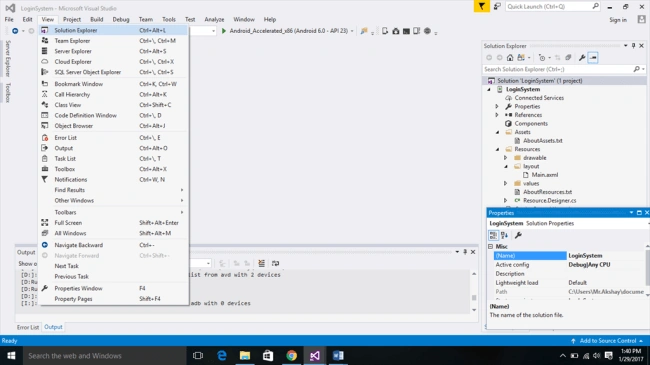
Here we go to our new project that has been created and then we need to navigate to Designer Page. To open the designer page you need to open Solution Explorer ViewàSolution Explorer.
Step 4
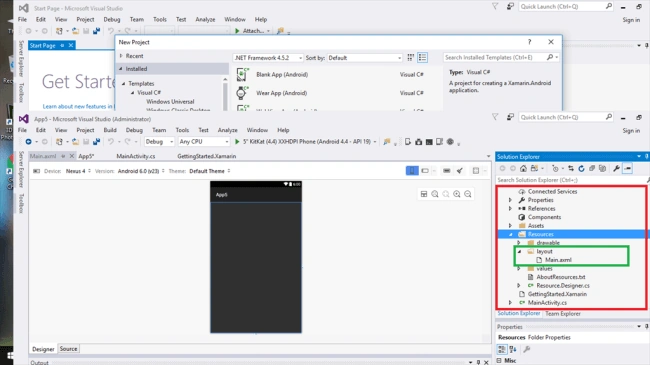
Then to Open Designer Page we need to select the Following, Solution ExploreràResourcesàLayoutàMain.Xaml.
Step 5
Add this Following Code in Main.Xaml Source Page. This main.xaml file is our designer page and here our PhoneWord UI design will be present here. And if you can, do it by manually by dragging and dropping the TextBox and Buttons from the Toolbar.
- <?xml version="1.0" encoding="utf-8"?>
- <LinearLayout xmlns:android="http://schemas.android.com/apk/res/android"
- android:orientation="vertical"
- android:layout_width="match_parent"
- android:layout_height="match_parent"
- android:minWidth="25px"
- android:minHeight="25px">
- <EditText
- android:layout_width="match_parent"
- android:layout_height="wrap_content"
- android:id="@+id/PhonewordText" />
- <Button
- android:text="Translate"
- android:layout_width="match_parent"
- android:layout_height="wrap_content"
- android:id="@+id/TranslateButton" />
- <Button
- android:text="Call"
- android:layout_width="match_parent"
- android:layout_height="wrap_content"
- android:id="@+id/CallButton" />
- </LinearLayout>
Step 6
Add the Following Code in MainActivity.cs this main acitivity plays a most important role and this makes our app work correctly and customizes buttons with background activity.
- using System;
- using Android.App;
- using Android.Content;
- using Android.Runtime;
- using Android.Views;
- using Android.Widget;
- using Android.OS;
- namespace Phoneword.Droid
- {
- [Activity (Label = "Phoneword.Droid", MainLauncher = true, Icon = "@drawable/icon")]
- public class MainActivity : Activity
- {
- EditText phoneNumberText;
- Button translateButton;
- Button callButton;
- string TranslatedNumber;
- protected override void OnCreate (Bundle bundle)
- {
- base.OnCreate(bundle);
- // Set our view from the "main" layout resource
- SetContentView (Resource.Layout.Main);
- // Get our button from the layout resource,
- // and attach an event to it
- Button button = FindViewById<Button> (Resource.Id.TranslateButton);
- SetContentView(Resource.Layout.Main);
- phoneNumberText = FindViewById<EditText>(Resource.Id.PhonewordText);
- translateButton = FindViewById<Button>(Resource.Id.TranslateButton);
- callButton = FindViewById<Button>(Resource.Id.CallButton);
- translateButton.Click += TranslateButton_Click;
- callButton.Click += CallButton_Click;
- }
- }
- }
Then you need to add the PhoneWordTranslator.cs it is used transalte the alphabets into numbers and add this code under the phonewordtranslator class .
- using System;
- using System.Collections.Generic;
- using System.Text;
- namespace Phoneword
- {
- public static class PhonewordTranslator
- {
- public static string ToNumber(string raw)
- {
- if (string.IsNullOrWhiteSpace(raw))
- return "";
- else
- raw = raw.ToUpperInvariant();
- var newNumber = new StringBuilder();
- foreach (var c in raw)
- {
- if (" -0123456789".Contains(c))
- newNumber.Append(c);
- else
- {
- var result = TranslateToNumber(c);
- if (result != null)
- newNumber.Append(result);
- }
- // otherwise we've skipped a non-numeric char
- }
- return newNumber.ToString();
- }
- static bool Contains(this string keyString, char c)
- {
- return keyString.IndexOf(c) >= 0;
- }
- static int? TranslateToNumber(char c)
- {
- if ("ABC".Contains(c))
- return 2;
- else if ("DEF".Contains(c))
- return 3;
- else if ("GHI".Contains(c))
- return 4;
- else if ("JKL".Contains(c))
- return 5;
- else if ("MNO".Contains(c))
- return 6;
- else if ("PQRS".Contains(c))
- return 7;
- else if ("TUV".Contains(c))
- return 8;
- else if ("WXYZ".Contains(c))
- return 9;
- return null;
- }
- }
- }
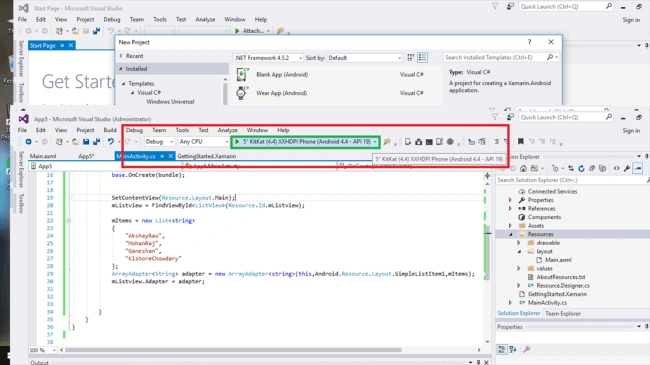
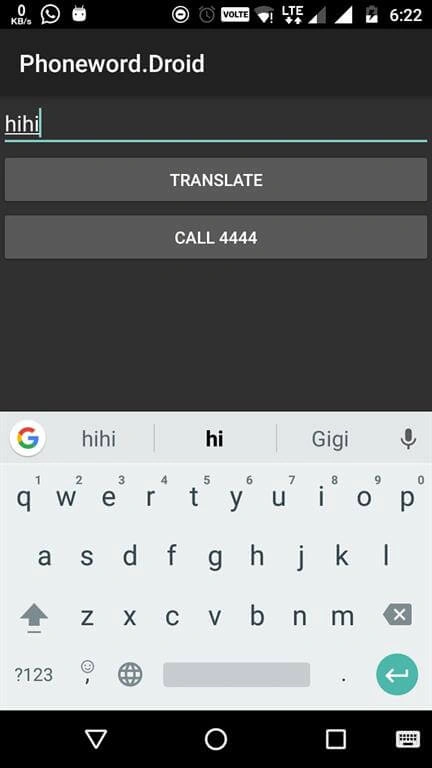
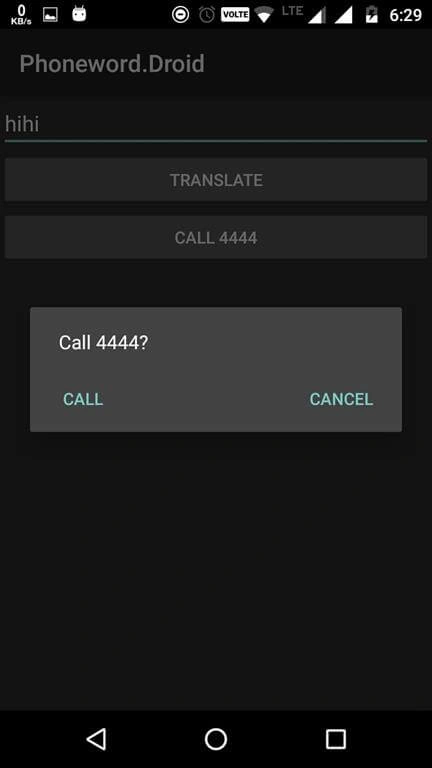
Then run the app using Visual Studio Android Emulator and here we go -- our app gets executed.
Output Of our PhoneWord,
Conclusion
Thank you for reading. Please make use of this article and if you have any doubts comment below and for any queries comment below. If you like it please follow me for more updates about Xamarin Android App development.
David MartinPosted Jun 4, 2019, 5:07 AM
This does not work for me using Visual Studio 2019 in Windows 10 Pro. Has anyone used this environment?
Akshayrao VPosted Apr 6, 2017, 2:29 PM
Thanks for your valuable time
Ganeshan NPosted Apr 5, 2017, 8:34 AM
Nice one .....keep it up
Akshayrao VPosted Apr 5, 2017, 6:51 AM
Yes C# is programming language I have used the main aspect of Xamarain is to build application for cross platforms.so it supports
Former memberPosted Apr 5, 2017, 5:34 AM
How to create app with xamarin which will run on android, IOS and windown phone because here you select android template. does it run on android, IOS and windown phone then ?