

This control provides functionality for displaying, paging, filtering and sorting data from a collection of your Model objects.
As a developer I have used various controls for displaying data in MVC such as Webgrid for displaying and sorting and paging data. I have also used normal for and foreach loops for Iterating Model data and displaying it. Finally I have also used PagedList.Mvc for paging with a Webgrid but in all of this I found the Grid.MVC Control to be the easies to use and less to code.
Agenda
- Creating simple application in MVC.
- Adding Entity Framework and configuring it.
- Adding Grid.MVC and Bootstrap from Nuget.
- Adding simple controller.
- Adding View and using Grid.MVC in it.
- Lastly how to use the filter properties of Grid.MVC.
The following are the tables we will use for the demo.
Let's start with creating a basic MVC application and naming it GridDemo.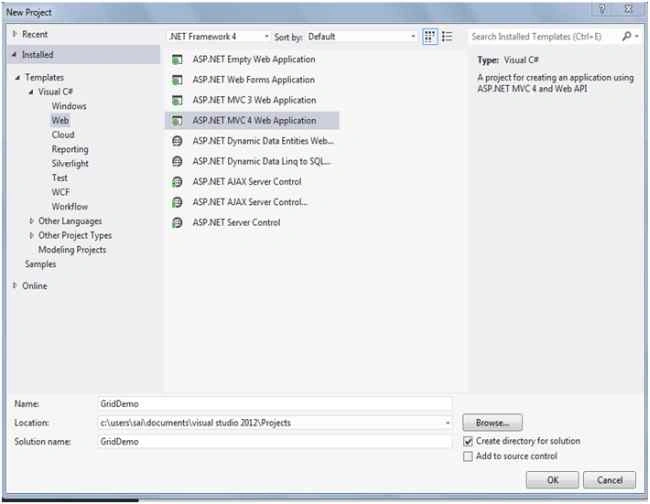
Creating Application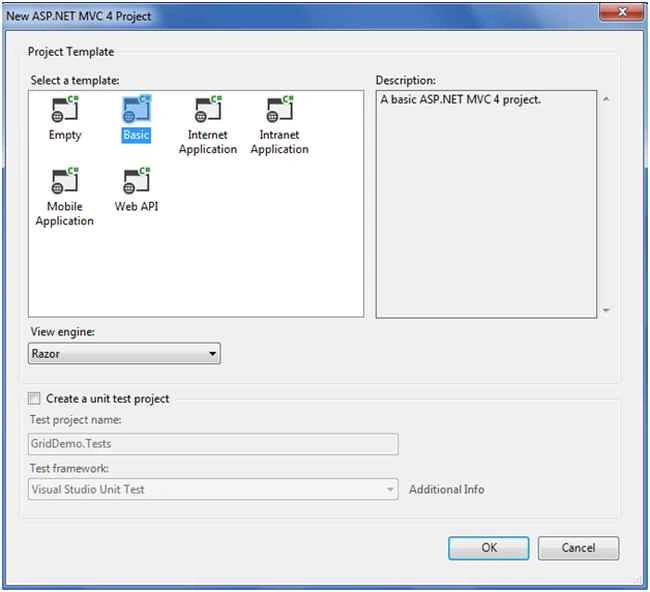
After creating the application you need to select the project template. In this template we will use the Basic template.
Finally click on the Ok button.
After creating the application here is the application view.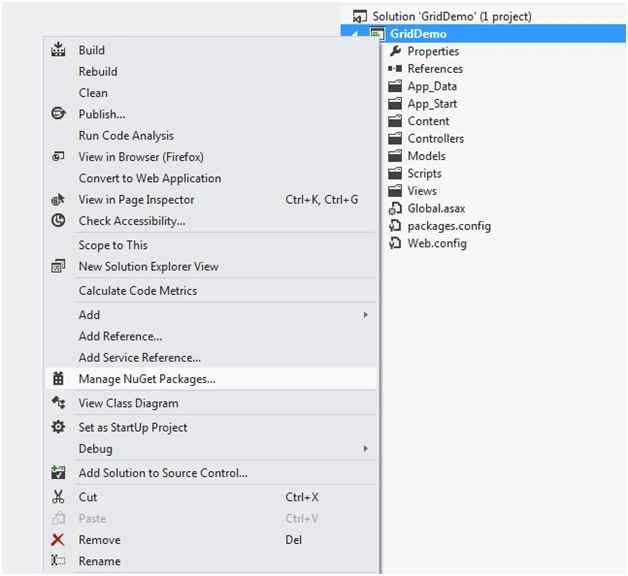
We have completed creating the application. We will add an Entity Framework entity to the application.
Installing Entity Framework
For adding Entity Framework just right-click on your application and from the preceding list select “Manage NuGet Packages”.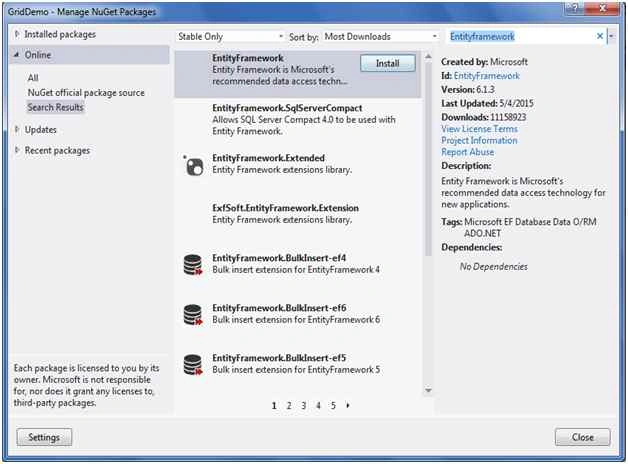
After select a new dialog will popup of “Manage NuGet Packages”.
Inside the search box enter “Entity Framework”.
After getting the search results select Entity Framework then click on the Install button.
After adding it, it will show in the Installed packages.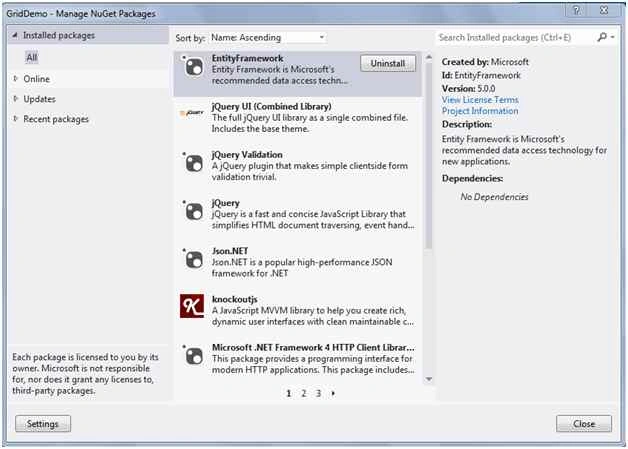
After adding Entity Framework now we will add an ADO.NET Entity Data Model.
For ADO.NET Entity Data Model just right-click on the Model folder and select Add inside that select ADO.NET Entity Data Model to our solution.
Then a small dialog will pop up asking for the ADO.NET Entity Data Model name. I will name it MyTestDB.
Then a new Wizard will popup where we will configure the Entity Data Model. In this we will use Database First.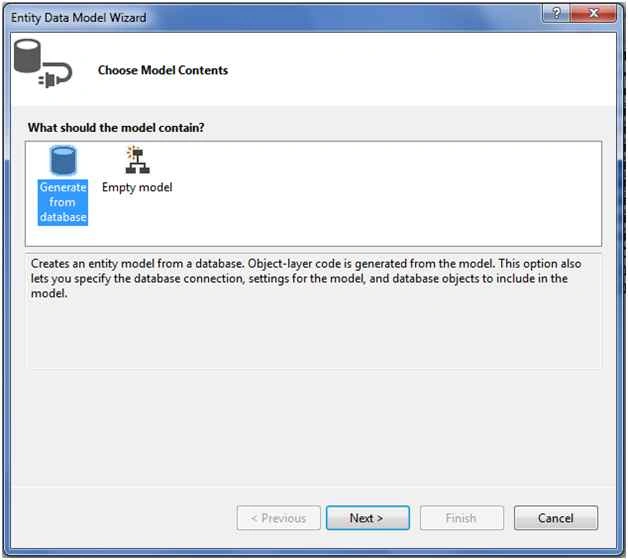
From that select Generate from database and click on the Next button.
After clicking on the Next button a new wizard will po pup for choosing the Data Connection.
Choosing Data Connection
Now click on New Connection and a new dialog will popup.
We need to configure it.
In Server name you need to add your SQL Server Name.
Using SQL Server Authentication then you need to enter User name and Password of SQL Server.
Last I will select the database name: EmployeeDB.
Lastly click on the OK button.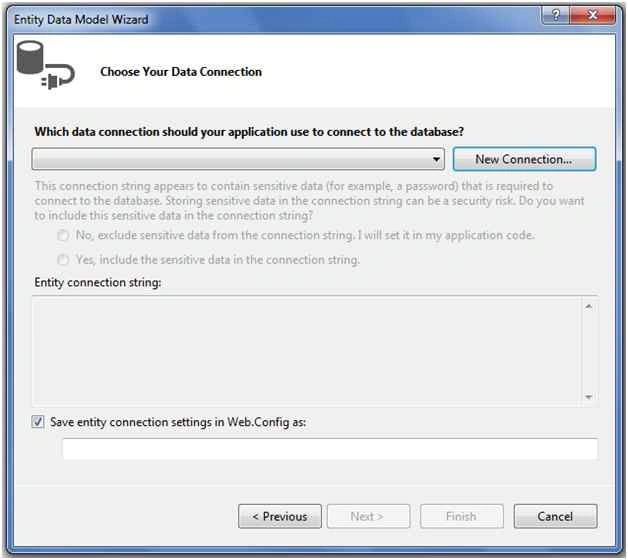
Here is the final wizard after completing the configuration.
After adding the Entity Data Model the wizard will look as in the following snapshot.
Selecting database objects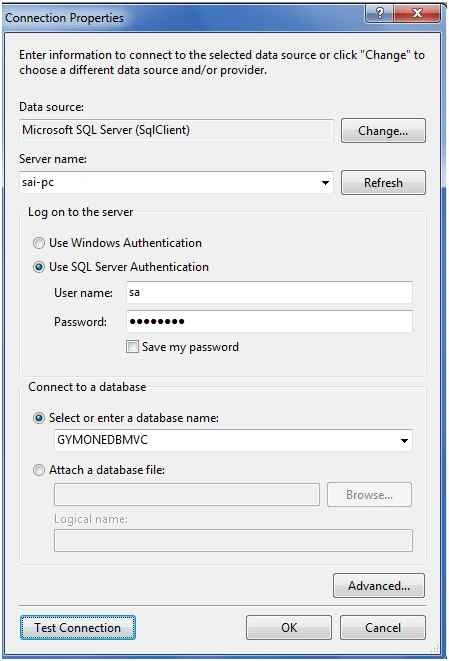
Now click on the Next button.
A new wizard will pop up for selecting a database object and in this you will see all the table that we have created in the database.
Finally clicking on the Finish button after adding the ADO.NET Entity Data Model.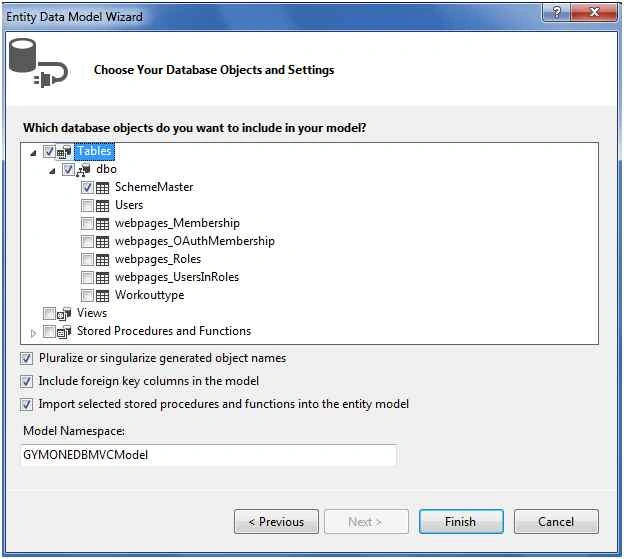
The connection string as generated after adding Entity Framework.
- <addname="GYMONEDBMVCEntities"connectionString="metadata=res://*/Models.MyTestDB.csdl|res://*/Models.MyTestDB.ssdl|res://*/Models.MyTestDB.msl;
- provider=System.Data.SqlClient;provider
- connection string="
- data source=sai-pc;
- initial catalog=GYMONEDBMVC;
- user id=sa;
- password=Pass$123;
- MultipleActiveResultSets=True;
- App=EntityFramework""
- providerName="System.Data.EntityClient" />
For adding Grid.MVC just right-click on your application and from the preceding list select “Manage NuGet Packages”.

A new wizard will pop up and inside that there is search box, just type Grid.MVC.
Then click on the Install Button.
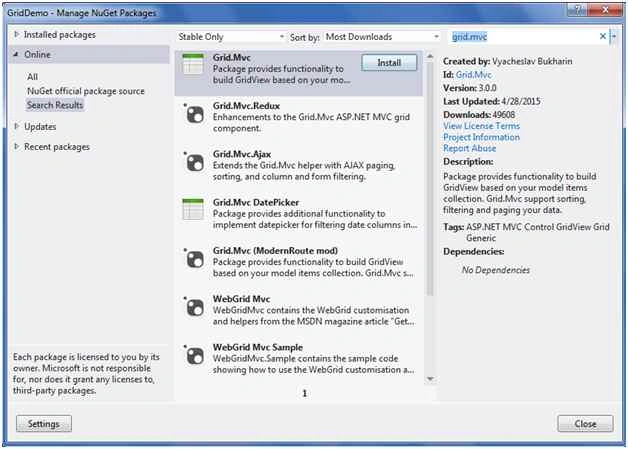
The following is the View after adding Grid.MVC:
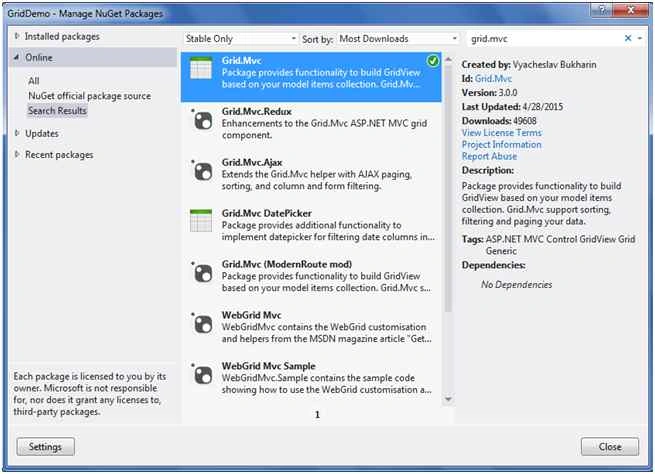
Completed with adding Grid.MVC.
Adding Bootstrap
The following is a similar step for adding Bootstrap from Nuget.
In the search box just type Bootstrap.
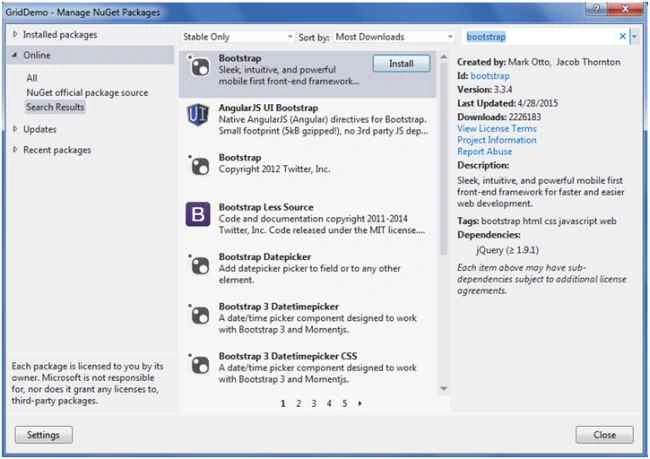
View after adding Bootstrap.
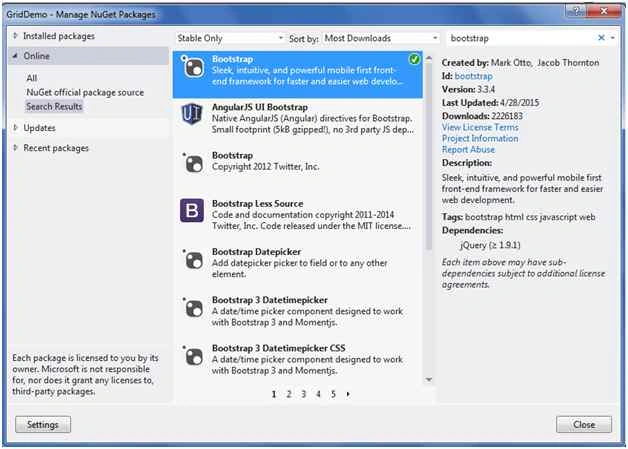
Completed with adding Bootstrap.
Let's add the Controller.
Adding simple controller
To add a controller just right-click on the Controller folder then select Add from the list and inside that select controller.
After selecting controller a new dialog will popup with the name Add Controller.
Now let's change the name of the Controller to HomeController.
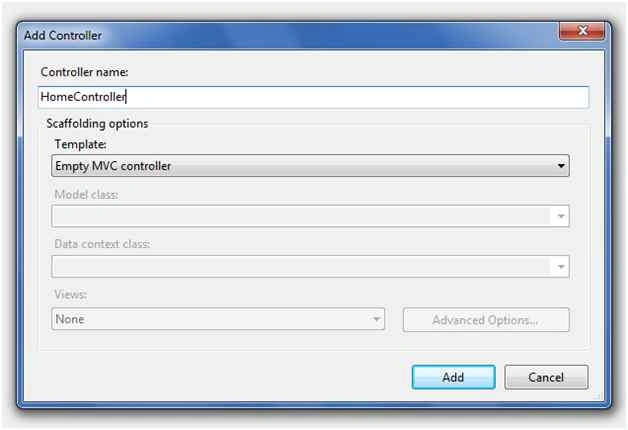
Code Snippet After Adding
- using System;
- using System.Collections.Generic;
- using System.Linq;
- using System.Web;
- using System.Web.Mvc;
- namespace GridDemo.Controllers
- {
- public class HomeController : Controller
- {
- public ActionResult Index()
- {
- return View();
- }
- }
- }
Here I have just wrote a simple LINQ query for getting the data from the SchemeMasters table.
- public class HomeController : Controller
- {
- public ActionResult Details()
- {
- GYMONEDBMVCEntities GVDB = new GYMONEDBMVCEntities();
- var SchemeList = (from scheme in GVDB.SchemeMasters
- select scheme).ToList();
- return View(SchemeList);
- }
- }
For adding the View just right-click inside the Details Action Method and then select Add View. A new wizard will pop up with the same name as that of the Action Method and in the Model select SchemeMaster Model and the scaffold template will be empty. Finally click on the Add Button.
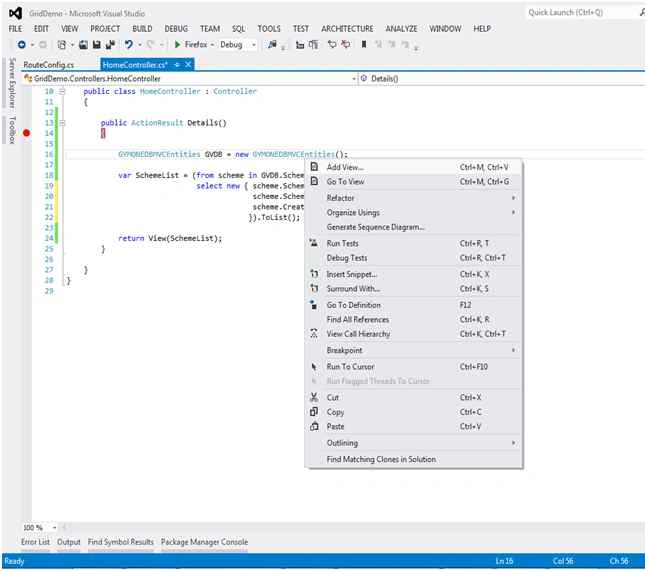
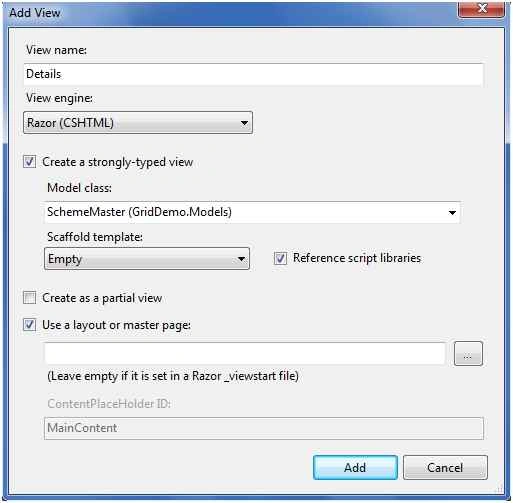
After adding the view, the following is the complete View of Details.cshtml that is generated.
- @model GridDemo.Models.SchemeMaster
- @{
- ViewBag.Title = "Details";
- }
- <h2>Details</h2>
- @model IEnumerable<GridDemo.Models.SchemeMaster>
- @model IEnumerable<GridDemo.Models.SchemeMaster>
- @using GridMvc.Html
- @{
- ViewBag.Title = "Details";
- }
- @{
- Layout = null;
- }
- <h2>Details</h2>
- <link href="@Url.Content("~/Content/Gridmvc.css")" rel="stylesheet" />
- <link href="@Url.Content("~/Content/bootstrap.min.css")" rel="stylesheet" />
- <script src="@Url.Content("~/Scripts/jquery-1.9.1.min.js")"></script>
- <script src="@Url.Content("~/Scripts/gridmvc.min.js")"></script>
- <div class="code-cut">
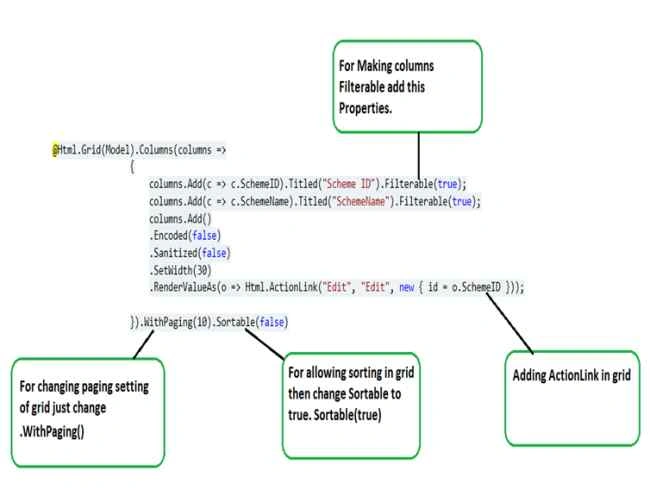
- @Html.Grid(Model).Columns(columns =>
- {
- columns.Add(c => c.SchemeID).Titled("Scheme ID").Filterable(true);
- columns.Add(c => c.SchemeName).Titled("SchemeName").Filterable(true);
- columns.Add()
- .Encoded(false)
- .Sanitized(false)
- .SetWidth(30)
- .RenderValueAs(o => Html.ActionLink("Edit", "Edit", new { id = o.SchemeID }));
- }).WithPaging(10).Sortable(true)
- </div>
Declaring the namespace of GridMVC and then make the layout null.
- @using GridMvc.Html
- @{
- Layout = null;
- }
- <link href="@Url.Content("~/Content/Gridmvc.css")" rel="stylesheet" />
- <link href="@Url.Content("~/Content/bootstrap.min.css")" rel="stylesheet" />
- <script src="@Url.Content("~/Scripts/jquery-1.9.1.min.js")"></script>
- <script src="@Url.Content("~/Scripts/gridmvc.min.js")"></script>
In Grid.MVC we will use a lamba expression for displaying columns in the Grid.
Example:
- columns.Add(c => c.SchemeID).Titled("Scheme ID");
If you want to add a filter to the Grid then set the fliter to true.
Example
- .Filterable(true);
- columns.Add(c => c.SchemeName).Titled("SchemeName").Filterable(true);
Here I have added an Edit button Action link in Grid.MVC. We usually require a button in the grid for editing or deleting and for other purposes.
- columns.Add()
- .Encoded(false)
- .Sanitized(false)
- .SetWidth(30)
- .RenderValueAs(o => Html.ActionLink("Edit", "Edit", new { id = o.SchemeID }));
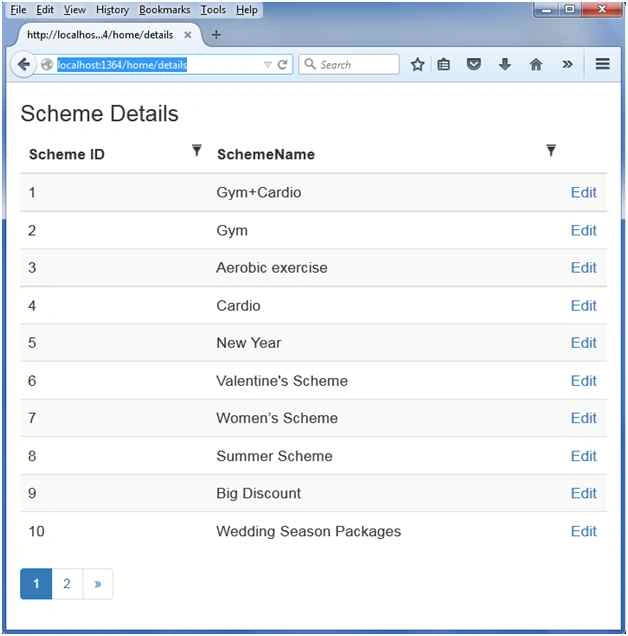
Now finally run the application and see how the grid is displayed.
URL for Accessing: http://localhost:1364/home/details
Final output of Grid.MVC
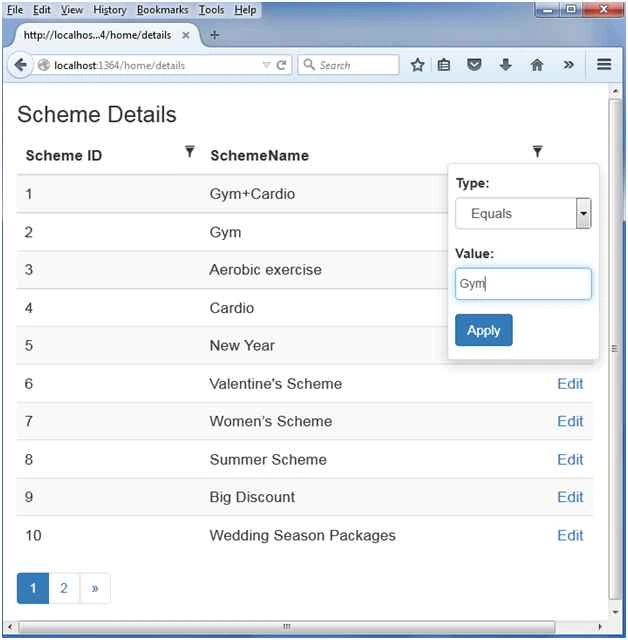
How to use Filter of Grid.MVC
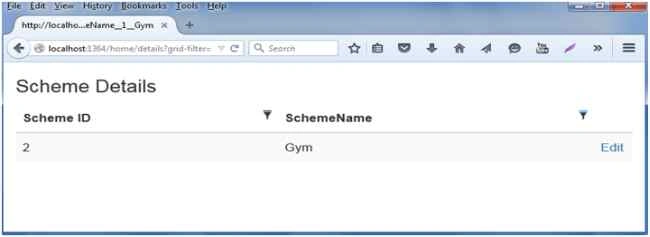
After Filtering records in Grid
pushpa AcharyaPosted Dec 15, 2020, 3:48 PM
What is Encoded(false)and .Sanitized(false) do to grid?
Ahmed AliPosted Jun 21, 2020, 8:56 AM
How to include the Insert , Delete In Gridmvc.
John mikePosted Apr 26, 2020, 6:26 PM
Hi Saineshwar. Thanks a lot. It is clear explanation and nice demo project. Is there any article to do this with dot.net core ?
shubham gargPosted Feb 24, 2020, 12:31 AM
I want to add a gridview in mvc application but with using ado.net means without using entity model.
Dinesh GabhanePosted Nov 12, 2019, 6:02 AM
Nice Article. Thanks\
Goutham RPosted Jul 25, 2019, 5:10 AM
Can you suggest to call post method on paging
dinalPosted Mar 19, 2019, 8:27 AM
Thanks for your article, how to put serial no column in grid
Abdul NasirPosted Sep 28, 2018, 9:56 AM
How to post grid data values to controller with jquery
Nirmesh ChampaneriaPosted Sep 20, 2018, 12:21 AM
How to change Title dynamically? if i want change grid title dynamically.
Bhavana RahangdalePosted May 2, 2018, 2:00 AM
Can we bind json data to this grid? I want bind json result to the grid....
sivakrishna maddianPosted Apr 11, 2018, 9:23 AM
Could you please upload edit and delete functionalites
Sudhir DehadePosted Apr 3, 2018, 9:22 AM
I am using vs 2017. My code generated after creating view is different from your code and it gives errors there....
dhana aaaPosted Mar 16, 2018, 5:24 AM
Guys can anyone pls help me soon . i want to remove that edit button thanks in advance
dhana aaaPosted Mar 16, 2018, 5:11 AM
I don't want editing button how to remove that????
sivakrishna maddianPosted Mar 16, 2018, 3:20 AM
Hi Saineshwar, Can you please Sorting and Paging view to controller. It's very helpful to complete the functionlity
Amar BhagatPosted Nov 15, 2017, 6:44 AM
Im getting error of @using GridMvc.Html it says that namesapce could not found..
fahad noumanPosted Oct 13, 2017, 2:38 AM
My filter button is not working ,when i click on it nothing happens ,i did exactly what you have mention is this example.please tell me whats the problem
fahad noumanPosted Oct 13, 2017, 2:37 AM
When i click in filter button nothing happens ,please tell me whats the problem.i followed every step you mentioned in this example.
Utla DotnetPosted Oct 10, 2017, 4:06 AM
Hi,i want to add column for display image
navaneetha krishnanPosted Aug 16, 2017, 3:06 PM
I want to clear the filter and sorting if i do search with different search option. How to clear the filter and sorting ?
Alaeddin AlhamoudPosted Aug 3, 2017, 4:48 PM
Bro , try to add 1000+ as u said .ToList() ?!?!?! what will happen ?? Thank you ;)
sherief mohamedPosted Jul 20, 2017, 9:34 AM
Thanks dear , but is Grid.MVC is free for commertial use, I mean i will use this grid at commertial website??
Former memberPosted May 16, 2017, 8:23 AM
In-line edit is possible with grid.mvc ? if yes then tell me how to achieve it. thanks
Pradeep Kumar Chowdary KommiPosted May 13, 2017, 2:33 PM
Can we display data based on if condition??????? for example : i have data value bit (1 or 0) now i have to display 0 as Female and 1 as Male. is this possible in this grid????????
Nigel FernandesPosted Dec 8, 2016, 1:25 AM
What about Paging and filtering , does it happen on front end or at server ? Do I need to write extra code for it?
Former memberPosted Oct 4, 2016, 6:56 AM
Gridmvc is capable for doing in-place data edit ?
Arun KumarPosted Oct 3, 2016, 11:26 AM
Thanks.
Arun KumarPosted Oct 2, 2016, 3:39 AM
'System.Web.Mvc.HtmlHelper<MvcApplication1.Models.MyModel>' does not contain a definition for 'Grid' and no extension method 'Grid' accepting a first argument of type 'System.Web.Mvc.HtmlHelper<MvcApplication1.Models.MyModel>' could be found (are you missing a using directive or an assembly reference?)
Delpin Susai RajPosted Aug 28, 2016, 10:24 AM
Good
Manindar SinghPosted Jul 21, 2016, 4:48 AM
Hi Saineshwar , as discussed i am done with the changes and even tried that had been suggested at some other portals <meta name="viewport" content="width=device-width" /> but unfortunately no luck.Can you help me to understand which classs or ID and in which css file we specify this responsive property?
Manindar SinghPosted Jul 20, 2016, 11:55 PM
Thanks alot Saineshwar Bageri, that was so prompt reply i appreciate the commitment and will do as per you suggestion.
Maninder SinghPosted Jul 20, 2016, 9:22 PM
Hi first of all thanks for such a nice article, i do appreciate the approach you took the explain this topic in a simple way. Actually you made it look simple :) However i have one question can we make this GRID responsive? I mean for my particular requirement i have 23 columns to display and if i change the browser size the GRID should automatically start re rendering itself as per the display or the view(screen) size. I googled a few links but wasn't able to achieve anything big. Any help on this would be appreciated.
Prasad DPosted May 6, 2016, 12:21 PM
First in Action method i am rendering the data to My view. Now in my view i am doing some filtering operation(Not in Grid filterable option), when i click on Search button i am calling the same Action method. Now i am getting the data. but from here how to proceed?
Prasad DPosted May 6, 2016, 10:24 AM
Please tell me how to refresh the grid after update or delete?
Former memberPosted Jan 19, 2016, 6:14 AM
in line edit is possible with Grid.MVC ?
Former memberPosted Jan 19, 2016, 6:13 AM
you did not discuss in details the meaning for these functions called Encoded(false) , Sanitized(false) ,SetWidth(30) . please the meaning of these 3 function if possible.
Veera ManiPosted Nov 19, 2015, 7:57 AM
Edit link for open popup and reload mvc
Linda KaiserPosted Nov 6, 2015, 5:42 PM
Hi, nice article! but I'm having a problem with pagination, I have this colum columns.Add().Encoded(false).Sanitized(false).RenderValueAs( c => @Ajax.ActionLink(" ", "ShowDetailInfo", new { tankId = c.IDTank }, new AjaxOptions { UpdateTargetId = "mEdit", InsertionMode = InsertionMode.Replace, HttpMethod = "GET", OnSuccess = "LoadMonitoring" }, new { id = "Edit_", @style = "color:#D72641", @class = "glyphicon glyphicon-search btn-sm" })); And when I add Pagination, it shows the first page but when I move to page 2 and so on, it doesn?t work. It showed me an invalid page. thank you very much
Sambasivam Pathmaraj ManiPosted Oct 2, 2015, 9:21 AM
can you share me with CustomFilterWidget using like .SetFilterWidgetType("CustomEmployeeNameFilterWidget"); and can you please look at this url and share me answer, http://stackoverflow.com/questions/31704666/grid-mvc-use-select-fillter-form-listt/
Rajeev RanjanPosted Sep 24, 2015, 8:06 AM
if i have to get the particular value from grid... could you help how i get that value using jqury?? I cant able to get the id of column
Yashwanth MuthineniPosted Aug 27, 2015, 3:15 AM
Nice Share
Bruno PétersonPosted Aug 25, 2015, 8:55 AM
Cool
asghar taraghePosted Aug 21, 2015, 1:42 PM
the edit dosnt work
lvelasco lvelascoPosted Aug 16, 2015, 3:56 PM
Excellent explanation ... investigation in several places but always had questions ... you've done great. !!! thanks for sharing.best regards.!
Surya Prakash PandeyPosted Jun 24, 2015, 3:39 AM
filter not working... :(
Shweta LodhaPosted Jun 15, 2015, 5:27 AM
Nice writeup
Rahul Kumar SaxenaPosted Jun 15, 2015, 2:31 AM
Good Show...
Santhakumar MunuswamyPosted Jun 14, 2015, 2:32 AM
Thanks for nice article:) keep it up
Khan Abrar AhmedPosted Jun 14, 2015, 2:26 AM
Nice Artical sir.
Debendra DashPosted Jun 13, 2015, 11:58 PM
Nice Sir...........