

This is Part 3 of the series "Creating Menus". This article will explain how to create a single level menu dynamically using C# in ASP.NET. You can read the other 2 articles in this series from the following links:
- How to Create a Horizontal Hierarchical Menu Using HTML, CSS and jQuery
- How to Create a Hierarchical Menu Using HTML And CSS
In this article we will create a dynamic single-level menu using C# in ASP.NET where the menu names are stored in the database. To begin with let's consider we have a database named "TestDB" with a table named "Categories". To keep things simple, we consider the table structure something as in the following. In real scenarios, the table structure may be more complex than specified below.
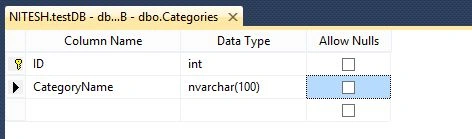
Once the table structure is defined, we fill it with some dummy data as below.
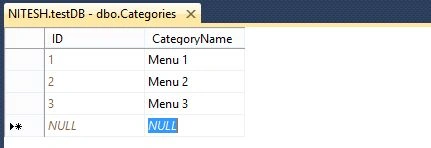
Now for the coding part. In our application, normally we will create menus in the master page. We will use the Repeater Control of ASP.NET to build our dynamic menu. We write the following code in our page (.master or .aspx or .ascx file wherever you want to place the menu).
- <asp:Repeater ID="rptCategories" runat="server">
- <HeaderTemplate>
- <div class="menu">
- <ul></ul>
- </div>
- </HeaderTemplate>
- <ItemTemplate>
- <li>
- <a href='#'>
- < %#Eval( "CategoryName") %>
- </a>
- </li>
- </ItemTemplate>
- <FooterTemplate>
- </FooterTemplate>
- </asp:Repeater>
If you notice the code above, we are just trying to build the <ul> and <li> tags using the Repeater control. The <ul> and </ul> tags go inside the HeaderTemplate and FooterTemplate respectively and the <li> tag goes inside the ItemTemplate tag since we will be repeating the menu items from the database.
In the code file (.master.cs/.aspx.cs/.acsx.cs), we will make a call to our database to get all the categories and bind the data to the repeater control. For doing this, we will write the following code.
- protected void Page_Load(object sender, EventArgs e)
- {
- if (!IsPostBack)
- {
- LoadCategories();
- }
- }
- private void LoadCategories()
- {
- rptCategories.DataSource = GetCategories();
- rptCategories.DataBind();
- }
- private DataTable GetCategories()
- {
- SqlConnection connection = new SqlConnection("Data Source=NITESH;Initial Catalog=TestDB;Integrated Security=SSPI;"
- providerName = "System.Data.SqlClient");
- SqlCommand selectCommand = new SqlCommand("SELECT ID,CategoryName FROM Categories", connection);
- DataTable dt = new DataTable();
- try
- {
- connection.Open();
- SqlDataReader reader = selectCommand.ExecuteReader();
- if (reader.HasRows)
- {
- dt.Load(reader);
- }
- reader.Close();
- } catch (SqlException)
- {
- throw;
- } finally
- {
- connection.Close();
- }
- return dt;
- }
In the code above, the first thing we do is to get all categories in a DataTable and then bind the DataTable to the Repeater Control. At runtime, the Repeater control will render all the rows of the DataTable wrapped with <li> and </li> tags and the complete data wrapped with <ul> and </ul> tags. Once you do this, you're done creating a menu dynamically from the database. The only thing that remains is adding CSS for the menu. You can use the following CSS for this simple menu and add it to your CSS file.
- .menu
- {
- width: 500 px;
- margin: 0 px auto;
- : Arial,
- Helvetica,
- sans - serif;
- : bold;
- : 14 px;
- }
- .menu ul li a: link, div ul li a: visited
- {
- display: block;
- background - color: #f1f1f1;
- color: #000;
- text-align: center;
- text-decoration: none;
- padding: 4px;
- border-bottom: 1px solid # fff;
- width: 150 px;
- }
- .menu ul li a: hover
- {
- background - color: #ccc;
- }
- .menu ul
- {
- list - style - type: none;
- margin: 0 px;
- padding: 0 px;
- }
- .menu ul li
- {
- float: left;
- margin - left: 5 px;
- }
You can see the output below.

I hope you like this article! Keep learning and sharing folks.
Rupesh KahanePosted Dec 30, 2015, 6:07 AM
Good one...
Humayun Kabir MamunPosted Dec 30, 2015, 3:40 AM
Nice...
Sibeesh VenuPosted Dec 30, 2015, 3:26 AM
Nice Share
siva balanPosted Dec 30, 2015, 12:59 AM
rptCategories.DataSource = GetCategories(); in this line cannot implicitly convert type void to object error sir