

Introduction
As AI agents rapidly move from experimental prototypes to production-ready solutions, organizations are increasingly focused on more than just intelligence and performance. Security, governance, and responsible usage have become foundational requirements for deploying AI at scale. Without appropriate controls in place, AI agents can introduce risks of data leakage, compliance violations, unsafe content, and unintended behaviours.
In this article, we will explore how to build secure and governable AI agents using Microsoft Foundry. You’ll gain an understanding of key governance concepts, security best practices, and practical approaches to implementing guardrails—ensuring your AI agents operate safely, responsibly, and with confidence in real-world enterprise environments.
A unified platform for building enterprise-grade AI agents
Microsoft Foundry is a unified, interoperable platform for building, optimizing, and governing AI applications and agents at scale. At its core, the Foundry Agent Service brings together models, tools, knowledge, and frameworks into a single, observable runtime environment.
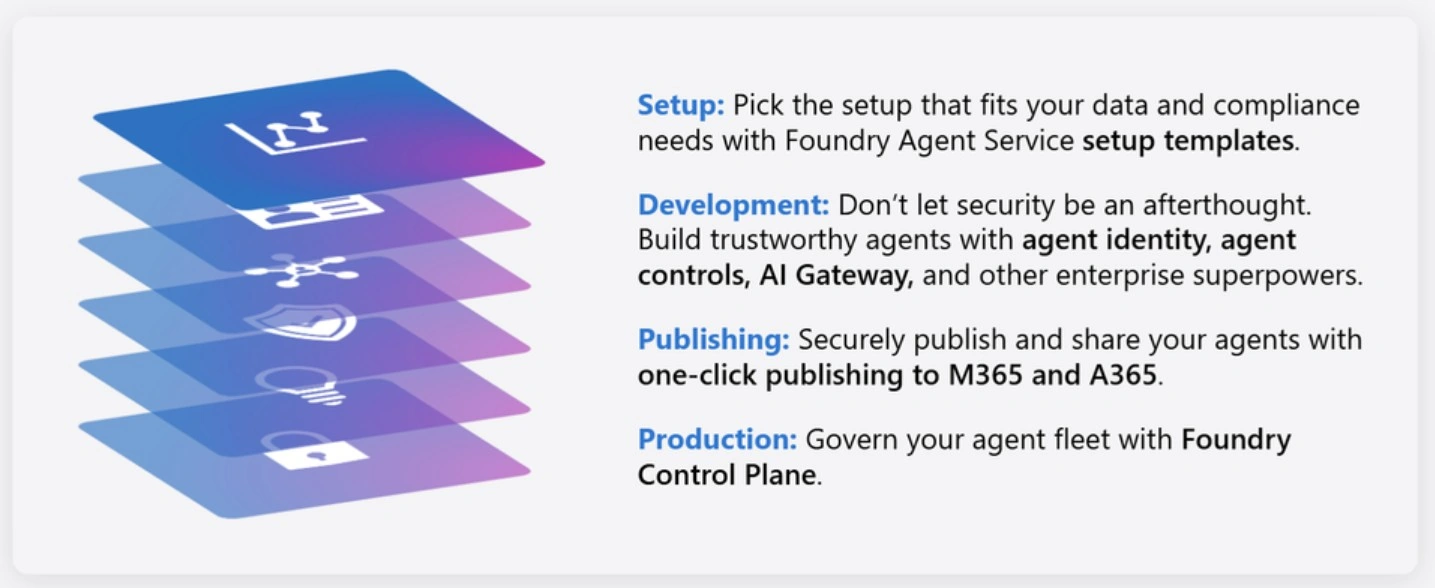
Image Source: Microsoft Ignite
Step:1 Setup: Build on a strong foundation
Enterprise organizations often face strict networking, compliance, and security requirements that must be satisfied before they can begin evaluating AI capabilities. Microsoft Foundry Agent Service offers a flexible setup experience that meets organizations where they are—supporting both startups that value speed and simplicity and enterprises that require rigorous data protection and compliance controls.
Data Control
Basic Setup: Designed for quick onboarding and rapid prototyping, using platform-managed storage.
Standard Setup: Provides granular control over data by leveraging customer-owned Azure resources and configurations.
Networking
Organizations can achieve full network isolation and strong data exfiltration controls by choosing either Bring Your Own Virtual Network (BYO VNet) or a Managed Virtual Network (Managed VNet). These options ensure sensitive data remains within trusted organizational boundaries.
The Managed Virtual Network (preview) simplifies this process by creating and managing a virtual network within the Microsoft tenant. It removes the complexity of configuring network isolation by handling subnet ranges, IP allocation, and subnet delegation automatically.
Secrets Management
Organizations can manage secrets and access credentials using either a Managed Key Vault or Bring Your Own Key Vault, aligning with internal security policies. These credentials are essential for securely connecting to external tools and resources integrated through the Model Context Protocol (MCP).
Encryption
All data is encrypted in transit and at rest using Microsoft-managed keys by default. For greater control, customers can enable Customer Managed Keys (CMK) to support key rotation and advanced data governance requirements.
Model Governance with AI Gateway
Foundry supports Bring Your Own AI Gateway (preview), allowing enterprises to route existing Foundry and Azure OpenAI model endpoints through an AI Gateway. This approach enables enhanced governance, control, and flexibility across model usage.
Authentication
Foundry enforces keyless authentication through Microsoft Entra ID, ensuring secure and centralized access control for all users interacting with agents.
Step:2 Development: Creating agents you can trust
Once the environment is set up, Microsoft Foundry offers comprehensive tools to build, manage, and evaluate AI agents before they are deployed to production.
Microsoft Entra Agent ID
Every agent in Foundry is assigned a Microsoft Entra Agent ID—a purpose-built identity designed to meet the security and operational requirements of enterprise-scale AI agents. With this identity, agents can be identified, authenticated, and governed in the same way as users, enabling IT teams to apply familiar controls such as Conditional Access, Identity Protection, Identity Governance, and network policies.
Unpublished Agents (Shared Agent Identity)
All unpublished or in-development agents within the same Foundry project share a common agent identity. This approach streamlines permission management, as early-stage agents typically require similar access patterns.
Published Agents (Unique Agent Identity)
When an agent is ready to be shared as a stable, production-ready solution, it is published as an agent application. At this stage, the agent is assigned a unique agent identity tied specifically to that application. This creates clear, auditable boundaries and enables independent lifecycle management, compliance enforcement, and monitoring for production agents.
Observability: Tracing, Evaluation, and Monitoring
Microsoft Foundry delivers a robust observability layer that provides end-to-end visibility into agent performance, quality, and operational health across both development and production environments. Foundry’s observability stack unifies traces, logs, evaluations, and safety signals, enabling developers and administrators to clearly understand how an agent generated a response, which tools were invoked, and where potential issues may be arising.
This observability capability includes:
Tracing: Capture every stage of an agent’s execution—including prompts, tool invocations, tool responses, and output generation—to analyze decision paths, identify latency drivers, and pinpoint failure points.
Evaluations: Foundry offers a rich set of built-in evaluators to assess coherence, groundedness, relevance, safety risks, security vulnerabilities, and agent-specific behaviors such as task adherence and tool-call accuracy. These evaluations help teams detect regressions early, benchmark quality, and validate intended behavior before promoting agents to production.
Monitoring: The Agent Monitoring Dashboard in Microsoft Foundry provides real-time visibility into agent health, performance, and compliance. Teams can monitor token consumption, latency, evaluation scores, and security posture across single- and multi-agent systems.
AI Red Teaming: Foundry’s AI Red Teaming Agent enables proactive testing using adversarial prompts to uncover jailbreaks, prompt injection attacks, and other security weaknesses.
Agent Guardrails and Controls
Microsoft Foundry provides built-in safety and security guardrails that can be applied to core models—including image generation models—as well as agents. Guardrails are composed of controls that define:
What risks to detect (such as harmful content, prompt injection attacks, or data leakage)
Where to inspect for risks (user inputs, tool calls, tool responses, or model outputs)
What actions to take (for example, annotating or blocking content)
By default, Foundry automatically applies a baseline safety guardrail to all models and agents, addressing a wide range of risks including hate and fairness concerns, sexual and violent content, self-harm, protected text or code usage, and prompt injection attempts. For organizations that require finer control, Foundry supports custom guardrails, enabling teams to tune sensitivity levels, selectively enable or disable specific risks, and apply tailored safety policies at either the model or agent level.
Step:3 Publish: Securely Share Agents with End Users
After controls are configured and testing is complete, agents are ready to be promoted to production. At this stage, enterprises need a secure and governed mechanism to share agents with internal teams or external users.
Publishing an Agent as an Agent Application
Within a Foundry project, users assigned the Azure AI User role can interact with all agents in that project, with shared conversation state across users. While this model is well-suited for development activities such as authoring, debugging, and testing, it is not intended for broad distribution.
Publishing an agent elevates it from a development artifact to a managed Azure resource with a dedicated endpoint, independent identity, and enterprise-grade governance. When published, Foundry creates an Agent Application designed for secure and scalable consumption. After an agent is published, it can be integrated into Microsoft 365 or Agent 365, allowing developers to seamlessly deploy Foundry agents into familiar Microsoft productivity experiences such as Microsoft 365 Copilot and Microsoft Teams.
This integration enables users to discover and interact with agents directly within the tools they use every day, delivering enterprise-scale distribution while maintaining established governance, security, and trust boundaries.
Step:4 Production: Govern Your Agent Fleet at Scale
As organizations grow from managing a few agents to operating hundreds or even thousands, maintaining visibility, control, and governance becomes critical. The Foundry Control Plane provides a centralized, real-time view of an organization’s entire agent ecosystem, spanning both Foundry-built and third-party agents.
The Foundry Control Plane unifies observability, control, security, and operations into a single, connected experience—enabling organizations to confidently scale AI systems that are both highly capable and responsibly governed.
Summary
Building enterprise-grade AI agents requires more than just intelligent models—it demands strong foundations in security, governance, observability, and scalable deployment. Microsoft Foundry provides a unified platform that empowers organizations to create, manage, and govern AI agents with confidence, ensuring they are secure, compliant, and production ready.
I hope you enjoyed this deep dive into building secure and governable AI agents with Microsoft Foundry. Happy learning, happy reading, and stay tuned for the next article—see you soon!
Join the conversation! Your thoughts help the community grow.