

Previous Article
What Is Noda Time?
NodaTime is an open-source date and time library for .NET applications. It is designed to provide a more robust and precise alternative to the built-in date and time types in the .NET Framework. Noda Time is particularly useful when dealing with complex time zone calculations, intervals, and different calendar systems.
What is a Unit test, and how much is it important for a developer?
A unit test is a type of software testing that focuses on validating the individual units or components of a software application in isolation. A "unit" typically refers to the smallest testable part of the software, such as a function, method, or class. Unit testing is a crucial aspect of the software development process, and its importance for developers cannot be overstated. Here are several reasons why unit testing is considered essential:
- Bug Detection: Unit tests help identify and catch bugs or defects in the early stages of development. By testing individual units of code, developers can quickly detect and fix issues before they propagate to higher-level components or the entire application.
- Code Confidence: Unit testing provides a level of confidence to developers that their code works as expected. It allows them to make changes to the codebase with the assurance that existing functionality won't break as long as the unit tests continue to pass.
- Code Refactoring: Unit tests facilitate code refactoring by providing a safety net. Developers can make improvements to the code structure, optimize performance, or enhance functionality, knowing that they can rely on unit tests to catch regressions if any occur.
- Cost Savings: Detecting and fixing bugs early in the development process is more cost-effective than addressing them later in the software lifecycle. Unit testing contributes to reducing the overall cost of software development and maintenance.
- Maintainability: Unit tests contribute to code maintainability by providing a safety net during maintenance activities. As developers modify or extend the code, they can rely on unit tests to quickly identify and rectify any unintended side effects.
Why the xUnit testing framework?
xUnit.net is a popular open-source unit testing framework for the .NET platform. It is widely used by developers for writing and executing unit tests in C# and other .NET languages. xUnit.net follows the xUnit architecture and shares similarities with other xUnit frameworks like JUnit and NUnit. xUnit.net is well-documented, actively maintained, and widely used in the .NET development community. It provides a clean and extensible framework for writing and running unit tests in .NET applications.
.NET ClassLibrary project for NodaTime
Let's start implementing the .NET ClassLibrary project for NodaTime types.
Step 1. First, let's create a Class library as NodaTime_classlibrary project for NodaTime types.
Install the NodaTime package/library from the Manage NuGet package or enter the below command in the package manager console.
This is the main library for NodaTime.
Install-Package NodaTime
Install the NodaTime Serialization package/library as below in the package manager console. This library is useful when serializing the NodaTime type.
Install-Package NodaTime.Serialization.JsonNet
Install the NodaTime Testing library for building the Unit test project.
Install-Package NodaTime.Testing
Step 2. Create an Interface as IDateTimeProvider.cs and add the code below for NodaTime types.
public interface IDateTimeProvider
{
    //represents a time zone
    //DateTimeZone TimeZone { get; }

    //class represents an instantaneous point on the timeline,
    Instant Now { get; }

    //class represents a date and time without regard to any particular time zone or offset from UTC
    LocalDateTime Today { get; }

    //class represents a date without regard to any specific time zone or offset from UTC
    LocalDate CurrentDate { get; }

    //class represents a time of day without regard to any specific time zone or offset from UTC
    LocalTime CurrentTime { get; }

    //class represents a date and time in a specific time zone
    ZonedDateTime CurrentDateTime { get; }

    //represents a date and time with a specific offset from UTC (Coordinated Universal Time).
    OffsetDateTime CurrentDateTimeOffset { get; }

}
Step 3. Create a class as DateTimeProvider.cs and implement the above interface.
public class DateTimeProvider : IDateTimeProvider
 {

     private readonly IClock clock;
     public static DateTimeZone TimeZone { get; private set; }
     public Instant Now => clock.GetCurrentInstant();
     public LocalDateTime Today => Now.InZone(TimeZone).LocalDateTime;
     public LocalDate CurrentDate => Now.InZone(TimeZone).Date;
     public LocalTime CurrentTime => Now.InZone(TimeZone).TimeOfDay;
     public ZonedDateTime CurrentDateTime => Now.InZone(TimeZone);
     public OffsetDateTime CurrentDateTimeOffset => Now.InZone(TimeZone).ToOffsetDateTime();

     public DateTimeProvider(IClock clock)
     {
         TimeZone = GetEasternTimeZoneId();
         this.clock = clock;
     }

     public DateTimeProvider(DateTimeZone timeZone)
     {
         TimeZone = timeZone;
         this.clock = SystemClock.Instance;
     }

     public DateTimeProvider()
     {
         TimeZone = GetEasternTimeZoneId();
         this.clock = SystemClock.Instance;
     }

     private static DateTimeZone GetEasternTimeZoneId()
     {
         return DateTimeZoneProviders.Tzdb["America/New_York"];
     }

}
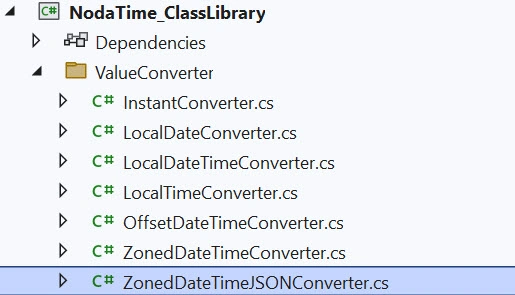
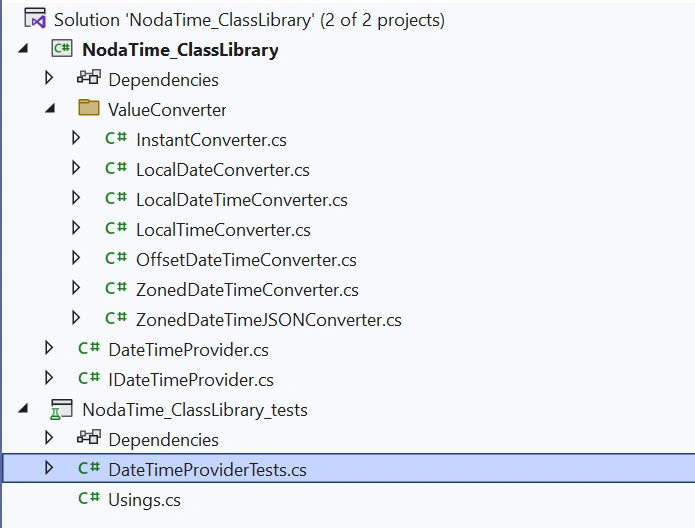
Step 4. Add a folder like ValueConverter and add the following converter classes. These converter classes will be useful when converting NodaTime types to DataBase types.
Join the conversation! Your thoughts help the community grow.