

Introduction
In this article, I have described the steps to
create a Windows Gadget. I have demonstrated the article with an example of a
digital clock gadget.
Gadgets
Gadgets are small applications that are hosted on the Windows Sidebar. Windows
Gadgets are simply made up of HTML and JavaScript code. User-created gadgets are stored in the following folder:
C:\Users\<current
user>\AppData\Local\Microsoft\Windows Sidebar\Gadgets
Every gadget is stored in its own folder under the above-mentioned folder. The
folder name should be the same as the gadget name followed by the .gadget
extension. Every gadget has two files associated with it. One is an HTML file
with embedded JavaScript code to provide the functionality of the gadget. The
other file is an XML file called gadget.xml and is also known as the gadget
manifest.
Example Code
In the HTML file, the style element is used to
specify the layout and format of the gadget. The script element is used to
specify the content and working of the gadget. Finally, a span element is used to
display the gadget.
Following is the HTML/JavaScript code for
our digital clock gadget (DigitalClock.html)
- <html>
- <head>
- <title>Digital Clock</title>
- <style>
- body
- {
- margin: 0;
- width: 130px;
- height: 65px;
- }
- #gadgetContent
- {
- width: 130px;
- top: 24px;
- text-align: center;
- position: absolute;
- font-family: Verdana;
- font-size: 10pt;
- }
- </style>
- <script language="javascript">
- function showtime()
- {
- var now=new Date(); // Find current date
- var h=now.getHours(); // Find current hour
- var m=now.getMinutes(); // Find current minute
- var s=now.getSeconds(); // Find current second
- h=(h<10)?"0"+h:h; // Convert hour to 2 digits
- m=(m<10)?"0"+m:m; // Convert minute to 2 digits
- s=(s<10)?"0"+s:s; // Convert second to 2 digits
- gadgetContent.innerHTML="<h2><font color='red'>"+h+":</font>
- <font color='lime'>"+m+":</font><font color='cyan'>"+s+"</font></h2>";
- // Set time on the span element
- setTimeout("showtime()",1000); // Display time after every one second
- }
- </script>
- </head>
- <body onload="showtime()" bgcolor="black">
- <span id="gadgetContent"></span>
- </body>
- </html>
The gadget manifest file is an XML file which
describes the properties of the gadget.
Following is the code of the gadget.xml file:
- <?xml version="1.0" encoding="utf-8" ?>
- <gadget>
- <name>DigitalClock</name>
- <namespace>Example.Azim</namespace>
- <version>1.0.0.0</version>
- <author name="Azim">
- <info url="www.example.com" />
- </author>
- <copyright>Azim</copyright>
- <description>Digital Clock</description>
- <hosts>
- <host name="sidebar">
- <base type="HTML" apiVersion="1.0.0" src="DigitalClock.html" />
- <platform minPlatformVersion="1.0" />
- <permissions>Full</permissions>
- </host>
- </hosts>
- </gadget>
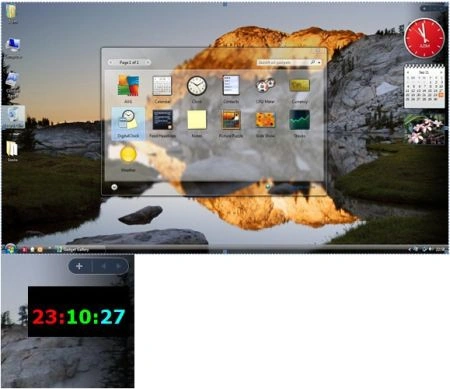
Perform the following steps to add the gadget to
the sidebar.
-
Create a folder called DigitalClock. gadget in the following folder:
C:\Users\<current user>\AppData\Local\Microsoft\Windows
Sidebar\Gadgets
- Copy the files DigitalClock.html and gadget.xml into the DigitalClock.gadget folder.
- Right-click on the sidebar and select Add Gadgets option.
- Select DigitalClockgadget.
Note
I have attached the DigitalClock.html and
gadget.xml files along with this project.
The following figures show how to add the gadget to the sidebar.
Summary
In this article, we learned about creating window gadgets.
Dharuman NPosted Nov 4, 2016, 7:16 AM
How to create windows desktop gadget using wcf service
Dharuman NPosted Nov 4, 2016, 7:16 AM
Http://stackoverflow.com/questions/39805559/how-to-show-html-response-in-windows-gadget
Dharuman NPosted Nov 4, 2016, 7:15 AM
AZim please give me the solution below url:
Bob JamiePosted Jul 16, 2013, 3:08 PM
Amazing tutorial! I tweaked somethings, and now I have exactly what I intended (which I couldn't find anywhere on the internet): a simple digital clock widget that had customizable fonts or looked simple and clean. I made it larger, and changed the background color to my wallpaper's color, so it appears it has a transparent background. I only wish HTML supported transparent backgrounds, help anyone?
Junaid Ullah namdeePosted Dec 7, 2012, 4:31 PM
thx AZIm.... you actually simplify the problem and give help in understand the problem..fantastic tutorial.... thanking again
Adora KrausePosted Jan 19, 2012, 11:07 PM
Its a very useful article for those who want to learn about windows gadget.
Sonakshi SinghPosted Jan 19, 2012, 11:04 PM
Thank you Azim for sharing and thanks to you too Sam for helping in removing the possible errors..
Sam HobbseditedPosted Jan 19, 2012, 3:24 PMEdited Jan 19, 2012, 3:24 PM
Thank you for this simple and quick introduction. The sample works for me except I copied the code from the article and I got a syntax error in the lines that set the gadgetContent.innerHTML. It might be due to the way I copied the code. For anyone in the future, if you get the error complaining that showtime is undefined, then you just need to fix the syntax for setting gadgetContent.innerHTML.