

Introduction
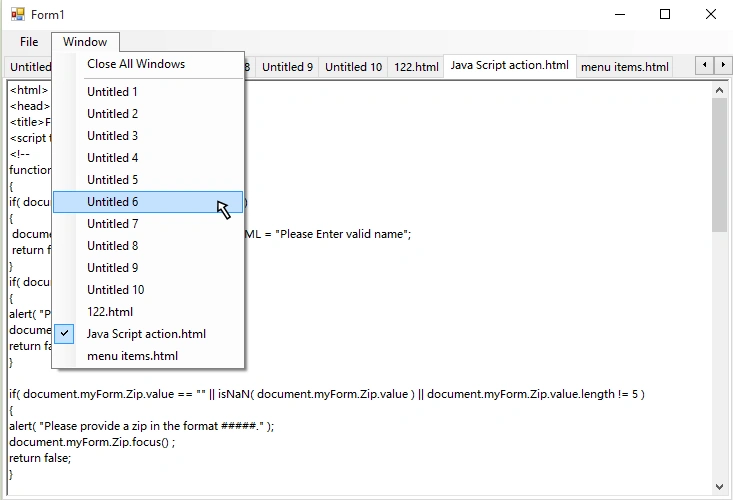
Look in any editor,you can see Window menu that shows list of tabs.(see above image)
So that it is so much important in any editor to manage list of tabs.it is also used to change a tab easily without finding a tab in tabcontrol or in any tab selector. Just go to Window menu and select tab/window which you want to edit. It is so much simple to create windows list in C#.
So how to create Tabs Windows List
Create a windows list function that change in menu items by changing tabs. If you create a new tab then just call windows list function to modify drop down menu items of Window menu. Whenever tabs are changed in tabControl then just call windows list function. If you add new tab/remove tab then just call windows list function.
How it Works
Firstly, you have to remove all drop down menu items of Window menu. Then read all tabs from tabControl and add it to TabControl.TabCollection.
So how to create Tabs Windows List
Create a windows list function that change in menu items by changing tabs. If you create a new tab then just call windows list function to modify drop down menu items of Window menu. Whenever tabs are changed in tabControl then just call windows list function. If you add new tab/remove tab then just call windows list function.
How it Works
Firstly, you have to remove all drop down menu items of Window menu. Then read all tabs from tabControl and add it to TabControl.TabCollection.
Now read each tabpage in TabCollection using foreach() statement. In foreach statement, create new menuitem using class ToolStripMenuItem and set text to each menuitem as each tabpage text. Now add each menuitem to Window menu. Finally, add click event handler to each menuitem. Create menuitem click events function. In this function, read clicked menuitem text and find tabpage in tabControl having text of clicked menuitem.
Start
Start
Step 1 : Create new Windows Forms Application in C#.
Step 2 : Drag & Drop MenuStrip onto Form and add the following components to MenuStrip(menuStrip1),
Step 2 : Drag & Drop MenuStrip onto Form and add the following components to MenuStrip(menuStrip1),
File
New
Open
Close
Close All
Exit
Window
Close All Windows
---separator------
Step 3: Drag & Drop TabControl onto Form and remove all tabpages of TabControl(tabControl1).
Step 4: Declare "static int count" variable globally.
Step 4: Declare "static int count" variable globally.
- public static int count = 1;
Add the following windows list function to your Form1 code. Whenever you will do changes in tabs then just call the following function to apply all changes to Window drop down menu items. I used function name "UpdateWindowsList_WindowMenu".
- //*************************************************************************************
- // Update windows list to Window menu
- //*************************************************************************************
- public void UpdateWindowsList_WindowMenu()
- {
- //get all tab pages from tabControl1
- TabControl.TabPageCollection tabcoll = tabControl1.TabPages;
- //get windowToolStripMenuItem drop down menu items count
- int n = windowToolStripMenuItem.DropDownItems.Count;
- //remove all menu items from of windowToolStripMenuItem
- for (int i = n - 1; i >=2; i--)
- {
- windowToolStripMenuItem.DropDownItems.RemoveAt(i);
- }
- //read each tabpage from tabcoll and add each tabpage text to windowToolStripMenuItem
- foreach (TabPage tabpage in tabcoll)
- {
- //create Toolstripmenuitem
- ToolStripMenuItem menuitem = new ToolStripMenuItem();
- String s = tabpage.Text;
- menuitem.Text = s;
- if (tabControl1.SelectedTab == tabpage)
- {
- menuitem.Checked = true;
- }
- else
- {
- menuitem.Checked = false;
- }
- //add menuitem to windowToolStripMenuItem
- windowToolStripMenuItem.DropDownItems.Add(menuitem);
- //add click events to each added menuitem
- menuitem.Click += new System.EventHandler(WindowListEvent_Click);
- }
- }
- private void WindowListEvent_Click(object sender, EventArgs e)
- {
- //casting ToolStripMenuItem to ToolStripItem
- ToolStripItem toolstripitem = (ToolStripItem)sender;
- //create collection of tabs of tabContro1
- //check every tab text is equal to clicked menuitem then select the tab
- TabControl.TabPageCollection tabcoll = tabControl1.TabPages;
- foreach (TabPage tb in tabcoll)
- {
- if (toolstripitem.Text == tb.Text)
- {
- tabControl1.SelectedTab = tb;
- //call UpdateWindowsList_WindowMenu() to perform changes on menuitems
- UpdateWindowsList_WindowMenu();
- }
- }
- }
Step 6: Perform operations of New, Open, Close, Close All, Exit, Close All Windows. The following are the actions defined separately.
New
- private void newToolStripMenuItem_Click(object sender, EventArgs e)
- {
- TabPage tabpage = new TabPage();
- tabpage.Text = "Untitled " + count;
- //add richtextbox to tabpage
- RichTextBox richtextbox = new RichTextBox();
- richtextbox.Dock = DockStyle.Fill;
- tabpage.Controls.Add(richtextbox);
- tabControl1.TabPages.Add(tabpage);
- tabControl1.SelectedTab = tabpage;
- count++;
- //call windows list function
- UpdateWindowsList_WindowMenu();
- }
- private void openToolStripMenuItem_Click(object sender, EventArgs e)
- {
- TabPage tabpage = new TabPage();
- //add richtextbox to tabpage
- RichTextBox richtextbox = new RichTextBox();
- richtextbox.Dock = DockStyle.Fill;
- tabpage.Controls.Add(richtextbox);
- //read file using OpenFileDialog
- OpenFileDialog openfilediag = new OpenFileDialog();
- openfilediag.Filter = "All files|*.*";
- if(openfilediag.ShowDialog()==DialogResult.OK)
- {
- richtextbox.Text = File.ReadAllText(openfilediag.FileName);
- String filename = openfilediag.FileName.Substring(openfilediag.FileName.LastIndexOf("\\") + 1);
- tabpage.Text = filename;
- tabControl1.TabPages.Add(tabpage);
- tabControl1.SelectedTab = tabpage;
- }
- //call windows list function
- UpdateWindowsList_WindowMenu();
- }
Close
- private void closeToolStripMenuItem_Click(object sender, EventArgs e)
- {
- if(tabControl1.TabCount>0)
- {
- tabControl1.TabPages.Remove(tabControl1.SelectedTab);
- //call windows list function
- UpdateWindowsList_WindowMenu();
- }
- }
Close All
- private void closeAllToolStripMenuItem_Click(object sender, EventArgs e)
- {
- tabControl1.TabPages.Clear();
- }
Exit
- private void exitToolStripMenuItem_Click(object sender, EventArgs e)
- {
- Application.Exit();
- }
Close All Windows: Same as Close All,
Step 7: Now add SelectedIndexChanged event to tabControl1 and call UpdateWindowsList_WindowMenu() function at last in it.
Step 7: Now add SelectedIndexChanged event to tabControl1 and call UpdateWindowsList_WindowMenu() function at last in it.
- private void tabControl1_SelectedIndexChanged(object sender, EventArgs e)
- {
- //call windows list function
- UpdateWindowsList_WindowMenu();
- }
Step 8: Run your form and check it out.
Complete Code:
- using System;
- using System.Collections.Generic;
- using System.ComponentModel;
- using System.Data;
- using System.IO;
- using System.Drawing;
- using System.Windows.Forms;
- namespace WindowsListOfTabs
- {
- public partial class Form1 : Form
- {
- public Form1()
- {
- InitializeComponent();
- }
- //*************************************************************************************
- // Update windows list to Window menu
- //*************************************************************************************
- public void UpdateWindowsList_WindowMenu()
- {
- //get all tab pages from tabControl1
- TabControl.TabPageCollection tabcoll = tabControl1.TabPages;
- //get windowToolStripMenuItem drop down menu items count
- int n = windowToolStripMenuItem.DropDownItems.Count;
- //remove all menu items from of windowToolStripMenuItem
- for (int i = n - 1; i >=2; i--)
- {
- windowToolStripMenuItem.DropDownItems.RemoveAt(i);
- }
- //read each tabpage from tabcoll and add each tabpage text to windowToolStripMenuItem
- foreach (TabPage tabpage in tabcoll)
- {
- //create Toolstripmenuitem
- ToolStripMenuItem menuitem = new ToolStripMenuItem();
- String s = tabpage.Text;
- menuitem.Text = s;
- if (tabControl1.SelectedTab == tabpage)
- {
- menuitem.Checked = true;
- }
- else
- {
- menuitem.Checked = false;
- }
- //add menuitem to windowToolStripMenuItem
- windowToolStripMenuItem.DropDownItems.Add(menuitem);
- //add click events to each added menuitem
- menuitem.Click += new System.EventHandler(WindowListEvent_Click);
- }
- }
- private void WindowListEvent_Click(object sender, EventArgs e)
- {
- //casting ToolStripMenuItem to ToolStripItem
- ToolStripItem toolstripitem = (ToolStripItem)sender;
- //create collection of tabs of tabContro1
- //check every tab text is equal to clicked menuitem then select the tab
- TabControl.TabPageCollection tabcoll = tabControl1.TabPages;
- foreach (TabPage tb in tabcoll)
- {
- if (toolstripitem.Text == tb.Text)
- {
- tabControl1.SelectedTab = tb;
- //call UpdateWindowsList_WindowMenu() to perform changes on menuitems
- UpdateWindowsList_WindowMenu();
- }
- }
- }
- public static int count = 1;
- //Form1 Load
- private void Form1_Load(object sender, EventArgs e)
- {
- UpdateWindowsList_WindowMenu();
- }
- // File -> New
- private void newToolStripMenuItem_Click(object sender, EventArgs e)
- {
- TabPage tabpage = new TabPage();
- tabpage.Text = "Untitled " + count;
- //add richtextbox to tabpage
- RichTextBox richtextbox = new RichTextBox();
- richtextbox.Dock = DockStyle.Fill;
- tabpage.Controls.Add(richtextbox);
- tabControl1.TabPages.Add(tabpage);
- tabControl1.SelectedTab = tabpage;
- count++;
- //call windows list function
- UpdateWindowsList_WindowMenu();
- }
- // File -> Open
- private void openToolStripMenuItem_Click(object sender, EventArgs e)
- {
- TabPage tabpage = new TabPage();
- //add richtextbox to tabpage
- RichTextBox richtextbox = new RichTextBox();
- richtextbox.Dock = DockStyle.Fill;
- tabpage.Controls.Add(richtextbox);
- //read file using OpenFileDialog
- OpenFileDialog openfilediag = new OpenFileDialog();
- openfilediag.Filter = "All files|*.*";
- if(openfilediag.ShowDialog()==DialogResult.OK)
- {
- richtextbox.Text = File.ReadAllText(openfilediag.FileName);
- String filename = openfilediag.FileName.Substring(openfilediag.FileName.LastIndexOf("\\") + 1);
- tabpage.Text = filename;
- tabControl1.TabPages.Add(tabpage);
- tabControl1.SelectedTab = tabpage;
- }
- //call windows list function
- UpdateWindowsList_WindowMenu();
- }
- // File -> Close
- private void closeToolStripMenuItem_Click(object sender, EventArgs e)
- {
- if(tabControl1.TabCount>0)
- {
- tabControl1.TabPages.Remove(tabControl1.SelectedTab);
- //call windows list function
- UpdateWindowsList_WindowMenu();
- }
- }
- // File -> Close All
- private void closeAllToolStripMenuItem_Click(object sender, EventArgs e)
- {
- tabControl1.TabPages.Clear();
- }
- // File -> Exit
- private void exitToolStripMenuItem_Click(object sender, EventArgs e)
- {
- Application.Exit();
- }
- // tabControl1 Selected Index Changed
- private void tabControl1_SelectedIndexChanged(object sender, EventArgs e)
- {
- //call windows list function
- UpdateWindowsList_WindowMenu();
- }
- // Window -> Close All Windows
- private void closeAllWindowsToolStripMenuItem_Click(object sender, EventArgs e)
- {
- tabControl1.TabPages.Clear();
- }
- }
- }
Humayun Kabir MamunPosted Dec 28, 2015, 1:53 AM
Nice...
Santhakumar MunuswamyPosted Dec 25, 2015, 3:25 PM
Thanks for nice article
Gowtham KPosted Dec 25, 2015, 10:19 AM
Good One, Thanks for sharing
Sibeesh VenuPosted Dec 25, 2015, 10:13 AM
Nice Share