

Introduction
Tkinter is a standard library in Python used for creating graphical user interfaces. It's a great tool for beginners due to its simplicity and ease of use. In this article, I'll walk you through creating a basic GUI application: a window with a button and a text label. This example will give you a foundation in Tkinter, opening the door to more complex and interactive GUI applications.
Simple Tkinter code
import tkinter as tk

def on_button_click():
    label.config(text="Hello, Tkinter!")

# Create the main window
root = tk.Tk()
root.title("My First Tkinter App")

# Create a label
label = tk.Label(root, text="Press the button...")
label.pack()

# Create a button
button = tk.Button(root, text="Click Me", command=on_button_click)
button.pack()

# Run the application
root.mainloop()
Output
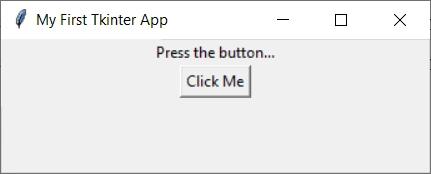
Explanation
- We start by importing the
tkintermodule. - Define a function
on_button_click, which changes the text of a label when the button is clicked. - Create the main window (
root) for our application and set its title. - Add a
Labelwidget to the window, displaying some initial text. - Add a
Buttonwidget, which callson_button_clickwhen clicked. - Use
root.mainloop()to start the application's event loop, waiting for user interaction.
Conclusion
Tkinter makes it straightforward to create basic GUI applications in Python. With just a few lines of code, you can build interactive elements like buttons and labels. This example is just the starting point; Tkinter offers a wide range of widgets and capabilities to explore.
Tuhin PaulPosted Feb 2, 2024, 8:10 AM
The article effectively introduces Tkinter and its suitability for beginners. The code is well-formatted and easy to follow. It is also true that, Tkinter is a user-friendly library for building Python GUIs.
Kuppu SwamiPosted Feb 1, 2024, 11:52 AM
Nice share