

Introduction
In this article we will learn how to do the CRUD operations with MongoDB using ASP.NET. MongoDB is a document database and SQL Server is a relational database, often used many times with ASP.NET projects. But this time we will implement the MongoDB with ASP.NET. The advantage over the SQL-Server is scalability, agility, however these are not the only redeeming qualities that database MongoDB possess.
As we know that MongoDB is a Document Database. This is the new breed of the database, that is designed for storing, retrieving and managing document oriented information. The main objective of this database is to store data in a standard format or encoding.
Some features of MongoDB are :
- Continues Data Availability
- Real Location Independence
- Flexible Data Models
- Full Index Support
- Replication and High Availability
- Auto-Sharding
Prerequisites
- Visual Studio
- MongoDB
- MongoDB Driver for CSharp
Installation process of MongoDB Driver for C#
The MongoDB Driver was officially developed by the MongoDB Team. We need to download the driver from github or the official website of the MongoDB. There is another way to install driver from Nuget Package Manager from Visual Studio. In this article we will see the installation process through Nuget Package Manager. In this driver are two major classes.
- BSON Library
- C# Driver Library
Step 1
Open the Visual Studio .
Step 2
Choose empty project.
Step 3
Open The Nuget Package Manager.
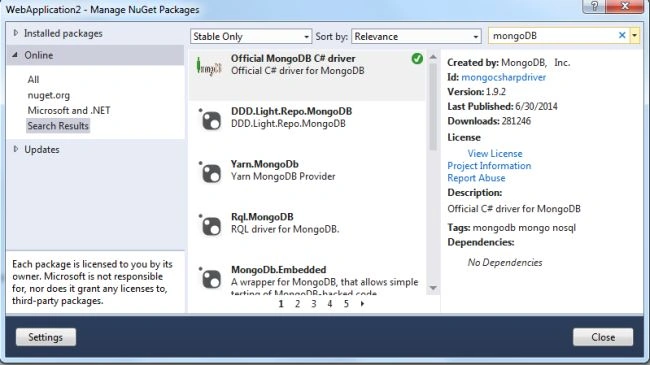
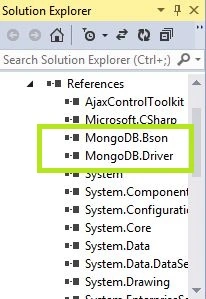
This is the simplest way to install the MongoDB Driver from the Visual Studio. After installation we will get MongoDB.Bson and MongoDB.Driver in the reference folder.
Step 4
Be confirmed after installation.
Step 5
Start the MongoDB Server.
To start the server we need to type "mongod - - dbpath db" in the command prompt. 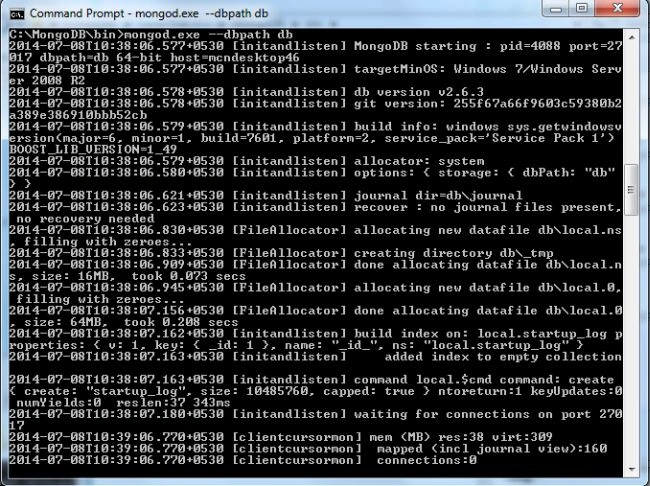
Step 6
Make a connection in the web config file as in the following:
- <connectionStrings>
- <add name="con" connectionString="Server=127.0.0.1:27017"/>
- </connectionStrings>
Step 7
Create and select.
- public DAL()
- {
- con = ConfigurationManager.ConnectionStrings["con"].ConnectionString;
- server = MongoServer.Create(con);
- emptbl = server.GetDatabase("Employee");
- }
- public List<Employee> getEmployeeList()
- {
- List<Employee> list = new List<Employee>();
- var collection = emptbl.GetCollection<Employee>("Employee");
- foreach (Employee emp in collection.FindAll())
- {
- list.Add(emp);
- }
- return list;
- }
Step 8
Insert.
- public void insert(Employee emp)
- {
- try
- {
- MongoCollection<Employee> collection = emptbl.GetCollection<Employee>("Employee");
- BsonDocument employee = new BsonDocument
- {
- {"empName",emp.empName},
- {"empId",emp.empId},
- {"salary",emp.salary},
- {"address", emp.address},
- {"phone",emp.phone}
- };
- collection.Insert(employee);
- }
- catch { };
- }
Step 9
Update.
- public void updateEmployee(Employee emp)
- {
- MongoCollection<Employee> collection = emptbl.GetCollection<Employee>("Employee");
- IMongoQuery query = Query.EQ("_id", emp._id);
- IMongoUpdate update = MongoDB.Driver.Builders.Update.Set("empName", emp.empName)
- .Set("empId", emp.empId)
- .Set("salary", emp.salary)
- .Set("address", emp.address)
- .Set("phone", emp.phone);
- collection.Update(query, update);
- }
Step 10
Delete
- public void DeleteEmployee(ObjectId id)
- {
- MongoCollection<Employee> collection = emptbl.GetCollection<Employee>("Employee");
- IMongoQuery query = Query.EQ("_id", id);
- collection.Remove(query);
- }
HTML Page
- <%@ Page Language="C#" AutoEventWireup="true" CodeBehind="CRUD.aspx.cs" Inherits="WebApplication2.CRUD" %>
- <%@ Register Assembly="AjaxControlToolkit" Namespace="AjaxControlToolkit" TagPrefix="asp" %>
- <!DOCTYPE html>
- <html>
- <head id="Head1" runat="server">
- <title></title>
- <link href="Script/bootstrap.min.css" rel="stylesheet" />
- <script src="Script/jquery-1.3.2.min.js"></script>
- <script src="Script/jquery.blockUI.js"></script>
- <link href="StyleSheet1.css" rel="stylesheet" />
- <script type="text/javascript">
- function BlockUI(elementID) {
- var prm = Sys.WebForms.PageRequestManager.getInstance();
- prm.add_beginRequest(function () {
- $("#" + elementID).block({
- message: '<table align = "center"><tr><td>' +
- '<img src="loading.gif"/></td></tr></table>',
- css: {},
- overlayCSS: {
- backgroundColor: '#000000', opacity: 0.6
- }
- });
- });
- prm.add_endRequest(function () {
- $("#" + elementID).unblock();
- });
- }
- $(document).ready(function () {
- BlockUI("<%=pnlAddEdit.ClientID %>");
- $.blockUI.defaults.css = {};
- });
- function Hidepopup() {
- $find("popup").hide();
- return false;
- }
- </script>
- </head>
- <body>
- <form id="form1" runat="server">
- <div>
- <asp:ScriptManager ID="ScriptManager1" runat="server">
- </asp:ScriptManager>
- <asp:UpdatePanel ID="UpdatePanel1" runat="server">
- <ContentTemplate>
- <asp:GridView ID="GridView1" runat="server" Width="700px"
- AutoGenerateColumns="false" PageSize="5" HeaderStyle-BackColor="#6699ff" HeaderStyle-ForeColor="WhiteSmoke" AllowPaging="False">
- <Columns>
- <asp:BoundField DataField="empName" HeaderText="Employee Name" HtmlEncode="true" />
- <asp:BoundField DataField="empId" HeaderText="Employee ID" HtmlEncode="true" />
- <asp:BoundField DataField="salary" HeaderText="Employee Salary" HtmlEncode="true" />
- <asp:BoundField DataField="address" HeaderText="Employee Address" HtmlEncode="true" />
- <asp:BoundField DataField="phone" HeaderText="Phone Number" HtmlEncode="true" />
- <asp:TemplateField ItemStyle-Width="80px" HeaderText="Edit">
- <ItemTemplate>
- <asp:LinkButton ID="lnkbtn" runat="server" OnClick="Edit" CommandArgument='<%# Eval("_id") %>'>Edit</asp:LinkButton>
- <asp:LinkButton ID="lnkDel" runat="server" OnClick="delete" CommandArgument='<%# Eval("_id") %>'>Delete</asp:LinkButton>
- </ItemTemplate>
- </asp:TemplateField>
- </Columns>
- </asp:GridView>
- <asp:HiddenField ID="hdn" runat="server" />
- <asp:Button ID="btnAdd" runat="server" Text="Add" OnClick="Add" CssClass="btn-success" Width="100px" />
- <asp:Panel ID="pnlAddEdit" runat="server" CssClass="modalPopup" Style="display: none">
- <asp:Label Font-Bold="true" ID="Label4" CssClass="lbl" runat="server" Text="Employee Details"></asp:Label>
- <br />
- <table align="center" class="table">
- <tr>
- <td>
- <asp:Label ID="Label1" runat="server" Text="Employee Name"></asp:Label>
- </td>
- <td>
- <asp:TextBox ID="txtEmployeeName" CssClass="control-group info" runat="server"></asp:TextBox>
- </td>
- </tr>
- <tr>
- <td>
- <asp:Label ID="Label2" runat="server" Text="Employee ID" ></asp:Label>
- </td>
- <td>
- <asp:TextBox ID="txtID" runat="server" CssClass="control-group info"></asp:TextBox>
- </td>
- </tr>
- <tr>
- <td>
- <asp:Label ID="Label3" runat="server" Text="Employee Salary"></asp:Label>
- </td>
- <td>
- <asp:TextBox ID="txtSal" runat="server" CssClass="control-group info"></asp:TextBox>
- </td>
- </tr>
- <tr>
- <td>
- <asp:Label ID="Label5" runat="server" Text="Employee Address"></asp:Label>
- </td>
- <td>
- <asp:TextBox ID="txtAddress" runat="server" CssClass="control-group info"></asp:TextBox>
- </td>
- </tr>
- <tr>
- <td>
- <asp:Label ID="Label6" runat="server" Text="Phone Number"></asp:Label>
- </td>
- <td>
- <asp:TextBox ID="txtPhn" runat="server" CssClass="control-group info"></asp:TextBox>
- </td>
- </tr>
- <tr>
- <td>
- <asp:Button ID="btnSave" runat="server" Text="Save" CssClass="btn-primary" OnClick="Save" />
- </td>
- <td>
- <asp:Button ID="btnCancel" runat="server" Text="Cancel" CssClass="btn-primary" OnClientClick="return Hidepopup()" />
- </td>
- </tr>
- </table>
- </asp:Panel>
- <asp:LinkButton ID="lnkFake" runat="server"></asp:LinkButton>
- <asp:ModalPopupExtender ID="popup" runat="server" DropShadow="false"
- PopupControlID="pnlAddEdit" TargetControlID="lnkFake"
- BackgroundCssClass="modalBackground">
- </asp:ModalPopupExtender>
- </ContentTemplate>
- <Triggers>
- <asp:AsyncPostBackTrigger ControlID="GridView1" />
- <asp:AsyncPostBackTrigger ControlID="btnSave" />
- </Triggers>
- </asp:UpdatePanel>
- </div>
- </form>
- </body>
- </html>
- using System;
- using System.Collections.Generic;
- using System.Linq;
- using System.Web;
- using System.Web.UI;
- using System.Web.UI.WebControls;
- using MongoDB.Driver;
- using MongoDB.Bson;
- using System.Data;
- using System.Configuration;
- namespace WebApplication2
- {
- public partial class CRUD : System.Web.UI.Page
- {
- Model.DAL dal = new Model.DAL();
- protected void Page_Load(object sender, EventArgs e)
- {
- if (!IsPostBack)
- {
- LoadEMployee();
- }
- }
- private void LoadEMployee()
- {
- try
- {
- GridView1.DataSource = dal.getEmployeeList().ToList();
- GridView1.DataBind();
- }
- catch (Exception) { }
- }
- protected void Save(object sender, EventArgs e)
- {
- Employee emp = new Employee();
- if (hdn.Value == "Edit")
- {
- if (ViewState["_idEdit"] != "")
- emp._id = ObjectId.Parse(ViewState["_idEdit"].ToString());
- emp.empName = txtEmployeeName.Text;
- emp.empId = txtID.Text;
- emp.salary = Convert.ToDouble(txtSal.Text);
- emp.address = txtAddress.Text;
- emp.phone = txtPhn.Text;
- //dal.insert(emp);
- // emp._id = Xid;
- dal.updateEmployee(emp);
- LoadEMployee();
- }
- else
- {
- //Employee emp = new Employee();
- emp.empName = txtEmployeeName.Text;
- emp.empId = txtID.Text;
- emp.salary = Convert.ToDouble(txtSal.Text);
- emp.address = txtAddress.Text;
- emp.phone = txtPhn.Text;
- dal.insert(emp);
- LoadEMployee();
- }
- }
- protected void Add(object sender, EventArgs e)
- {
- txtEmployeeName.Text = string.Empty;
- txtID.Text = string.Empty;
- txtSal.Text = string.Empty;
- txtAddress.Text = string.Empty;
- txtPhn.Text = string.Empty;
- popup.Show();
- }
- public void Edit(object sender, EventArgs e)
- {
- LinkButton btn = (LinkButton)sender;
- hdn.Value = "Edit";
- using (GridViewRow row = (GridViewRow)((LinkButton)sender).Parent.Parent)
- {
- txtEmployeeName.Text = row.Cells[0].Text;
- txtID.Text = row.Cells[1].Text;
- txtSal.Text = row.Cells[2].Text;
- txtAddress.Text = row.Cells[3].Text;
- txtPhn.Text = row.Cells[4].Text;
- popup.Show();
- }
- ViewState["_idEdit"] = btn.CommandArgument;
- }
- protected void delete(object sender, EventArgs e)
- {
- LinkButton btn = (LinkButton)sender;
- Employee emp = new Employee();
- var x = emp._id;
- if (btn.Text == "Delete")
- {
- dal.DeleteEmployee(ObjectId.Parse(btn.CommandArgument));
- LoadEMployee();
- }
- else
- {
- hdn.Value = "Edit";
- }
- }
- }
- }
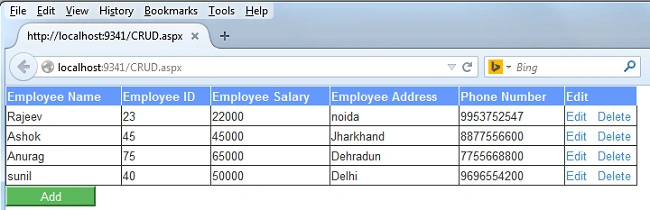
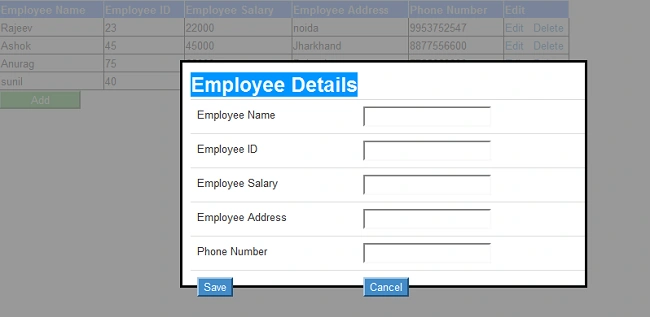
Output: When we hit the Add button, this pop up box will display for inserting a new record.
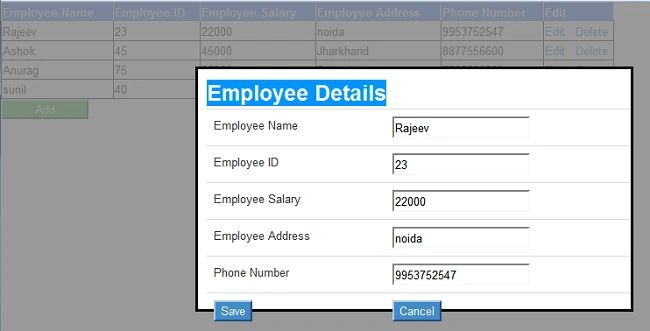
Output: When we hit the edit button , we can edit any record.
Summary
In this article we learned the Mongo C# driver and how the driver interacts with the MongoDB server. We also learned the basic CRUD operations using the Mongo Driver.
MN AmbaliyaPosted Jul 12, 2018, 12:27 AM
How can I create complex schema in MongoDB using .Net class
MN AmbaliyaPosted Jul 12, 2018, 12:27 AM
Nice article...
Hamid KhanPosted Sep 26, 2017, 9:59 AM
Nice........................
Muhammad Aqib ShehzadPosted Nov 29, 2016, 4:57 AM
Very nice explanation and really a useful stuff
Ananth AnanthakrishnanPosted Mar 22, 2016, 4:52 AM
Great one!
Pankaj Kumar ChoudharyPosted Aug 28, 2015, 8:14 PM
nice explain sir,,,,,,,,,,,,,,,,,,
Akash NaginaPosted Jul 1, 2015, 9:02 AM
Good Work..
Rajeev RanjanPosted Sep 9, 2014, 3:11 AM
Thanks,
Lakshmanan Sethu SankaranarayanPosted Sep 9, 2014, 2:27 AM
Excellent one!